Freedom251 › Teleprompter Software
Teleprompterly
What Teleprompterly is
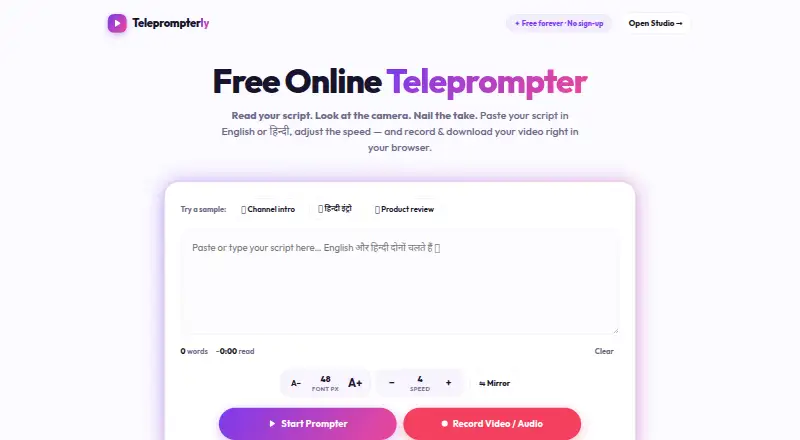
Teleprompterly is a free browser-based teleprompter with built-in video and audio recording. Its Studio records camera and microphone while a script scrolls over the camera feed, with 16:9, 9:16, and 1:1 framing options. Readers can choose from ten scroll speed levels and adjust them while reading. Display controls include font size, an eye-line marker, a progress bar, tap-to-pause, and keyboard shortcuts. Mirror mode flips text for beam-splitter teleprompter rigs. It supports English and Hindi in Devanagari, including mixed-language scripts, and works in Chrome, Edge, Safari, and Firefox on desktop and mobile browsers. Phone and tablet use includes vertical 9:16 recording. The prompter can be used alongside Zoom, Microsoft Teams, Google Meet, and Webex. Scripts are stored in browser storage and recordings stay in browser memory until downloaded; the site says nothing is sent to a server. The Free plan costs nothing forever, with unlimited script length, no account, no watermark, and downloads. It requires the page to load before use and does not offer voice-follow scrolling.
Who it suits
Teleprompterly suits creators who want a browser teleprompter with recording and adjustable framing. It may also suit people presenting through supported meeting software or using a phone browser.
What it does well
- Free forever with unlimited script length
- Video and audio recording with downloads
- Supports English, Hindi, and mixed scripts
- Works in desktop and mobile browsers
What to know first
- Page must load before use
- No voice-follow scrolling
- No remote control
Limits
The Free plan has unlimited script length and includes video and audio recording with download. Voice-follow scrolling and remote control are unavailable, and the page needs to load before use.
Plans
| Plan | Billed and limits | Price |
|---|---|---|
| Free | free forever · unlimited script length · no account · no watermark · video and audio recording · downloads | Free |
| Yearly Pro | in-app purchase · premium features | $39.99 a year |
| Weekly Pro | in-app purchase · premium features | $4.99 a month |
| Annual | annual; includes 7-day free trial · Voice Follow · recording · unlimited local scripts | $49.99 a year |
| Monthly | monthly; cancel through Apple subscription settings · Voice Follow · recording · unlimited local scripts | $7.99 a month |
| Monthly Pro | in-app purchase · premium features | $9.99 a month |
As teleprompterly.com lists them, read 14 Oct 2026. The maker's own page has the final word.
Getting started
- Open https://www.teleprompterly.com/ in a supported browser.
- Use Chrome, Edge, Safari, or Firefox on desktop or mobile.
- Enter or use a script; no account is required.
- Choose a framing option and adjust the scroll speed and display controls.
- Record with the camera and microphone, then download the recording.
Overview
Teleprompterly is a browser-based prompter with built-in video and audio recording. It is best for creators and presenters who want to read and record without paying or opening an account. Its adjustable pacing and phone-friendly framing are useful; readers who need voice-follow scrolling or remote control should look elsewhere.
Key features
The Studio records from the camera and microphone while the script scrolls over the camera feed. You can choose 16:9, 9:16 or 1:1 framing, covering landscape, vertical-phone and square video. Ten scroll-speed levels can be adjusted while reading, while font sizing, an eye-line marker and a progress bar help keep text legible and your place clear. Tap-to-pause and keyboard shortcuts provide direct ways to manage scrolling as you speak.
Mirror mode flips the text for beam-splitter teleprompter rigs. The prompter supports English and Hindi in Devanagari, including mixed-language scripts. It can also be used alongside Zoom, Microsoft Teams, Google Meet and Webex, making it suitable for remote presentations as well as standalone recordings.
Scripts stay in browser storage, and recordings remain in browser memory until downloaded; Teleprompterly says nothing is sent to a server. That approach may suit users who prefer local handling of their material, but recordings need to be downloaded for safekeeping. The page must load before use, so this is not a ready-to-go offline prompter.
Pricing
The Free plan costs nothing and is billed Free forever. It includes unlimited script length, no account requirement, no watermark, and video and audio recording with download. With no paid tier or trial, there is no upgrade path described for additional capabilities; the trade-off is accepting the product's limits, including no voice tracking and no remote control.
That makes the free plan a strong fit for solo creators who want uncapped scripts and downloadable recordings without a watermark. It is less suitable for production workflows that depend on voice-follow pacing or a remote control.
Platforms
Teleprompterly runs in a browser on desktop and mobile, with support for Chrome, Edge, Safari and Firefox. Its supported platforms include web, Windows, macOS, Linux, iOS and Android. Phone and tablet browsers are supported, including vertical 9:16 recording from a phone. The breadth of device support is convenient, though use still depends on loading the web page.
Who it's for
Choose Teleprompterly if you are a creator, presenter or remote meeting participant who wants a no-cost way to scroll a script while recording or speaking. Its framing choices and pacing controls cover common recording needs, and its English and Hindi support is useful for bilingual scripts. It is a poor match for anyone who needs automatic voice-follow scrolling, remote operation or access before the page loads.
Pros and cons
- Pros: Unlimited script length and recording downloads on a free, no-account plan make it practical for independent creators.
- Pros: Three recording aspect ratios, adjustable speed and reading aids give presenters control over both framing and pace.
- Pros: Local browser storage and memory, with no server transmission according to Teleprompterly, may appeal to privacy-conscious users.
- Cons: No voice tracking means readers must manage scrolling themselves.
- Cons: No remote control limits hands-free operation from another device.
- Cons: The page has to load before use, so it cannot serve as an immediately available offline prompter.
Alternatives
For a wider comparison, browse Teleprompter Software.
FluidPrompter is worth considering if you want a defined entry-level allowance: its free Starter Plan supports one user and one prompter, with a 600-word script limit and keyboard or mouse controls.
Speakflow may suit readers looking for a different free-plan structure, with Limited Flow and seven-day script history; its Plus plan is $19 a month and includes recording and storage for one hour of video.
Teleprompter.com is an option if remote control matters: its free Starter plan includes remote control, alongside cloud script storage, custom fonts and colors, and recordings with a watermark.
VoicePrompter offers a free web app that works offline as a PWA, making it a possible alternative when offline browser use is important.
CuePrompter includes Smart Follow for three minutes per session on its free plan, which may appeal if you want to try limited voice-follow functionality.
EasyPrompter has a free plan capped at two saved scripts and 500 promptable words per script, with one basic viewer display and no phone remote.
QPrompt is a free-to-download alternative for Android, Linux, macOS and Windows, including commercial use.
TeleprompterFlow is another free-plan option for Android, iOS, web and Windows.
Verdict
Teleprompterly is a sensible choice for creators and presenters who want free, account-free script scrolling with recording, flexible framing and support for mobile browsers. Its unlimited scripts and watermark-free downloads make the case especially clear for solo use. Look elsewhere if you need voice-follow scrolling, a remote control or a prompter that is usable before a web page has loaded.
Verdict
Teleprompterly provides script scrolling and recording in a browser, with several display controls and mobile support. Its page must load before use, and it lacks voice-follow scrolling and remote control.
Questions
How much does Teleprompterly cost?
The Free plan costs nothing and is billed free forever.
Do I need an account?
No. The Free plan requires no account.
Which platforms and browsers does it support?
It supports web, Windows, macOS, Linux, iOS, and Android. The site says it works in Chrome, Edge, Safari, and Firefox on desktop and mobile.
Can Teleprompterly record video and audio?
Yes. Its Studio records camera and microphone while the script scrolls over the camera feed, and recordings can be downloaded.
Does it support voice tracking or remote control?
No. Voice tracking and remote control are listed as unsupported.
How does Teleprompterly handle scripts and recordings?
Scripts are stored in browser storage, and recordings stay in browser memory until downloaded. The site says nothing is sent to a server.
Facts from Teleprompterly's own pages
- App developer
- The Apple listing identifies North Studio as the developer and NORTH STUDIO LLC as the seller. · apps.apple.com, 14 Oct 2026
- App privacy disclosure
- Apple’s listing says North Studio reports purchases and identifiers may be used for tracking, with additional analytics and diagnostics data not linked to identity. · apps.apple.com, 14 Oct 2026
- App subscription pricing
- The US App Store lists Monthly Pro at $9.99, Weekly Pro at $4.99, and Yearly Pro options at $39.99 and $49.99. · apps.apple.com, 14 Oct 2026
- Audio recording
- Studio includes audio-only recording with a live waveform for voice-overs. · teleprompterly.com, 14 Oct 2026
- Browser support
- The maker names Chrome, Edge, Safari and Firefox on desktop and mobile. · teleprompterly.com, 14 Oct 2026
- Clean export
- The teleprompterly.app version says prompt text is an on-device overlay and exported clips contain clean camera footage with audio. · teleprompterly.app, 14 Oct 2026
- Company headquarters
- The reviewed maker pages do not state a headquarters location. · teleprompterly.com, 14 Oct 2026
- Display controls
- Controls include 24–96 px text, an eye-line marker, progress bar, tap-to-pause and keyboard shortcuts. · teleprompterly.com, 14 Oct 2026
- Export format
- Recorded takes can be downloaded directly as .webm files. · teleprompterly.com, 14 Oct 2026
- Founded year
- The reviewed maker pages do not state a founding year. · teleprompterly.com, 14 Oct 2026
- Free access
- The web tool says every feature is free forever with no sign-up, trial timer or premium unlock. · teleprompterly.com, 14 Oct 2026
- Hardware compatibility
- The teleprompterly.app version supports mirrored text for hardware teleprompter glass and adjustable font, color and background opacity. · teleprompterly.app, 14 Oct 2026
- Intended users
- The site describes Teleprompterly as a free online teleprompter with video recording made for creators. · teleprompterly.com, 2 Oct 2026
- iOS requirement
- The North Studio app requires iOS 17.0 or later and supports iPhone and iPad. · apps.apple.com, 14 Oct 2026
- Languages
- The web app supports English, Hindi in Devanagari and mixed-language scripts. · teleprompterly.com, 14 Oct 2026
- Limit: eye-line positioning
- An Apple reviewer complained that viewers can still see eye movement unless the script is positioned very close to the camera. · apps.apple.com, 14 Oct 2026
- Local processing
- The teleprompterly.app privacy policy says scripts, folders, favorites and settings are stored locally and there is no cloud-sync service. · teleprompterly.app, 14 Oct 2026
- Maker copyright
- The web homepage carries a 2026 copyright notice for Teleprompterly. · teleprompterly.com, 14 Oct 2026
- Meeting software
- The browser prompter can be used alongside Zoom, Microsoft Teams, Google Meet and Webex. · teleprompterly.com, 2 Oct 2026
- Mirror mode
- Mirror mode flips text horizontally for beam-splitter teleprompter glass. · teleprompterly.com, 14 Oct 2026
- Mobile use
- Phone and tablet users get touch controls and can record vertical 9:16 video from the browser. · teleprompterly.com, 14 Oct 2026
- Native app features
- The iOS listing describes an on-screen guide, AI script generation, adjustable text layout, social-video cropping and clean exports without burned-in prompt text. · apps.apple.com, 14 Oct 2026
- Native free limits
- The iOS free version allows up to five scripts and recordings and places a watermark on exported videos. · apps.apple.com, 14 Oct 2026
- Native premium features
- The iOS listing says premium removes the watermark, enables unlimited scripts and recordings, and adds auto-scroll while recording. · apps.apple.com, 14 Oct 2026
Where Teleprompterly stands on Freedom251
- Teleprompter Software#14 of 32