Freedom251 › Teleprompter Software
SuperPrompter
What SuperPrompter is
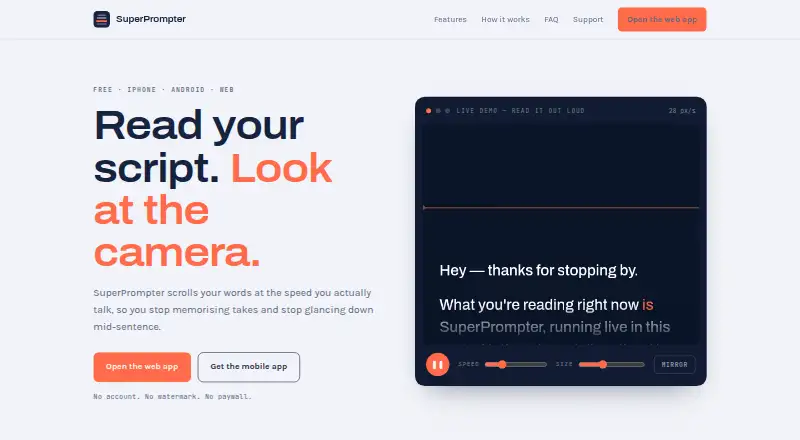
SuperPrompter is a teleprompter for reading scripts while looking toward a camera. It scrolls at the speaker’s pace and is available on the web, iOS, and Android. Scripts can be typed or pasted from notes, Google Docs, or email, and readers can change text size and scrolling speed while reading. Mirror mode flips the display for beam-splitter rigs and glass prompters. Voice tracking follows speech and is processed on-device on iPhone and Android. Camera recording puts the prompt over the camera view and saves or downloads a clean camera feed to the device.
Reading can begin without an account. Signing in lets users save scripts and sync them across devices; without an account, scripts remain on the device and are not sent to SuperPrompter’s servers. The Free plan costs nothing and includes all features, unlimited exports, and no watermark. Supporters can pay what they want for AI search across saved scripts and an assistant; assistant messages and relevant script excerpts are sent to OpenRouter, and scripts are not used to train models.
Who it suits
It suits people who want to read a script on camera, including users of glass or beam-splitter prompters. It also fits readers who want to save and sync scripts or use voice tracking and camera recording.
What it does well
- Available on web, iOS, and Android.
- Adjust scroll speed and text size while reading.
- Free plan includes all features and no watermark.
- Voice tracking is processed on-device on iPhone and Android.
- Scripts can sync across devices when signed in.
What to know first
- No free trial is offered.
- AI assistant messages and script excerpts go to OpenRouter.
- Voice tracking is listed for iPhone and Android.
Plans
| Plan | Billed and limits | Price |
|---|---|---|
| Free | All features · no export limit · no watermark | Free |
| Supporter | Pay what you want · Optional contribution · AI-powered search across saved scripts · AI assistant using your script library as context | On request |
As superprompter.net lists them, read 5 Oct 2026. The maker's own page has the final word.
Getting started
- Open https://superprompter.net/ or use SuperPrompter on iOS or Android.
- Type or paste a script from notes, Google Docs or email.
- Start reading without an account, or sign in to save and sync scripts.
- Adjust text size and scroll speed while reading.
- Enable mirror mode for a beam-splitter rig or glass prompter.
- Use camera recording to save or download a clean camera feed.
Verdict
SuperPrompter combines paced script scrolling with mirror mode, voice tracking, and camera recording. The free plan has no export limit or watermark; AI tools are reserved for supporters.
Questions
How much does SuperPrompter cost?
The Free plan costs nothing. The Supporter plan is billed Pay what you want; no price is listed.
Is there a free plan or trial?
Yes. The Free plan includes all features, no export limit and no watermark. There is no free trial.
Which platforms does it support?
SuperPrompter is available on the web, iOS and Android.
Do I need an account?
No account is needed to start reading. Signing in enables scripts to be saved and synced across devices.
What does the Supporter plan add?
It adds AI-powered search across saved scripts and an AI assistant that can use the script library as context.
How does it handle scripts and AI data?
Without an account, scripts stay on the device and are not sent to SuperPrompter’s servers. Assistant messages and relevant script excerpts are sent to OpenRouter, and scripts are not used to train models.
Facts from SuperPrompter's own pages
- Accounts and sync
- An account is not required to start reading; signing in enables scripts to be saved and synced across devices. · superprompter.net, 5 Oct 2026
- AI features
- Supporters can search saved scripts and use an AI assistant; assistant messages and relevant script excerpts are sent to OpenRouter, and scripts are not used to train models. · superprompter.net, 5 Oct 2026
- Camera recording
- Camera recording keeps the teleprompter text as an overlay and saves or downloads the clean camera feed to the user’s device. · superprompter.net, 5 Oct 2026
- Mirror mode
- Mirror mode flips text horizontally for beam-splitter rigs and glass prompters. · superprompter.net, 5 Oct 2026
- Pacing and text size
- Users can adjust scroll speed and text size, including while reading. · superprompter.net, 5 Oct 2026
- Payments
- Web payments are processed by Stripe, while mobile payments are handled by the Apple App Store or Google Play. · superprompter.net, 5 Oct 2026
- Privacy
- Without an account, scripts stay locally on the device and are not sent to SuperPrompter’s servers; the company says it does not sell data or show ads. · superprompter.net, 5 Oct 2026
- Purpose
- SuperPrompter scrolls scripts at the speaker’s pace so they can read while looking at the camera. · superprompter.net, 5 Oct 2026
- Script input
- Users can paste or type scripts, including text from notes, Google Docs, and email. · superprompter.net, 5 Oct 2026
- Storage and providers
- Account data and saved scripts are stored in Germany in the EU; listed providers include Hetzner, Cloudflare, OpenRouter, Stripe, Apple, and Google. · superprompter.net, 5 Oct 2026
- Support
- The support page says the team usually replies to questions, bug reports, or feedback within a couple of days. · superprompter.net, 5 Oct 2026
- Voice tracking
- Voice tracking follows the reader’s speech and is processed on the device on iPhone and Android. · superprompter.net, 5 Oct 2026
Where SuperPrompter stands on Freedom251
- Teleprompter Software#12 of 32