Freedom251 › Teleprompter Software

Prompt+
What Prompt+ is
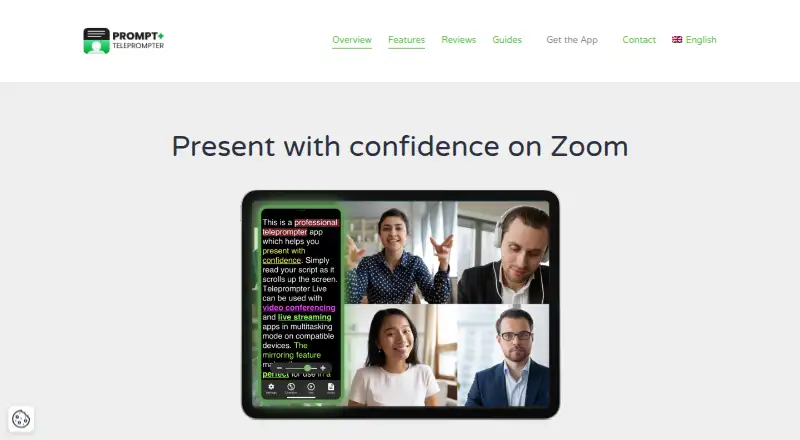
Prompt+ scrolls a script on screen for presentations, teaching, and sermons. Users can change scroll speed, pause or reverse the text, adjust font size and colours, and highlight words. The app imports scripts from Dropbox, Google Drive, OneDrive, and iCloud, as well as TXT, RTF, PDF, and Google Docs; DOCX import is available on iOS but not macOS. Prompt+ can be used with Zoom on iPad and Mac, while the iPhone version cannot be used with Zoom. The Mac version also works with Teams, Facebook Live, and other live-streaming platforms. Scripts can be controlled with Bluetooth presentation remotes, foot pedals, wireless keyboards, game controllers, or another Mac or iOS device. The app can mirror text for a physical teleprompter and display a countdown and clock. Signing in stores scripts in the cloud for access across devices; without login, data stays on the device and is not shared across devices. The free plan limits scripts to 750 characters. A one-time 19.99 USD in-app purchase removes that limit.
Who it suits
Prompt+ suits presenters, teachers, and people delivering sermons who need adjustable script scrolling. It also fits users who want to control scripts remotely or use a teleprompter alongside supported live platforms.
What it does well
- Scrolling can pause or reverse direction.
- Imports from multiple cloud providers.
- Supports remote controls, pedals, and keyboards.
- Can mirror text for a physical teleprompter.
- One-time purchase removes the script limit.
What to know first
- Free scripts are limited to 750 characters.
- DOCX import is iOS-only.
- iPhone cannot be used with Zoom.
- Without login, scripts do not sync across devices.
Limits
The free plan limits scripts to 750 characters. Premium Teleprompter removes this limit for a one-time 19.99 USD in-app purchase.
Plans
| Plan | Billed and limits | Price |
|---|---|---|
| Free | Scripts up to 750 characters | Free |
| Premium Teleprompter | one-off in-app purchase · Removes the 750-character script limit | $19.99, paid once |
As teleprompterapp.com lists them, read 15 Oct 2026. The maker's own page has the final word.
Getting started
- Install Prompt+ on an iPhone, iPad, or Mac.
- Choose whether to sign in for cloud access across devices or keep scripts on the device.
- Import a script from a supported cloud provider or file type.
- Adjust the scroll speed and script formatting.
- Use an available remote or device control while presenting.
Verdict
Prompt+ offers script controls, formatting, and several import and remote-control options for live presentation settings. The free plan has a 750-character limit; Premium removes it for a one-time 19.99 USD in-app purchase.
Questions
How much does Prompt+ cost?
The Free plan costs nothing and limits scripts to 750 characters. Premium Teleprompter costs $19.99, paid once as a one-off in-app purchase.
Which devices support Prompt+?
Prompt+ has iPhone, iPad, and Mac versions. The listed platforms are iOS and macOS.
Can I import DOCX scripts?
Yes, DOCX import is available on iOS. It is unsupported on macOS.
Can I use Prompt+ with Zoom?
The iPad and Mac versions can be used alongside Zoom. The iPhone version cannot be used with Zoom.
Can I use Prompt+ without signing in?
Yes. Without login, scripts stay on the device and cross-device sharing is disabled. Signing in stores scripts in the cloud for access across devices.
Who makes Prompt+?
The listed headquarters is Winkfield Row, Bracknell, England, RG42 6LX.
Facts from Prompt+'s own pages
- AI processing
- The terms say AI features may send prompts or content to providers such as OpenAI and may have usage limits or extra charges. · teleprompterapp.com, 15 Oct 2026
- Changelog: AI Rewrite
- Version 11.4.3 added an AI Rewrite tool, redesigned the editor, improved external-microphone voice scrolling and added remote double-tap actions. · apps.apple.com, 15 Oct 2026
- Changelog: iOS 26 fixes
- The version history records a macOS 26 creation-crash fix and later compatibility and stability updates for current Apple releases. · apps.apple.com, 15 Oct 2026
- Cloud and offline use
- Signing in stores scripts in the cloud for access across devices, while skipping login keeps data on the device and disables cross-device sharing. · teleprompterapp.com, 2 Oct 2026
- Company headquarters
- Companies House lists Norton Five Limited at Paddocks End, Winkfield Row, Bracknell, England RG42 6LX. · find-and-update.company-information.service.gov.uk, 15 Oct 2026
- Company legal entity
- Norton Five Limited is an active UK private company incorporated on 7 December 2017 for software development. · find-and-update.company-information.service.gov.uk, 15 Oct 2026
- Device limitation
- The iPhone version cannot be used with Zoom, whereas the iPad version can. · teleprompterapp.com, 15 Oct 2026
- Display controls
- Users can mirror or reverse text, change font and colours, resize the text area, highlight words and choose portrait or landscape orientation. · teleprompterapp.com, 15 Oct 2026
- Formatting
- Users can change font size, text and background colours, and highlight words. · teleprompterapp.com, 2 Oct 2026
- Headquarters
- Winkfield Row, Bracknell, England, RG42 6LX · teleprompterapp.com, 28 Sept 2026
- Import formats
- Supported formats include TXT, RTF, PDF, Google Docs and DOCX on iOS; DOCX is not supported on macOS. · teleprompterapp.com, 15 Oct 2026
- Licence
- The terms license the app rather than sell it, prohibit copying, modification and reverse engineering, and assign intellectual property to the company or licensors. · teleprompterapp.com, 15 Oct 2026
- Limit: Bluetooth
- Reviewers say Bluetooth control can be unreliable in field use and may require a shared Wi-Fi or hotspot workaround. · apps.apple.com, 15 Oct 2026
- Limit: macOS reliability
- A macOS reviewer reports voice tracking losing its place, scripts failing to save and weak keyboard-shortcut support. · apps.apple.com, 15 Oct 2026
- Limit: stability
- A 2025 App Store review reports random remote disconnects, freezes, crashes and corrupted PDF or Word imports. · apps.apple.com, 15 Oct 2026
- Limit: voice matching
- Justuseapp reviews report voice scrolling occasionally jumping to a later occurrence of a repeated word. · justuseapp.com, 15 Oct 2026
- Mirroring and timing
- The app can mirror text for a physical teleprompter and show a countdown and clock. · teleprompterapp.com, 2 Oct 2026
- Other live platforms
- The Mac version can be used with Zoom, Teams, Facebook Live, and other live streaming platforms. · teleprompterapp.com, 2 Oct 2026
- Payment handling
- Apple, rather than the maker, processes in-app payment card information. · teleprompterapp.com, 15 Oct 2026
- Platforms and limit
- The maker documents iPhone, iPad, and Mac versions; DOCX import is iOS-only and unsupported on macOS. · teleprompterapp.com, 2 Oct 2026
- Praise: usability
- Reviews praise intuitive font and margin controls, easy script entry and useful remote operation. · apps.apple.com, 15 Oct 2026
- Praise: value
- Independent reviewers repeatedly praise the one-time purchase, lack of subscription and broad feature set. · justuseapp.com, 15 Oct 2026
- Praise: voice prompting
- Reviewers describe voice-activated scrolling as the app's standout capability when it works correctly. · justuseapp.com, 15 Oct 2026
- Purpose
- Prompt+ scrolls a script on screen to help users present with confidence. · teleprompterapp.com, 2 Oct 2026
Where Prompt+ stands on Freedom251
- Teleprompter Software#16 of 32