Freedom251 › Teleprompter Software
Teleflow
What Teleflow is
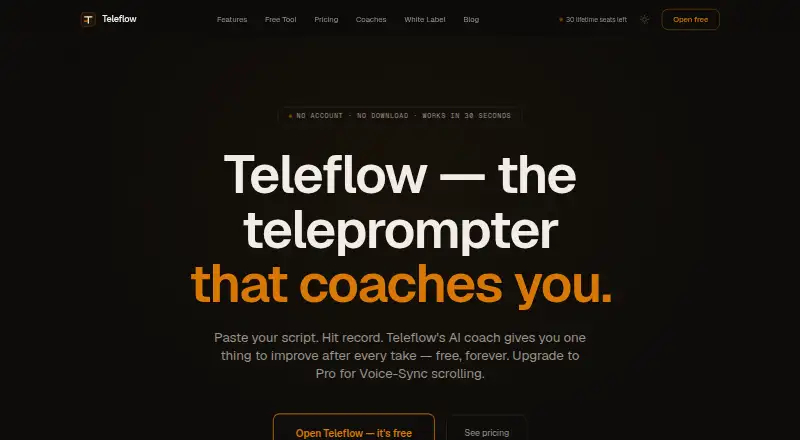
Teleflow is a browser-based teleprompter that follows spoken delivery with AI voice recognition. It scrolls through a script as you speak and pauses when you pause, so the text stays aligned with your pace. After each take, its AI offers one actionable suggestion for improving delivery. You can organize scripts into projects, import .docx files, or paste text, then record multiple takes. Teleflow describes recording as unlimited on its free plan.
The free plan costs nothing, never expires, and includes one project, three scripts, unlimited recording, and local storage. No credit card is required. Pro adds unlimited projects and scripts, AI voice-sync, and Google Drive sync for scripts and takes across devices. Pro Monthly costs $8 a month; Pro Annual costs $69 a year. A Lifetime plan costs $149, paid once and includes current and future Pro features, with limited seats.
Teleflow works in Chrome, Firefox, and Safari on desktop and mobile, including modern iPhone and Android browsers. It is listed for web, iOS, and Android, and the maker says you can begin without an account or download. A free trial is not offered.
Who it suits
Teleflow suits creators, educators, podcasters, and public speakers who want a script to follow their speech while recording. Its project and script tools also suit people organizing multiple presentations or takes.
What it does well
- Speech tracking scrolls scripts and pauses with the speaker.
- AI gives one actionable delivery improvement after each take.
- Free plan includes unlimited recording.
- Import .docx files or paste text into projects.
- Works in desktop and mobile browsers.
What to know first
- Free plan is limited to one project and three scripts.
- Google Drive sync is a Pro feature.
- No free trial is offered.
Limits
The free plan allows one project and three scripts and stores content locally. Google Drive sync and unlimited projects and scripts are listed with Pro; the free plan has no credit-card requirement and does not expire.
Plans
| Plan | Billed and limits | Price |
|---|---|---|
| Free | Never expires · 1 project · 3 scripts · Unlimited recording · Local storage | Free |
| Lifetime | $149 one-time · All Pro features, current and future · Limited seats | $149, paid once |
| Pro Annual | $69/year · Save 28% · Unlimited projects and scripts · AI voice-sync · Google Drive sync | $69 a year |
| Pro Monthly | $8/month · Unlimited projects and scripts · AI voice-sync · Google Drive sync | $8 a month |
As teleflow.live lists them, read 7 Oct 2026. The maker's own page has the final word.
Getting started
- Open https://teleflow.live/ in Chrome, Firefox, or Safari.
- Start using the browser service without an account or download.
- Organize scripts in a project, then import a .docx file or paste text.
- Record a take and follow the script as Teleflow tracks your voice.
- Choose Pro Monthly, Pro Annual, or Lifetime for the listed Pro features.
Verdict
Choose Teleflow if you want a browser teleprompter that tracks speech and gives a delivery suggestion after each take. The free plan includes unlimited recording, while users needing more projects, scripts, or Google Drive sync need Pro; there is no free trial.
Questions
Is Teleflow free?
Yes. Its Free plan costs nothing and never expires. It includes one project, three scripts, unlimited recording, and local storage.
How much does Teleflow Pro cost?
Pro Monthly costs $8 a month, and Pro Annual costs $69 a year. A Lifetime plan costs $149, paid once and includes current and future Pro features, with limited seats.
Does Teleflow offer a free trial?
No. Teleflow does not offer a free trial.
Which platforms and browsers does Teleflow support?
It is listed for web, iOS, and Android. The service says it works in Chrome, Firefox, and Safari on desktop and mobile, including modern iPhone and Android browsers.
Do I need an account or app download to start?
Teleflow says you can start without an account or download, using a supported browser.
What does Pro add?
Pro includes unlimited projects and scripts, AI voice-sync, and Google Drive sync for scripts and takes across devices.
Facts from Teleflow's own pages
- Account and setup
- The site says no account or download is required to start using Teleflow. · teleflow.live, 7 Oct 2026
- Browser support
- The site says Teleflow works in Chrome, Firefox, and Safari on desktop and mobile. · teleflow.live, 7 Oct 2026
- Delivery coaching
- After each take, its AI gives one actionable improvement. · teleflow.live, 7 Oct 2026
- Free plan limit
- The free plan includes one project, three scripts, unlimited recording, and local storage, with no credit card required. · teleflow.live, 7 Oct 2026
- Integration
- Google Drive sync keeps scripts and takes across devices and is listed as a Pro feature. · teleflow.live, 7 Oct 2026
- Intended users
- The site describes Teleflow as a tool for creators, educators, podcasters, and public speakers. · teleflow.live, 7 Oct 2026
- Mobile use
- Teleflow works on modern iPhone and Android browsers without an app store download. · teleflow.live, 7 Oct 2026
- Product
- Teleflow is a browser-based teleprompter with AI voice recognition that scrolls the script as you speak and pauses when you pause. · teleflow.live, 7 Oct 2026
- Recording
- Teleflow supports multiple takes and describes recording as unlimited on its free plan. · teleflow.live, 7 Oct 2026
- Script library
- Users can organize scripts into projects and import .docx files or paste text. · teleflow.live, 7 Oct 2026
Where Teleflow stands on Freedom251
- Teleprompter Software#17 of 32