Freedom251 › Internet Filtering Software
Technitium DNS Server
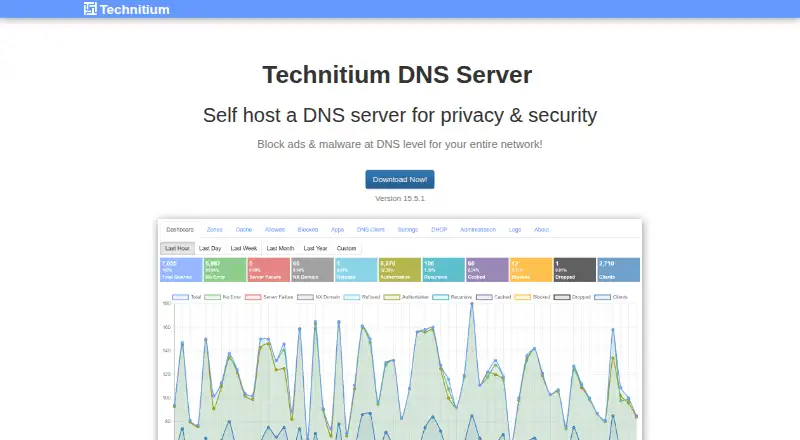
What Technitium DNS Server is
Technitium DNS Server is a free, open-source server for self-hosted authoritative and recursive DNS, with tools for privacy and network security. It supports primary, secondary, stub, and conditional forwarder zones, plus DNSSEC validation and signed zones. For network-wide ad and malware blocking, administrators can use block-list URLs that update daily. Encrypted DNS forwarding to public resolvers is supported through DNS-over-TLS, DNS-over-HTTPS, and DNS-over-QUIC. A browser-accessible console provides administration and clustering for two or more server instances. Authentication options include OpenID Connect single sign-on, LDAP, role-based access, and TOTP two-factor authentication. The software can forward queries to Cloudflare, Google, Quad9, or AdGuard, and provides an HTTP API for apps and scripts. It also includes a DHCP server for multiple networks and an app for DNS rebinding protection. Downloads are offered for Windows, Linux, macOS, and Raspberry Pi arm7, with an official Docker image. Raspberry Pi arm6 devices, including Raspberry Pi 1 and Raspberry Pi Zero, are unsupported.
Who it suits
Technitium DNS Server suits people self-hosting DNS for privacy or security, as well as software developers and testers and small to medium networks.
What it does well
- Supports authoritative and recursive DNS roles.
- Offers encrypted DNS forwarding protocols.
- Includes DNSSEC and daily-updating block lists.
- Browser console can manage clustered instances.
- Free and open source.
What to know first
- Raspberry Pi arm6 devices are unsupported.
- Clustering is for two or more server instances.
Plans
| Plan | Billed and limits | Price |
|---|---|---|
| Technitium DNS Server | Open source; self-hosted DNS server | Free |
As technitium.com lists them, read 30 Sept 2026. The maker's own page has the final word.
Getting started
- Open the Technitium DNS Server website.
- Choose a deployment route: Windows, Linux, macOS, Raspberry Pi arm7, or the official Docker image.
- Install the server on your self-hosted system.
- Use the browser-accessible web console to administer it.
- Configure DNS roles, forwarding, and any block lists needed for your network.
Technitium DNS Server is an open-source authoritative and recursive DNS platform that you run on your own infrastructure. It is aimed at privacy-focused self-hosters, developers, and small to medium networks that want filtering, DNS hosting, and administration in one system.
Overview
Technitium combines authoritative DNS hosting with recursive resolution, so it can serve your own zones and handle everyday network lookups. Primary, secondary, stub, and conditional forwarder zones cover varied routing and delegation needs. That makes it more capable than a simple network-wide blocker, but it also assumes you are willing to operate DNS infrastructure yourself.
The project is free, open source, and self-hosted. Registration is not required; the privacy policy says that, beyond web server logs, the maker does not collect or know user information. Email support, a user manual, an FAQ, and a Reddit community provide help when administration questions arise.
Key features
Daily-updating block-list URLs can block ads and malware across an entire network. Safe-search controls and basic activity reports add practical oversight, although the reporting is not a replacement for a deep analytics or monitoring product.
Encrypted forwarding is available through DNS-over-TLS, DNS-over-HTTPS, and DNS-over-QUIC. You can forward queries to Cloudflare, Google, Quad9, or AdGuard, giving privacy-conscious administrators several public resolver choices. DNSSEC validation and signed zones protect DNS integrity, while a separate app supplies DNS-rebinding attack protection.
A browser-accessible console includes built-in clustering for two or more server instances. OpenID Connect single sign-on, LDAP, role-based access, and TOTP two-factor authentication make the administrative surface suitable for organizations with established identity controls. The HTTP API supports scripts and third-party applications, and the built-in DHCP server can serve multiple networks.
Pricing
Technitium DNS Server — free. The plan is open source and self-hosted, with custom blocklists, safe-search controls, basic activity reports, and support for Windows, Linux, macOS, Raspberry Pi, Docker, and local networks. There is no paid tier or free trial to evaluate; the trade-off for the zero price is that you provide the hardware, deployment, maintenance, and DNS administration.
Platforms
Downloads are offered for Windows, Linux, macOS, and Raspberry Pi arm7, with an official Docker image and an HTTP API. The web console provides browser-based administration, while local-network deployment supports the included DHCP service. Raspberry Pi arm6 hardware, including Raspberry Pi 1 and Raspberry Pi Zero, is not supported, so those devices cannot be used for this deployment.
Who it's for
Choose Technitium if you want to self-host DNS for privacy and security, need both authoritative and recursive roles, or are developing and testing DNS software. It is also a strong fit for small to medium networks that want network-wide ad and malware blocking, encrypted upstreams, DHCP, and centralized administration without a subscription.
It is a poor fit if you want a provider-managed DNS service, do not want to maintain a server, or rely on Raspberry Pi arm6 hardware. The breadth of roles and security controls rewards an administrator comfortable with DNS concepts and ongoing upkeep.
Pros and cons
Pros
- Broad DNS coverage: Authoritative and recursive service, plus four zone roles, handles hosting and local resolution in one installation.
- Strong privacy and security options: DNS-over-TLS, DNS-over-HTTPS, DNS-over-QUIC, DNSSEC, signed zones, and rebinding protection cover both transport and DNS integrity.
- Network-wide controls: Daily blocklists, safe search, DHCP for multiple networks, and encrypted forwarding extend beyond basic DNS hosting.
- Administration and integration: Clustering, enterprise authentication methods, TOTP, and an HTTP API support managed deployments and automation.
- No license cost: The open-source self-hosted plan is free without registration.
Cons
- Self-hosting responsibility: You must supply compatible infrastructure and handle deployment, updates, reliability, and DNS configuration.
- Limited reporting: Activity reports are basic, so operators seeking extensive analytics will need other tooling.
- Hardware exclusion: Raspberry Pi arm6 devices, including Pi 1 and Pi Zero, are unsupported.
Alternatives
AdGuard DNS is the better choice when you want a freemium service available across mobile, desktop, web, API, and self-hosted environments, with a free starter plan and trial.
Comodo Secure DNS suits enterprises and MSPs seeking a free gateway plan with up to 300,000 DNS requests per month.
NextDNS is preferable for hosted, multi-device filtering: its free plan allows 300,000 queries per month, unlimited devices, unlimited configurations, and all features.
NxFilter offers a free-for-all-purpose freeware option, with a paid Jahaslist plan also available.
OpenDNS FamilyShield is a simpler free choice preconfigured to block adult content without sign-up.
Quad9 provides a free DNS service with no contract or sign-up process.
Blocky is another free, open-source, self-hosted DNS proxy.
Pi-hole is free, open-source filtering software for supported Linux hardware or Docker.
For broader comparisons, see DNS Filtering Software and Internet Filtering Software.
Verdict
Technitium DNS Server is a strong recommendation for privacy-minded administrators who want free, self-hosted DNS with authoritative hosting, recursive resolution, filtering, security controls, and network services in one package. Choose it for breadth and control; choose a managed alternative if you want less operational responsibility or need Raspberry Pi arm6 support.
Verdict
Technitium DNS Server offers extensive self-hosted DNS, authentication, and network management capabilities at no cost. Raspberry Pi arm6 users should note the platform limitation.
Questions
Is Technitium DNS Server free?
Yes. Its listed plan costs nothing, and the server is open source.
Which operating systems and deployment options are supported?
Downloads are available for Windows, Linux, macOS, and Raspberry Pi arm7. An official Docker image is also available.
Does it support Raspberry Pi?
Raspberry Pi arm7 is supported. Raspberry Pi arm6 devices, including Raspberry Pi 1 and Raspberry Pi Zero, are not supported.
Can it block ads and malware?
It can use block-list URLs that update daily to block ads and malware across a network.
Which DNS forwarding options does it support?
Encrypted forwarding is available through DNS-over-TLS, DNS-over-HTTPS, and DNS-over-QUIC. It can forward queries to Cloudflare, Google, Quad9, or AdGuard.
Is registration required?
Its privacy policy says registration is not required.
Facts from Technitium DNS Server's own pages
- Ad and malware blocking
- It can use block list URLs that update daily to block ads and malware across a network. · technitium.com, 30 Sept 2026
- Administration
- A browser-accessible web console includes built-in clustering to manage two or more server instances. · technitium.com, 30 Sept 2026
- Authentication
- It supports OpenID Connect single sign-on, LDAP authentication, role-based access, and TOTP two-factor authentication. · technitium.com, 30 Sept 2026
- Deployment
- Downloads are offered for Windows, Linux, macOS, and Raspberry Pi arm7; an official Docker image is also available. · technitium.com, 30 Sept 2026
- DNS privacy
- It supports DNS-over-TLS, DNS-over-HTTPS, and DNS-over-QUIC for encrypted forwarding to public resolvers. · technitium.com, 30 Sept 2026
- DNS roles
- It supports both authoritative and recursive DNS service, including primary, secondary, stub, and conditional forwarder zones. · technitium.com, 30 Sept 2026
- Integrations
- It can forward DNS queries to Cloudflare, Google, Quad9, or AdGuard and provides an HTTP API for third-party apps and scripts. · technitium.com, 30 Sept 2026
- Intended users
- The help page describes it as aimed at self-hosting for privacy and security, software development and testing, and small to medium networks. · technitium.com, 30 Sept 2026
- Network services
- It includes a DHCP server that can work with multiple networks. · technitium.com, 30 Sept 2026
- Platform limitation
- Raspberry Pi arm6 devices, including Raspberry Pi 1 and Raspberry Pi Zero, are not supported. · technitium.com, 30 Sept 2026
- Privacy
- The privacy policy says registration is not required and that, apart from web server logs, the maker does not collect or know user information. · technitium.com, 30 Sept 2026
- Purpose
- It is an open source authoritative and recursive DNS server for self-hosting, privacy, and security. · technitium.com, 30 Sept 2026
- Security
- It supports DNSSEC validation and signed zones, and provides DNS rebinding attack protection through an app. · technitium.com, 30 Sept 2026
- Support
- The maker lists email support, a user manual and FAQ, and a Reddit community. · technitium.com, 30 Sept 2026
Where Technitium DNS Server stands on Freedom251
- Internet Filtering Software#19 of 65
- DNS Filtering Services#18 of 60
- DNS Filtering Software#13 of 28
- DNS Server Software#14 of 23