Freedom251 › DNS Filtering Services
OpenDNS FamilyShield
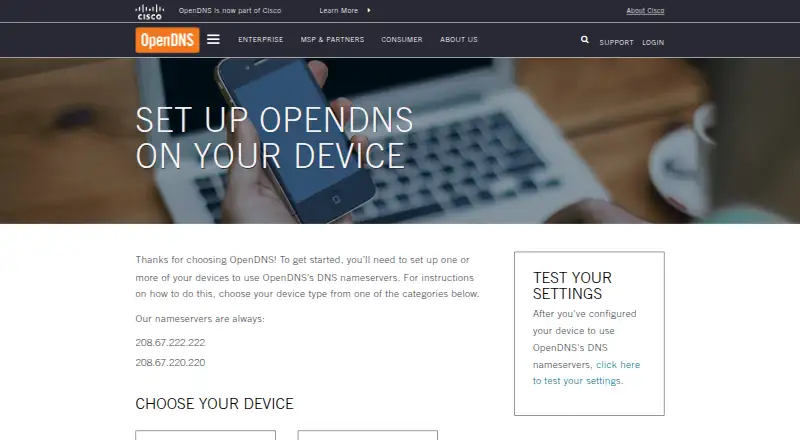
What OpenDNS FamilyShield is
OpenDNS FamilyShield is a free DNS service for home networks, preconfigured to block adult content. OpenDNS says its parental controls protect devices throughout the home, and the service includes protection against malicious phishing. Settings can apply to devices connected to the home network, including laptops, smartphones, tablets, DVRs, game consoles, and TVs. Setup means configuring devices to use the FamilyShield DNS nameservers, 208.67.222.123 and 208.67.220.123. The setup guide recommends configuring a home router so devices using that network can receive the settings, and it links to a test for checking whether DNS is configured. FamilyShield requires no sign-up and is listed for Android, iOS, Linux, macOS, web, and Windows. OpenDNS provides support forums and documentation, including deployment walkthroughs and API guides. Use of the service constitutes agreement to the OpenDNS Terms of Service and Cisco Online Privacy Statement. OpenDNS says it was founded in 2006 and acquired by Cisco in 2015.
Who it suits
FamilyShield suits households that want adult-content filtering and phishing protection for devices connected to their home network. It is a fit for users prepared to configure DNS settings on their devices or router.
What it does well
- Free plan requires no sign-up.
- Preconfigured to block adult content.
- Includes protection against malicious phishing.
- Settings can cover devices across a home network.
What to know first
- Setup requires configuring DNS nameservers.
- Custom domain policies are not available.
- Use is subject to OpenDNS and Cisco privacy terms.
Plans
| Plan | Billed and limits | Price |
|---|---|---|
| OpenDNS Family Shield | Preconfigured to block adult content · no sign-up required | Free |
As opendns.com lists them, read 8 Oct 2026. The maker's own page has the final word.
Getting started
- Open the OpenDNS setup guide at https://www.opendns.com/setupguide/.
- Configure a home router or individual devices to use FamilyShield DNS.
- Set the nameservers to 208.67.222.123 and 208.67.220.123.
- Use the guide’s verification link to check the DNS settings.
OpenDNS FamilyShield is a free DNS filtering service for households that want a ready-made adult-content filter and phishing protection. It is strongest as a shared home-network baseline; families needing site-by-site rules should look elsewhere.
Overview
FamilyShield filters adult content when a device uses its DNS nameservers, and the home service includes protection against malicious phishing. OpenDNS recommends configuring a home router, which can extend the settings to connected laptops, smartphones, tablets, DVRs, game consoles and TVs. That broad reach is useful in homes with varied devices, but it depends on configuring the router or the individual devices to use OpenDNS.
The setup guide provides a test to check whether DNS settings are in place. OpenDNS also offers support forums and documentation, including deployment walkthroughs and API guides. Using FamilyShield constitutes agreement to the OpenDNS Terms of Service and Cisco Online Privacy Statement.
Key features
- Preconfigured category filtering: FamilyShield blocks adult content without requiring sign-up or custom rule-building. That makes it a straightforward starting point for households seeking a fixed filter, but custom domain policies are not supported, so families cannot tailor the service to particular sites.
- Network-level device coverage: Applying the DNS settings at the router can cover multiple kinds of devices on the home network. It is a practical alternative to configuring each device separately, although coverage is tied to use of those DNS settings.
- Phishing protection: The home service includes protection against malicious phishing alongside content filtering, giving households two protections through the same DNS setup.
- DNS setup and verification: The FamilyShield nameservers are 208.67.222.123 and 208.67.220.123. The guide's verification link helps confirm configuration; support forums and deployment documentation provide additional setup assistance.
Pricing
OpenDNS Family Shield — free: The free plan is preconfigured to block adult content and requires no sign-up. It suits households seeking a no-cost baseline rather than configurable controls. The tradeoff is the fixed filtering: there are no custom domain policies.
Platforms
FamilyShield is listed for Android, iOS, Linux, macOS, web and Windows. In practice, the service works through DNS configuration: OpenDNS says settings can apply to devices connected to the home network, and recommends configuring the router. The device list does not remove the need to set the relevant DNS settings.
Who it's for
FamilyShield fits households that want a free, no-sign-up adult-content filter and phishing protection across devices using their home network. It is less suitable for families who need custom domain rules or need coverage beyond devices configured to use the service.
Pros and cons
- Pro — No-cost, no-sign-up start: The free plan provides a preconfigured adult-content filter without an account.
- Pro — Can cover varied home devices: Router configuration can extend DNS settings to computers, mobile devices, televisions and consoles on the network.
- Pro — Phishing protection is included: The home service combines this protection with filtering.
- Con — No custom domain policies: Households cannot create site-specific exceptions or blocks.
- Con — Coverage requires DNS configuration: Devices or the router must use the FamilyShield nameservers for the settings to apply.
Alternatives
DNS Filtering Software is the broader category to explore if FamilyShield's fixed filtering is not the right fit.
- AdGuard DNS is worth considering if open-source code matters: AdGuard says its code can be inspected, and it offers a free plan as well as a free trial.
- Comodo Secure DNS may suit enterprises or MSPs looking for a free plan with up to 300,000 DNS requests per month.
- NextDNS is an option for readers who want a free plan with 300,000 queries per month, unlimited devices and configurations, and all features.
- NxFilter offers a free plan for commercial and non-commercial use, with a separate Jahaslist Monthly plan at $7 a month.
- Quad9 is another free DNS service, with no contract or sign-up process.
- Technitium DNS Server is a free, open-source self-hosted DNS server for readers willing to use a self-hosted setup.
- Blocky is a free, open-source self-hosted DNS proxy.
- Pi-hole is free open-source software that runs on supported Linux hardware or in Docker.
Verdict
Choose OpenDNS FamilyShield if you want a free, no-sign-up adult-content filter and phishing protection that can cover devices through your home router. Its main advantage is a simple shared DNS setup; its main limitation is the lack of custom domain policies. Look elsewhere if your household needs finer control over which sites are blocked or allowed.
Verdict
FamilyShield offers a no-cost, preconfigured DNS option for home filtering and phishing protection. Its reach depends on configuring DNS for the devices or router you want covered.
Questions
How much does OpenDNS FamilyShield cost?
The listed plan is free.
Do I need to sign up?
No sign-up is required.
What does FamilyShield filter?
It is preconfigured to block adult content and includes protection against malicious phishing.
Which platforms are listed?
Android, iOS, Linux, macOS, web, and Windows.
How do I set it up?
Configure your device or home router to use DNS nameservers 208.67.222.123 and 208.67.220.123.
What terms apply?
Using FamilyShield constitutes agreement to the OpenDNS Terms of Service and Cisco Online Privacy Statement.
Facts from OpenDNS FamilyShield's own pages
- Company history
- OpenDNS says it was founded in 2006 and was acquired by Cisco in 2015. · opendns.com, 8 Oct 2026
- Content filtering
- Family Shield is preconfigured to block adult content. · opendns.com, 8 Oct 2026
- Device coverage
- OpenDNS settings can apply to devices connected to the home network, including laptops, smartphones, tablets, DVRs, game consoles, and TVs. · opendns.com, 8 Oct 2026
- FamilyShield DNS
- The FamilyShield nameservers are 208.67.222.123 and 208.67.220.123. · opendns.com, 8 Oct 2026
- Parental controls
- OpenDNS says its parental controls protect every device in the home. · opendns.com, 8 Oct 2026
- Phishing protection
- The home service includes built-in protection against malicious phishing. · opendns.com, 8 Oct 2026
- Setup
- Setup involves configuring devices to use OpenDNS DNS nameservers, and the guide recommends setting it up on a home router. · opendns.com, 8 Oct 2026
- Setup verification
- The setup guide provides a link to test whether the DNS settings are configured. · opendns.com, 8 Oct 2026
- Support
- OpenDNS offers support forums and documentation with deployment walkthroughs and API guides. · opendns.com, 8 Oct 2026
- Terms and privacy
- Using Family Shield constitutes agreement to the OpenDNS Terms of Service and Cisco Online Privacy Statement. · opendns.com, 8 Oct 2026
- Who it is for
- OpenDNS describes its consumer products as designed to provide safer, faster, and more reliable internet at home. · opendns.com, 8 Oct 2026
Where OpenDNS FamilyShield stands on Freedom251
- DNS Filtering Services#14 of 60
- DNS Filtering Software#10 of 28