Freedom251 › Text-to-Speech Software
e2guardian
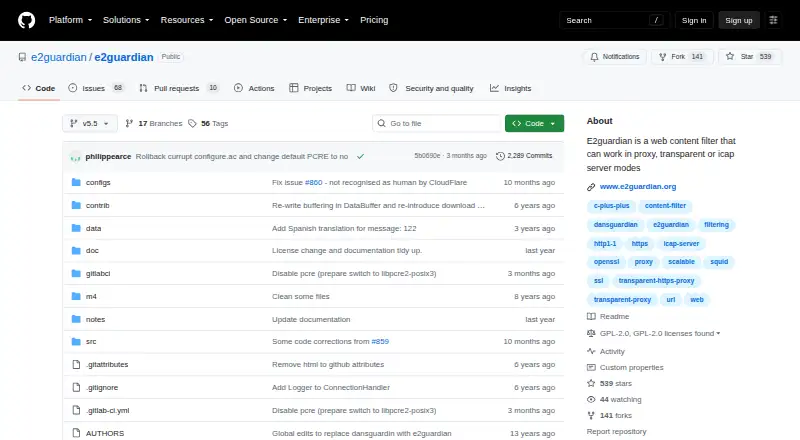
What e2guardian is
e2guardian is a web content filtering proxy for Linux and self-hosted deployments. It can operate in explicit proxy, transparent proxy, or ICAP server mode. Administrators can configure different filtering levels for different user groups, using domain and URL allowlists, blocklists, and greylists, deep URL scanning, and regular-expression rules for URLs, page bodies, and headers. Other listed controls include advert blocking, time-based rules, referer exceptions, temporary click-to-acknowledge bypass, safe search controls, filtering schedules, and SSL inspection. The project also lists custom blocklists, basic activity reports, and a scanner plugin system that includes antivirus scanning. Optional build features support ClamD, AvastD, ICAP AV server, Kaspersky AV daemon, command-line scanners, and email reporting; the installation guide also references an NTLM authentication plugin. The project is free software under GNU General Public License version 2, with a listed price of $0. The repository links Debian and Ubuntu packages and an official Docker image, while the installation guide describes building from source. Linux is recommended; the project notes limited features on FreeBSD and says other ports are untested. Its stable v5.5 branch is identified as v5.5.8r and frozen except for bug fixes, and some v5.5 configuration files are not fully backward compatible with v5.4.
Who it suits
e2guardian suits administrators who need configurable web filtering for different user groups and can deploy a Linux or self-hosted proxy. It may also fit environments seeking URL controls, schedules, scanner plugins, or optional reporting features.
What it does well
- Runs in explicit proxy, transparent proxy, or ICAP server mode.
- Supports group-specific filtering configurations.
- Includes URL lists, regex rules, schedules, and safe search controls.
- Optional builds support antivirus scanners and email reporting.
- Free software under GNU GPL version 2.
What to know first
- Linux is recommended; FreeBSD features are limited.
- Other ports are untested.
- Some v5.5 configuration files are not fully compatible with v5.4.
Limits
The listed plan is free at 0.00 USD per. Linux is recommended; features are limited on FreeBSD and other ports are untested. Some v5.5 configuration files are not fully backward compatible with v5.4.
Plans
| Plan | Billed and limits | Price |
|---|---|---|
| e2guardian | GPL version 2 software | Free |
As github.com lists them, read 11 Oct 2026. The maker's own page has the final word.
Getting started
- Visit the e2guardian GitHub repository.
- Choose a linked Debian or Ubuntu package, the official Docker image, or a source build.
- For a source build, use GNU autotools and run configure, make, and make install.
- Select optional build features such as scanner integrations or email reporting if needed.
- Configure proxy mode and filtering rules for the user groups you need.
Verdict
Choose e2guardian if you need a free, configurable filtering proxy and can work with its Linux-oriented deployment and setup options. Look elsewhere if you need a tested non-Linux port or straightforward compatibility between v5.4 and v5.5 configuration files.
Questions
How much does e2guardian cost?
The listed plan is free at 0.00 USD per.
Which platforms does it support?
The platform listing names Linux, FreeBSD, NetBSD, and OpenBSD. The project recommends Linux, notes limited features on FreeBSD, and says other ports are untested.
Can it filter differently for different groups?
Yes. It can use multiple filter configurations to provide different filtering levels to different user groups.
Is e2guardian open source?
It is free software distributed under GNU General Public License version 2.
How can I install it?
The repository links Debian and Ubuntu packages and an official Docker image. The installation guide also describes building from source with GNU autotools.
What proxy modes does it offer?
It can run as an explicit proxy, transparent proxy, or ICAP server.
Facts from e2guardian's own pages
- Authentication
- The installation guide references an NTLM authentication plugin. · github.com, 11 Oct 2026
- Compatibility
- Some v5.5 configuration files are not fully backward compatible with v5.4 configuration files. · github.com, 11 Oct 2026
- Content rules
- The wiki says regular expressions can be used to deny URLs, body content, and headers. · github.com, 11 Oct 2026
- Content scanners
- Optional build features include support for ClamD, AvastD, ICAP AV server, Kaspersky AV daemon, and command-line content scanners. · github.com, 11 Oct 2026
- Deployment
- The project recommends Linux and says features are limited on FreeBSD while other ports are untested. · github.com, 11 Oct 2026
- Distribution
- The repository links to Debian/Ubuntu packages and an official Docker image. · github.com, 11 Oct 2026
- Filtering groups
- The wiki says it can use multiple filter configurations to provide different levels of web filtering to different user groups. · github.com, 11 Oct 2026
- Free plan
- Yes · github.com, 22 Sept 2026
- Installation
- The installation guide describes building from source with GNU autotools and the configure, make, and make install steps. · github.com, 11 Oct 2026
- Installation and platform limits
- The installation guide recommends Linux, says features are limited on FreeBSD, and says other ports are not tested. · github.com, 11 Oct 2026
- Large file scanning
- The wiki lists download and scanning support for files larger than 2 GB. · github.com, 11 Oct 2026
- License
- The project is free software distributed under GNU General Public License version 2. · github.com, 11 Oct 2026
- Maintainer
- The README lists Frederic Bourgeois, Philip Pearce, and others in its copyright notice. · github.com, 11 Oct 2026
- Other filtering features
- The wiki lists advert blocking, time-based blocking, referer exceptions, and temporary click-to-acknowledge bypass. · github.com, 11 Oct 2026
- Packages
- The README links Debian and Ubuntu packages and an official Docker image. · github.com, 11 Oct 2026
- Product
- E2guardian is a web content filtering proxy that can run in explicit proxy, transparent proxy, or ICAP server mode. · github.com, 11 Oct 2026
- Purpose
- E2guardian is a web content filtering proxy that can run in explicit proxy, transparent proxy, or ICAP server mode. · github.com, 11 Oct 2026
- Release
- The README identifies v5.5.8r as the stable v5.5 version and says the branch is frozen except for bug fixes. · github.com, 11 Oct 2026
- Reporting
- Email reporting functionality is available as an optional build feature. · github.com, 11 Oct 2026
- Scanner plugins
- The project wiki lists a built-in content scanner plugin system that includes antivirus scanning. · github.com, 11 Oct 2026
- SSL inspection
- SSL inspection is listed as a feature. · github.com, 11 Oct 2026
- Support
- The README directs users to a community forum and GitHub issues for bugs and feature requests. · github.com, 11 Oct 2026
- URL controls
- The wiki lists domain and URL whitelists, blacklists, greylists, deep URL scanning, and URL regular-expression replacement. · github.com, 11 Oct 2026
- Version caveat
- The repository says some v5.5 configuration files are not fully backward compatible with v5.4 configuration files. · github.com, 11 Oct 2026
Where e2guardian stands on Freedom251
- Text-to-Speech Software#41 of 223
- Internet Filtering Software#18 of 65
- Text-to-speech tools#165 of 232