Freedom251 › Performance Testing Software
Taurus
What Taurus is
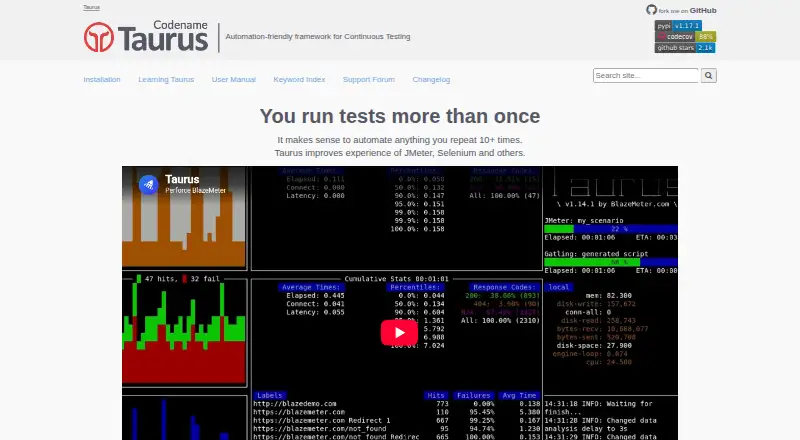
Taurus is a free, open-source framework for automating continuous testing, covering performance and functional tests through tools such as JMeter, Gatling, Locust.io, and Selenium WebDriver. Its documented executors also include JUnit, K6, Postman/Newman, PyTest, TestNG, and Playwright. Test scripts can be written in YAML or JSON, and runs can use configurable pass/fail criteria. Taurus displays live statistics in a terminal and can generate interactive reports, JUnit XML, and CSV outputs. The project documents CI integrations with Jenkins, Bamboo, and TeamCity, and provides a Docker image. Installation can use Python’s package manager with `pip install bzt`; official instructions cover Linux, Mac OS, and Windows. Requirements vary by operating system and test type: Linux installation requires Python 3.7+ and Java, while some tests need additional software. Cloud-provisioned runs use BlazeMeter locations and require an API key in the cloud module settings. Taurus directs users to GitHub Issues and a support forum for help. It is open source under the Apache 2.0 License.
Who it suits
Taurus suits teams or individuals automating performance and functional tests across its documented executors. Users should be prepared to install additional software where their operating system or test type requires it.
What it does well
- Supports YAML and JSON test scripts
- Shows live terminal statistics and generates reports
- Documents Jenkins, Bamboo, and TeamCity integrations
- Offers a Docker image and Python-package installation
- Free and open source under Apache 2.0
What to know first
- Linux installation requires Python 3.7+ and Java
- Some test types require additional software
- Cloud-provisioned execution requires an API key
Limits
Taurus has no paid-plan boundary because it is free and open source. Linux installation requires Python 3.7+ and Java, and other test types may need additional software; cloud-provisioned runs require a BlazeMeter API key.
Plans
| Plan | Billed and limits | Price |
|---|---|---|
| Taurus | Free and open source under Apache 2.0 License | Free |
As gettaurus.org lists them, read 2 Oct 2026. The maker's own page has the final word.
Getting started
- Visit https://gettaurus.org/ for the project and installation instructions.
- Choose an installation route: Python package manager or the Taurus Docker image.
- For the simplest Python installation, run `pip install bzt`.
- Follow the operating-system requirements; Linux needs Python 3.7+ and Java.
- Prepare a YAML or JSON test script and choose a documented executor.
- For cloud-provisioned execution, configure a BlazeMeter API key in the cloud module settings.
Taurus is a free framework for automating performance and functional tests through established test engines. It is best suited to teams that want to coordinate several engines in one workflow; the trade-off is that they still manage those engines and their dependencies.
Overview
Rather than supply a standalone test engine, Taurus provides a way to configure and run tools such as JMeter, Gatling, Locust.io and Selenium WebDriver. Its broad executor catalogue is useful when a team already relies on different tools for load, API or browser testing. If you need a single product that contains the testing engine and its runtime, Taurus is a less natural fit.
It supports load testing, browser-based testing, distributed load and API testing, with a hybrid deployment model. Configurable pass/fail criteria help turn test outcomes into a workflow decision rather than leaving teams to interpret measurements alone.
Key features
Shared configuration across test engines
YAML and JSON scripts can configure documented executors including JMeter, Gatling, JUnit, k6, Locust, Postman/Newman, PyTest, Selenium, TestNG and Playwright. This gives teams a common automation layer across varied test types, but it does not make the underlying engines interchangeable or remove their setup requirements. Teams can extend Taurus with separately installed Python packages for additional executors, services and reporters.
Run feedback and reporting
Taurus can display live statistics in the terminal and produce interactive online reports, JUnit XML and CSV output. That range serves both monitoring during a run and passing results into other workflows. Configurable pass/fail criteria add a practical basis for automating decisions about test results.
Continuous integration and cloud execution
Its learning materials cover Jenkins, Bamboo and TeamCity, making Taurus relevant to teams that want tests in established CI workflows. Cloud-provisioned runs use BlazeMeter locations and require an API key in the cloud module settings. Teams choosing that route need to account for the cloud configuration as well as the test setup.
Pricing
The Taurus plan costs nothing. Taurus is free and open source under the Apache 2.0 License, so it is a straightforward option for teams that want to adopt a testing framework without a software charge. The cost advantage comes with operational responsibility: installation and test-specific dependencies remain part of using the framework.
Platforms
Official installation instructions cover Linux, Mac OS and Windows. The simplest installation uses Python’s package manager with pip install bzt, and Taurus also provides a Docker image. Linux installation requires Python 3.7+ and Java; other test types can require additional software, such as Locust. The framework also collects the name of the desktop operating system where it was run and may display anonymous usage statistics.
Live support and feedback channels include GitHub Issues and a support forum. These project channels suit teams comfortable seeking help in a community setting rather than expecting a packaged support arrangement.
Who it's for
Taurus is a strong fit for technical teams that already use multiple testing engines and want shared configuration, CI integration and varied reporting outputs. It is less suitable for readers who want a self-contained testing application or who do not want to install and maintain the software required by each chosen test type.
Pros and cons
Pros
- One framework supports a broad set of documented executors, useful for coordinating different testing tools.
- Live terminal statistics, interactive reports and JUnit XML or CSV outputs serve both run monitoring and downstream workflows.
- Free, open-source licensing and a Docker image give teams flexible ways to adopt and run it.
Cons
- Underlying test engines remain essential, so Taurus does not spare teams their installation and maintenance work.
- Dependencies vary by test type; Linux installation requires Python 3.7+ and Java, while some tests need additional software.
- Cloud-provisioned execution requires a BlazeMeter API key, adding configuration for teams using that mode.
Alternatives
Performance Testing Software is a useful category to browse when you want to compare tools beyond this framework.
- Artillery is worth considering if you want a freemium alternative with a paid Team plan at $199 a month, which includes 1,000 reports/month, six months of data retention, eight team members and up to 25 workers per distributed test.
- Fortio is another free, open-source option for readers comparing performance-testing projects.
- Locust is a free, MIT-licensed alternative if you prefer that tool rather than Taurus’s multi-executor approach.
- Speedscale has a free proxymock plan with unlimited local mocking, basic traffic recording, community support and a desktop CLI tool; consider it if those capabilities match your needs.
- Tricentis Testim may suit readers focused on mobile and web testing, with a free plan of up to 1,000 runs/month and custom pricing for paid plans.
- Apache JMeter is a free, open-source choice if you want JMeter itself rather than a framework that coordinates several engines; it requires Java 8+.
- HammerDB is a free, open-source option for database benchmarking, with Windows and Linux builds and a Docker image.
- Tsung is another free option, released under GNU General Public License version 2.
Verdict
Choose Taurus if you want a free automation layer that brings multiple test engines, reporting formats and CI workflows together. Its range is the main reason to adopt it; the need to install and manage underlying tools is the main reason to look elsewhere, especially if a self-contained testing product would better suit your team.
Verdict
Taurus brings multiple test engines, reporting formats, and CI integrations under one automation framework. Its installation and cloud requirements vary by test type and execution method.
Questions
Is Taurus free?
Yes. Taurus is free and open source under the Apache 2.0 License.
Which platforms does Taurus support?
It is listed for Linux, macOS, Windows and self-hosted use. Official installation instructions cover Linux, Mac OS and Windows.
What test tools can Taurus run?
Documented executors include Gatling, JMeter, JUnit, k6, Locust, Postman/Newman, PyTest, Selenium, TestNG and Playwright.
What reports can Taurus produce?
It can show live terminal statistics and generate interactive reports, JUnit XML and CSV outputs.
Does Taurus integrate with CI tools?
Its learning materials document running Taurus tests with Jenkins, Bamboo and TeamCity.
What does cloud execution require?
Cloud-provisioned execution uses BlazeMeter locations and requires an API key in the cloud module settings.
Facts from Taurus's own pages
- CI integration
- The maker’s learning materials describe running Taurus tests with Jenkins, Bamboo, and TeamCity. · gettaurus.org, 2 Oct 2026
- CI integrations
- The knowledge base documents integrations with Jenkins, Bamboo and TeamCity. · gettaurus.org, 1 Oct 2026
- Cloud execution
- Taurus documentation describes cloud-provisioned test execution using BlazeMeter. · gettaurus.org, 2 Oct 2026
- Configuration
- Tests can be configured using YAML, and Taurus can run existing JMeter scripts. · gettaurus.org, 2 Oct 2026
- Container
- Taurus provides a Docker image for running the tool as a container. · gettaurus.org, 1 Oct 2026
- Dependencies
- Additional software such as Java or test-specific Python tools may be required depending on the test type. · gettaurus.org, 2 Oct 2026
- Executors
- Documented executors include Gatling, JMeter, JUnit, K6, Locust, Postman/Newman, PyTest, Selenium, TestNG and Playwright. · gettaurus.org, 1 Oct 2026
- Extensibility
- Users can develop separate Python packages that add Taurus executors, services, or reporters. · gettaurus.org, 2 Oct 2026
- Installation
- The maker documents installation on Linux, macOS, and Windows, and provides a Docker image. · gettaurus.org, 2 Oct 2026
- License
- Taurus is free and open source under the Apache 2.0 License. · github.com, 1 Oct 2026
- Operating systems
- Official installation instructions cover Linux, Mac OS and Windows. · gettaurus.org, 1 Oct 2026
- Pass or fail
- Taurus supports configurable pass/fail criteria for test runs. · gettaurus.org, 2 Oct 2026
- Purpose
- Taurus is an automation-friendly framework for continuous testing that wraps performance and functional test tools. · gettaurus.org, 2 Oct 2026
- Reporting
- Taurus can show live terminal statistics and generate interactive reports, JUnit XML and CSV outputs. · gettaurus.org, 1 Oct 2026
- Reports
- Taurus can show live test statistics in the terminal and generate online interactive reports. · gettaurus.org, 2 Oct 2026
- Requirements
- Linux installation requires Python 3.7+ and Java, and some test types require additional software such as Locust. · gettaurus.org, 1 Oct 2026
- Support
- The maker directs users to its support forum and GitHub issue tracker. · gettaurus.org, 2 Oct 2026
- Test engines
- The documentation lists executors for JMeter, Gatling, k6, Locust, Selenium, Playwright, and other tools. · gettaurus.org, 2 Oct 2026
- Testing scope
- It is a convenience wrapper for performance and functional tests. · github.com, 1 Oct 2026
- Underlying tools
- Taurus relies on JMeter, Gatling, Locust.io and Selenium WebDriver. · github.com, 1 Oct 2026
- Usage data
- The installation page says Taurus collects the name of the desktop operating system where it was run and may display anonymous usage statistics. · gettaurus.org, 2 Oct 2026
Where Taurus stands on Freedom251
- Performance Testing Software#17 of 38