Freedom251 › Performance Testing Software

Speedscale
What Speedscale is
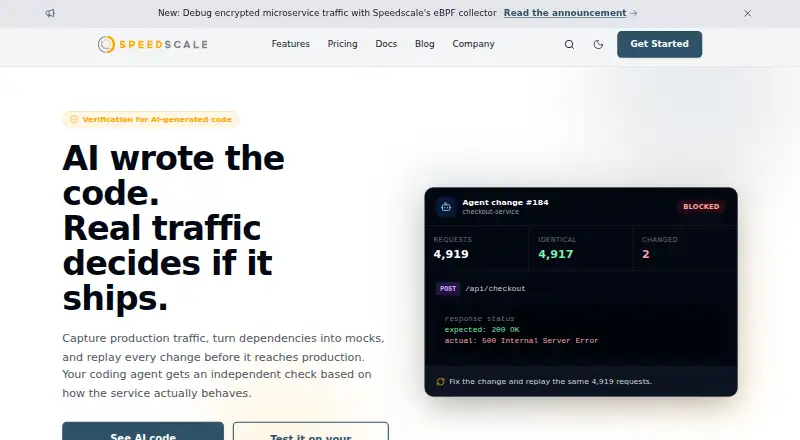
Speedscale is an API and load-testing product for teams building cloud-native software. It uses captured production traffic to test APIs, replay requests, and create service virtualizations. In Kubernetes, it can capture and replay real traffic to help validate changes. Teams can also mock unreliable or third-party dependencies with responses based on production traffic. For load testing, Speedscale generates tests from captured traffic and tracks latency and throughput against budgets. It supports stress testing and distributed load, and lists integrations with CI/CD pipelines including GitHub, GitLab, Jenkins, Azure DevOps, Google Cloud Deploy, AWS CodeBuild, Bitbucket Pipelines, TeamCity, and CircleCI. Other listed integrations include GitHub Actions, k6, and Postman. The full stack can run in a customer’s AWS, GCP, or Azure account, keeping traffic within that VPC. Speedscale offers data loss prevention to redact sensitive data, and says sensitive data can be deleted retroactively after leakage. The company reports completing an AICPA SOC 2 Type I audit. Its free proxymock tool provides unlimited local API mocking and testing, basic traffic recording, and a desktop CLI. Speedscale supports HTTP, gRPC, Kafka, RabbitMQ, PostgreSQL, and other protocols, databases, and APIs; IMAP is capture-only and mTLS support is partial.
Who it suits
Speedscale suits teams testing and delivering cloud-native applications that want to replay production traffic, generate load tests, or mock dependencies. Its local proxymock tool also fits developers who need API mocking and testing on macOS, Linux, or Windows.
What it does well
- Replays captured Kubernetes traffic to validate changes.
- Creates load tests from production traffic and tracks latency and throughput budgets.
- Mocks flaky or third-party dependencies with production-realistic responses.
- Full stack can run in AWS, GCP, or Azure customer accounts.
- Free proxymock plan includes unlimited local mocking.
- Lists integrations across major CI/CD pipelines, k6, and Postman.
What to know first
- Browser-based testing is not supported.
- Free proxymock is limited to local mocking and basic traffic recording.
- IMAP support is capture-only, and mTLS support is partial.
Limits
The free proxymock plan covers unlimited local mocking, basic traffic recording, community support, and a desktop CLI tool for local development. Advanced traffic replay, CI/CD integration, team collaboration, and cloud storage are listed under Pro; Enterprise lists custom deployment, dedicated support and SLAs, SSO, enterprise controls, and BYOC.
Plans
| Plan | Billed and limits | Price |
|---|---|---|
| Free (proxymock) | Unlimited local mocking · basic traffic recording · community support · desktop CLI tool · local dev setup | Free |
| Enterprise | Custom deployment · dedicated support and SLAs · SSO and enterprise controls · BYOC option · cloud dedicated tenant | On request |
| Pro (Speedscale cloud) | Advanced traffic replay · CI/CD integration · priority email support · team collaboration and dashboard · cloud multi-tenant storage | On request |
As speedscale.com lists them, read 7 Oct 2026. The maker's own page has the final word.
Getting started
- Visit https://speedscale.com/.
- Choose the free proxymock plan for local API mocking and testing, or review Pro and Enterprise options.
- Install the proxymock command-line tool on macOS, Linux, or Windows.
- For the full Speedscale stack, consider a custom deployment in AWS, GCP, or Azure.
Speedscale is a hybrid API and load-testing platform built around captured production traffic. It suits cloud-native teams that want realistic Kubernetes replay, traffic-derived load tests, or local API mocks. It is a weaker fit for browser testing or teams that need full mTLS support.
Overview
Speedscale captures and replays production traffic in Kubernetes to validate application changes against real request patterns. It also turns captured traffic into load tests and virtualizes flaky or third-party dependencies with production-realistic responses. That combination is most useful when synthetic tests miss the behavior a team needs to exercise; teams without usable production traffic may get less from its core approach.
The hybrid deployment model offers Speedscale cloud or a full-stack deployment inside a customer's AWS, GCP, or Azure account. With BYOC, traffic stays inside that VPC, which suits organizations that want their test traffic in their own cloud environment. Speedscale offers DLP redaction and says sensitive data can be deleted retroactively after leakage. It has successfully completed an AICPA SOC 2 Type I audit.
Key features
Replay, mocking, and load
Traffic replay lets teams validate changes using captured Kubernetes traffic. Virtualized dependencies can reduce reliance on flaky or third-party services during testing, while preserving realistic responses. Captured traffic can also generate load tests that track latency and throughput against budgets. Stress testing and distributed load are supported, so the product extends beyond local API checks to workload testing.
Integrations and protocol coverage
Speedscale's load-testing integrations include GitHub, GitLab, Jenkins, Azure DevOps, Google Cloud Deploy, AWS CodeBuild, Bitbucket Pipelines, TeamCity, and CircleCI. Its features page also names CI/CD, GitHub Actions, k6, and Postman. Documentation describes full support for HTTP, gRPC, Kafka, RabbitMQ, PostgreSQL, and many other protocols, databases, and APIs; IMAP is capture-only and mTLS support is partial. Those exceptions matter for teams whose test paths depend on either one.
Local development
Free proxymock supports local API mocking and testing, basic traffic recording, and unlimited local mocking. Native command-line installation options cover macOS, Linux, and Windows. It is a practical starting point for individual local workflows, but it does not include the advanced replay, CI/CD integration, team collaboration, or cloud storage in Pro.
Pricing
Speedscale uses a freemium model, with a free trial also offered. The Free (proxymock) plan costs nothing and includes unlimited local mocking, basic traffic recording, community support, a desktop CLI tool, and local development setup. It is best for local mocking and basic recording; the stated plan does not include the cloud-oriented team features.
Pro (Speedscale cloud) has custom pricing. It adds advanced traffic replay, CI/CD integration, priority email support, team collaboration and a dashboard, and cloud multi-tenant storage.
Enterprise also has custom pricing. It includes custom deployment, dedicated support and SLAs, SSO and enterprise controls, a BYOC option, and a cloud dedicated tenant. That is the relevant tier for organizations seeking dedicated deployment and support, while smaller teams may find the free local plan sufficient if they do not need those controls.
Platforms
Speedscale supports API, Linux, macOS, self-hosted, web, and Windows environments. Its deployment model is hybrid. Proxymock's native CLI installation options are for macOS, Linux, and Windows; the full-stack BYOC deployment runs in a customer's AWS, GCP, or Azure account.
Who it's for
Speedscale is a strong match for cloud-native teams that want to reproduce production behavior in Kubernetes, derive load tests from recorded traffic, or isolate tests from unreliable dependencies. It also fits teams that need a self-hosted option in their own cloud account. It is not the right choice when browser-based testing is central, and teams depending on mTLS should account for partial support.
Pros and cons
- Production-based validation: Replay and traffic-derived load tests let teams exercise real request patterns rather than relying only on synthetic scenarios.
- Useful dependency isolation: Virtualized services can stand in for flaky or third-party dependencies with realistic responses.
- Deployment choice: Teams can use the cloud offering or run the full stack in their AWS, GCP, or Azure account, with BYOC traffic staying inside that VPC.
- Free local entry point: Proxymock provides unlimited local mocking and basic recording at no cost, with CLI options for three major desktop operating systems.
- No browser testing: Teams testing browser flows need another tool.
- Protocol caveats: IMAP capture is limited to capture-only use, and mTLS support is partial.
- Paid-tier pricing: Pro and Enterprise use custom pricing, so teams cannot compare their costs from the stated plan prices.
Alternatives
If you want a performance-testing category overview, browse Performance Testing Software. For a named alternative, Artillery offers a Team plan at $199 a month with 1,000 reports per month, six months of data retention, eight team members, and up to 25 workers per distributed test; choose it if those published team limits suit your workload.
Fortio is a free, open-source alternative. Locust is free and open source under the MIT license, while Taurus is free and open source under Apache 2.0. Those are options for readers who want open-source tools, though their supplied details do not establish a production-traffic replay approach like Speedscale's.
Tricentis Testim is the alternative to consider for mobile and web testing: its free plan allows up to 1,000 runs per month, and paid plans are customized to mobile and web testing needs. Apache JMeter is a free, open-source option that requires Java 8 or later. HammerDB is a free, open-source database benchmarking tool with Windows and Linux builds and a Docker image. Tsung is free under the GNU General Public License version 2.
Verdict
Choose Speedscale if your team wants to validate cloud-native changes with captured production traffic, build load tests from that traffic, or run the full stack in your own AWS, GCP, or Azure account. Its free proxymock plan is a useful no-cost fit for local mocking and basic recording. Look elsewhere if browser-based testing is required, or if your workflows depend on complete mTLS support.
Verdict
Choose Speedscale if your team wants to test APIs and load using captured production traffic, or run the full stack in a customer’s AWS, GCP, or Azure account. The free proxymock plan is suited to local mocking and basic traffic recording. Look elsewhere if browser-based testing is required.
Questions
Does Speedscale have a free plan?
Yes. Free (proxymock) costs nothing and includes unlimited local mocking, basic traffic recording, community support, and a desktop CLI tool.
Is there a free trial?
Yes, Speedscale lists a free trial.
Which platforms does Speedscale support?
Its listed platforms are API, Linux, macOS, self-hosted, web, and Windows. Proxymock offers native command-line installation options for macOS, Linux, and Windows.
Which protocols and technologies does it support?
Documentation lists full support for HTTP, gRPC, Kafka, RabbitMQ, PostgreSQL, and many other protocols, databases, and APIs. IMAP is capture-only and mTLS support is partial.
What integrations does Speedscale list?
Its listed pipeline integrations include GitHub, GitLab, Jenkins, Azure DevOps, Google Cloud Deploy, AWS CodeBuild, Bitbucket Pipelines, TeamCity, and CircleCI. Other listed integrations include CI/CD, GitHub Actions, k6, and Postman.
Who makes Speedscale?
The product is named Speedscale, and its website is https://speedscale.com/.
Facts from Speedscale's own pages
- BYOC
- The full Speedscale stack can run inside a customer's AWS, GCP, or Azure account, with traffic staying inside that VPC. · speedscale.com, 7 Oct 2026
- CI/CD integrations
- The load-testing page lists GitHub, GitLab, Jenkins, Azure DevOps, Google Cloud Deploy, AWS CodeBuild, Bitbucket Pipelines, TeamCity, and CircleCI as supported pipeline integrations. · speedscale.com, 7 Oct 2026
- Free local tool
- proxymock is free for local API mocking and testing, and the pricing page says local mocking is unlimited. · speedscale.com, 7 Oct 2026
- Load testing
- It can generate load tests from captured production traffic and track latency and throughput against budgets. · speedscale.com, 7 Oct 2026
- Operating systems
- proxymock provides native command-line installation options for macOS, Linux, and Windows. · docs.speedscale.com, 7 Oct 2026
- Other integrations
- The features page says it works with CI/CD, GitHub Actions, k6, and Postman. · speedscale.com, 7 Oct 2026
- Security certification
- Speedscale says it successfully completed an AICPA SOC 2 Type I audit. · docs.speedscale.com, 7 Oct 2026
- Sensitive data
- Speedscale offers DLP to redact sensitive data, and its compliance page says sensitive data can be retroactively deleted after leakage. · docs.speedscale.com, 7 Oct 2026
- Service virtualization
- It can mock flaky or third-party dependencies with production-realistic responses. · speedscale.com, 7 Oct 2026
- Support
- The pricing page lists community support for Free, priority email support for Pro, and dedicated channels and onboarding for Enterprise. · speedscale.com, 7 Oct 2026
- Target users
- Speedscale describes its product as a way to test and deliver cloud-native software applications using production traffic replication. · speedscale.com, 7 Oct 2026
- Technology coverage
- The documentation lists full support for HTTP, gRPC, Kafka, RabbitMQ, PostgreSQL, and many other protocols, databases, and APIs; it marks IMAP as capture-only and mTLS as partial. · docs.speedscale.com, 7 Oct 2026
- Traffic replay
- It captures and replays real production traffic in Kubernetes to validate changes. · speedscale.com, 7 Oct 2026
- What it does
- Speedscale provides API testing, load testing, and service virtualization using captured production traffic. · speedscale.com, 7 Oct 2026
Where Speedscale stands on Freedom251
- Performance Testing Software#14 of 38