Freedom251 › Tab Management Software
Tab Session Manager
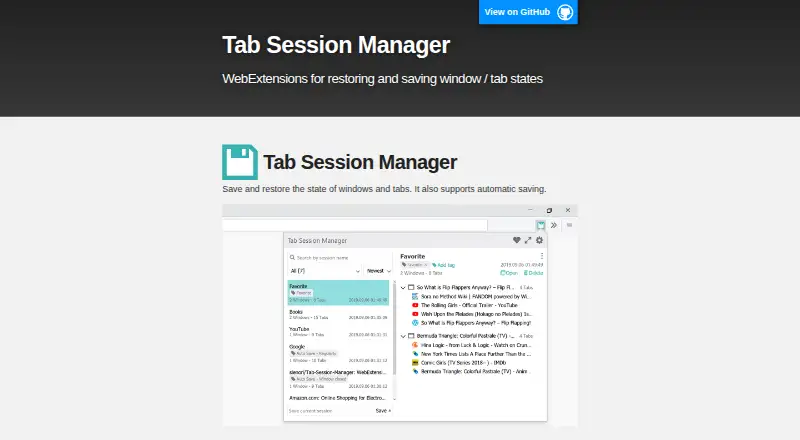
What Tab Session Manager is
Tab Session Manager is a browser extension for saving and restoring browser windows and tabs. It can save sessions automatically when a window closes or on a regular schedule, and lets users name and tag sessions to keep them organized. Saved tab groups are supported as well. Users can import and export sessions, including importing data from Session Buddy. The extension is free, with session saving and restoration, autosave, cloud sync, and import and export included. By default, session data stays on the local device and is not sent to an external server. If Cloud sync is enabled, Google Drive synchronizes the data between computers; the privacy policy says it is stored in the Drive App Folder, where other apps and the maker cannot access it. The maker links to Chrome and Microsoft Edge versions, and the Firefox listing says it is compatible with the Chrome extension. On Firefox, regular autosaving has a minimum interval of 0.5 minutes due to Manifest V3 limitations. An Import URL list option uses Google’s API to retrieve favicons, and a local compressor can reduce memory use for favicons in sessions saved by version 6.7.0 or earlier.
Who it suits
It suits people who want to preserve browser windows, tabs, and tab groups for later restoration, with either manual session management or automatic saving. It may also suit users moving sessions between computers who want Google Drive sync, or people importing existing Session Buddy data.
What it does well
- Automatically saves sessions when a window closes or at intervals.
- Organizes sessions with names and tags, and saves tab groups.
- Imports and exports sessions, including Session Buddy data.
- Google Drive sync can share sessions between computers.
- Session data stays local unless Cloud sync is enabled.
What to know first
- Firefox regular autosave cannot be set below 0.5 minutes.
- Cloud sync requires enabling Google Drive synchronization.
Plans
| Plan | Billed and limits | Price |
|---|---|---|
| Free | Save and restore sessions · Auto-save · Cloud sync · Import and export | Free |
As tab-session-manager.sienori.com lists them, read 8 Oct 2026. The maker's own page has the final word.
Getting started
- Open the maker’s website to find the browser extension links.
- Install the extension for Chrome, Microsoft Edge, or Firefox.
- Save sessions manually or enable automatic saving on window close or at intervals.
- Name and tag sessions, and save tab groups as needed.
- Enable Cloud sync to synchronize sessions between computers through Google Drive, if desired.
Verdict
Choose Tab Session Manager if you want a free extension for saving and restoring sessions, with autosave, tags, tab groups, and import/export tools. Look elsewhere if you need tab search, or if Firefox autosaving must run more frequently than every 0.5 minutes.
Questions
How much does Tab Session Manager cost?
The Free plan costs nothing.
What does the free plan include?
It includes saving and restoring sessions, auto-save, Cloud sync, and import and export.
Which browsers does it support?
The maker links to Chrome and Microsoft Edge versions. The Firefox listing says it is compatible with the Chrome extension.
Where is session data stored?
It is stored locally by default and is not sent to an external server unless Cloud sync is enabled. With sync enabled, session data is stored in the Google Drive App Folder.
Can it import Session Buddy data?
Yes. The extension supports importing Session Buddy data.
Does it support tab search?
No. Tab search is not supported.
Facts from Tab Session Manager's own pages
- Automatic saving
- The extension can save automatically when a window closes and at regular intervals. · addons.mozilla.org, 8 Oct 2026
- Autosave limit
- The Firefox listing says the minimum interval for regular autosaving changed to 0.5 minutes due to Manifest V3 limitations. · addons.mozilla.org, 8 Oct 2026
- Browser compatibility
- The maker links to Chrome and Microsoft Edge versions, and the Firefox listing says it is compatible with the Chrome extension. · addons.mozilla.org, 8 Oct 2026
- Cloud sync
- Cloud sync can synchronize session data between computers using Google Drive. · tab-session-manager.sienori.com, 8 Oct 2026
- Compression privacy
- The maker says loaded session files in the compressor are not sent to the Internet. · tab-session-manager.sienori.com, 8 Oct 2026
- Google Drive access
- When Cloud sync is enabled, session data is stored in the Google Drive App Folder, which the policy says other apps and the maker cannot access. · tab-session-manager.sienori.com, 8 Oct 2026
- Import and export
- The extension supports importing and exporting sessions and importing Session Buddy data. · addons.mozilla.org, 8 Oct 2026
- Imported URL favicons
- The Import URL list feature uses Google’s API to retrieve favicons for imported URLs. · tab-session-manager.sienori.com, 8 Oct 2026
- Local data storage
- The privacy policy says session data is stored locally and is not sent to an external server unless Cloud sync is enabled. · tab-session-manager.sienori.com, 8 Oct 2026
- Purpose
- Tab Session Manager saves and restores browser windows and tabs, with automatic saving. · tab-session-manager.sienori.com, 8 Oct 2026
- Session compression
- The maker provides a local tool to compress favicons in sessions saved by version 6.7.0 or earlier to reduce memory use. · tab-session-manager.sienori.com, 8 Oct 2026
- Session management
- Users can manage sessions with names and tags. · addons.mozilla.org, 8 Oct 2026
- Support
- The Firefox listing provides a support email and links to the maker’s homepage and support site. · addons.mozilla.org, 8 Oct 2026
- Tab groups
- The extension supports saving tab groups. · addons.mozilla.org, 8 Oct 2026
Where Tab Session Manager stands on Freedom251
- Tab Management Software#18 of 27
- Browser Extensions#15 of 19