Freedom251 › Tab Management Software
Tab Manager v2
What Tab Manager v2 is
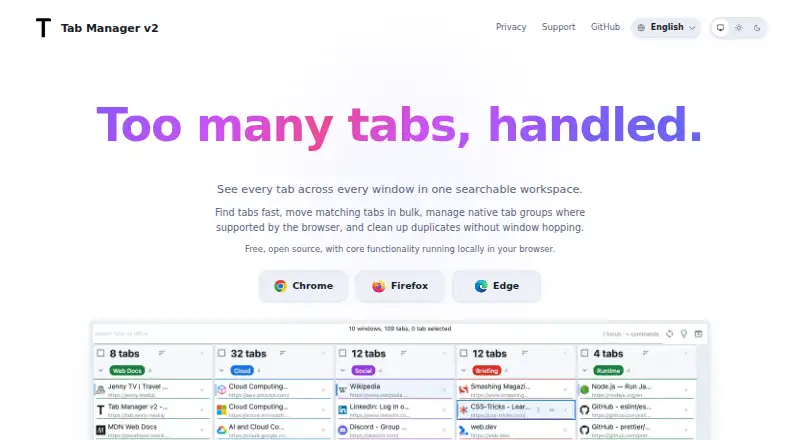
Tab Manager v2 is a free browser extension for searching and organizing tabs across browser windows. It can search open tabs by title or URL, with an option to include browser history. From matching results, users can move tabs, group them, close them, or open them in a new window. The extension highlights duplicate tabs for cleanup. Where supported by the browser, native tab groups can be renamed, recolored, collapsed, and reorganized. Keyboard navigation, shortcut help, and a command palette provide additional ways to work with tabs. Users can adjust the theme, tab width, font size, toolbar behavior, URL visibility, and other display preferences. The maker links to Chrome, Firefox, and Edge extensions. Safari is unsupported because it lacks an API the extension relies on for moving tabs. The maker says core functionality runs locally and tab data stays in the browser; its privacy policy says tab, window, history, and settings data are not sent to its servers. Extension data uses browser sync storage when available, with local storage as a fallback. The popup may request Google Fonts assets directly from Google. Windows themselves cannot be renamed; the maker suggests native tab groups for labels.
Who it suits
It suits people who manage many tabs across browser windows and want search, bulk actions, and duplicate cleanup. It is not suitable for Safari users who need this extension’s tab-moving feature.
What it does well
- Free plan; core functionality runs locally.
- Searches tabs by title or URL.
- Bulk actions include moving, grouping, and closing.
- Highlights duplicate tabs.
- Offers keyboard navigation and a command palette.
What to know first
- Safari is unsupported.
- Browser groups depend on browser support.
- Windows cannot be renamed.
- Popup may request Google Fonts assets.
Limits
The extension cannot rename windows, and Safari is unsupported because it lacks an API needed to move tabs. Native tab group controls depend on browser support.
Plans
| Plan | Billed and limits | Price |
|---|---|---|
| Free | Core functionality runs locally in your browser · open source | Free |
As tab.jenny.media lists them, read 4 Oct 2026. The maker's own page has the final word.
Getting started
- Open the Tab Manager v2 website.
- Choose the Chrome, Firefox, or Edge extension link for your browser.
- Install the extension in that browser.
- Search tabs by title or URL, and optionally include browser history.
- Select matching tabs to move, group, close, or open in a new window.
Verdict
Tab Manager v2 combines tab search, bulk organization, and duplicate cleanup with configurable display options. Check browser support and the inability to rename windows before relying on it for a particular workflow.
Questions
Is Tab Manager v2 free?
Yes. Its Free plan costs nothing and provides core functionality locally in the browser.
Which browsers support it?
The maker links to Chrome, Firefox, and Edge extensions. Safari is unsupported.
Can it search browser history?
Yes. Search focuses on open tabs by title or URL, and history results can be included optionally.
Does it send tab data to the maker’s servers?
The privacy policy says tab, window, history, and settings data are not sent to its servers. Extension data is stored in browser sync storage when available, or local storage as a fallback.
Can I rename windows or tab groups?
Windows cannot be renamed. Where the browser supports native tab groups, those groups can be renamed, recolored, collapsed, and reorganized.
Is the extension open source?
Yes. The Free plan is described as open source.
Facts from Tab Manager v2's own pages
- Browser availability
- The maker links to Chrome, Firefox, and Edge extensions, and says Safari is unsupported because it lacks an API the extension relies on for moving tabs. · tab.jenny.media, 4 Oct 2026
- Bulk actions
- Users can select matching tabs to move them, group them, close them, or open them in a new window. · tab.jenny.media, 4 Oct 2026
- Customization
- Users can adjust the theme, tab width, font size, toolbar behavior, URL visibility, and other display preferences. · tab.jenny.media, 4 Oct 2026
- Data handling
- The privacy policy says the extension does not send tab, window, history, or settings data to its own servers and stores extension data in browser sync storage when available, with local storage as a fallback. · github.com, 4 Oct 2026
- Duplicate cleanup
- The extension highlights duplicate tabs so users can remove them quickly. · tab.jenny.media, 4 Oct 2026
- Keyboard tools
- The extension includes keyboard navigation, shortcut help, and a command palette. · tab.jenny.media, 4 Oct 2026
- Notable limit
- The maker says users cannot rename windows; it suggests using native tab groups for labels instead. · tab.jenny.media, 4 Oct 2026
- Optional network request
- The privacy policy says the extension popup references Google Fonts, whose stylesheet or font assets may be requested directly from Google. · github.com, 4 Oct 2026
- Privacy
- The maker says core functionality runs locally, tab data stays in the browser, and the extension does not add analytics or tracking. · tab.jenny.media, 4 Oct 2026
- Purpose
- Tab Manager v2 provides a searchable workspace for tabs across browser windows. · tab.jenny.media, 4 Oct 2026
- Search
- It searches open tabs by title or URL and can optionally include browser history results. · tab.jenny.media, 4 Oct 2026
- Support
- The maker links to a GitHub issues page for issues and privacy questions. · github.com, 4 Oct 2026
- Tab groups
- Where supported by the browser, users can rename, recolor, collapse, and reorganize native tab groups. · tab.jenny.media, 4 Oct 2026
Where Tab Manager v2 stands on Freedom251
- Tab Management Software#16 of 27