Freedom251 › JavaScript Build Tools

SWC
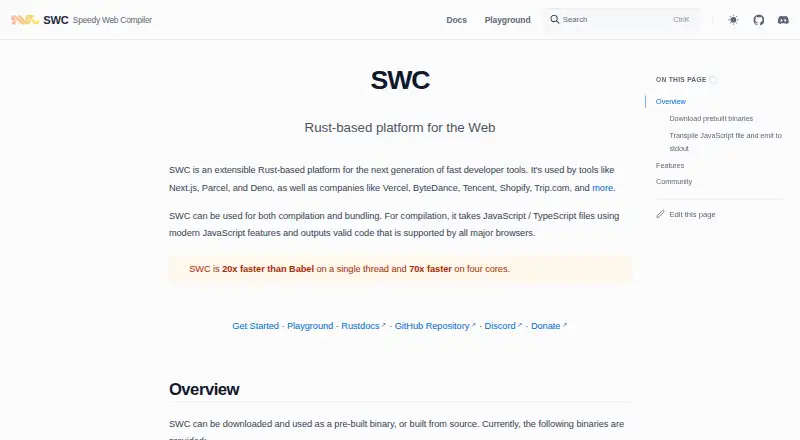
What SWC is
SWC is a Rust-based developer platform for compiling and transforming JavaScript and TypeScript. It converts modern code into forms intended for major browsers and supports minification, WebAssembly transforms, custom plugins, and compilation targets set with browserslist-compatible queries or minimum environment versions. Its core API parses ECMAScript, TypeScript, and Flow, and is mainly aimed at build-tool authors. Integrations include webpack, Rspack, and Jest; Next.js, Parcel, and Deno are among the tools named as users. Developers can install prebuilt binaries or build from source, with packages documented for npm, Yarn, pnpm, Bun, and Deno. SWC also offers a WebAssembly module for synchronous browser transformations. The site states performance figures of 20x Babel on one thread and 70x on four cores. SWC is free. Its bundling feature is slated to be dropped in v2, and documentation recommends using SWC-based bundlers instead.
Who it suits
SWC suits developers building JavaScript or TypeScript toolchains, especially build-tool authors who need compilation, minification, plugins, or integrations. Browser-based transformations are also supported through its WebAssembly module.
What it does well
- Compiles modern JavaScript and TypeScript for major browsers.
- Supports minification, WebAssembly transforms, and custom plugins.
- Offers integrations for webpack, Rspack, and Jest.
- Targets browsers, iOS, Android, Node, and Electron.
- Free plan; packages documented for five package managers.
What to know first
- Bundling is slated for removal in v2.
- Polyfill usage is less efficient for certain computed properties.
Plans
| Plan | Billed and limits | Price |
|---|---|---|
| SWC | Open source Rust-based developer toolchain | Free |
As swc.rs lists them, read 30 Sept 2026. The maker's own page has the final word.
Getting started
- Visit https://swc.rs/.
- Choose a documented package manager: npm, Yarn, pnpm, Bun, or Deno.
- Install SWC using the package instructions, or use a prebuilt binary or build from source.
- Set compilation targets with browserslist-compatible queries or minimum environment versions as needed.
- Join GitHub Discussions or Discord for community discussion.
SWC is a free Rust-based toolchain for compiling and transforming JavaScript and TypeScript. It suits developers building JavaScript tools or adding compilation to an existing workflow. Its speed-focused compiler and integrations are compelling, but its bundler is a poor foundation for projects planning to move to v2.
Overview
SWC turns modern JavaScript and TypeScript into code intended for major browsers, while its core API also parses ECMAScript, TypeScript, and Flow. Its documentation describes @swc/core as mainly useful to build-tool authors, so it is a more natural fit as infrastructure inside a development workflow than as a turnkey application for writing software.
The project reports performance of 20x Babel on one thread and 70x on four cores. That makes speed a central part of its appeal, though results will vary with workload and environment. Next.js, Parcel, and Deno are named as tools that use SWC; Vercel, ByteDance, Tencent, Shopify, and Trip.com are among the companies it cites as users.
Key features
- Compilation and targeting: SWC aims to support ECMAScript features, stage 3 proposals, and preset-env transforms, including bugfix transforms. Browserslist-compatible queries or minimum versions let teams target browsers, iOS, Android, Node, or Electron. That flexibility helps teams align output with their deployment environments.
- Transformation tools: Minification, WebAssembly transforms, and a custom plugin API make SWC useful beyond syntax conversion. The core feature set also includes code splitting, tree shaking, and source maps.
- Build integrations: SWC integrates with webpack, Rspack, and Jest. The @swc/jest package can replace Jest’s default JavaScript-based ts-jest runner with a Rust replacement, a focused option for teams seeking a different TypeScript runner.
- Browser and package options: The @swc/wasm-web module can transform code synchronously inside a browser using WebAssembly. Prebuilt binaries and source builds are documented, with installation paths for npm, Yarn, pnpm, Bun, and Deno.
One meaningful caveat concerns polyfills: SWC’s documentation warns that its usage mode is less efficient than Babel for certain dynamically computed property expressions. Teams relying on those cases should weigh that limitation rather than assuming the speed advantage applies equally to every transformation.
Pricing
SWC is free, with a listed price of free for its open-source Rust-based developer toolchain. There is no free trial because the product is already free, and no paid tier or usage cap is stated. That makes it accessible for individual developers and teams adopting it in build workflows; there is no lower paid plan that trades away features. The published plan information gives no seat terms to factor into a team decision.
Platforms
SWC is listed for Android, API, Linux, macOS, web, and Windows. Its package documentation spans npm, Yarn, pnpm, Bun, and Deno, and users can choose prebuilt binaries or build from source. Those options suit teams with varied development environments, though the API’s stated focus on build-tool authors is important when judging whether it fits a particular workflow.
Who it's for
SWC is a strong fit for developers and tool authors who need JavaScript or TypeScript compilation, configurable targets, or integrations with existing build and test systems. Its plugin and transformation capabilities also suit teams extending a toolchain. It is less compelling for projects choosing a long-term bundler: SWC says bundling will be dropped in v2 and recommends SWC-based alternatives including Parcel 2, Turbopack, Rspack, and fe-farm.
Pros and cons
- Pro: Broad parsing and target options cover ECMAScript, TypeScript, and Flow, with targets ranging from browsers to Node and Electron.
- Pro: The plugin API, minification, WebAssembly transforms, and integrations with webpack, Rspack, and Jest support multiple parts of a development workflow.
- Pro: The toolchain is free, and distribution through prebuilt binaries, source, and several package managers gives teams multiple adoption paths.
- Con: Bundling is slated to be dropped in v2, so projects should not choose SWC’s own bundling feature as a lasting foundation.
- Con: The documented polyfill approach is less efficient than Babel for certain dynamically computed property expressions.
- Con: The core API is chiefly aimed at build-tool authors, which makes SWC a less direct choice for developers seeking a self-contained app-development environment.
Alternatives
- Babel is another free JavaScript toolchain to consider, particularly if its polyfill handling is a priority in the cases where SWC documents a limitation.
- Transcrypt is a free, Apache 2.0-licensed option for readers comparing open-source tools.
- ClojureScript is a free option under the Eclipse Public License 1.0.
- Google Web Toolkit is a free, Apache 2.0-licensed alternative.
- Kotlin/JS is a free JavaScript compiler target configured with the Kotlin Multiplatform Gradle plugin.
- Cython is a free option under the Apache 2.0 license.
- Vala is a free option made by the Vala Community.
- CoffeeScript is another free alternative.
For category browsing, see Code Transpilers and JavaScript Build Tools.
Verdict
Choose SWC if you need a free, extensible JavaScript and TypeScript compiler that can slot into a build or test workflow, especially when its targeting options and integrations match your stack. Look elsewhere if your project depends on SWC’s bundling feature for the long term, or if the documented polyfill limitation matters to your code.
Verdict
SWC covers compilation and transformation needs with multiple integrations and package options, and it is free. Its bundling roadmap and documented polyfill limitation are worth considering before choosing it for those tasks.
Questions
Is SWC free?
Yes. The listed SWC plan costs nothing, and SWC is open source.
Which platforms does SWC support?
The listed platforms are Android, API, Linux, macOS, web, and Windows.
Which languages and syntax does SWC handle?
It compiles JavaScript and TypeScript, and its core API documents parsing ECMAScript, TypeScript, and Flow syntax.
Which tools integrate with SWC?
Its listed integrations include webpack, Rspack, and Jest. Next.js, Parcel, and Deno are also named as tools that use SWC.
How can developers install SWC?
It can be installed as a prebuilt binary or built from source. Package instructions cover npm, Yarn, pnpm, Bun, and Deno.
What is the bundling limitation?
The bundling documentation says the feature will be dropped in v2 and recommends SWC-based bundlers instead.
Facts from SWC's own pages
- Browser use
- The @swc/wasm-web module can synchronously transform code inside a browser using WebAssembly. · swc.rs, 30 Sept 2026
- Bundling status
- The bundling documentation says the feature will be dropped in v2 and recommends SWC-based bundlers such as Parcel 2, Turbopack, Rspack, and fe-farm. · swc.rs, 30 Sept 2026
- Community and support
- SWC describes itself as community-driven and directs users to GitHub Discussions and Discord for community discussion. · swc.rs, 30 Sept 2026
- Community support
- The site invites users to join GitHub discussions and Discord. · swc.rs, 30 Sept 2026
- Compatibility
- SWC's compilation is intended to support all ECMAScript features, and its migration guide says it supports stage 3 proposals and preset-env, including bugfix transforms. · swc.rs, 30 Sept 2026
- Compilation
- SWC compiles modern JavaScript and TypeScript into code supported by major browsers. · swc.rs, 30 Sept 2026
- Distribution
- SWC can be installed as prebuilt binaries or built from source, with packages documented for npm, Yarn, pnpm, Bun, and Deno. · swc.rs, 30 Sept 2026
- Features
- SWC supports compilation, minification, WebAssembly transforms, custom plugins, and integrations for webpack, Rspack, and Jest. · swc.rs, 30 Sept 2026
- Input formats
- The core API documents parsing ECMAScript, TypeScript, and Flow syntax. · swc.rs, 30 Sept 2026
- Integration
- The @swc/jest package can replace Jest's default JavaScript-based ts-jest runner with a Rust replacement. · swc.rs, 30 Sept 2026
- Integrations
- The site names Next.js, Parcel, and Deno as tools that use SWC. · swc.rs, 30 Sept 2026
- Limit
- SWC's documentation warns its usage mode for polyfills is less efficient than Babel for certain dynamically computed property expressions. · swc.rs, 30 Sept 2026
- Notable limit
- The bundling documentation says the feature will be dropped in v2 and recommends using SWC-based bundlers instead. · swc.rs, 30 Sept 2026
- Package managers
- The getting started guide shows installation through npm, yarn, pnpm, bun, and deno. · swc.rs, 30 Sept 2026
- Performance
- The site states that SWC is 20x faster than Babel on a single thread and 70x faster on four cores. · swc.rs, 30 Sept 2026
- Platforms
- Provided binary targets include macOS, Linux, Android aarch64, and Windows architectures. · swc.rs, 30 Sept 2026
- Purpose
- SWC is an extensible Rust-based platform for fast developer tools that can compile and bundle JavaScript and TypeScript. · swc.rs, 30 Sept 2026
- Security
- The official pages reviewed do not state security certifications or compliance claims. · swc.rs, 30 Sept 2026
- Targeting
- SWC can use browserslist-compatible queries or minimum environment versions to set compilation targets, with examples including browsers, iOS, Android, Node, and Electron. · swc.rs, 30 Sept 2026
- Use in build tools
- The @swc/core APIs are described as mainly useful for build tool authors. · swc.rs, 30 Sept 2026
- Users
- The site lists Vercel, ByteDance, Tencent, Shopify, and Trip.com among companies using SWC. · swc.rs, 30 Sept 2026
Where SWC stands on Freedom251
- JavaScript Build Tools#10 of 27
- Code Transpilers#16 of 28