Freedom251 › Moving Company Software

Supermove
What Supermove is
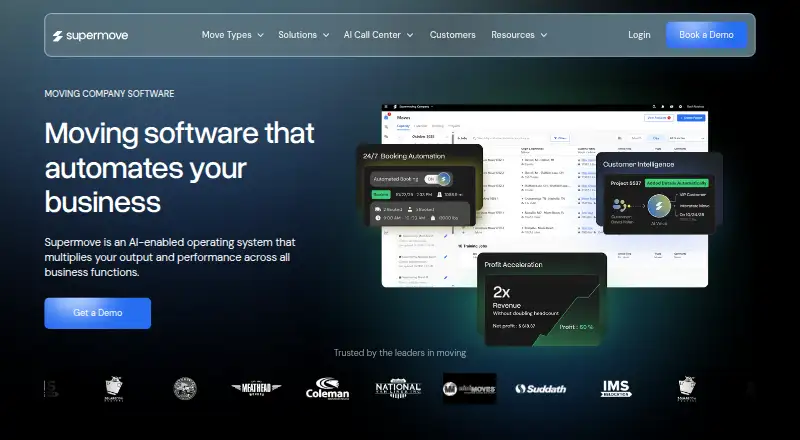
Supermove is an AI-enabled operating system for moving companies, with tools spanning the work from lead capture through estimates, scheduling, job management, and reporting. Its office app combines customer relationship management and lead handling with scheduling, communication, dispatch, and reporting. A separate crew app gives teams access to assigned jobs, digital documents, timesheets, and payment processing. The estimator supports surveys at a property or virtually, then builds estimates using inventory, square footage, and weight. For movers that manage storage, the system tracks warehouse inventory and customer storage projects, and supports recurring invoices and payments.
Supermove describes AI features for automating repetitive tasks, handling customer calls and emails, following up on sales leads, and surfacing business insights. It can export customer, invoice, bill-item, charge, and payment data to QuickBooks Online or Desktop. Calendar connections can sync moves and surveys with Google Calendar, Outlook, or iCal, and sales calendars can be checked for availability. Standard and developer API connections support sending outside lead data into the platform. Supermove Payments supports deposits in the office app and payment collection through the crew app; activation is arranged through a sales representative.
Who it suits
Supermove suits moving companies that need office and crew workflows in one system, from lead handling and estimates to dispatch, jobs, and reporting. Its storage tracking, payment tools, calendar connections, and QuickBooks exports may also fit movers managing storage and financial operations alongside moves.
What it does well
- Covers lead capture, estimates, scheduling, jobs, and reporting.
- Crew app supports assigned jobs, digital documents, timesheets, and payments.
- Estimator uses inventory, square footage, and weight.
- Storage tools track warehouse inventory and customer storage projects.
- Exports customer and financial data to QuickBooks Online or Desktop.
- Syncs moves and surveys with Google Calendar, Outlook, or iCal.
What to know first
- Pricing is available on request.
- Payments activation is arranged through a sales representative.
Limits
Pricing is on request. Supermove Payments requires activation arranged through a sales representative.
Plans
| Plan | Billed and limits | Price |
|---|---|---|
| Supermove | Pricing not listed; book a demo | On request |
As supermove.com lists them, read 8 Oct 2026. The maker's own page has the final word.
Getting started
- Visit the Supermove website.
- Request pricing or book a demo.
- Use the web platform, or access the office and crew apps on Android or iOS.
- Arrange Supermove Payments activation through a sales representative if needed.
Supermove is an AI-enabled operating system built specifically for moving companies, spanning sales, estimating, scheduling, jobs, crews, storage, and reporting. It suits operators that want office and field work in one suite rather than stitching together separate tools. The trade-off is a sales-led purchase with custom pricing, so smaller movers should compare the commitment against simpler low-cost options.
Overview
Supermove’s scope follows a mover’s workflow from lead capture to completed jobs and ongoing storage. The office app combines CRM and lead management with scheduling, communication, dispatch, and reporting. A companion crew app puts assigned jobs, digital documents, timesheets, and payment collection in the field. That breadth is useful for companies coordinating office staff, estimators, drivers, and warehouse work in one system; it may be more software than a small operator needs if only quoting or lead tracking is required.
The suite also includes an estimator for in-person or virtual surveys. It builds estimates from inventory, square footage, and weight, giving sales staff a structured way to price jobs. Storage tools track warehouse inventory and customer storage projects, while handling recurring invoices and payments. AI is positioned for repetitive-task automation, customer calls and emails, sales follow-ups, and business insights, so its value is greatest for teams with enough communication and administrative volume to benefit from automation.
Key features
- Office operations: CRM, lead handling, scheduling, communication, dispatch, and reporting are combined in the Office App, reducing the need to pass information between separate systems.
- Crew execution: Crews can open assigned jobs, complete digital paperwork, record timesheets, and process payments through the Crew App. This connects field completion and collections to office records.
- Estimating: Property surveys can be conducted in person or virtually, with estimates calculated from inventory, square footage, and weight. It is suited to movers whose quotes depend on detailed household information.
- Storage: Warehouse inventory, storage projects, recurring invoices, and payments are covered, making the suite relevant to movers with a storage operation rather than only transport jobs.
- Integrations and API: Data exports to QuickBooks Online or Desktop include customers, invoices, bill items, charges, and payments. Moves and surveys can sync with Google Calendar, Outlook, or iCal, and sales calendars can be used to check availability. Standard and developer APIs accept external lead data, which helps companies connecting their own intake channels.
- Payments and support: Supermove Payments handles deposits in the Office App and collection in the Crew App, with activation arranged through a sales representative. Product experts are listed as available Monday to Friday, 7 a.m. to 8 p.m. Eastern, by email, phone, text, and tickets.
Pricing
Supermove uses paid, custom pricing. The listed Supermove plan includes an estimate builder, inventory management, crew scheduling, job management, payment processing, customer communication, and a mobile app, but a price requires booking a demo. There is no published free plan or trial term to reduce the risk of evaluating it, and payment activation is handled through sales. This model fits established moving companies prepared to discuss their operation and requirements; it is less convenient for a small business that needs an immediate, transparent monthly price.
Platforms
Supermove runs on the web and has Android and iOS access. The maker documents Office and Crew app access on both mobile platforms, including a browser-based home-screen shortcut for iOS. That gives office teams browser access while crews can work from phones in the field.
Who it's for
Supermove is aimed at moving companies managing the full process from lead capture through estimates, scheduling, job management, and reporting. It is a strong fit for multi-role operations that need crew scheduling, digital documents, payment collection, QuickBooks connectivity, calendar coordination, and storage management together. Companies seeking only a lightweight lead dashboard, or those unwilling to buy through a sales conversation, should look elsewhere.
Pros and cons
Pros
- Broad moving-specific coverage: Office, crew, estimating, payments, and storage workflows sit in one suite.
- Useful accounting and calendar connections: QuickBooks exports and synchronization with Google Calendar, Outlook, and iCal can reduce duplicate entry.
- Field-ready mobile workflow: Crews can handle documents, timesheets, and payments from Android or iOS.
- Automation focus: AI targets repetitive administration, communications, follow-ups, and business insights.
Cons
- Pricing is not transparent: Buyers must request a demo rather than compare a published rate or free tier.
- Payments require sales activation: Deposit and crew collection features depend on arranging activation with a representative.
- Potentially excessive for narrow needs: A mover wanting only leads or simple quoting may not benefit from the full operational scope.
Alternatives
See the broader Moving Company Software list when you want to compare the category before committing.
- Moverbase is the better starting point for a budget-conscious mover needing a free tier: Mover FREE allows 10 quotes or jobs per month, 20MB of storage, and unlimited users, while paid Mover Pro adds capacity.
- SmartMoving suits teams that need an API-led setup, with a free API Basic tier for 20,000 calls per month and a $149-per-month API Premium plan for higher usage.
- SuperSmart Moving is for organizations willing to self-host open-source software, including a free AGPL Community edition without support.
- Move and Store fits small operators wanting a free web plan with unlimited jobs, quotes, CRM, payments, and storage records, subject to a 5% application fee.
- Moventry is a simpler web option for lead-focused teams, with a free plan capped at 20 leads per month.
- CompuMove is an alternative for organizations preferring self-hosted or Windows deployment.
- GS Bilty is a paid option with Android, iOS, macOS, web, and Windows support plus a free trial.
- Eclipse offers modular moving-company software and asks buyers to schedule a demo for pricing.
Verdict
Choose Supermove if your moving company wants one coordinated system for office administration, estimates, crew work, payments, and storage, with QuickBooks, calendar, and API connections available. Look elsewhere if transparent self-serve pricing, a free tier, or a narrowly focused tool matters more than an integrated suite purchased through sales.
Verdict
Moving companies seeking one system for office operations, crew tasks, estimates, and storage should consider Supermove. Its QuickBooks, calendar, and API connections extend those workflows; the main buying step is requesting pricing and arranging payments activation through a sales representative.
Questions
How much does Supermove cost?
Pricing is available on request.
Which platforms does Supermove support?
Supermove is available on web, Android, and iOS.
Can Supermove connect with QuickBooks?
It can export customer, invoice, bill-item, charge, and payment data to QuickBooks Online or Desktop.
Which calendars can it sync with?
It can sync moves and surveys with Google Calendar, Outlook, or iCal, and can check sales calendars for availability.
Does Supermove process payments?
Supermove Payments supports deposits in the Office App and payment collection through the Crew App. Activation is arranged through a sales representative.
Does Supermove provide an API?
It documents standard and developer API connections for sending external lead data into the platform.
Facts from Supermove's own pages
- AI features
- The product site describes AI for repetitive task automation, customer calls and emails, sales follow-ups, and business insights. · supermove.com, 8 Oct 2026
- API
- Supermove documents standard and developer API connections for sending external lead data into the platform. · help.supermove.com, 8 Oct 2026
- Audience
- Supermove says its product suite is designed for moving companies and covers the process from lead capture through estimates, scheduling, job management, and reporting. · supermove.com, 8 Oct 2026
- Business workflow
- Its products cover lead capture, estimates, scheduling, job management, and reporting for movers. · supermove.com, 8 Oct 2026
- Calendar integrations
- The help center says Supermove can sync moves and surveys to Google Calendar, Outlook, or iCal, and can use sales calendars to check availability. · help.supermove.com, 8 Oct 2026
- Crew app
- The crew app lets crews view assigned jobs, complete digital documents, record timesheets, and process payments. · supermove.com, 8 Oct 2026
- Estimator
- The estimator app supports in-person or virtual property surveys and calculates move estimates from inventory, square footage, and weight. · supermove.com, 8 Oct 2026
- Mobile access
- The maker’s help article documents Office and Crew app access on Android and iOS, including browser-based home-screen shortcuts for iOS. · help.supermove.com, 8 Oct 2026
- Office app
- The office app combines a moving-company CRM with lead management, scheduling, communication, dispatch, and reporting. · supermove.com, 8 Oct 2026
- Payments
- Supermove Payments supports deposits in the Office App and payment collection through the Crew App; activation is arranged through a sales representative. · help.supermove.com, 8 Oct 2026
- Purpose
- Supermove describes itself as an AI-enabled operating system for moving companies. · supermove.com, 8 Oct 2026
- QuickBooks
- Supermove can export customer, invoice, bill-item, charge, and payment data to QuickBooks Online or Desktop. · help.supermove.com, 8 Oct 2026
- Storage
- The storage feature supports warehouse inventory tracking, customer storage projects, recurring invoices, and payments. · supermove.com, 8 Oct 2026
- Support
- The help center lists product-expert support Monday through Friday, 7 a.m. to 8 p.m. Eastern, with email, phone or text, and ticket options. · help.supermove.com, 8 Oct 2026
Where Supermove stands on Freedom251
- Moving Company Software#23 of 24