Freedom251 › Desktop Widget Software
Stickies
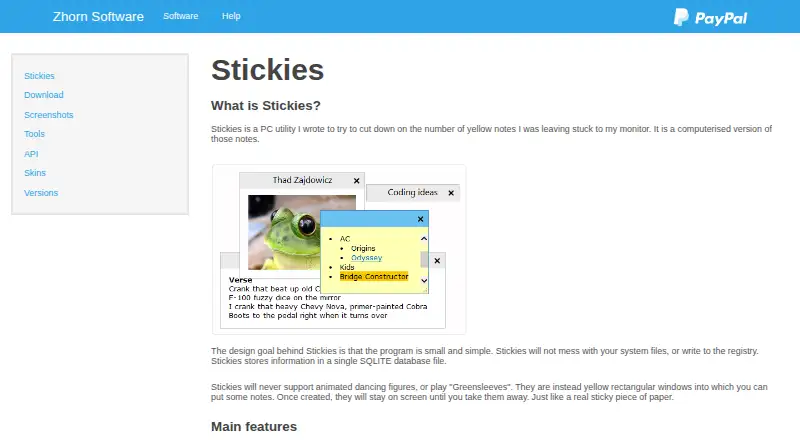
What Stickies is
Stickies is a Windows utility for keeping text and image notes on screen. Notes stay in place until closed, including after a reboot. You can resize each note and customize its fonts, colours, buttons, and style. For reminders, a note can be hidden until a chosen date and time, given an alarm, or set to wake daily, weekly, or monthly. You can attach a note to an application, website, document, or folder so it appears only while that item is on screen. Stickies can transfer notes between machines over TCP/IP or through an SMTP mail server or MAPI client. It also provides an API for other applications through Windows messages. Notes and other information are stored in a single SQLite database file, and Stickies does not write to the registry. The software supports Unicode and right-to-left text, with translation files available for menus and dialogs. Active Directory administrators can manage settings through Group Policy. Stickies is freeware for home and office use, with no charge, time limit, or feature restrictions for registered users. The current download page supports Windows 7, 8, 10, and 11; earlier Windows versions are no longer supported.
Who it suits
Stickies suits Windows users who want persistent text or image notes, alarms, and notes tied to specific on-screen items. Its transfers, API, and Group Policy controls may also suit people moving notes between machines or administrators managing settings.
What it does well
- Keeps notes through reboots until they are closed.
- Supports text and image notes with customizable appearance.
- Offers alarms and daily, weekly, or monthly reminders.
- Attaches notes to applications, websites, documents, or folders.
- Transfers notes between machines over TCP/IP, SMTP, or MAPI.
- Freeware for home and office use without time or feature restrictions.
What to know first
- The current download page supports Windows 7, 8, 10, and 11.
- Earlier Windows versions are no longer supported.
Plans
| Plan | Billed and limits | Price |
|---|---|---|
| Freeware | Use on any number of computers · No time limit · No feature restrictions · No charge for home or office use | On request |
| Stickies | Freeware; use on any number of computers for as long as you like · Windows 7, 8, 10 and 11 | Free |
As zhornsoftware.co.uk lists them, read 22 Sept 2026. The maker's own page has the final word.
Getting started
- Visit the Stickies website.
- Open the download page and choose a version for Windows 7, 8, 10, or 11.
- Install and open Stickies to create on-screen notes.
Verdict
Choose Stickies if you want a free Windows utility for persistent notes, recurring reminders, or notes that appear with particular items. Its listed support is limited to Windows 7, 8, 10, and 11, so it may not suit users of other operating systems.
Questions
How much does Stickies cost?
The Stickies plan is free. The freeware license has no charge for home or office use.
Is there a free plan or trial?
Stickies is freeware with no time limit or feature restrictions for registered users. There is no free trial.
Which platforms does Stickies support?
The current download page lists Windows 7, 8, 10, and 11. Earlier Windows versions are no longer supported.
Can Stickies connect with other applications?
Stickies provides an API for integration through Windows messages. It can also attach notes to an application, website, document, or folder.
How can I get help with Stickies?
The maker recommends its knowledgebase and user forum. It says it tries to reply to everyone who contacts them.
Facts from Stickies's own pages
- Administration
- Active Directory network administrators can use Group Policy to control settings. · zhornsoftware.co.uk, 9 Oct 2026
- Appearance
- Users can customize note fonts, colours, buttons, and styles, and resize notes. · zhornsoftware.co.uk, 9 Oct 2026
- Compatibility
- The current download page lists Windows 7, 8, 10, and 11 as supported; earlier Windows versions are no longer supported. · zhornsoftware.co.uk, 9 Oct 2026
- Free plan
- Yes · zhornsoftware.co.uk, 22 Sept 2026
- Integrations
- Stickies provides an API for integration with other applications, accessed through Windows messages. · zhornsoftware.co.uk, 9 Oct 2026
- Language support
- The product supports Unicode and right-to-left text, and language translation files are available for its menus and dialogs. · zhornsoftware.co.uk, 9 Oct 2026
- License
- Stickies is freeware for home and office use, with no charge, time limits, or feature restrictions for registered users. · zhornsoftware.co.uk, 9 Oct 2026
- Note attachments
- Notes can be attached to an application, website, document, or folder so they appear only when it is on screen. · zhornsoftware.co.uk, 9 Oct 2026
- Note content
- Notes can contain text or images. · zhornsoftware.co.uk, 9 Oct 2026
- Persistence
- Notes remain where placed until closed, including through reboots. · zhornsoftware.co.uk, 9 Oct 2026
- Reminders
- Notes can be hidden until a specified date and time or set to wake daily, weekly, or monthly, and can have alarms. · zhornsoftware.co.uk, 9 Oct 2026
- Storage
- Stickies stores information in a single SQLite database file and does not write to the registry. · zhornsoftware.co.uk, 9 Oct 2026
- Support
- The maker recommends the knowledgebase and user forum for help and says they try to reply to everyone who contacts them. · zhornsoftware.co.uk, 9 Oct 2026
- Transfers
- Notes can be transferred between machines over TCP/IP or using an SMTP mail server or MAPI client. · zhornsoftware.co.uk, 9 Oct 2026
- What it does
- Stickies is a PC utility that provides on-screen notes. · zhornsoftware.co.uk, 9 Oct 2026
Where Stickies stands on Freedom251
- Desktop Widget Software#17 of 29
- Note-taking apps#159 of 216