Freedom251 › Hardware monitoring tools
Sidebar Diagnostics
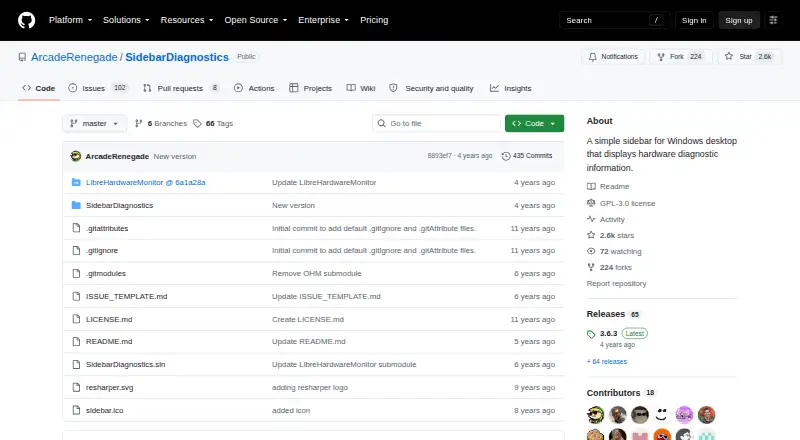
What Sidebar Diagnostics is
Sidebar Diagnostics is a free Windows desktop sidebar for viewing hardware diagnostic information. It monitors CPU, RAM, GPU, network, and logical drives, and can graph those metrics. The display can also show a clock and support alerts, hotkeys, and monitors with different DPI settings. The project describes the sidebar as extensively customizable, with hardware data provided by Libre Hardware Monitor. The README lists Windows 7, Windows 8, Windows 8.1, and Windows 10 as supported systems. Its GitHub repository identifies the software as GNU General Public License (GPL-3.0). The releases page offers an installer and a standalone ZIP, though the standalone build does not update itself automatically. The README says the application must be run as administrator. The repository provides an issue template for reporting problems, and the author says the software will always be free on GitHub and invites donations. The Free plan is listed as free for the Windows desktop app. Remote monitoring is not supported.
Who it suits
Sidebar Diagnostics suits Windows users who want hardware metrics visible in a desktop sidebar. It may fit users who need local monitoring and customization rather than remote monitoring.
What it does well
- Monitors CPU, RAM, GPU, network, and logical drives.
- Can graph metrics and show a clock.
- Supports alerts, hotkeys, and different DPI settings.
- Available free under GPL-3.0.
What to know first
- Must be run as administrator.
- Standalone ZIP does not auto-update.
- Remote monitoring is not supported.
Limits
The Free plan is listed as free for the Windows desktop app. The app requires administrator privileges, and the standalone ZIP does not auto-update.
Plans
| Plan | Billed and limits | Price |
|---|---|---|
| Free | Windows desktop app · requires administrator privileges | Free |
As github.com lists them, read 9 Oct 2026. The maker's own page has the final word.
Getting started
- Visit the GitHub project at https://github.com/arcaderenegade/sidebardiagnostics.
- Open the releases page and choose the installer or standalone ZIP.
- Install or extract the chosen release.
- Run the application as administrator.
- Use it on a supported Windows version: Windows 7, 8, 8.1, or 10.
Verdict
Sidebar Diagnostics provides a customizable desktop view of several hardware metrics on listed Windows versions. It is free, but requires administrator privileges and does not support remote monitoring.
Questions
Does Sidebar Diagnostics cost anything?
The Free plan is listed as free. The author says the software will always be free on GitHub and invites donations.
Which Windows versions are supported?
The README lists Windows 7, Windows 8, Windows 8.1, and Windows 10.
What does it monitor?
It monitors CPU, RAM, GPU, network, and logical drives. It can graph metrics and show a clock.
How can I install it?
The releases page offers an installer and a standalone ZIP. The standalone build does not auto-update.
Does it support remote monitoring?
No, remote monitoring is not supported.
What license does it use?
The GitHub repository identifies Sidebar Diagnostics as GNU General Public License (GPL-3.0) software.
Facts from Sidebar Diagnostics's own pages
- Customization
- The project says the sidebar supports extensive customization. · github.com, 9 Oct 2026
- Data library
- The project says its hardware data is provided by Libre Hardware Monitor. · github.com, 9 Oct 2026
- Display features
- It can graph metrics, show a clock, and support alerts, hotkeys, and monitors with different DPI settings. · github.com, 9 Oct 2026
- Donation
- The author says the software will always be free on GitHub and invites donations. · github.com, 9 Oct 2026
- Free plan
- Yes · github.com, 24 Sept 2026
- Installation
- The releases page provides an installer and a standalone ZIP; the standalone build does not auto-update. · github.com, 9 Oct 2026
- License
- The repository identifies the software as GNU General Public License (GPL-3.0). · github.com, 9 Oct 2026
- Metrics
- It monitors CPU, RAM, GPU, network, and logical drives. · github.com, 9 Oct 2026
- Purpose
- Sidebar Diagnostics is a Windows desktop sidebar that displays hardware diagnostic information. · github.com, 9 Oct 2026
- Remote monitoring
- No · github.com, 24 Sept 2026
- Support
- The repository provides an issue template for reporting issues. · github.com, 9 Oct 2026
- Supported platforms
- Windows 7,Windows 8,Windows 8.1,Windows 10 · github.com, 24 Sept 2026
- Supported Windows versions
- The README lists Windows 10, Windows 8.1, Windows 8, and Windows 7 as supported operating systems. · github.com, 9 Oct 2026
- System requirement
- The README says the application must be run as administrator. · github.com, 9 Oct 2026
Where Sidebar Diagnostics stands on Freedom251
- Hardware monitoring tools#32 of 59
- Desktop Widget Software#19 of 29
- Hardware Monitoring Software#49 of 59