Freedom251 › Favicon Generators
Static.app
What Static.app is
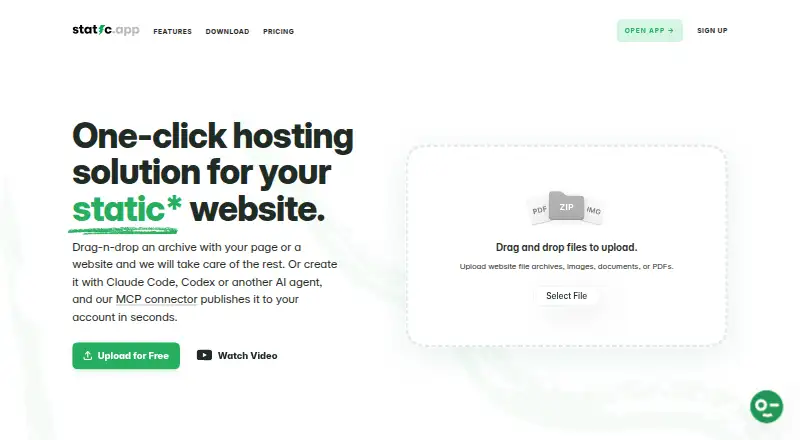
Static.app hosts static websites, letting users publish by uploading an archive or sending content from an AI agent through its MCP connector. It is suited to portfolios, landing pages, documentation, and websites made with coding assistants. The desktop app syncs a local folder with a site so saved changes publish automatically; Static App Sync is currently available for macOS, while a Windows version is described as coming soon. A browser editor handles HTML, CSS, and JavaScript, and daily snapshots allow one-click rollback. Other features include form collection, privacy-friendly analytics, HTTPS with a free SSL certificate, and password-protected pages. Integrations include a REST API, MCP connector, webhooks, GitHub Actions, Claude Artifacts publishing, and OpenClaw. The free plan includes one website and limits each file to 50MB; paid plans allow files up to 1GB. Server-side scripts may be stored, but Static.app does not execute them. Free plans include help documents; paid plans include priority email and chat support. Starter is listed at $5 a month, billed $60 billed annually.
Who it suits
Static.app suits people publishing static portfolios, landing pages, documentation, or coding-assistant-built websites who want browser editing or folder syncing.
What it does well
- Publish by archive upload or AI agent connector.
- Daily snapshots support one-click rollback.
- Includes form collection and privacy-friendly analytics.
- Free plan includes one website and SSL.
- Integrations include a REST API and webhooks.
What to know first
- Server-side scripts are not executed.
- Free plan has a 50MB per-file limit.
- Desktop sync is currently available for macOS only.
- Short links are excluded from the free plan and trial.
Limits
The Free plan allows one website, 50MB storage and a maximum file size of 50MB. Short links are not included in the Free plan or 7-day trial; paid plans allow files up to 1GB each.
Plans
| Plan | Billed and limits | Price |
|---|---|---|
| Free | No credit card required · 1 website · 50MB storage · free subdomain · SSL · QR codes · Mac desktop app · 7-day trial | Free |
| Medium | $120 billed annually; save $24 · 7 websites · 3GB storage · free and custom domains · unlimited traffic · analytics · workspaces · forms · integrations · API/MCP · QR codes · short links · Mac desktop app · 1 team seat | $10 a month |
| Large | $180 billed annually; save $36 · 30 websites · 10GB storage · free and custom domains · unlimited traffic · analytics · workspaces · forms · integrations · API/MCP · QR codes · short links · Mac desktop app · 3 team seats · 3 backup slots | $15 a month |
| Starter | $60 billed annually; save $12 · 2 websites · 500MB storage · free and custom domains · unlimited traffic · analytics · workspaces · forms · integrations · API/MCP · QR codes · short links · Mac desktop app | $5 a month |
As static.app lists them, read 3 Oct 2026. The maker's own page has the final word.
Getting started
- Visit Static.app.
- Choose the Free plan, which requires no credit card, or select a paid plan.
- Upload a website archive or publish from an AI agent through the MCP connector.
- For folder syncing, download Static App Sync for macOS.
- Use the browser code editor to edit HTML, CSS or JavaScript.
Static.app is a managed publishing service for websites built from files, with options ranging from archive uploads to automated deployment. It is a strong fit for portfolios, landing pages, documentation, and AI-built sites that do not need server-side code. Its publishing and recovery tools are useful, but its paid plans are necessary for multiple sites, forms, analytics, and team seats.
Overview
Static.app lets you publish an archive or send a site from an AI agent through its MCP connector. Git deployment and preview deployments provide more structured workflows, while the browser editor supports direct HTML, CSS, and JavaScript changes. For local editing, the desktop app syncs a folder and publishes saved changes automatically; that workflow currently requires macOS.
Daily snapshots make one-click rollback possible, and password protection can restrict access to pages. HTTPS with a free SSL certificate covers secure connections. These features make Static.app more than a basic file host, but the static-hosting model is a firm constraint: server-side scripts can be stored, not run.
Key features
The browser editor is useful for small changes without switching tools, while folder sync suits people who prefer to work locally. Static.app also offers forms and privacy-friendly analytics that work without tracking scripts or cookies. Both are paid-plan features, so the free plan is better for testing the publishing workflow than for a site that depends on those additions.
Integrations include a REST API, MCP connector, webhooks, GitHub Actions, Claude Artifacts publishing, and OpenClaw. That breadth gives developers and AI-assisted workflows several ways to publish. Paid plans also include short links, but those links point only to content hosted on Static.app.
Storage and file size are separate constraints: the free plan allows up to 50MB per file, while paid plans raise the per-file limit to 1GB. Static.app offers unlimited traffic on paid plans; the free plan includes one website and 50MB of storage. Free accounts also receive help documents, while paid plans add priority email and chat support.
Pricing
Static.app has a free plan and a 7-day trial. The Free plan costs nothing, requires no credit card, and includes one website, 50MB storage, a free subdomain, SSL, QR codes, and the Mac desktop app. It is a sensible starting point for a small site, but excludes custom domains, forms, analytics, integrations, and short links.
Starter costs $5 a month, with $60 billed annually and $12 in annual savings. It supports two websites and 500MB storage, with free and custom domains, unlimited traffic, analytics, workspaces, forms, integrations, API/MCP, QR codes, short links, and the Mac app. This is the entry point for a custom-domain site that needs the paid publishing and measurement tools.
Medium costs $10 a month, with $120 billed annually and $24 in annual savings. It raises the allowance to seven websites and 3GB storage, and adds one team seat. Choose it when one collaborator needs access or when Starter’s site and storage limits are too tight.
Large costs $15 a month, with $180 billed annually and $36 in annual savings. It covers 30 websites and 10GB storage, includes three team seats and three backup slots, and retains the paid features of the lower tiers. It fits a larger portfolio of sites or a small team; those needing more seats should compare the custom pricing option.
Platforms
Static.app is available on the web and lists API, macOS, and Windows platforms. However, the desktop sync download is currently available only for macOS, with a Windows version described as coming soon. Windows users can use the web service, but should not plan on the desktop folder-sync workflow today.
Who it's for
Static.app is best for individuals and small teams publishing file-based sites, especially portfolios, landing pages, documentation, or AI-generated websites. The free tier suits a single modest site; Starter is more practical for a custom domain and paid tools, while Medium and Large serve users managing more sites or collaborators. It is not the right choice for applications that depend on server-side execution.
Pros and cons
- Pros: Multiple publishing routes, including archives, Git, previews, API, and MCP, suit both manual and automated workflows.
- Pros: Daily snapshots and one-click rollback provide a straightforward recovery path.
- Pros: Paid analytics avoid tracking scripts and cookies, a useful fit for privacy-conscious site owners.
- Cons: Server-side scripts do not execute, excluding sites that rely on server logic.
- Cons: Desktop folder sync is limited to macOS for now, leaving Windows users without that workflow.
- Cons: The free tier is limited to one website and 50MB storage, and excludes several tools available on paid plans.
Alternatives
For a separate favicon task rather than hosting, Favicon Generators collects relevant options. MakeIcon is a free alternative for creating PNG or multi-platform ZIP icons without signup or a watermark. Resizo Favicon Generator is another free option, with no account, watermark, or daily quota. Favicon Maker is a free alternative for favicon creation.
Texterfly is a free web and API toolkit with 136+ tools and no signup or limits. App Icon & Manifest Generator is a free web app for that more specific asset task. favicon.gg is free for personal and commercial projects without an account, though its server-side tools are rate-limited per IP. Favicon.io is a free web option for favicon generation and conversion. Favicon.now offers free web and API tools for favicon generation, conversion, validation, and related tasks without an account.
Verdict
Choose Static.app if you want managed publishing for static sites, with flexible deployment routes, rollback, and a free way to start. Its paid tiers make sense when custom domains, forms, analytics, or multiple sites matter. Look elsewhere if your site needs server-side code to run or if Windows desktop folder sync is essential.
Verdict
Static.app offers static-site publishing, editing, rollback, and integrations, with a free entry plan and paid options. Its static hosting does not execute server-side scripts, and desktop sync is currently limited to macOS.
Questions
Is Static.app free?
Yes. The Free plan costs nothing, includes one website and 50MB storage, and requires no credit card.
What does the Free plan include?
It includes a free subdomain, SSL, QR codes, a Mac desktop app and a 7-day trial. Each file can be up to 50MB.
Which platforms are available?
The service lists API, macOS, web and Windows platforms. Static App Sync is currently available for macOS, with a Windows version coming soon.
What does Starter cost?
Starter costs $5 a month, billed $60 billed annually.
Can Static.app run server-side scripts?
Server-side scripts can be stored, but they are not executed because Static.app is a static host.
Which integrations are listed?
They include a REST API, MCP connector, webhooks, GitHub Actions, Claude Artifacts publishing and OpenClaw.
Facts from Static.app's own pages
- Audience
- The site describes static hosting as suited to portfolios, landing pages, documentation, and vibe-coded websites. · static.app, 3 Oct 2026
- Company attribution
- The site credits Designmodo in its footer. · static.app, 3 Oct 2026
- Desktop availability
- The download page says Static App Sync is currently available for macOS and that a Windows version is coming soon. · static.app, 3 Oct 2026
- Editing and recovery
- The product page says users can edit HTML, CSS, and JavaScript in a browser code editor and that websites are snapshotted daily for one-click rollback. · static.app, 3 Oct 2026
- File limits
- The pricing page lists a 50MB maximum per file on the free plan and up to 1GB per file on paid plans. · static.app, 3 Oct 2026
- Forms and analytics
- Static.app offers form collection and privacy-friendly website analytics without a tracking script or cookies. · static.app, 3 Oct 2026
- Founded
- 2010 · static.app, 28 Sept 2026
- Hosting limitation
- Static.app says server-side scripts can be stored but are not executed because it is a static host. · static.app, 3 Oct 2026
- Integrations
- The product page lists a REST API, MCP connector, webhooks, GitHub Actions, Claude Artifacts publishing, and OpenClaw. · static.app, 3 Oct 2026
- Product
- Static.app provides one-click hosting for static websites and lets users upload an archive or publish from an AI agent through its MCP connector. · static.app, 3 Oct 2026
- Security
- Static.app says HTTPS is enabled with a free SSL certificate and offers password-protected pages. · static.app, 3 Oct 2026
- Short link limitation
- The pricing page says short links point only to content hosted on Static.app and are not included in the free plan or 7-day trial. · static.app, 3 Oct 2026
- Static desktop app
- The desktop app syncs a local folder with a website so that saved changes publish automatically. · static.app, 3 Oct 2026
- Support
- The pricing page says free plans include help documents and paid plans include priority email and chat support. · static.app, 3 Oct 2026
Where Static.app stands on Freedom251
- Favicon Generators#11 of 30