Freedom251 › Favicon Generators

Favicon.io
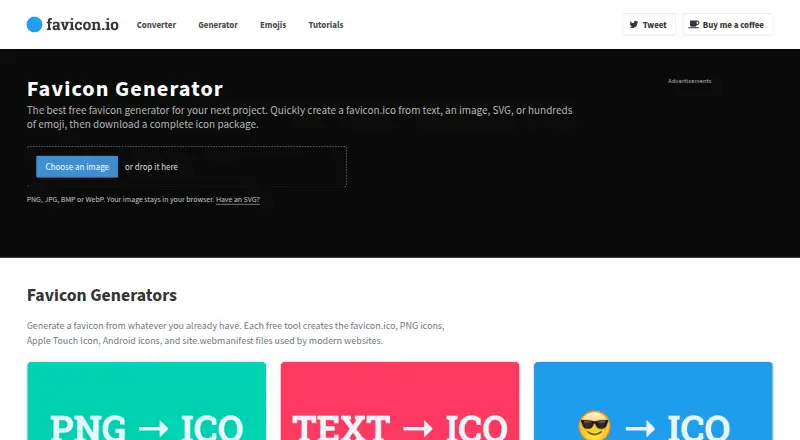
What Favicon.io is
Favicon.io is a free web tool for building favicon packages from images, text, emoji, or SVG files. Image conversion runs in the browser and creates a ZIP of favicon and app icon sizes. The text generator can use letters, initials, or Unicode characters, with choices for fonts, background shapes, and colors. Its emoji library can be searched by name, symbol, or category, while the SVG converter accepts either an uploaded file or pasted code and renders it in the browser.
A generated package can include favicon.ico, PNG icons, an Apple Touch Icon, Android icons, and a web manifest. These files are intended for browser tabs, iPhone and iPad home screens, Android home screens, and installable web apps. A separate checker reviews a website’s HTML and server responses to preview reachable favicon files and identify missing ones. Setup guides cover WordPress, Shopify, and Squarespace. Favicon.io identifies John Sorrentino as its creator. Emoji downloads use Twemoji graphics under CC-BY 4.0 and include attribution details; users are responsible for permissions or licenses for images they convert.
Who it suits
Favicon.io suits site owners who need favicon files for browser tabs, mobile home screens, or installable web apps. Its image, text, emoji, and SVG tools offer several ways to create a package, and the checker and setup guides support adding favicons to a website.
What it does well
- Converts images in the browser and downloads a ZIP package.
- Creates icons from text, emoji, images, or SVG.
- Packages include ICO, PNG, Apple Touch, Android icons, and a manifest.
- Checker previews reachable favicon files and identifies missing ones.
- Setup guides cover WordPress, Shopify, and Squarespace.
What to know first
- SVG export is not available.
- Users are responsible for rights to images they convert.
- Emoji downloads use Twemoji under CC-BY 4.0 and require attribution details.
Limits
The free plan includes favicon generation, conversion, the emoji library, and checker tools. SVG export is unavailable.
Plans
| Plan | Billed and limits | Price |
|---|---|---|
| Free | Free favicon generation, conversion, emoji library, and checker tools | Free |
As favicon.io lists them, read 4 Oct 2026. The maker's own page has the final word.
Getting started
- Open https://favicon.io/ in a web browser.
- Choose image conversion, text generation, the emoji library, or the SVG converter.
- Create or provide the image, text, emoji, or SVG for the icon.
- Download the generated favicon package.
- Use the setup guide for WordPress, Shopify, or Squarespace if applicable.
Verdict
Choose Favicon.io if you want a free web tool to generate a favicon package from an image, text, emoji, or SVG. Its checker and website setup guides can help with implementation; users converting images need permission or a license, and SVG export is not offered.
Questions
How much does Favicon.io cost?
The Free plan costs nothing.
Is there a free plan?
Yes. It includes favicon generation, conversion, the emoji library, and checker tools.
Which platforms does it support?
Favicon.io is a web tool. Generated files cover browser tabs, iPhone and iPad home screens, Android home screens, and installable web apps.
Can it export SVG files?
No. ICO and PNG export are available, while SVG export is not.
Who created Favicon.io?
The site identifies John Sorrentino as its creator.
Can I use downloaded emoji graphics?
Emoji downloads use Twemoji graphics licensed under CC-BY 4.0 and include attribution details.
Facts from Favicon.io's own pages
- Data collection detail
- The privacy policy says image-conversion tools do not request an email address, account, payment, or free-form text for product research questions. · favicon.io, 4 Oct 2026
- Emoji library
- The emoji library lets users search by name, symbol, or category and download complete favicon packages. · favicon.io, 4 Oct 2026
- Emoji licensing
- Emoji downloads use Twemoji graphics licensed under CC-BY 4.0 and include attribution details. · favicon.io, 4 Oct 2026
- Favicon checker
- The checker analyzes a website’s HTML and server responses to preview reachable favicon files and identify missing ones. · favicon.io, 4 Oct 2026
- Image conversion
- Image conversion runs in the browser and downloads a ZIP containing favicon and app icon sizes. · favicon.io, 4 Oct 2026
- Integrations
- The site provides setup guides for adding favicons to WordPress, Shopify, and Squarespace websites. · favicon.io, 4 Oct 2026
- Maker
- The site identifies John Sorrentino as its creator and says he built Favicon.io to make favicon creation simple. · favicon.io, 4 Oct 2026
- Package contents
- Generated packages include favicon.ico, PNG icons, an Apple Touch Icon, Android icons, and a web manifest. · favicon.io, 4 Oct 2026
- Privacy
- The privacy policy says personal information is collected when voluntarily submitted and that third-party services use cookies, collect usage data, and display ads. · favicon.io, 4 Oct 2026
- Purpose
- Favicon.io provides free tools to create favicon packages from images, text, emoji, or SVG files. · favicon.io, 4 Oct 2026
- Support
- The site says users can contact John Sorrentino through X/Twitter or by email at [email protected]. · favicon.io, 4 Oct 2026
- Supported use cases
- The generated files cover browser tabs, iPhone and iPad home screens, Android home screens, and installable web apps. · favicon.io, 4 Oct 2026
- SVG conversion
- The SVG converter accepts an uploaded SVG or pasted SVG code and renders it in the browser. · favicon.io, 4 Oct 2026
- Text generator
- The text generator supports letters, initials, Unicode characters, fonts, background shapes, and custom colors. · favicon.io, 4 Oct 2026
- Usage responsibility
- The terms say users are responsible for having permission or a license to use images they convert. · favicon.io, 4 Oct 2026
Where Favicon.io stands on Freedom251
- Favicon Generators#8 of 30