Freedom251 › Favicon Generators

App Icon & Manifest Generator
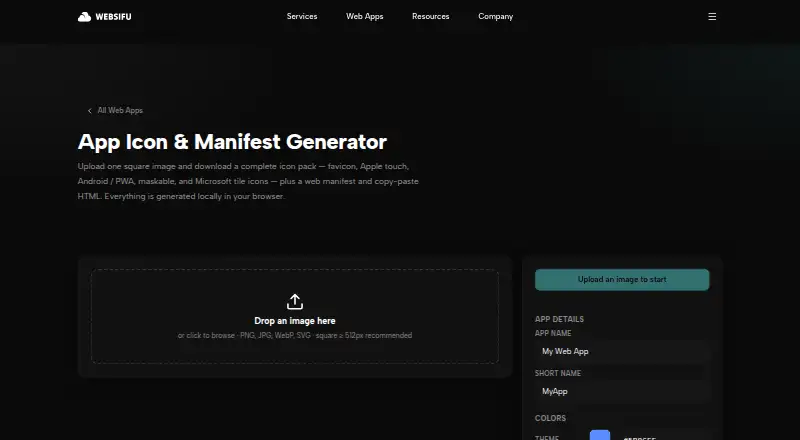
What App Icon & Manifest Generator is
App Icon & Manifest Generator is a free web app that turns a square image into an app icon pack, web manifest files, and copy-ready HTML. It accepts PNG, JPG, WebP, and SVG files, and recommends a square image of at least 512 px. After upload, the page shows a live preview. The generated pack covers favicon files, Apple touch icons, Android and PWA icons, maskable icons, and Microsoft tiles. It includes favicon PNGs at 16, 32, and 48 px, Apple touch icons from 120–180 px, Android/PWA icons from 72–512 px, and maskable icons at 192 and 512 px. Downloads include manifest.json, .webmanifest, browserconfig.xml, and an HTML snippet. Users can set the app name and short name, theme and background colors, and maskable safe-zone padding. The product page says generation happens locally in the browser. It lists no third-party integrations or security certification. The free plan is listed as free.
Who it suits
It suits web and app creators who need icon files and manifest assets from one image. It may be useful when adjustable names, colors, safe-zone padding, and a live preview are wanted.
What it does well
- Accepts PNG, JPG, WebP, and SVG.
- Provides a live preview after image upload.
- Downloads manifest files and an HTML snippet.
- Generation happens locally in the browser.
- Free plan listed as free.
What to know first
- Recommends a square image at least 512 px.
- No third-party integrations are listed.
- No security certification is stated.
Plans
| Plan | Billed and limits | Price |
|---|---|---|
| Free | Free web app; no pricing or usage limits stated | Free |
As websifu.co lists them, read 5 Oct 2026. The maker's own page has the final word.
Getting started
- Open the Websifu App Icon & Manifest Generator page.
- Upload a PNG, JPG, WebP, or SVG image; a square image of at least 512 px is recommended.
- Review the live preview.
- Set the app name, short name, colors, or maskable safe-zone padding as needed.
- Download the generated icon files, manifest files, and HTML snippet.
App Icon & Manifest Generator converts one square image into a full set of web and app icon assets, manifest files and ready-to-paste HTML. It is aimed at developers and site owners preparing a browser app or PWA who want a broad export in one step. The strongest case for it is comprehensive, free generation in a browser; teams needing integrations or a service-oriented workflow should consider alternatives.
Overview
This is a web-based utility from Websifu with a free plan priced at $0 use. Upload a source image, set the identity and display options, then download the generated package. The workflow is focused on producing files for direct inclusion in a website or progressive web app rather than managing an ongoing project or deployment.
Because processing takes place locally in the browser, the image-generation step runs on the device. That is a sensible fit for private brand artwork or workflows where sending the source image to a remote service is undesirable. The output is a download and HTML snippet, not a connected publishing pipeline.
Key features
The uploader accepts PNG, JPG, WebP and SVG files and recommends a square source of at least 512 px. A live preview appears after upload, helping you check the result before exporting. Controls cover the app name, short name, theme color, background color and maskable-icon safe-zone padding. Those settings are useful when the same source artwork must work across browser, mobile and installable-app contexts.
The generated icon set is unusually broad for a single-image tool. It includes favicon PNGs at 16, 32 and 48 px; Apple touch icons from 120–180 px; Android and PWA icons from 72–512 px; maskable icons at 192 and 512 px; and Microsoft tiles. ICO and PNG export are supported, alongside an app icon set and web manifest support.
The download contains manifest.json, .webmanifest, browserconfig.xml and an HTML snippet. That combination reduces the manual work of wiring icons and metadata into a site, while still leaving implementation in your hands. No third-party integration is part of the workflow, so it is less suitable for automated build or deployment systems.
Pricing
The Free plan costs free and is a free web app. It is the natural choice for individuals, prototypes, small websites and occasional client work that need a complete icon package without a subscription. There are no paid tiers to compare, so buyers who require account-based administration, service-level commitments or a defined automation quota will need a different product.
There is no trial conversion or renewal decision to manage. Support is handled through the site contact form, which says replies arrive within one business day.
Platforms
App Icon & Manifest Generator runs on the web. Since generation is performed in the browser, it fits a desktop development workflow without a separate Android, iOS or desktop installation.
Who it's for
Choose it when you are launching a website, PWA or small app and need favicon, Apple, Android, maskable and Microsoft assets from one square source. It also suits developers who want manifest files and copy-paste markup alongside the images, and users who prefer local browser processing for their source artwork.
Look elsewhere if your process depends on API calls, repository integrations, centralized team controls or a published service quota. This tool produces downloadable files, so those needs would require extra tooling around it.
Pros and cons
- Pro: One export covers favicon, Apple touch, Android/PWA, maskable and Microsoft tile formats, reducing repetitive resizing.
- Pro: Manifest files, browser configuration and an HTML snippet are included, not just image files.
- Pro: Local browser generation keeps the stated processing on the user’s device.
- Pro: Name, color and maskable safe-zone controls provide practical branding adjustments.
- Con: The web-only format and download-based workflow offer no listed third-party integrations or deployment automation.
- Con: A single free plan provides no tiered collaboration or service options for larger teams.
Alternatives
For a broader directory of similar tools, browse Favicon Generators.
MakeIcon is a better pick when you need Android, iOS, Linux, macOS, web and Windows coverage, with no signup, no watermark and PNG or multi-platform ZIP output.
Choose Resizo Favicon Generator if no account, no watermark and no daily quota matter more than manifest-focused exports.
Favicon Maker is a straightforward free alternative for favicon work across Android, iOS, web and Windows.
Pick Static.app when you also need hosting features such as a free subdomain, SSL, QR codes, 50MB storage and a Mac desktop app; its free plan includes a seven-day trial and requires no credit card.
Favicon & App Icon Generator suits users seeking an online editor that converts images to ICO and app icons.
Choose Texterfly for a larger collection of free web utilities, including 136+ tools with no signup or limits.
Favicon Generator API is the alternative for API or self-hosted use; its API is open source.
favicon.gg is a free personal or commercial option with no account requirement, though its server-side tools are rate-limited per IP.
Verdict
App Icon & Manifest Generator is a strong free choice for developers who want a complete, configurable icon and manifest bundle from one square image, especially when local browser processing is preferable. Choose another tool if your priority is API access, integrations, team administration or a clearly defined service allowance.
Verdict
This tool generates a broad set of icon assets and manifest files from a single image. Its browser-local processing is stated, but no security certification or third-party integrations are listed.
Questions
How much does it cost?
The Free plan costs nothing.
Which image formats can I upload?
The uploader accepts PNG, JPG, WebP, and SVG. A square image of at least 512 px is recommended.
What does the download include?
It includes favicon, Apple touch, Android/PWA, maskable, and Microsoft tile assets, along with manifest.json, .webmanifest, browserconfig.xml, and an HTML snippet.
Where does image generation happen?
The product page says generation happens locally in the browser.
Does it connect to third-party services?
The product page offers downloadable files and an HTML snippet; it does not list third-party integrations.
Facts from App Icon & Manifest Generator's own pages
- Accepted formats
- The uploader accepts PNG, JPG, WebP, and SVG files, and recommends a square image of at least 512 px. · websifu.co, 5 Oct 2026
- Customization
- Users can set app name, short name, theme and background colors, and maskable safe-zone padding. · websifu.co, 5 Oct 2026
- Free availability
- Websifu describes its web apps collection as a collection of free tools. · websifu.co, 5 Oct 2026
- Icon formats
- The output includes favicon files, Apple touch icons, Android/PWA icons, maskable icons, and Microsoft tiles. · websifu.co, 5 Oct 2026
- Icon sizes
- Included sizes are favicon PNGs at 16, 32, and 48 px; Apple touch icons from 120–180 px; Android/PWA icons from 72–512 px; and maskable icons at 192 and 512 px. · websifu.co, 5 Oct 2026
- Integrations
- The product page offers downloadable files and an HTML snippet; it does not list third-party integrations. · websifu.co, 5 Oct 2026
- Local processing
- The page states that everything is generated locally in the browser. · websifu.co, 5 Oct 2026
- Manifest files
- The download includes manifest.json, .webmanifest, browserconfig.xml, and an HTML snippet. · websifu.co, 5 Oct 2026
- Preview
- The page provides a live preview after an image is uploaded. · websifu.co, 5 Oct 2026
- Purpose
- Generates a complete app icon pack, web manifest, and copy-paste HTML from one square image. · websifu.co, 5 Oct 2026
- Security and privacy
- The product page says generation happens locally in the browser; it does not state a security certification or compliance standard. · websifu.co, 5 Oct 2026
- Support
- The site’s contact form says it will reply within one business day. · websifu.co, 5 Oct 2026
Where App Icon & Manifest Generator stands on Freedom251
- Favicon Generators#4 of 30