Freedom251 › Diff and Merge Tools
SourceGear DiffMerge
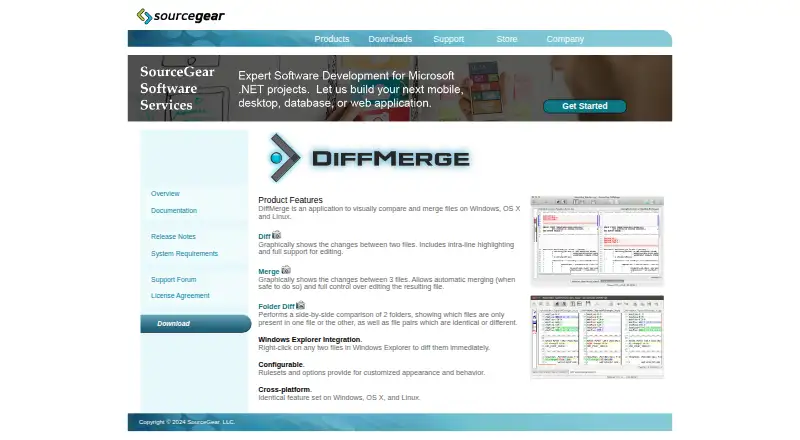
What SourceGear DiffMerge is
SourceGear DiffMerge is a desktop tool for visually comparing and merging files and folders. Its Diff view displays changes between two files, highlights differences within lines, and supports editing. For a three-file comparison, Merge can combine changes automatically when it determines that is safe. Folder Diff places two folders side by side and classifies files as identical, equivalent, different, or present in only one folder. Rulesets and options let users adjust its appearance and behavior, and Unicode support lets it import files in a wide range of character encodings. It also provides a command-line interface for comparing files and writing differences in unified or traditional formats. The manual documents integrations with Git, Mercurial, TortoiseSVN, Microsoft TFS, and Microsoft VSS 2005. DiffMerge is free for Linux, macOS, and Windows. Its download page lists version 4.2 builds, and SourceGear support said in February 2026 that it was no longer accepting registrations while transitioning the project to open source.
Who it suits
DiffMerge suits people who need visual file or folder comparisons, three-way merging, or command-line diff output on a desktop system. Its documented integrations may be useful to teams working with Git, Mercurial, TortoiseSVN, Microsoft TFS, or Microsoft VSS 2005.
What it does well
- Free to use on Linux, macOS, and Windows.
- Highlights within-line changes and supports editing.
- Three-way merge can combine changes when safe.
- Folder Diff identifies matching and differing files.
- Imports a wide range of character encodings.
What to know first
- Version 4.2 is the build listed for download.
- Registrations are no longer being accepted.
- Open-source transition is underway.
Plans
| Plan | Billed and limits | Price |
|---|---|---|
| DiffMerge | Licensed for use free of charge · registration key previously available for a small fee | Free |
As sourcegear.com lists them, read 30 Sept 2026. The maker's own page has the final word.
Getting started
- Visit the SourceGear DiffMerge website.
- Choose a listed version 4.2 download for Windows, macOS, Ubuntu or Fedora.
- Install the build for your platform, checking the listed system requirements where applicable.
- Open DiffMerge to compare files, compare folders or work with a three-file merge.
- Use the command-line interface or a documented integration if it fits your workflow.
Overview
SourceGear DiffMerge is a desktop app for comparing and merging files and folders. It is a strong fit for people who want visual diffs, three-file merges, and command-line output without paying; its changing registration status is a reason to be cautious about relying on registration-related updates or support.
DiffMerge is free to use on Linux, macOS, and Windows. The license agreement says it is licensed rather than sold and protected by copyright. SourceGear, founded in 1997 and headquartered in Champaign, Illinois, said in February 2026 that it had stopped accepting registrations while transitioning DiffMerge to an open-source project.
Key features
Visual comparison and editing
Diff displays two files graphically, highlights changes within lines, and supports editing. That makes it useful for inspecting and correcting a focused difference in one view, rather than just spotting that files diverge.
Three-file merges
Merge compares three files and can merge automatically when it judges the result safe. This is useful when reconciling parallel versions, while the safety condition avoids presenting every change as suitable for automatic resolution.
Folder comparison and workflow
Folder Diff shows two folders side by side and classifies contents as identical, equivalent, different, or present on only one side. This gives users a quick way to locate mismatches across directory trees, though the feature is comparison rather than a stated folder-synchronization tool.
Windows Explorer integration adds context-menu actions for selected files and folders. Rulesets and options let users adjust appearance and behavior. Unicode support and import for a wide range of character encodings broaden the kinds of files it can handle.
Command line and integrations
The command-line interface can compare files and write differences in unified or traditional formats, useful for scripted or terminal-based workflows. The manual documents integration with Git, Mercurial, TortoiseSVN, Microsoft TFS, and Microsoft VSS 2005.
Pricing
DiffMerge — free. The plan is licensed for use free of charge; a registration key was previously available for a small fee. There are no stated seat limits, quotas, or trial period. Registration keys do not expire, and registered users receive product updates and support, but SourceGear no longer accepts registrations. That leaves the core free offer attractive, while making new registration-based access to updates or support unavailable.
Platforms
DiffMerge supports Linux, macOS, and Windows desktop use. The download page lists version 4.2 builds for Windows, MacOS 10.6+, Ubuntu 12.04+, and Fedora 17+. Windows support requires XP SP3 or newer on 32-bit systems or Vista or newer on 64-bit systems, with 20 MB of disk space.
Who it's for
DiffMerge suits developers and other users who need visual file and folder comparisons, three-way merging, or command-line diff output across desktop platforms. It is less compelling for anyone whose decision depends on newly registering for product updates or support, or who needs a stated folder-sync function.
Pros and cons
- Pros: Visual two-file comparisons include intra-line highlighting and editing, so users can inspect and revise changes in one workflow.
- Pros: Three-way merging with automatic merging when safe, plus folder classification, covers more than basic pairwise file viewing.
- Pros: Free use across Linux, macOS, and Windows, with command-line output and documented version-control integrations.
- Cons: New registrations are no longer accepted, limiting access to the registration benefits of updates and support.
- Cons: Folder Diff compares and classifies contents, but no synchronization capability is stated.
Alternatives
Diff and Merge Tools is the broader list to consult when you want to compare more options.
- Diffchecker is worth considering if a web platform or a freemium plan matters; its Basic tier has monthly try-count limits on some features, while Pro + Desktop is $15 a month billed periodically.
- Diffract is another freemium option with Linux, macOS, and Windows support.
- delta is a free, MIT-licensed choice for Linux, macOS, and Windows users who prefer installable package-manager or executable distribution.
- Difftastic is a free, MIT-licensed alternative for those same desktop platforms.
- KDiff3 offers a free plan from the KDE community for readers seeking another free, open-source option.
- Meld is a free GPLv2-or-later alternative for Linux and Windows users.
- Code Compare may suit Windows users looking for an extension; it has a free tier and a paid Pro tier with custom pricing.
- Compare Suite is a Windows freemium option if basic file comparison is enough; its Light plan omits folder sync, archives, and Office formats.
Verdict
Choose DiffMerge if you want a no-cost desktop tool with visual file and folder comparison, three-way merges, and command-line diffs across Linux, macOS, or Windows. Look elsewhere if registration-dependent support or updates are central to your choice, or if folder synchronization is a requirement.
Verdict
DiffMerge covers file and folder comparisons, three-way merges, and command-line output without a listed charge. Note the listed version and the change in registration status before relying on registration-related updates or support.
Questions
Is SourceGear DiffMerge free?
Yes. Its DiffMerge plan is licensed for use free of charge.
Which platforms have listed downloads?
The download page lists version 4.2 builds for Windows, MacOS 10.6+, Ubuntu 12.04+ and Fedora 17+. The supported platforms are Linux, macOS and Windows.
Can DiffMerge merge three versions of a file?
Yes. Its Merge feature compares three files and supports automatic merging when safe.
Which integrations are documented?
The manual documents integration with Git, Mercurial, TortoiseSVN, Microsoft TFS and Microsoft VSS 2005.
Can DiffMerge be used from the command line?
Yes. Its command-line interface can compare files and write differences in unified or traditional formats.
Is DiffMerge open source?
SourceGear support stated in February 2026 that it was transitioning DiffMerge to an open-source project. The license agreement says the software is licensed rather than sold.
Facts from SourceGear DiffMerge's own pages
- Character encodings
- DiffMerge is Unicode-based and can import files in a wide range of character encodings. · kb.sourcegear.com, 30 Sept 2026
- Command line
- The command-line interface can compare files and write differences in unified or traditional formats. · sourcegear.com, 30 Sept 2026
- Current registration status
- SourceGear support stated in February 2026 that it was no longer accepting DiffMerge registrations and was transitioning DiffMerge to an open-source project. · support.sourcegear.com, 30 Sept 2026
- Customization
- Rulesets and options customize DiffMerge appearance and behavior. · sourcegear.com, 30 Sept 2026
- Downloads
- The official download page lists DiffMerge 4.2 builds for Windows, MacOS 10.6+, Ubuntu 12.04+ and Fedora 17+. · sourcegear.com, 30 Sept 2026
- File diff
- Its Diff feature graphically shows changes between two files, with intra-line highlighting and editing support. · sourcegear.com, 30 Sept 2026
- Folder comparison
- Folder Diff compares two folders side by side and identifies files that are identical, equivalent, different, or present in only one folder. · sourcegear.com, 30 Sept 2026
- Founded
- 1997 · sourcegear.com, 28 Sept 2026
- Headquarters
- Champaign, Illinois, USA · sourcegear.com, 28 Sept 2026
- Integrations
- The manual documents integration with Git, Mercurial, TortoiseSVN, Microsoft TFS, and Microsoft VSS 2005. · sourcegear.com, 30 Sept 2026
- License
- The license agreement states that DiffMerge is protected by copyright and is licensed rather than sold. · sourcegear.com, 30 Sept 2026
- Purpose
- DiffMerge visually compares and merges files and folders. · sourcegear.com, 30 Sept 2026
- Registration
- The registration page says the software is free to use, registration keys do not expire, and registered users receive product updates and support. · sourcegear.com, 30 Sept 2026
- Three-way merge
- Its Merge feature graphically compares three files and supports automatic merging when safe. · sourcegear.com, 30 Sept 2026
- Windows integration
- Windows Explorer integration adds context-menu actions for diffing selected files or folders. · sourcegear.com, 30 Sept 2026
- Windows requirements
- Windows support requires XP SP3 or newer for 32-bit systems and Vista or newer for 64-bit systems, with 20 MB available disk space. · sourcegear.com, 30 Sept 2026
Where SourceGear DiffMerge stands on Freedom251
- Diff and Merge Tools#15 of 29