Freedom251 › Diff and Merge Tools
delta
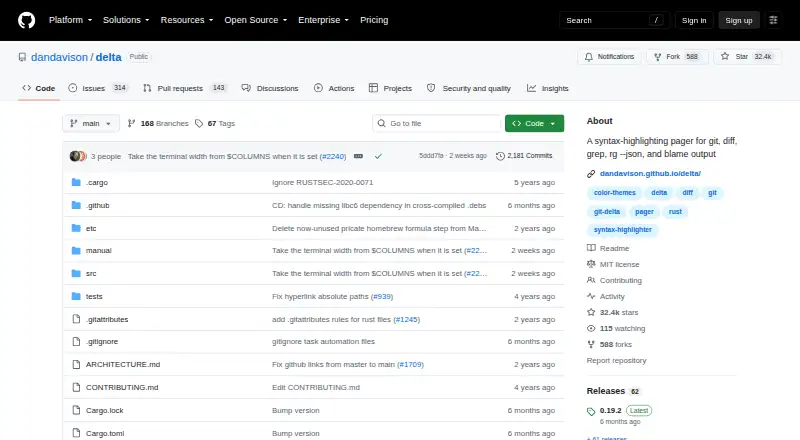
What delta is
delta is a free, open-source pager for Git and related command-line output, including diffs, grep, ripgrep JSON, and blame. It can present diffs side by side with line numbers and automatic wrapping, and highlight edits within a line using a Levenshtein edit inference algorithm. Its syntax themes are those available with bat. The project documents configuring delta as Git's pager and interactive diff filter, including zdiff3 for merge conflicts. It can syntax-highlight output from ripgrep, git grep, and grep. Hyperlinks in blame and diff output can target GitHub, GitLab, SourceHut, and Codeberg. The manual covers use with Magit, VS Code, tmux, and GNU Screen. Installation options include executables for Linux glibc, Linux musl, macOS, and Windows, along with package-manager instructions. Delta relies on less for paging, and the project recommends a reasonably recent version. Its repository includes the MIT License. The listed plan is free.
Who it suits
delta suits command-line users who want syntax-highlighted Git diffs and related search or blame output. Its documentation also covers integrations with editors and terminal tools.
What it does well
- Free and open source under the MIT License.
- Shows side-by-side diffs with line numbers.
- Highlights edits within lines.
- Supports Git, grep, and ripgrep output.
- Executables are available for Linux, macOS, and Windows.
What to know first
- Requires less for paging.
- A reasonably recent version of less is recommended.
Plans
| Plan | Billed and limits | Price |
|---|---|---|
| git-delta | MIT-licensed software; install via package manager or download an executable | Free |
As github.com lists them, read 4 Oct 2026. The maker's own page has the final word.
Getting started
- Install delta using a package manager or download an executable for Linux, macOS, or Windows.
- Install a reasonably recent version of less for paging.
- Configure delta as Git's pager or interactive diff filter.
- Use zdiff3 for merge-conflict workflows if needed.
- Consult the manual for Magit, VS Code, tmux, or GNU Screen integration.
Delta is a command-line pager for Git diffs and related search and blame output, best suited to developers who review code in a terminal. It combines syntax-aware presentation with documented Git, editor, and terminal integrations, while depending on a reasonably recent version of less for paging.
Overview
Delta focuses on making differences and command output easier to inspect rather than replacing Git or serving as a general-purpose visual comparison suite. Its free, MIT-licensed distribution permits use, modification, redistribution, sublicensing, and sale subject to the license conditions. That makes it a practical choice for individual and team workflows, provided less is available in a sufficiently recent version.
Key features
Diffs and search output
Side-by-side diffs include line numbers and automatic wrapping, which helps when reviewing long lines or scanning changes across a file. Delta also uses Levenshtein edit inference to highlight changes within lines, making small edits easier to distinguish from unchanged context. Syntax themes available with bat give users a range of established highlighting choices.
Beyond diffs, Delta can syntax-highlight output from ripgrep, git grep, grep, ripgrep JSON, and blame. That range is useful for developers who want a consistent, readable presentation across code review and command-line searches without switching tools.
Git and editor integrations
The manual explains how to configure Delta as Git's pager and interactive diff filter, and how to use zdiff3 for merge conflicts. It also covers Magit and VS Code, as well as tmux and GNU Screen. These documented paths make Delta especially relevant to developers whose review habits already depend on Git and terminal or editor workflows.
Blame and diff hyperlinks support GitHub, GitLab, SourceHut, and Codeberg. Release 0.20.0 adds OSC1717 diff-line metadata support for TUIs such as lazygit, extending its usefulness in terminal-based interfaces.
Pricing
Delta is free, with no paid plan or free trial. The git-delta plan costs nothing and provides MIT-licensed software, installable through a package manager or by downloading an executable. There are no seat or usage quotas attached to the plan. Its main practical cost is setup: users need a reasonably recent less for paging.
Platforms
Delta supports Linux, macOS, and Windows. The project offers executables for Linux glibc, Linux musl, macOS, and Windows, alongside package-manager installation instructions. This range makes it viable across common developer environments, though it remains a command-line tool rather than a graphical comparison application.
Who it's for
Delta is a strong fit for developers who routinely inspect Git changes, grep results, or blame output in a terminal and want line-level highlighting and syntax-aware presentation. Its documented Git, Magit, VS Code, tmux, and GNU Screen integrations also suit workflows that move between command-line and editor tools.
It is a weaker fit for someone seeking a self-contained pager or a dedicated graphical diff interface. Delta relies on less, and its focus is command-line output rather than a standalone visual comparison workspace.
Pros and cons
- Pro: Side-by-side diffs, line numbers, wrapping, and within-line change highlighting make code differences easier to scan.
- Pro: Syntax highlighting across Git, grep, ripgrep JSON, and blame output supports more than one review task.
- Pro: Git, editor, hosting, and terminal integrations suit established developer workflows across multiple platforms.
- Con: Paging depends on a reasonably recent version of less, so Delta is not an independent drop-in pager.
- Con: Its command-line focus makes it a poor match for readers who want a general-purpose graphical diff tool.
Alternatives
Diff and Merge Tools is a useful place to compare tools across the broader category. Choose Diffchecker instead if a freemium option with Linux, macOS, web, and Windows support is a better fit; its free tier has limited access to Pro features and some monthly try-count limits, while Pro + Desktop costs $15 a month.
Diffract is another freemium option for Linux, macOS, and Windows. Consider Difftastic if you want a free, MIT-licensed alternative available on Linux, macOS, and Windows. KDiff3 is a free, open-source alternative for those platforms; SourceGear DiffMerge is also free and supports Linux, macOS, and Windows.
Code Compare is a Windows-focused option with an extension and a free version, while its Pro plan is paid. Compare Suite is a Windows freemium option. Meld is a free GPLv2-or-later alternative for Linux and Windows.
For other software categories, see SNES Emulators or Disk Space Analyzers.
Verdict
Choose Delta if you want a free, permissively licensed way to make Git diffs and related command-line output clearer, with integrations that fit established developer workflows. Look elsewhere if you need a graphical comparison suite or a pager that does not rely on less.
Verdict
delta offers a broad set of display options for diffs and other command-line output, with documented Git and editor integrations. It depends on less for paging.
Questions
How much does delta cost?
The listed git-delta plan costs nothing. Delta is open source under the MIT License.
Which operating systems can I use it on?
Executables are offered for Linux glibc, Linux musl, macOS, and Windows.
What output can delta format?
It provides syntax highlighting for Git diffs, grep, ripgrep JSON, and blame output. It can also highlight ripgrep, git grep, and grep results.
Does it support three-way merge workflows?
Yes. The project documentation describes using zdiff3 for merge conflicts.
Which code-hosting services are supported by its links?
Diff and blame hyperlinks can point to GitHub, GitLab, SourceHut, and Codeberg.
What does delta need to run?
Delta uses less for paging, and recommends a reasonably recent version.
Facts from delta's own pages
- Dependency
- Delta uses less for paging and says a reasonably recent version should be installed. · dandavison.github.io, 4 Oct 2026
- Diff views
- It supports side-by-side diffs with automatic line wrapping and line numbers. · github.com, 4 Oct 2026
- Editor integration
- The manual describes using delta with Magit and VS Code. · dandavison.github.io, 4 Oct 2026
- Git integration
- The project documents configuring delta as Git's pager and interactive diff filter, and using zdiff3 for merge conflicts. · github.com, 4 Oct 2026
- Hosting links
- Its blame and diff hyperlinks support GitHub, GitLab, SourceHut, and Codeberg. · github.com, 4 Oct 2026
- Installation
- The project offers executables for Linux glibc, Linux musl, macOS, and Windows, plus package-manager installation instructions. · dandavison.github.io, 4 Oct 2026
- License
- The repository includes the MIT License, which permits use, copying, modification, distribution, sublicensing, and sale subject to its stated conditions. · github.com, 4 Oct 2026
- Other integrations
- The manual also has guidance for tmux and GNU Screen. · dandavison.github.io, 4 Oct 2026
- Purpose
- Delta is a syntax-highlighting pager for Git, diff, grep, ripgrep JSON, and blame output. · github.com, 4 Oct 2026
- Release
- The 0.20.0 release adds OSC1717 diff-line metadata support for TUIs such as lazygit. · github.com, 4 Oct 2026
- Search output
- Delta can syntax-highlight output from ripgrep, git grep, and grep. · github.com, 4 Oct 2026
- Security
- GitHub reports that the project has not set up a SECURITY.md file and has no published security advisories. · github.com, 4 Oct 2026
- Syntax themes
- Delta supports the syntax-highlighting themes available with bat. · github.com, 4 Oct 2026
- Word highlighting
- It highlights changes within lines using a Levenshtein edit inference algorithm. · github.com, 4 Oct 2026
Where delta stands on Freedom251
- Diff and Merge Tools#5 of 29
- SNES Emulators#8 of 30
- Disk Space Analyzers#68 of 105