Freedom251 › Diff and Merge Tools
Difftastic
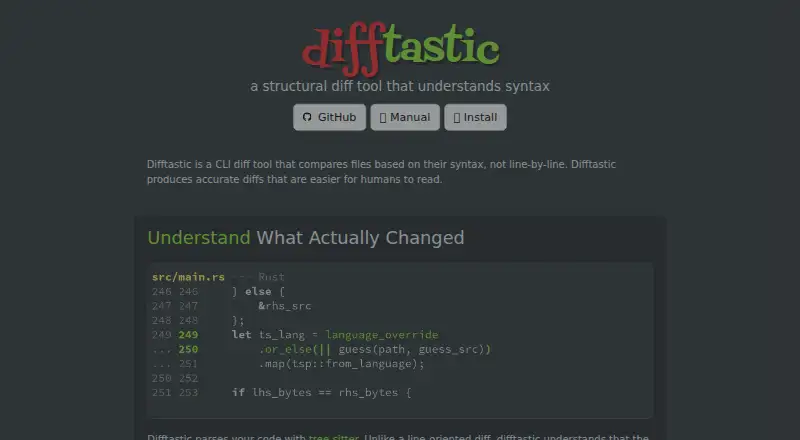
What Difftastic is
Difftastic is a free, open-source command-line tool that compares files by their syntax rather than only by lines. It identifies a file’s language, parses it, and compares syntax trees with tree-sitter. The manual lists support for more than 30 programming languages, and the site names HCL, HTML, JSON, and YAML among supported formats. It can recognize expressions that stay the same across whitespace or line-wrapping changes and display the original line numbers. Unsupported formats and extremely large inputs instead receive a conventional line-based comparison with word highlighting. Difftastic supports folder comparison and syntax highlighting, but its merge scope is two-way. It can be set up as Git’s external diff command; the manual also gives instructions for Mercurial, Fossil, and Jujutsu. Prebuilt binaries are available for Linux, macOS, and Windows, with package-manager installation options also listed. Difftastic is MIT licensed. The manual warns that Git 2.43.1 and earlier can crash when an external diff is used after file permissions have changed.
Who it suits
Difftastic suits developers who want syntax-aware file comparisons from the command line, including use with Git or other version-control tools. It is available on Linux, macOS, and Windows.
What it does well
- Compares syntax trees using tree-sitter.
- Supports more than 30 programming languages.
- Can identify unchanged expressions across formatting changes.
- Free and MIT licensed.
What to know first
- Unsupported formats fall back to line-based comparison.
- Merge scope is two-way.
- Git 2.43.1 and earlier can crash in a stated case.
Plans
| Plan | Billed and limits | Price |
|---|---|---|
| Difftastic | MIT licensed open source software | Free |
As difftastic.wilfred.me.uk lists them, read 5 Oct 2026. The maker's own page has the final word.
Getting started
- Visit https://difftastic.wilfred.me.uk/ and consult the manual.
- Download a prebuilt binary for Windows, macOS, or Linux, or use a listed package manager option.
- Configure Difftastic as Git’s external diff command, or follow the manual’s instructions for Mercurial, Fossil, or Jujutsu.
- Compare files or folders from the command line.
Difftastic is a free, open-source command-line tool for comparing files by syntax rather than line alone. It is best suited to developers reviewing code whose formatting or layout has shifted. Its structural view can clarify those changes, but it is a two-way diff tool, not a merge solution.
Overview
Difftastic detects a file’s language, parses it, then compares the resulting syntax trees with tree-sitter. It supports more than 30 programming languages, including HCL, HTML, JSON, and YAML. When expressions remain the same despite whitespace or line-wrapping changes, it can show them as unchanged and report the files’ actual line numbers. This makes it a useful choice when ordinary line-by-line diffs obscure what really changed.
For unsupported formats or extremely large inputs, it falls back to a conventional line-oriented comparison with word highlighting. That fallback extends its reach, but it also means the central syntax-aware benefit is not guaranteed for every file or input size.
Key features
Code-structure comparisons
Syntax highlighting complements the structural comparison by distinguishing parts of the diff. The combination is most relevant to code review, especially when formatting changes would otherwise make unchanged expressions appear to have moved or changed. Folder comparison is supported, but Difftastic does not offer three-way merge; teams looking for a tool to resolve competing edits should choose a different kind of product.
Version-control integration
Difftastic can be configured as Git’s external diff command and used with Git subcommands. Its manual also provides configuration instructions for Mercurial, Fossil, and Jujutsu, giving users of those systems a path to integrate it into their workflows. One Git caveat matters: the manual warns that Git 2.43.1 and earlier can crash when an external diff is used after file permissions have changed.
Pricing
Difftastic is free: its plan costs nothing and the software is open source under the MIT license. There is no paid tier or free-trial distinction to weigh. The free plan is a strong fit for individual developers and teams that want a syntax-aware CLI diff without a software charge; it gives up three-way merging, so it is not a substitute for merge tooling.
Platforms
Difftastic runs on Linux, macOS, and Windows as a command-line tool. Prebuilt binaries are published for all three, and the manual also describes package-manager installation options. That makes it accessible across common desktop operating systems, though its CLI format is intended for users comfortable working from a command line.
Who it's for
Choose Difftastic if you regularly review code and want formatting or line-wrap changes separated from substantive edits, or if you need a free tool that can be configured with Git and several other version-control systems. It is less suitable if your main need is three-way merge, or if your workflow frequently compares unsupported formats or inputs large enough to trigger its line-oriented fallback. The maker’s site and manual do not state security certifications or compliance claims, which may matter to organizations with formal requirements.
Pros and cons
- Pro: Syntax-tree comparisons can preserve the visibility of unchanged expressions across whitespace and wrapping changes, reducing noise in code review.
- Pro: It supports over 30 programming languages, folder comparison, and configuration with Git, Mercurial, Fossil, and Jujutsu.
- Pro: It is MIT-licensed, costs nothing, and has prebuilt binaries for Linux, macOS, and Windows.
- Con: Unsupported formats and extremely large inputs fall back to line-oriented diffs, where the structural advantage is lost.
- Con: It is a two-way comparison tool without three-way merge.
- Con: Git 2.43.1 and earlier can crash with external diff after file permissions change.
Alternatives
Browse diff and merge tools if you want to compare a broader set of options. Diffchecker is worth considering if you want a freemium tool with a web platform as well as desktop support, and a Pro + Desktop plan at $15 a month. For another free command-line option, delta offers an MIT-licensed tool for Linux, macOS, and Windows. Diffract is another freemium option for Linux, macOS, and Windows. KDiff3 is a free, open-source alternative from the KDE community. SourceGear DiffMerge is free to use across Linux, macOS, and Windows. Code Compare may suit Windows users looking for an extension, with a free version and paid Pro features. Compare Suite is a Windows freemium option. icdiff is a free open-source command-line diff tool for Linux and macOS.
Verdict
Choose Difftastic if your priority is a free, cross-platform CLI diff that can make code changes easier to read despite formatting shifts. Its syntax-aware comparisons and version-control integration are compelling for that job. Look elsewhere if you need three-way merge, or if the Git permission-change limitation affects your environment.
Verdict
Difftastic offers syntax-aware comparisons across many languages and can be connected to several version-control systems. Its fallback behavior and the stated Git limitation are worth considering for your workflow.
Questions
Is Difftastic free?
Yes. It is free, open source software under the MIT license.
Which operating systems does it support?
Prebuilt binaries are published for Windows, macOS, and Linux.
Which languages and file formats does it support?
The manual says it supports more than 30 programming languages. The site names HCL, HTML, JSON, and YAML, and points to the manual for more.
Can I use Difftastic with Git?
Yes. It can be configured as Git’s external diff command and used with Git subcommands.
Does it support other version control systems?
The manual links configuration instructions for Mercurial, Fossil, and Jujutsu.
Does Difftastic support three-way merging?
No. Its listed merge scope is two-way.
Facts from Difftastic's own pages
- Fallback behavior
- For unsupported formats or extremely large inputs, it uses a conventional line-oriented diff with word highlighting. · difftastic.wilfred.me.uk, 5 Oct 2026
- File formats
- The site lists HCL, HTML, JSON, and YAML among supported file formats, and points to the manual for more. · difftastic.wilfred.me.uk, 5 Oct 2026
- Git integration
- Difftastic can be configured as Git’s external diff command and used with Git subcommands. · difftastic.wilfred.me.uk, 5 Oct 2026
- How it works
- It detects a file’s language, parses the code, and compares syntax trees using tree-sitter. · difftastic.wilfred.me.uk, 5 Oct 2026
- Install options
- Prebuilt binaries are published for Windows, macOS, and Linux; the manual also lists package manager installation options. · difftastic.wilfred.me.uk, 5 Oct 2026
- License
- Difftastic is open source software under the MIT license. · difftastic.wilfred.me.uk, 5 Oct 2026
- Notable Git limitation
- The manual warns that Git 2.43.1 and earlier can crash when using an external diff if file permissions have changed. · difftastic.wilfred.me.uk, 5 Oct 2026
- Other version control
- The usage manual links instructions for configuring Difftastic with Mercurial, Fossil, and Jujutsu. · difftastic.wilfred.me.uk, 5 Oct 2026
- Purpose
- Difftastic is a CLI diff tool that compares files based on syntax rather than line by line. · difftastic.wilfred.me.uk, 5 Oct 2026
- Readable changes
- It can recognize unchanged expressions across whitespace or line wrapping changes and shows actual line numbers from the files. · difftastic.wilfred.me.uk, 5 Oct 2026
- Security and compliance
- The maker’s site and manual pages reviewed here do not state security certifications or compliance claims. · difftastic.wilfred.me.uk, 5 Oct 2026
- Support
- The manual identifies GitHub as the place where the project is available and its changelog records features and bug fixes by version. · difftastic.wilfred.me.uk, 5 Oct 2026
- Supported languages
- The manual says Difftastic supports over 30 programming languages. · difftastic.wilfred.me.uk, 5 Oct 2026
Where Difftastic stands on Freedom251
- Diff and Merge Tools#7 of 29