Freedom251 › Diff and Merge Tools
icdiff
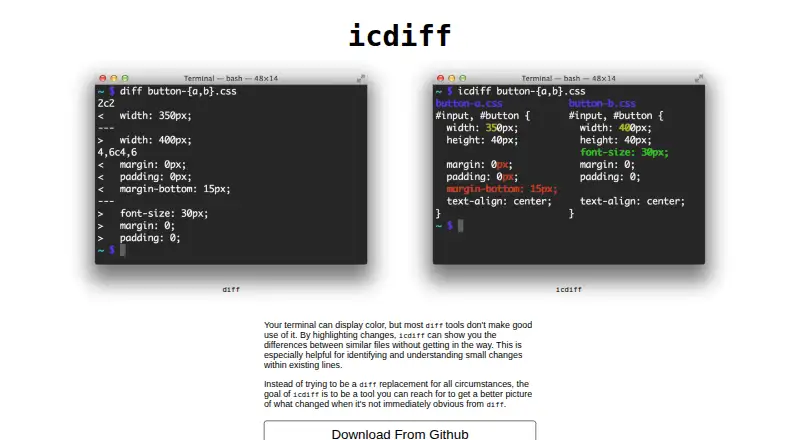
What icdiff is
icdiff is a free, open-source command-line tool for comparing two files in a side-by-side terminal view. It highlights changes between similar files, particularly small edits within existing lines, and is intended to make differences easier to see rather than replace diff in every situation. Users can apply foreground or background colors and customize the color map. Display options include line numbers, labels, whole-file output, whitespace highlighting, line truncation, and recursive directory comparison. The tool works with Git, Subversion, and Mercurial, and supports two-way comparisons rather than three-way merges. It runs on Linux and macOS as a command-line program that can be placed on the user's PATH. The maker lists pip, apt, and Homebrew installation; the README also lists AUR and Nix. Input and output default to UTF-8, with command-line options to set encoding. Screen-width autodetection is Unix-only, and the exclude-lines option cannot be used together with line numbers.
Who it suits
icdiff suits command-line users on Linux or macOS who want to inspect two files or compare directories. It may be useful for people working with Git, Subversion, or Mercurial.
What it does well
- Highlights small changes within existing lines.
- Offers customizable foreground and background colors.
- Supports recursive directory comparison.
- Works with Git, Subversion, and Mercurial.
- Available at no cost as open-source software.
What to know first
- Does not support three-way merges.
- Screen-width autodetection is Unix-only.
- Exclude-lines cannot be combined with line numbers.
Limits
icdiff compares two files at a time and does not provide three-way merging. Screen-width autodetection is Unix-only, and exclude-lines is incompatible with line numbers.
Plans
| Plan | Billed and limits | Price |
|---|---|---|
| icdiff | Open-source command-line diff tool | Free |
As jefftk.com lists them, read 9 Oct 2026. The maker's own page has the final word.
Getting started
- Open the maker's icdiff product page.
- Install it using pip, apt, Homebrew, AUR, or Nix.
- Place the installed command on your PATH.
- Run icdiff with the left and right file paths.
Verdict
icdiff adds a configurable, side-by-side view to two-way file comparison in the terminal. Its listed limits matter for users who need three-way merges or the affected display options.
Questions
How much does icdiff cost?
icdiff is free. The listed plan is free.
Which platforms does it support?
The listed platforms are Linux and macOS. It runs as a command-line program.
Can it compare folders?
Yes. It supports recursive directory comparison.
Does it integrate with version control?
The README describes using it with Git, Subversion, and Mercurial.
Can it perform three-way merges?
No. Its merge scope is two-way.
What installation methods are available?
The product page lists pip, apt, and Homebrew. The README also lists AUR and Nix.
Facts from icdiff's own pages
- Color options
- It can highlight changes with foreground or background colors, and users can customize the color map. · github.com, 9 Oct 2026
- Display options
- Options include line numbers, labels, whole-file output, whitespace highlighting, line truncation, and recursive directory comparison. · github.com, 9 Oct 2026
- Encoding
- Input and output encoding default to UTF-8 and can be specified with command-line options. · github.com, 9 Oct 2026
- File comparison
- The command accepts left and right files and shows their differences in a two-column view. · github.com, 9 Oct 2026
- Install methods
- The maker lists pip, apt, and Homebrew installation on the product page; the README also lists AUR and Nix. · github.com, 9 Oct 2026
- License
- The README says the maker releases their changes under the same license as Python's difflib.HtmlDiff and that the license is GPL compatible. · github.com, 9 Oct 2026
- Limit
- Screen-width autodetection is Unix-only, and the exclude-lines option is incompatible with line numbers. · github.com, 9 Oct 2026
- Maker location
- Jeff Kaufman's About page says he lives in the Boston area. · jefftk.com, 9 Oct 2026
- Positioning
- The maker describes icdiff as a tool for seeing changes that are not immediately obvious from diff, rather than a replacement for diff in all circumstances. · jefftk.com, 9 Oct 2026
- Purpose
- icdiff highlights changes between similar files in a side-by-side terminal view, especially small changes within existing lines. · jefftk.com, 9 Oct 2026
- Support
- The product page links to the maker's contact page. · jefftk.com, 9 Oct 2026
- Terminal use
- icdiff is installed as a command-line program and can be placed on the user's PATH. · github.com, 9 Oct 2026
- Version control
- The README describes using icdiff with Git, Subversion, and Mercurial. · github.com, 9 Oct 2026
Where icdiff stands on Freedom251
- Diff and Merge Tools#11 of 29