Freedom251 › File Comparison Software
Diffinity
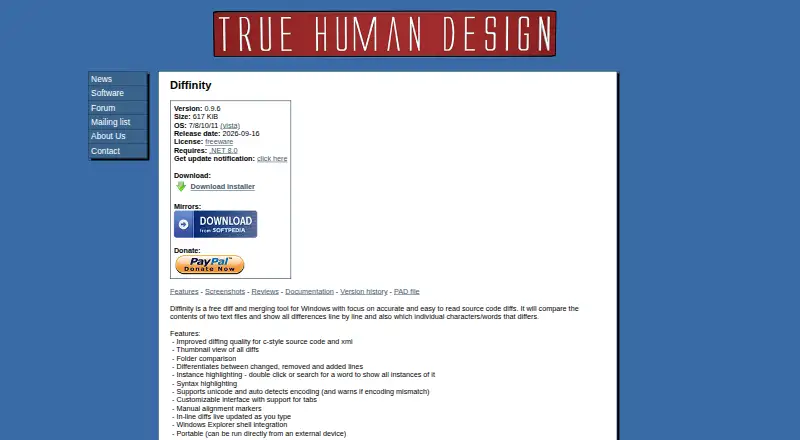
What Diffinity is
Diffinity is a Windows utility for comparing and merging text files, with folder comparison for reviewing differences across directories. Its two-way comparison distinguishes added, removed, and changed lines and highlights differing characters or words. A thumbnail view summarizes where differences occur, and users can search for a word to highlight its instances. For source code, the maker describes improved comparison for C-style code and XML. Editing and review options include syntax highlighting, customizable tabs, manual alignment markers, and inline diffs that refresh while typing. Diffinity supports Unicode, detects text encoding automatically, and warns when compared files use different encodings. It integrates with Windows Explorer, can run from an external device, and accepts file or folder paths plus command-line options. Documentation explains configuration as a diff tool for Git and Perforce Helix P4V. It is free for personal and commercial use; the license permits redistribution of unmodified copies but prohibits modification and reverse engineering. The listed release is version 0.9.6, dated 2026-09-16, and it requires .NET 8.0.
Who it suits
Diffinity suits Windows users reviewing text files, folders, and source code, including people configuring a diff tool for Git or Perforce Helix P4V. It supports two-way comparisons rather than three-way merge.
What it does well
- Compares both files and folders.
- Highlights line, character, and word differences.
- Includes syntax highlighting and inline diffs.
- Automatically detects encoding and warns of mismatches.
- Free for personal and commercial use.
What to know first
- Does not provide three-way merge.
- Requires .NET 8.0.
- License prohibits modification and reverse engineering.
Limits
Diffinity compares two inputs at a time and does not provide three-way merge. It requires .NET 8.0 and runs on Windows 7, 8, 10, or 11.
Plans
| Plan | Billed and limits | Price |
|---|---|---|
| Diffinity | Free for personal and commercial use · Windows 7/8/10/11 · Requires .NET 8.0 | Free |
As truehumandesign.se lists them, read 7 Oct 2026. The maker's own page has the final word.
Getting started
- Visit the Diffinity website and obtain the Windows utility.
- Use Windows 7, 8, 10, or 11 with .NET 8.0 installed.
- Open files or folders in Diffinity, or pass their paths through command-line options.
- Optionally configure Diffinity as a diff tool for Git or Perforce Helix P4V.
Verdict
Diffinity provides detailed two-way file and folder comparisons with source-code-oriented review tools. Check the .NET requirement and license restrictions before using it in your workflow.
Questions
Is Diffinity free?
Yes. The Diffinity plan costs nothing and permits personal and commercial use.
Which platforms does it support?
Diffinity is a Windows desktop application. The listed supported systems are Windows 7, 8, 10, and 11.
Can it compare folders?
Yes. Diffinity compares folders as well as files.
Does it support Git?
Yes. Its documentation explains how to configure it as a diff tool for Git and Perforce Helix P4V.
Does it provide three-way merge?
No. Diffinity supports two-way comparisons and does not provide three-way merge.
What does its license allow?
The license permits free personal and commercial use and redistribution of unmodified copies. It prohibits modification and reverse engineering.
Facts from Diffinity's own pages
- Command line
- Diffinity accepts file or folder paths and command-line options, including one to open the folder diff view. · truehumandesign.se, 7 Oct 2026
- Editing features
- The app supports syntax highlighting, customizable tabs, manual alignment markers, and inline diffs that update while typing. · truehumandesign.se, 7 Oct 2026
- Folder comparison
- Diffinity can compare folders as well as files. · truehumandesign.se, 7 Oct 2026
- Intended audience
- The maker describes True Human Design's programs as utilities made for functions the authors need, aiming to keep them powerful, simple, and small. · truehumandesign.se, 7 Oct 2026
- License
- The license permits free personal and commercial use and redistribution of unmodified copies, and prohibits modification and reverse engineering. · truehumandesign.se, 7 Oct 2026
- Purpose
- Diffinity compares and merges text files, showing differences line by line and highlighting differing characters or words. · truehumandesign.se, 7 Oct 2026
- Requirements and release
- The listed release is version 0.9.6, dated 2026-09-16, and requires .NET 8.0. · truehumandesign.se, 7 Oct 2026
- Review features
- It includes a thumbnail view of differences, distinguishes changed, removed, and added lines, and highlights instances of a selected or searched word. · truehumandesign.se, 7 Oct 2026
- Source code diffs
- The maker says Diffinity focuses on accurate, readable source code diffs and has improved diffing for C-style source code and XML. · truehumandesign.se, 7 Oct 2026
- Text encoding
- Diffinity supports Unicode, detects text encoding automatically, and warns when the compared files have an encoding mismatch. · truehumandesign.se, 7 Oct 2026
- Version control
- The documentation explains how to configure Diffinity with Git and Perforce Helix P4V as a diff tool. · truehumandesign.se, 7 Oct 2026
- Warranty
- The license provides the software as is and disclaims express and implied warranties. · truehumandesign.se, 7 Oct 2026
- Windows integration
- It integrates with Windows Explorer and can run directly from an external device. · truehumandesign.se, 7 Oct 2026
Where Diffinity stands on Freedom251
- File Comparison Software#7 of 33
- Diff and Merge Tools#9 of 29