Freedom251 › File Comparison Software
Meld
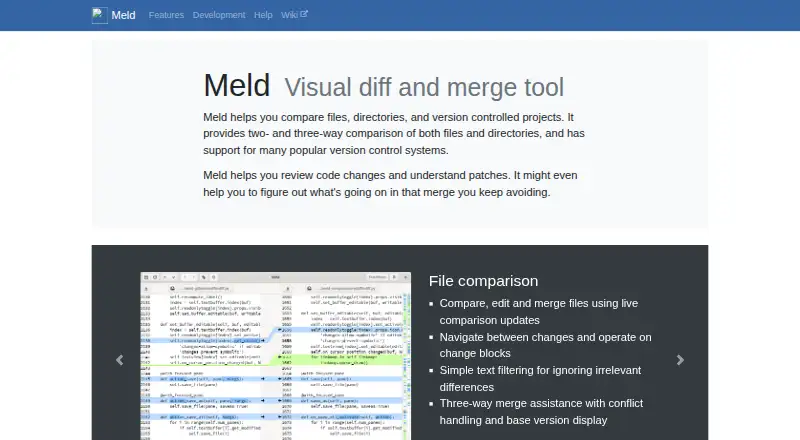
What Meld is
Meld is a free visual diff and merge tool for comparing files, directories, and version-controlled projects on Linux and Windows. It shows changes as files are edited, supports navigation between differences, and assists with three-way merges, including conflict handling and display of the base version. Folder comparisons identify missing or modified files, and users can exclude selected files or folders. Meld supports Git, Mercurial, Bazaar, and Subversion, including integration with tools such as git mergetool. Users can define regular-expression filters to ignore matching text, but filtering support is incomplete and filters cannot change line counts. Linux packages are available from most Linux and Unix distributions and on Flathub. Windows users can download an installer, though Windows builds do not support automatic updates or portable installs. macOS is not yet supported, although the project lists semi-official builds and installation options through Homebrew, MacPorts, or Fink. The project lists its license as GPLv2 or later, except as noted.
Who it suits
Meld suits people reviewing code changes, comparing folders, or resolving merge conflicts. It is available for Linux and Windows, with macOS not yet supported.
What it does well
- Compares files, folders, and version-controlled projects
- Provides three-way merge and conflict assistance
- Supports Git, Mercurial, Bazaar, and Subversion
- Free under GPLv2 or later, except as noted
What to know first
- Text filtering support is incomplete
- Filters cannot change line counts
- Windows lacks automatic updates and portable installs
- macOS is not yet supported
Plans
| Plan | Billed and limits | Price |
|---|---|---|
| Meld | GPLv2 or later | Free |
As gnome.pages.gitlab.gnome.org lists them, read 30 Sept 2026. The maker's own page has the final word.
Getting started
- Visit the Meld website.
- On Linux, install Meld through your distribution or Flathub.
- On Windows, download the installer.
- Compare files, folders, or version-controlled projects.
Meld is a free visual comparison and merge tool for files, folders, and version-controlled projects. It suits developers reviewing code changes or resolving conflicts on Linux and Windows. Three-way merge assistance is its strongest advantage; the lack of macOS support and binary comparison narrows its appeal.
Overview
Meld combines file diffs, folder checks, and version-control support in one application. Live updates and navigation between changes help keep file reviews moving, while folder comparisons surface missing or modified files. It is a focused choice for understanding patches and reconciling source changes, not for comparing binary files.
Key features
File, folder, and merge comparisons
Meld can compare, edit, and merge files, with live updates and tools for moving through changes. Its three-way merge assistance shows the base version and includes conflict-handling tools, which gives developers useful context when edits diverge. Folder comparisons identify missing and modified files, and let users ignore selected files or folders.
Text filters and version control
Regular-expression filters can hide matching text during file comparisons, helping focus attention on substantive edits when recurring lines get in the way. The filtering support is incomplete, however, and cannot change the number of lines, so it is a limited aid rather than a flexible way to reshape a diff.
Meld supports Git, Mercurial, Bazaar, and Subversion, including integration with tools such as git mergetool. That breadth makes it relevant to projects using those systems, particularly when merge work is part of code review. Binary comparison is not supported, so it is not the right choice for teams that need to inspect non-text file differences.
Pricing
Meld is free: its Meld plan costs nothing and is licensed under GPLv2 or later, except as noted. There is no paid tier or trial to weigh against feature limits. This is a strong fit for individuals and teams who need file, folder, and version-control comparisons without a license cost; the trade-off is the product’s platform coverage and its limits around text filtering and binary files.
Platforms
Meld supports Linux and Windows. It is packaged for most Linux and Unix distributions and is available on Flathub. Windows users can download an installer, but automatic updates and portable installs are not supported, so Windows users must manage installation and updates themselves.
Meld is not yet supported on macOS. Semi-official builds and installation options through Homebrew, MacPorts, or Fink exist, but users who need a supported macOS option should choose another tool.
Who it's for
Meld is best suited to developers who review code changes, understand patches, or resolve conflicts in Git, Mercurial, Bazaar, or Subversion projects. Its three-way merge view and folder comparison make it useful when changes span files or versions. It is a poor fit for macOS users seeking supported platform coverage, or anyone whose work depends on binary comparison or more flexible text filtering.
Pros and cons
- Pros: Three-way merging shows the base version and includes conflict-handling tools, giving developers more context when resolving competing edits.
- Pros: File and folder comparisons, plus support for four version-control systems, bring common source-change review tasks into one tool.
- Pros: The free GPLv2-or-later plan has no paid tier, making Meld accessible without a license charge.
- Cons: No macOS support limits it for users who need a supported option on Apple computers.
- Cons: Binary comparison is unavailable, and text filters are incomplete and cannot alter line counts.
- Cons: Windows installations do not update automatically and cannot be installed portably.
Alternatives
For a different comparison tool, Diffchecker has a free plan with limited access to Pro features and some features capped by monthly try counts, plus a paid Pro + Desktop plan at $15 a month. Buddi is a free GPLv2 budgeting application, rather than a file-comparison tool. Diffract is another freemium option with a free plan and trial. KDiff3 is a free, open-source alternative. WinMerge is a free GPLv2 file and folder comparison and merge tool for Windows, making it a closer fit for Windows-only needs. Code Compare offers a free version and a paid Pro edition with custom pricing. cwdiff is a free Linux alternative. Diffinity is free for personal and commercial use on Windows 7, 8, 10, and 11 and requires .NET 8.0.
Readers comparing more products can browse File Comparison Software and Diff and Merge Tools.
Verdict
Choose Meld if you work on Linux or Windows and want free file, folder, and version-control comparisons with capable three-way merge assistance. Its support for several version-control systems makes it especially useful for code review and conflict resolution. Look elsewhere if you need supported macOS use, binary comparison, or more flexible text filtering.
Verdict
Meld brings file, directory, and version-control comparisons together with merge assistance. Its platform limits and incomplete text filtering are worth considering before choosing it.
Questions
How much does Meld cost?
Meld is free. Its listed plan is free.
Which platforms does Meld support?
Meld is available for Linux and Windows. The project says macOS is not yet supported.
Is Meld open source?
The project lists its license as GPLv2 or later, except as noted.
Which version-control systems does Meld support?
It supports Git, Mercurial, Bazaar, and Subversion, including integration with tools such as git mergetool.
Does Meld help resolve merge conflicts?
Yes. Its three-way merge assistance includes conflict handling and displays the base version.
Facts from Meld's own pages
- Current release
- The official site lists Meld 3.24.0 as the stable release, dated 20 June 2026. · gnome.pages.gitlab.gnome.org, 30 Sept 2026
- Distribution
- Meld is packaged for most Linux and Unix distributions and is available on Flathub. · gnome.pages.gitlab.gnome.org, 30 Sept 2026
- File comparison
- It compares, edits, and merges files with live updates, change navigation, text filters, and three-way merge assistance. · gnome.pages.gitlab.gnome.org, 30 Sept 2026
- Folder comparison
- It identifies missing or modified files across folders and can ignore selected files or folders. · gnome.pages.gitlab.gnome.org, 30 Sept 2026
- Intended users
- The project describes Meld as useful for reviewing code changes and understanding patches. · gnome.pages.gitlab.gnome.org, 30 Sept 2026
- Latest stable release
- The page lists Meld 3.24.0 as stable, dated 20 June 2026. · gnome.pages.gitlab.gnome.org, 30 Sept 2026
- License
- The project lists its license as GPLv2 or later, except as noted. · gnome.pages.gitlab.gnome.org, 30 Sept 2026
- Linux availability
- Meld is packaged for most Linux and Unix distributions and is available on Flathub. · gnome.pages.gitlab.gnome.org, 30 Sept 2026
- macOS
- The site says macOS is not yet supported, though semi official builds and installation options through Homebrew, MacPorts, or Fink are available. · gnome.pages.gitlab.gnome.org, 30 Sept 2026
- macOS status
- Meld is not yet supported on macOS, though semi-official builds and installation options through Homebrew, MacPorts, or Fink are listed. · gnome.pages.gitlab.gnome.org, 30 Sept 2026
- Maintainers
- The site lists Kai Willadsen, Stephen Kennedy, and Vincent Legoll as primary authors. · gnome.pages.gitlab.gnome.org, 30 Sept 2026
- Merge assistance
- Three way merge assistance includes conflict handling and display of the base version. · gnome.pages.gitlab.gnome.org, 30 Sept 2026
- Purpose
- Meld is a visual diff and merge tool for comparing files, directories, and version-controlled projects. · gnome.pages.gitlab.gnome.org, 30 Sept 2026
- Support
- The project asks users to open an issue for problems and offers a discussion board for questions. · gnome.pages.gitlab.gnome.org, 30 Sept 2026
- Text filters
- Users can define regular-expression filters to ignore matching text when comparing files; the documentation says filtering support is incomplete and filters cannot change the number of lines. · gnome.pages.gitlab.gnome.org, 30 Sept 2026
- Version control
- It supports Git, Mercurial, Bazaar, and Subversion, including integration with tools such as git mergetool. · gnome.pages.gitlab.gnome.org, 30 Sept 2026
- Windows
- Windows users can download an installer, but automatic updates and portable installs are not supported. · gnome.pages.gitlab.gnome.org, 30 Sept 2026
- Windows availability
- Windows users can download an installer; Meld does not support automatic updates or portable installs. · gnome.pages.gitlab.gnome.org, 30 Sept 2026
Where Meld stands on Freedom251
- File Comparison Software#9 of 33
- Diff and Merge Tools#14 of 29