Freedom251 › Standard Operating Procedure Software
SOP Maker
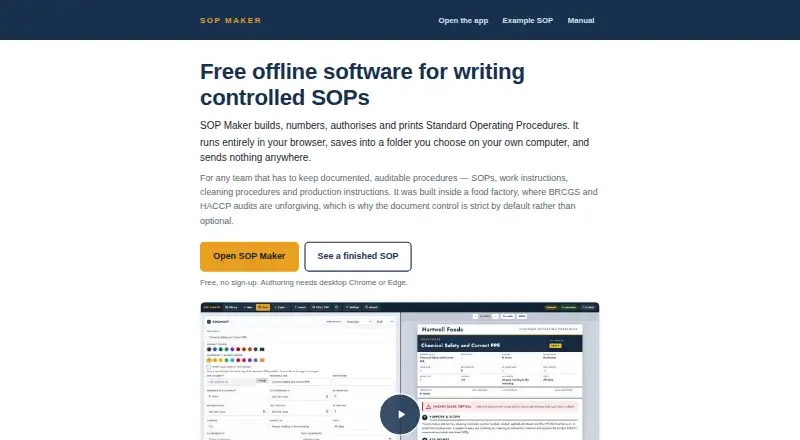
What SOP Maker is
SOP Maker is a web tool for creating and maintaining controlled Standard Operating Procedures (SOPs). Each document can record its preparer and authoriser, revision number, dates, and Draft, Review, or Approved status. It numbers procedures and prints finished documents as A4 PDFs, with page footers and steps kept together across page breaks. A library of 158 icons covers PPE, cleaning tools, controls, and chemical classes. The free plan has no sign-up or usage limit and permits commercial work. SOP data stays in the browser and, when connected, can also be saved to a folder on a computer or shared drive. The maker says user content is not sent to a server or used for AI calls or external network requests. Authoring and saving require desktop Chrome or Edge; other listed browsers and mobile devices can open and print issued SOPs. The hosted version works offline after loading, and a downloadable toolkit can be used offline after setup. It does not provide approval routing, electronic signatures, training records, read-and-sign tracking, or real-time co-editing.
Who it suits
It suits teams that need documented procedures, including food sites preparing for BRCGS and HACCP audits. Authoring is for desktop Chrome or Edge users.
What it does well
- Free plan has no sign-up or usage limit.
- Records preparer, authoriser, revisions, dates, and status.
- Prints A4 PDFs with page footers.
- Can work offline after loading or setup.
- SOP content is not sent to a server.
What to know first
- Authoring requires desktop Chrome or Edge.
- No approval routing or electronic signatures.
- No training records or read-and-sign tracking.
- Simultaneous shared-drive saves can overwrite earlier writes.
Limits
The free plan has no usage limit and is free for commercial work. Authoring and saving require desktop Google Chrome or Microsoft Edge; simultaneous saves from separate computers can collide, with the later write winning.
Plans
| Plan | Billed and limits | Price |
|---|---|---|
| Free | No paid tier · No sign-up · No usage limit · Free for commercial work | Free |
As sopmaker.uk lists them, read 7 Oct 2026. The maker's own page has the final word.
Getting started
- Visit https://sopmaker.uk/.
- Open it in desktop Google Chrome or Microsoft Edge to create and save SOPs.
- Create and number a procedure, then add its prepared-by, authorised-by, revision, date, and status details.
- Choose a folder on your computer or shared drive for connected storage, if desired.
- Print the finished SOP to A4 PDF, or use the downloadable toolkit offline after unzipping and opening it.
SOP Maker is a browser-based tool for creating controlled Standard Operating Procedures, aimed at teams that need documented procedures and printable records. It is most compelling when a simple, free authoring tool is enough and formal staff sign-offs are not required.
Overview
The focus is the SOP document itself: authors can record who prepared and authorised it, assign a revision number and dates, and mark it Draft, Review or Approved. That gives teams a useful basis for maintaining controlled procedures, including food sites documenting processes for BRCGS and HACCP audits. It does not, however, route approvals or capture electronic signatures, so status labels should not be mistaken for a managed approval process.
Completed procedures print to A4 PDF with per-page footers and steps kept together across page breaks. Those choices support legible paper copies. The 158 included icons cover PPE, cleaning tools, controls and chemical classes, adding visual cues to procedural instructions.
Key features
Local files and offline work
SOP data is stored in the browser and, when connected, can also be saved to a folder chosen on the computer or a shared drive. The maker says procedure content is not transmitted to or stored on a server and that the tool makes no AI calls or external network requests with that content. The downloadable toolkit runs offline after it is unzipped and opened; the hosted version continues to work offline once its page has loaded.
This model may suit teams that want to keep working files close to their own devices, but it brings a collaboration risk: simultaneous saves from separate computers to a shared drive can collide, with the later write winning. There is no real-time co-editing to prevent that. The maker also makes no third-party security certification, penetration-test or compliance claim, so local storage should not be treated as independent security assurance.
Authoring and workflow limits
Creating or saving SOPs requires desktop Google Chrome or Microsoft Edge. Firefox, Safari, phones and tablets can open and print issued documents, but cannot author or save them. Teams standardised on other browsers or mobile-first workflows will find that restriction decisive. SOP Maker also lacks training records, read-and-sign tracking and completion tracking; a team needing evidence that staff have read or completed training on a procedure will need another process or product.
Pricing
Free: free. The plan has no paid tier, no sign-up and no usage limit, and permits commercial work. There is no free trial because the product is free to use. With structured editing, version history and multichannel published formats, it covers document creation without a seat cap or usage quota. The trade-off is not a cheaper paid tier but the absence of workflow functions such as approval routing, read acknowledgements and completion tracking.
For a small team that can manage approvals and distribution outside the software, that is a strong cost fit. Organisations that need built-in accountability for review, sign-off or training should budget for a broader workflow tool instead.
Platforms
SOP Maker is a web product, with authoring limited to desktop Chrome and Edge. Other listed browsers and mobile devices can view and print issued SOPs but cannot create or save them. Offline use is possible through the downloaded toolkit or after the hosted page has loaded.
Who it's for
SOP Maker is best suited to teams that need a free way to create, revise and print controlled procedures, particularly where documented processes support food-safety audits. It is a poor fit for organisations that require approval routing, electronic signatures, staff acknowledgements, training records or reliable simultaneous editing.
Pros and cons
- Pros: Unlimited free commercial use with no sign-up removes cost and account barriers for teams creating procedures.
- Pros: Revision, date, preparer, authoriser and status fields make printed SOPs more maintainable than unstructured documents.
- Pros: Local browser storage and offline operation support work without sending procedure content to a server, according to the maker.
- Cons: No approval routing, signatures or staff read-and-sign tracking means teams must handle accountability elsewhere.
- Cons: Desktop Chrome or Edge is required to author and save, excluding mobile and other-browser authoring.
- Cons: Concurrent shared-drive saves can overwrite one another, making it unsuitable for teams that need live collaboration.
Alternatives
Tango is a better fit when teams want browser-captured workflows and link or embed sharing; its free plan allows five shared workflows and up to 10 users per workspace, while Pro Team (3+ users, annual billing) is 15.00.
Taqtile Manifest is worth considering for teams seeking AI-assisted workflow creation and export to their domain, with Manifest Maker free to get started.
Scribe suits teams that want documentation generated for use with any web app and shareable by link or embed; its Basic plan is free, while Pro Team is $1,713 a month.
Whale offers a free plan for up to 10 members, one creator and 20 Playbook items, making it an option for teams comparing a capped free knowledge base; its Scale plan is $249 a month, billed yearly.
L2L Manufacturing Intelligence, Parsable, Dozuki and Poka are other options to compare for operational documentation and related workflows.
For broader comparisons, see Standard Operating Procedure Software and SOP Software.
Verdict
Choose SOP Maker if your team needs controlled, printable SOPs at no cost and can manage approvals, training evidence and shared editing separately. Its document fields, PDF output and offline capability are practical strengths; its narrow workflow and desktop-browser authoring requirements are the reasons to look elsewhere.
Verdict
SOP Maker covers controlled SOP creation and printable output without a paid plan. Teams needing sign-offs, training tracking, or collaborative editing will need to account for its workflow limits.
Questions
Is SOP Maker free?
Yes. Its Free plan is listed as free, with no paid tier, no sign-up, and no usage limit.
Which browsers and devices can create SOPs?
Authoring requires desktop Google Chrome or Microsoft Edge. Firefox, Safari, phones, and tablets can open and print issued SOPs but cannot create or save them.
Can SOP Maker work offline?
Yes. The hosted version keeps working offline after the page loads. The downloadable toolkit can run offline after it is unzipped and opened.
Where is SOP content stored?
Data is stored locally in the browser and, when connected, in a folder chosen on the user's computer or shared drive. The maker says content is not sent to or stored on a server.
Does it support approval workflows or electronic signatures?
No. It does not provide approval routing or electronic signatures.
Does SOP Maker have a third-party security certification?
The maker says there is no third-party security certification, penetration test, or compliance claim.
Facts from SOP Maker's own pages
- Browser requirements
- Authoring requires desktop Google Chrome or Microsoft Edge; Firefox, Safari, phones and tablets can open and print issued SOPs but cannot create or save them. · sopmaker.uk, 7 Oct 2026
- Document controls
- Each SOP can include prepared-by and authorised-by details, a revision number, dates and Draft, Review or Approved status. · sopmaker.uk, 7 Oct 2026
- File storage
- SOP data is stored locally in the browser and, when connected, in a folder chosen on the user's computer or shared drive. · sopmaker.uk, 7 Oct 2026
- Headquarters
- Fife, Scotland · sopmaker.uk, 28 Sept 2026
- Icons
- The software includes 158 icons for PPE, cleaning tools, controls and chemical classes. · sopmaker.uk, 7 Oct 2026
- Intended users
- It is described for teams that need documented, auditable procedures, including food sites working with BRCGS and HACCP audits. · sopmaker.uk, 7 Oct 2026
- Network and privacy
- The maker says SOP content is not transmitted to or stored on a server, and the tool makes no AI calls or external network requests with user content. · sopmaker.uk, 7 Oct 2026
- Offline use
- The downloadable toolkit can be run offline after it is unzipped and opened, and the hosted version continues working offline after the page loads. · sopmaker.uk, 7 Oct 2026
- PDF output
- Finished SOPs print to A4 PDF with per-page footers and steps kept together across page breaks. · sopmaker.uk, 7 Oct 2026
- Purpose
- SOP Maker builds, numbers, authorises and prints controlled Standard Operating Procedures. · sopmaker.uk, 7 Oct 2026
- Security assurance
- The maker says there is no third-party security certification, penetration test or compliance claim. · sopmaker.uk, 7 Oct 2026
- Shared-drive limit
- The maker says simultaneous saves from separate computers can collide, with the later write winning. · sopmaker.uk, 7 Oct 2026
- Support
- The maker invites users to email [email protected] with ideas or requests to adapt the tool. · sopmaker.uk, 7 Oct 2026
- Workflow limits
- The software does not provide approval-routing, electronic signatures, training records, read-and-sign tracking or real-time co-editing. · sopmaker.uk, 7 Oct 2026
Where SOP Maker stands on Freedom251
- Standard Operating Procedure Software#5 of 22
- SOP Software#9 of 30