Freedom251 › SQL Linters and Formatters
Sleek
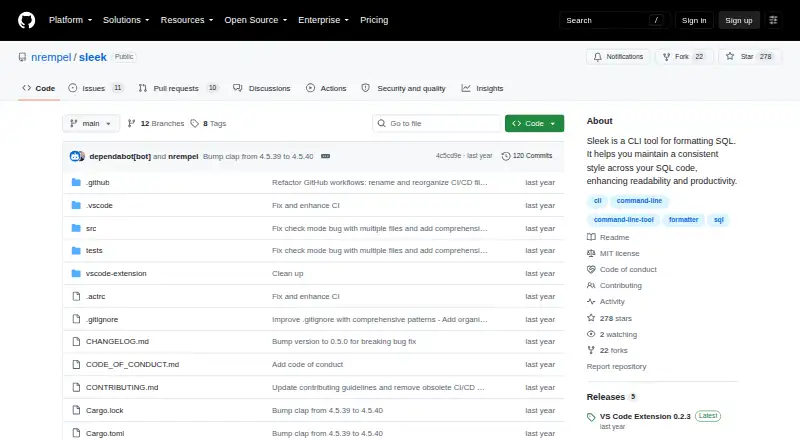
What Sleek is
Sleek is a command-line SQL formatter for making SQL files consistent and readable. It lets you configure indentation, keyword casing and blank lines between queries, and accepts file paths or glob patterns to format multiple files. With no paths provided, it reads from standard input. Use the --check flag to check formatting without changing files. Sleek supports PostgreSQL, MySQL, MariaDB, SQLite, SQL Server and Oracle. Its VS Code extension can format a document or selection, check formatting, and optionally format on save or paste; it can download the CLI if it is not found. The CLI is available as compiled binaries or through Cargo, which requires Rust. Choose a binary matching your operating system and architecture. Sleek is free under the MIT License, with a listed price of $0. The v0.4.0 release notes say building that release requires Rust 1.85 or later.
Who it suits
Sleek suits developers who want configurable SQL formatting in a command line or VS Code workflow. It can also fit projects that need to check multiple files or support the listed SQL dialects.
What it does well
- Configurable indentation, keyword casing and blank lines
- Glob patterns format multiple files
- Check mode leaves files unchanged
- VS Code extension supports format-on-save or paste
- Supports six listed SQL dialects
What to know first
- Cargo installation requires Rust
- Building v0.4.0 requires Rust 1.85 or later
Plans
| Plan | Billed and limits | Price |
|---|---|---|
| Sleek | Open-source SQL formatter · MIT License | Free |
As github.com lists them, read 3 Oct 2026. The maker's own page has the final word.
Getting started
- Open the Sleek GitHub repository.
- Choose a compiled release binary for your operating system and architecture, or install through Cargo with Rust.
- Install the VS Code extension if you want editor formatting and checks.
- Provide SQL file paths or glob patterns to the CLI, or send SQL through standard input.
- Use `--check` to check formatting without modifying files.
Sleek is a focused SQL formatter for developers who want repeatable query layout in a terminal or VS Code. It is best suited to individuals and teams standardizing everyday SQL across common database dialects. Its free, open-source distribution keeps adoption simple, while the lack of custom rules makes it a poor fit for teams that need lint policies beyond formatting.
Overview
Sleek formats SQL for readability and consistent presentation across PostgreSQL, MySQL, MariaDB, SQLite, SQL Server, and Oracle. Automatic fixes handle routine cleanup, but the tool does not provide custom rules, so it cannot encode organization-specific checks or act as a broader SQL quality gate. The MIT License is useful for projects that prefer permissive open-source software.
Key features
Configurable formatting
You can configure indentation, keyword casing, and blank lines between queries. Those controls cover the most visible aspects of query style and are enough for teams seeking a shared baseline without maintaining a large rule set. They do not provide the fine-grained policy controls expected from a linter with custom rules.
Batch and validation workflows
Glob patterns let one invocation format multiple files, which is practical for repositories with many SQL scripts. The --check flag reports whether files already match the formatter without modifying them, making it suitable for validation steps where a check should fail or pass without rewriting source. Sleek also accepts file paths as arguments and reads standard input when no paths are supplied, so it works with both direct file processing and piped SQL.
VS Code integration
The VS Code extension formats complete documents and selected text, checks formatting, and can format on save or paste. It can download the Sleek command-line tool automatically when it cannot find one, reducing manual setup for VS Code users. Developers who work outside VS Code will rely on the CLI instead.
Installation and implementation
Compiled binaries are provided through GitHub Releases, with users choosing a build that matches their operating system and architecture. Cargo installation is another route but requires Rust. Building the v0.4.0 release requires Rust 1.85 or later. The repository identifies the sqlformat crate as the component performing formatting.
Pricing
Sleek has one plan: Sleek costs free and includes an open-source SQL formatter under the MIT License. There is no paid tier, seat charge, usage quota, or free-trial period to manage. That makes it suitable for individual developers and teams that can adopt a shared command-line or editor workflow without a software budget. The trade-off is scope rather than price: the free plan does not add custom rules or other policy-oriented capabilities.
Platforms
Sleek is offered as a command-line application for Linux, macOS, and Windows, with operating-system- and architecture-matched release binaries. A VS Code extension provides the editor workflow on supported VS Code installations. Cargo is available for users who prefer to build or install through Rust tooling.
Who it's for
Sleek fits developers maintaining SQL in repositories, migration files, scripts, or editor buffers who want consistent indentation and casing across the six supported dialects. It is particularly useful when formatting must cover many files or when a pipeline needs a non-modifying check. VS Code users gain document, selection, save, and paste actions with automatic CLI acquisition.
Look elsewhere if your team needs custom SQL rules, dialect coverage beyond those six, or a dedicated linting system that evaluates more than presentation. Cargo-based installation also adds a Rust requirement for users who cannot use the supplied binaries.
Pros and cons
Pros
- Broad common-dialect coverage: PostgreSQL, MySQL, MariaDB, SQLite, SQL Server, and Oracle are supported.
- Useful repository workflows: glob patterns handle multiple files, while --check verifies formatting without changing them.
- Flexible input: file arguments and standard-input support suit both scripts and pipelines.
- Practical VS Code extension: document and selection formatting, checks, and optional save or paste formatting are included.
- No license cost: the 0.00 USD plan and MIT License remove subscription and redistribution hurdles.
Cons
- No custom rules: teams cannot encode organization-specific formatting policies.
- Formatter scope only: automatic fixes address style, not broader SQL linting or quality analysis.
- Rust build dependency: Cargo installation requires Rust, and v0.4.0 requires Rust 1.85 or later.
- Editor coverage is concentrated: the documented editor integration is for VS Code rather than a wider set of IDEs.
Alternatives
SQL Formatter is a better choice when a browser demo or web access matters alongside extension, Linux, macOS, and Windows support; it is also free and MIT licensed.
Choose SQLCheck instead for a free command-line option on Linux, macOS, and Windows when its SQL-checking focus is preferable.
Sqruff suits users seeking a free tool with extension, web, self-hosted, and desktop platform options.
Pick JSQLFormatter when Linux, macOS, Windows, or self-hosted deployment is the deciding requirement.
Poor SQL is an alternative for online or offline formatting with an SSMS/Visual Studio plugin and command-line access.
Choose SQLFluff when a free, MIT-licensed open-source SQL linter is more appropriate than a formatter alone.
sqlfmt is preferable when a browser-based WebAssembly formatter with no installation is the priority.
Pick TSQLLint for free MIT-licensed software installable through dotnet-tool, Homebrew, or NPM.
For a wider directory of formatter and linting choices, see SQL Linters and Formatters.
Verdict
Choose Sleek if you need a no-cost, MIT-licensed formatter for common SQL dialects with both CLI batch processing and a capable VS Code workflow. Its check mode and configurable presentation make routine repository formatting dependable. Look elsewhere when custom rules or full SQL linting are essential, because Sleek deliberately stays focused on formatting.
Verdict
Sleek covers common SQL formatting tasks, with both command-line and VS Code workflows. Its free MIT-licensed offering supports six listed dialects and includes a non-modifying check mode.
Questions
How much does Sleek cost?
The Sleek plan is free.
Which SQL dialects does it support?
PostgreSQL, MySQL, MariaDB, SQLite, SQL Server, and Oracle.
Which platforms are listed?
The listed platforms are extension, Linux, macOS, and Windows.
Is Sleek open source?
The project is available under the MIT License.
Can I use it in VS Code?
Yes. The extension formats documents and selections, checks formatting, and can optionally format on save or paste.
What is required to build v0.4.0?
The v0.4.0 release notes state that Rust 1.85 or later is required to build that release.
Facts from Sleek's own pages
- Check mode
- The --check flag checks whether SQL files are formatted without modifying them. · github.com, 3 Oct 2026
- Editor integration
- The VS Code extension formats documents and selections, checks formatting, and can optionally format on save or paste. · marketplace.visualstudio.com, 3 Oct 2026
- Extension setup
- The VS Code extension can download the Sleek CLI automatically when it is not found. · marketplace.visualstudio.com, 3 Oct 2026
- Formatting options
- It supports configurable indentation, keyword casing, and blank lines between queries. · github.com, 3 Oct 2026
- Free plan
- Yes · github.com, 20 Sept 2026
- Implementation
- The repository says the formatting work is handled by the sqlformat crate. · github.com, 3 Oct 2026
- Input methods
- Sleek reads file paths as arguments and reads from standard input when no paths are provided. · github.com, 3 Oct 2026
- Installation
- The CLI is available as compiled binaries from GitHub Releases or through Cargo, which requires Rust. · github.com, 3 Oct 2026
- License
- The project is available under the MIT License. · github.com, 3 Oct 2026
- Maker
- The repository owner profile identifies nrempel as Nick Rempel and lists Victoria, BC, Canada. · github.com, 3 Oct 2026
- Multiple files
- Sleek accepts glob patterns to format multiple files. · github.com, 3 Oct 2026
- Purpose
- Sleek is a command-line tool for formatting SQL to maintain consistent style and readability. · github.com, 3 Oct 2026
- Security
- The repository page shows a Security and quality section but states no security certification or compliance claim. · github.com, 3 Oct 2026
- Supported systems
- The project directs users to choose a release binary matching their operating system and architecture. · github.com, 3 Oct 2026
- Upgrade requirement
- The v0.4.0 release notes state that Rust 1.85 or later is required to build that release. · github.com, 3 Oct 2026
Where Sleek stands on Freedom251
- SQL Linters and Formatters#5 of 26
- To-do list apps#91 of 150