Freedom251 › SQL Linters and Formatters
Poor SQL
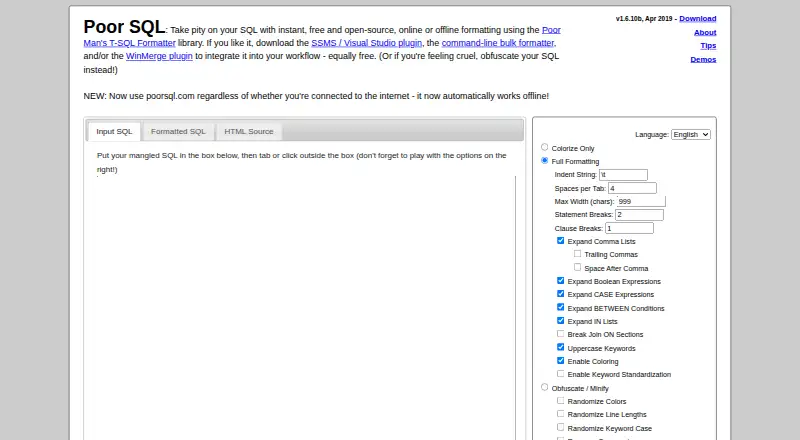
What Poor SQL is
Poor SQL is a free tool for reformatting and colorizing T-SQL according to chosen settings. Formatting runs in the browser, and the site says SQL submitted for formatting is not sent to an external service; it can also work offline. Controls include indentation, tab spacing, maximum width, statement and clause breaks, comma-list expansion, boolean and CASE expansion, and breaks within JOIN ON sections. An obfuscation and minification option can randomize colors, line lengths and keyword case, or substitute keywords. Results are available in input SQL, formatted SQL and HTML source views. Downloads include plugins for SQL Server Management Studio, Visual Studio and WinMerge, plus a command-line bulk formatter. The open-source Poor Man's T-SQL Formatter library is AGPL-licensed and works with Microsoft .NET and Mono; its JavaScript library supports browsers and contexts such as Node.js. The project describes its parsing as coarse rather than full, particularly for DDL. Settings are remembered with a cookie, so blocking cookies restores defaults each visit.
Who it suits
It suits T-SQL users who want browser-based formatting, configurable layout controls or downloadable plugins and command-line tools. Developers looking for full SQL parsing, especially for DDL, should note the stated parsing limitation.
What it does well
- Formats T-SQL online or offline.
- Formatting is processed in the browser.
- Offers controls for indentation and line breaks.
- Includes plugins and a command-line formatter.
- Open-source library is AGPL-licensed.
What to know first
- Parsing is coarse rather than full, especially for DDL.
- Blocking cookies resets settings to defaults each visit.
- Supported SQL dialect is T-SQL.
Plans
| Plan | Billed and limits | Price |
|---|---|---|
| Free | Free · online formatting · offline formatting · SSMS/Visual Studio plugin · command-line formatter · WinMerge plugin | Free |
As poorsql.com lists them, read 14 Oct 2026. The maker's own page has the final word.
Getting started
- Open https://poorsql.com/ in a browser.
- Set the formatting options you want; settings are remembered with a cookie.
- Format T-SQL and choose the input, formatted, or HTML source view.
- Download a plugin or the command-line bulk formatter if you want to use those tools.
Overview
Poor SQL is a free T-SQL formatter and colorizer for developers who want to adjust query layout in a browser, editor, or command-line workflow. It is best suited to people working specifically with T-SQL who value local processing and flexible formatting; its coarse parsing makes it a less dependable choice for complex SQL, particularly DDL.
Key features
Formatting controls cover indentation, spaces per tab, maximum width, statement and clause breaks, comma-list expansion, boolean and CASE expansion, and breaks within JOIN ON sections. That breadth gives users substantial control over readability without a paid tier. Automatic fixes are supported, but custom rules are not, so teams that need a tailored, enforceable house style may outgrow the built-in options.
The browser interface separates input SQL, formatted SQL, and HTML source views. Its obfuscate/minify option can randomize colors, line lengths, and keyword case, or substitute keywords. Formatting runs in the browser, the site says SQL is not sent to an external service, and the page works offline. Those are practical advantages for users who want formatting without sending queries elsewhere, though they do not make the formatter suitable for every parsing task.
Downloads include plugins for SQL Server Management Studio, Visual Studio, and WinMerge, as well as a command-line bulk formatter. The open-source Poor Man's T-SQL Formatter library is AGPL-licensed. It works with Microsoft .NET and Mono; its JavaScript library can run in browsers and contexts such as Node.js. The project also includes a web service, demo WinForms program, and add-ins, giving developers several ways to incorporate or use the formatter.
The central limitation is that Poor SQL performs coarse parsing rather than full SQL parsing, with DDL parsing especially coarse. That is a meaningful caution for workflows where structure matters: use it to format T-SQL with straightforward needs, not as a parser whose interpretation of complex statements you can rely on. Settings are stored in a cookie, so blocking cookies restores defaults on each visit. Support is available by email to Tao Klerks or through the GitHub issue tracker.
Pricing
Poor SQL's Free plan costs nothing. It includes online and offline formatting, the SSMS and Visual Studio plugins, the command-line bulk formatter, and the WinMerge plugin. There are no paid tiers or seat or usage limits described, making it a straightforward fit for individuals and teams willing to use the included T-SQL formatter as-is. The trade-off is not a lower-tier cap but the lack of custom rules and CI/CD integration.
Platforms
Poor SQL is available on the web, Linux, and Windows, with an API component. Its browser and JavaScript library can also run in other contexts such as Node.js, while the .NET library supports Mono. Editor extensions are available; there is no configuration file or CI/CD integration.
Who it's for
Poor SQL suits T-SQL developers who want a free formatter with detailed layout controls, offline browser use, or integrations with SSMS, Visual Studio, WinMerge, and command-line batch workflows. It is less suitable for multi-dialect teams, users who need custom formatting rules or CI/CD integration, and anyone relying on accurate parsing of complex DDL.
Pros and cons
- Pros: Free online and offline formatting, with SQL processed locally in the browser rather than sent to an external service.
- Pros: Numerous controls, plus plugins and a command-line bulk formatter, cover several common T-SQL workflows.
- Cons: Coarse parsing, especially for DDL, limits confidence with structurally complex SQL.
- Cons: T-SQL is the supported dialect; custom rules and CI/CD integration are absent.
- Cons: Cookie-dependent settings revert to defaults when cookies are blocked.
Alternatives
For another free formatter, SQL Formatter offers a browser demo and a formatting library under the MIT license, and supports extension, Linux, macOS, web, and Windows. Choose it if that broader platform range or MIT licensing better fits your needs. SQLCheck is a free open-source command-line tool for Linux, macOS, and Windows; it is the alternative to consider when a command-line tool is the priority.
Sqruff is another free option, with support for extensions, Linux, macOS, self-hosting, web, and Windows. JSQLFormatter is free and supports Linux, self-hosting, and Windows, making it an option for those platform needs. Sleek is a free formatter for extension, Linux, macOS, and Windows. SQLFluff is a free, MIT-licensed open-source SQL linter for API, Linux, self-hosted, and Windows use; pick it when linting is the aim rather than formatting alone. sqlfmt offers a free browser formatter that runs through WebAssembly without installation. TSQLLint is free, MIT-licensed software installable with dotnet-tool, Homebrew, or NPM, and suits readers seeking a linter instead of a formatter. Browse the SQL Linters and Formatters directory for more options.
Verdict
Choose Poor SQL if you work in T-SQL and want a no-cost formatter with extensive layout controls, local browser processing, and practical plugins or bulk formatting. Look elsewhere if your work depends on full parsing, especially for DDL, or requires custom rules, CI/CD integration, or dialects beyond T-SQL.
Verdict
Poor SQL offers a broad set of formatting controls and several ways to use the formatter, at no charge. Its coarse parsing and cookie-dependent settings may matter for some workflows.
Questions
How much does Poor SQL cost?
The Free plan costs nothing.
Can I use Poor SQL without an internet connection?
Yes. Formatting runs locally in the browser, so the site works offline.
Which SQL dialect does it support?
Poor SQL supports T-SQL.
Is Poor SQL open-source?
The Poor Man's T-SQL Formatter library is open-source and AGPL-licensed.
Which plugins and integrations are available?
Downloads include plugins for SQL Server Management Studio, Visual Studio, and WinMerge. A command-line bulk formatter is also available.
What limitation should I know about its parsing?
The project describes its parsing as coarse rather than full, with especially coarse parsing for DDL.
Facts from Poor SQL's own pages
- API component
- The project includes a web service alongside its demo WinForms program, add-ins, command-line utility, and plugins. · github.com, 1 Oct 2026
- Changelog event
- Version 1.6.10 in November 2017 added Atom and Visual Studio Code plugins and fixed several formatting and installer issues. · github.com, 14 Oct 2026
- Command line
- A command-line bulk formatter is available for download. · poorsql.com, 1 Oct 2026
- Command-line limitation
- The Node command-line tool does not currently produce syntax-highlighted HTML output. · github.com, 14 Oct 2026
- Command-line package
- The Node command-line formatter installs globally with npm and accepts stdin, files, configurable formatting options, and output files. · github.com, 14 Oct 2026
- Command-line performance
- The Node command-line implementation reports roughly half a second to format one query on the author’s laptop and describes itself as slower than the .NET formatter. · github.com, 14 Oct 2026
- Comment limitation
- The standard formatter can move comments from their original positions in some compound keywords. · github.com, 14 Oct 2026
- Community rating status
- Open Hub shows no user rating yet and invites the first rating. · openhub.net, 14 Oct 2026
- Cookie behavior
- Formatting preferences are remembered in a cookie; blocking cookies restores default settings on each visit. · poorsql.com, 14 Oct 2026
- Data handling
- The site says SQL submitted for formatting is not sent to any external service and is processed in the browser. · poorsql.com, 1 Oct 2026
- DDL limitation
- DDL parsing is described as very coarse and limited to the minimum needed for ordered declarations. · github.com, 14 Oct 2026
- Dialect support
- The project is focused on Microsoft T-SQL; support for other SQL dialects is possible but none is implemented as a dedicated dialect. · github.com, 14 Oct 2026
- Editor integrations
- Downloads and repositories provide integrations for SSMS, Visual Studio, Notepad++, WinMerge, Atom, and Visual Studio Code. · github.com, 14 Oct 2026
- External institutional mention
- A UCSF VA data-resources document lists Poor SQL as a SQL formatting tool among its SQL resources. · chime.ucsf.edu, 14 Oct 2026
- Formatting controls
- Controls include indentation, tab spacing, maximum width, statement and clause breaks, comma-list expansion, boolean and CASE expansion, and JOIN ON breaks. · poorsql.com, 14 Oct 2026
- Independent comparison
- A Korean SQL Server formatter comparison describes Poor SQL as an instant formatter with configurable options and says it targets SQL Server syntax. · windtrap.tistory.com, 14 Oct 2026
- Independent mention
- J.D. Hodges lists Poor SQL as a free online alternative for formatting SQL Server queries when SQL Server 2008 lacked a comparable built-in feature. · jdhodges.com, 14 Oct 2026
- Installation limitation
- The same comparison reports that using the SSMS 2012 add-in required manually copying an AddIn file into the user’s roaming Addins folder. · windtrap.tistory.com, 14 Oct 2026
- Integrations
- Downloads include plugins for SQL Server Management Studio, Visual Studio, and WinMerge. · poorsql.com, 1 Oct 2026
- Library
- The underlying Poor Man’s T-SQL Formatter is a free .NET and JavaScript library with a demo UI, web service, command-line utility, and editor plugins. · github.com, 14 Oct 2026
- Library contexts
- The library works with Microsoft .NET and Mono, and the JavaScript library works in browsers and other contexts such as Node.js. · github.com, 1 Oct 2026
- Licence
- The project is released under the GNU Affero General Public License version 3. · github.com, 14 Oct 2026
- Limit: detail
- The same Curated SQL review says the website is not as detailed as the reviewer wanted, despite being effective for quick formatting. · curatedsql.com, 14 Oct 2026
- Local processing
- The website says formatting happens entirely in the browser and SQL is not sent to an external service. · poorsql.com, 14 Oct 2026
Where Poor SQL stands on Freedom251
- SQL Linters and Formatters#1 of 26