Freedom251 › SQL Linters and Formatters
Sqruff
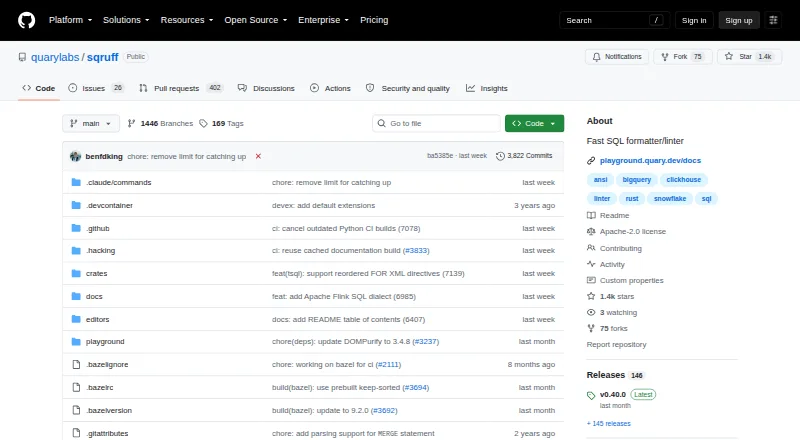
What Sqruff is
Sqruff is a SQL linter and formatter written in Rust. It checks SQL and provides configurable formatting and automatic fixes, with dialect and rule settings stored in a project `.sqruff` configuration file. Supported dialects include ANSI, Athena, BigQuery, ClickHouse, Databricks, DuckDB, MySQL, Oracle, Postgres, Snowflake, SQLite, and Trino, among others. The project also lists column-level data lineage analysis for SQL queries. Developers can use its VS Code or Zed integrations, or its LSP server with other editors that support LSP. A GitHub Action is documented for running Sqruff in CI, and a browser playground is available. Installation options include Homebrew, a bash installer, pip, cargo, binary releases, and an official Docker image. The public repository provides an Apache-2.0 license, and Sqruff is free. The overview marks support for dbt projects as experimental, which users should consider before relying on that workflow.
Who it suits
Sqruff suits developers who want configurable SQL linting and formatting across supported dialects. Its editor integrations, LSP server, CI action, and installation options support use in different development workflows.
What it does well
- Supports a broad range of SQL dialects.
- Provides automatic fixes and custom rules.
- Offers VS Code, Zed, and LSP integrations.
- Free and open source under Apache-2.0.
What to know first
- dbt project support is experimental.
- Available editors outside VS Code and Zed need LSP support for integration.
Limits
The plan is free. Support for dbt projects is experimental.
Plans
| Plan | Billed and limits | Price |
|---|---|---|
| Sqruff | Open-source SQL linter and formatter | Free |
As github.com lists them, read 29 Sept 2026. The maker's own page has the final word.
Getting started
- Open the browser playground to try Sqruff.
- Choose an installation route: Homebrew, bash installer, pip, cargo, binary release, or Docker image.
- Install the VS Code or Zed integration, or connect through the LSP server.
- Set the dialect and rules in the project `.sqruff` configuration file.
- Use the documented GitHub Action to install and run Sqruff in CI.
Sqruff is a free SQL linter and formatter for developers and teams working across different SQL dialects. Its configurable rules, automatic fixes and editor and CI integrations make it a strong fit for projects that want SQL checks in their existing workflow. For dbt projects, its support remains experimental.
Overview
Written in Rust, Sqruff combines linting with formatting for valid SQL, and also lists column-level data lineage analysis. It is open source under the Apache-2.0 license and maintained by Quary, an open-source analytics platform for engineers based in the United Kingdom.
Its breadth is a practical strength: Sqruff supports dialects ranging from ANSI and PostgreSQL to BigQuery, Snowflake, Databricks and Trino. That makes it a plausible choice for teams with varied SQL environments, though the right fit depends on whether its supported dialect and rules suit a given project.
Key features
Configurable linting and formatting
Sqruff can lint SQL, apply configurable formatting and automatically fix issues. Teams can tailor rules rather than accept a fixed style, with dialect and rule settings stored in a project-level .sqruff configuration file. That shared project configuration is useful for aligning local work and CI checks; it also means teams need to decide which settings reflect their conventions.
Dialect coverage
The supported dialects include ANSI, Athena, BigQuery, ClickHouse, Databricks, DB2, DuckDB, Exasol, Greenplum, Hive, MariaDB, Materialize, MySQL, Oracle, PostgreSQL, Redshift, Snowflake, SparkSQL, SQLite, StarRocks, Teradata, Trino, T-SQL and Vertica. This range can serve teams that need one formatter and linter across several SQL systems. Sqruff also lists column-level lineage analysis, though its purpose statement centers on linting and formatting.
Editor and CI workflows
Maintained integrations for VS Code and Zed cover two editor workflows, while an LSP server extends editor support to other LSP-capable tools. A documented GitHub Action lets teams install and run Sqruff in CI, bringing checks into an automated workflow. The project also offers a browser playground for trying it without making an initial local installation.
Installation and dbt
Installation options include Homebrew, a bash installer, pip, cargo, binary releases and an official Docker image. That choice suits varied development environments, including container-based setups. Sqruff labels dbt project support experimental, so teams that depend on dbt should not treat it as a settled part of their workflow.
Pricing
Sqruff is free: its Sqruff plan costs nothing and is described as an open-source SQL linter and formatter. The plan includes automatic fixes, custom rules, editor extensions, CI/CD integration and a configuration file. There is no paid tier or free trial to weigh against the free plan. With Apache-2.0 licensing, it is an option for teams wanting an open-source tool without a subscription cost.
Platforms
Sqruff supports extension, Linux, macOS, self-hosted, web and Windows platforms. Its installation choices span package managers, a Python package, Rust's cargo tool, binary releases and Docker; the browser playground offers a web-based way to try the project.
Who it's for
Sqruff suits SQL developers and teams who want customizable linting and formatting, automatic fixes, and checks that can run in editors and CI. Its broad dialect coverage is particularly relevant to teams working across more than one SQL environment. It is a less certain choice for dbt-dependent projects because dbt support is experimental.
Pros and cons
- Broad dialect support: the listed range covers many widely used SQL systems, making Sqruff relevant to varied database environments.
- Rules and fixes are configurable: teams can adapt linting and formatting to project conventions instead of relying only on defaults.
- Editor and CI options: VS Code and Zed integrations, LSP support and a GitHub Action can put checks into development and automation workflows.
- Free and open source: the Apache-2.0 project has a free plan that includes editor extensions and CI/CD integration.
- dbt support is experimental: teams that need dependable dbt project support should be cautious about making Sqruff their choice on that basis.
Alternatives
Poor SQL is another free option, with online and offline formatting and an SSMS/Visual Studio plugin; its formatter library is open source under AGPL. Consider it when those formatting modes or editor integrations better match your needs.
Sleek is a free, open-source SQL formatter for extension, Linux, macOS and Windows. Choose it if you want a formatter on those platforms rather than Sqruff's combination of linting, formatting and automatic fixes.
sqlfmt offers a free browser formatter that runs via WebAssembly without installation. It is the more direct fit when browser-based formatting without setup is the priority.
TSQLLint is free software available through dotnet-tool, Homebrew or NPM. Consider it when those installation routes fit your workflow.
pgFormatter is free software distributed under the PostgreSQL Licence. It may suit readers looking for a PostgreSQL-licensed alternative.
SQLint is a free MIT-licensed Python package described as a Standard SQL (BigQuery) parser and linter. It is worth considering if that narrower scope matches your needs.
Squawk is another free option, with support listed across mobile, desktop, web, API and self-hosted platforms.
Valk Guard is a free option for Windows, macOS and Linux.
Browse more options in SQL Linters and Formatters.
Verdict
Choose Sqruff if you want a free, open-source linter and formatter with configurable rules, automatic fixes, broad dialect support, and routes into editors and CI. Its clearest caveat is dbt: teams whose workflow depends on dbt should look elsewhere unless experimental support is acceptable.
Verdict
Sqruff brings linting, formatting, and automated fixes to a range of SQL dialects, with editor and CI options. Treat dbt support as experimental when assessing it for dbt projects.
Questions
How much does Sqruff cost?
Sqruff is free. Its listed plan is free.
Is Sqruff open source?
Yes. The public GitHub repository provides an Apache-2.0 license.
Which SQL dialects does Sqruff support?
Supported dialects include ANSI, Athena, BigQuery, ClickHouse, Databricks, DB2, DuckDB, Exasol, Greenplum, Hive, MariaDB, Materialize, MySQL, Oracle, Postgres, Redshift, Snowflake, SparkSQL, SQLite, StarRocks, Teradata, Trino, T-SQL, and Vertica.
Which editors can I use with Sqruff?
Sqruff maintains VS Code and Zed integrations, and provides an LSP server for other LSP-capable editors.
How can I install Sqruff?
Installation options include Homebrew, a bash installer, pip, cargo, binary releases, and an official Docker image.
Does Sqruff support dbt?
The project labels dbt project support as experimental.
Facts from Sqruff's own pages
- Browser playground
- The project provides a browser playground for trying Sqruff. · playground.quary.dev, 29 Sept 2026
- CI integration
- The installation guide documents a GitHub Action for installing and running Sqruff in CI. · playground.quary.dev, 29 Sept 2026
- Configuration
- Sqruff reads dialect and rule settings from a project `.sqruff` configuration file. · playground.quary.dev, 29 Sept 2026
- dbt support
- The overview labels dbt project support as experimental. · playground.quary.dev, 29 Sept 2026
- Editor integrations
- Sqruff maintains VS Code and Zed integrations and provides an LSP server for other LSP-capable editors. · playground.quary.dev, 29 Sept 2026
- Headquarters
- United Kingdom · github.com, 23 Sept 2026
- Installation
- The guide lists Homebrew, a bash installer, pip, cargo, binary releases, and an official Docker image as installation options. · playground.quary.dev, 29 Sept 2026
- Lineage
- The overview lists column-level data lineage analysis for SQL queries as a feature. · playground.quary.dev, 29 Sept 2026
- Linting and formatting
- It offers customizable SQL linting and configurable automated formatting. · playground.quary.dev, 29 Sept 2026
- Maker
- The GitHub organization describes Quary as an open-source analytics platform for engineers and lists the United Kingdom as its location. · github.com, 29 Sept 2026
- Open source license
- The GitHub repository identifies the project as public and provides an Apache-2.0 license. · github.com, 29 Sept 2026
- Purpose
- Sqruff is a SQL linter and formatter written in Rust, focused on formatting valid SQL for specific dialects and providing fast linting and fixing. · playground.quary.dev, 29 Sept 2026
- SQL dialects
- Supported dialects include ANSI, Athena, BigQuery, ClickHouse, Databricks, DuckDB, MySQL, Oracle, Postgres, Snowflake, SQLite, Trino, and others. · playground.quary.dev, 29 Sept 2026
Where Sqruff stands on Freedom251
- SQL Linters and Formatters#16 of 26