Freedom251 › SQL Linters and Formatters
Public Tools SQL Formatter
What Public Tools SQL Formatter is
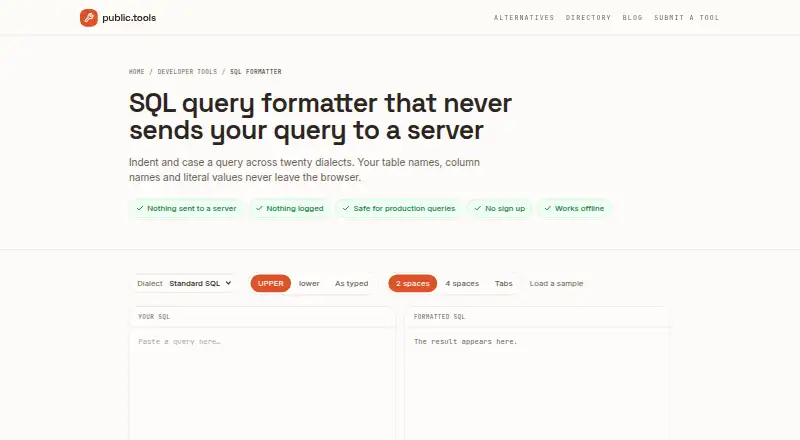
Public Tools SQL Formatter is a free web tool for adjusting SQL query whitespace and keyword casing. It supports 20 dialects, including Standard SQL, PostgreSQL, MySQL, MariaDB, SQLite, SQL Server, Oracle PL/SQL, BigQuery, Snowflake, Redshift, Spark, Hive, Trino, DuckDB, ClickHouse, Db2, N1QL, SingleStore, and TiDB. You can set keyword casing to uppercase, lowercase, or as typed, and choose two-space, four-space, or tab indentation. Semicolon-separated statements are formatted in sequence with a blank line between them. The formatter runs in your browser; the page says it makes no network requests after loading, so queries stay on your machine. After the page loads, you can disconnect and continue formatting offline. If a query has an unbalanced parenthesis or unclosed quote, the tool reports the line and column. It does not validate whether a query is correct, account for your schema, optimize queries, or lint them. Stored procedure bodies and vendor-specific scripting blocks are identified as weak spots. The tool requires no sign-up or email address, and its free plan has no query-length or daily limit. It is intended for people who want formatted SQL to copy into an editor or migration.
Who it suits
This formatter suits people working with SQL queries or migrations who want consistent whitespace and keyword casing before copying SQL into an editor. Its browser-based processing and offline use after loading may also suit people who want queries to remain on their machine.
What it does well
- Supports 20 SQL dialects, from Standard SQL to TiDB.
- Offers three casing choices and three indentation options.
- Formats semicolon-separated statements with blank lines between them.
- Works offline after loading and makes no network requests afterward.
- Free plan has no query-length or daily limit; no sign-up is needed.
What to know first
- It does not validate query correctness, optimize SQL, or lint queries.
- It does not understand the user's schema.
- Stored procedure bodies and vendor-specific scripting blocks are weak spots.
Plans
| Plan | Billed and limits | Price |
|---|---|---|
| Free | No sign up · no limit on query length · no daily limit | Free |
As public.tools lists them, read 8 Oct 2026. The maker's own page has the final word.
Getting started
- Open https://public.tools/sql-formatter in a web browser.
- Choose the SQL dialect for your query.
- Set keyword casing and indentation.
- Paste or enter the query to format it.
- Copy the formatted query into an editor or migration; disconnect after loading if you want to continue offline.
Verdict
Choose Public Tools SQL Formatter if you need a free way to reformat queries in one of its 20 supported dialects without signing up. Look elsewhere if you need SQL validation, schema-aware checks, optimization, linting, or stronger handling of stored procedures and vendor-specific scripts.
Questions
How much does Public Tools SQL Formatter cost?
The Free plan costs nothing.
Do I need to sign up?
No. The tool requires no sign-up or email address.
Which SQL dialects does it support?
It supports 20, including Standard SQL, PostgreSQL, MySQL, SQL Server, Oracle PL/SQL, BigQuery, Snowflake, DuckDB, and TiDB.
Does the formatter send queries over the network?
The page says it runs in the browser and makes no network requests after loading. You can disconnect after it loads and keep formatting offline.
Does it check whether a query is correct?
No. It does not validate correctness, understand your schema, optimize queries, or lint them.
Are there limits on query length or daily use?
The free plan has no query-length or daily limit.
Facts from Public Tools SQL Formatter's own pages
- Audience
- The page describes copying formatted queries back into an editor or migration, making it suitable for people working with SQL queries and migrations. · public.tools, 8 Oct 2026
- Dialect support
- Supports 20 dialects, including PostgreSQL, MySQL, SQL Server, Oracle PL/SQL, BigQuery, Snowflake, Redshift, Spark, Trino, DuckDB, ClickHouse, Db2, N1QL, SingleStore and TiDB. · public.tools, 8 Oct 2026
- Formatting options
- Users can choose uppercase, lowercase or as-typed casing, and two-space, four-space or tab indentation. · public.tools, 8 Oct 2026
- Limitations
- It does not validate query correctness, understand the user's schema, optimize queries or lint them; stored procedure bodies and vendor-specific scripting blocks are a known weak spot. · public.tools, 8 Oct 2026
- Multiple statements
- Semicolon-separated statements are formatted one after another with a blank line between them. · public.tools, 8 Oct 2026
- Offline use
- The page says users can disconnect after it loads and continue formatting queries. · public.tools, 8 Oct 2026
- Parsing errors
- The formatter parses the statement and reports the line and column when it encounters an unbalanced parenthesis or unclosed quote. · public.tools, 8 Oct 2026
- Private processing
- The formatter runs in the browser and the page says it makes no network requests after loading, so queries stay on the user's machine. · public.tools, 8 Oct 2026
- Purpose
- Formats SQL queries by changing whitespace and keyword casing. · public.tools, 8 Oct 2026
- Supported use
- The page says it is safe for production queries and requires no sign-up or email address. · public.tools, 8 Oct 2026
Where Public Tools SQL Formatter stands on Freedom251
- SQL Linters and Formatters#13 of 26