Freedom251 › Email Signature Management Software
Signature 365
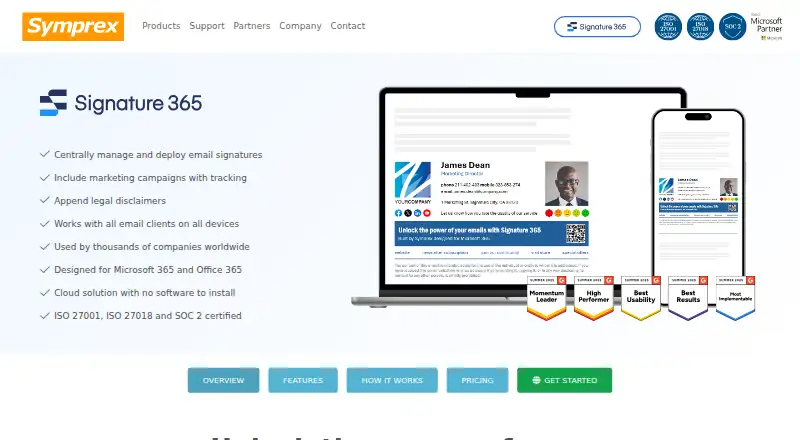
What Signature 365 is
Signature 365 is a cloud-based service for managing email signatures, marketing campaigns, and legal disclaimers in Microsoft 365 and Office 365. A central dashboard lets organizations create signatures, assign versions by department or individual, and update them across teams. Templates can include directory contact details, headshots, social links, banners, calls to action, branding, and disclaimers. Deployment can be client-side, server-side, or a combination. The Outlook add-in is deployed through the Microsoft 365 admin center, including for mobile Outlook use. Symprex says signatures can be added to messages from any email client or device, with sent items updated, and that the service does not access email content. Analytics track interactions and report on traffic, conversions, and sales opportunities. Directory sync and automatic updates are supported. The service lists web, Windows, macOS, iOS, and Android access, plus ISO 27001, ISO 27018, and SOC 2 Type II certifications. It is paid, offers a 14-day trial, and has no free plan.
Who it suits
Signature 365 suits Microsoft 365 organizations that need centrally managed signatures, campaign analytics, directory synchronization, and cloud deployment across desktop and mobile devices.
What it does well
- Central dashboard manages signatures across teams
- Supports client-side and server-side deployment
- Includes directory sync and automatic updates
- Analytics report on signature campaign interactions
- 14-day trial requires no commitment or credit card
What to know first
- No free plan is available
- Licenses count users and shared mailboxes routed through service
- Paid product after the trial period
Limits
The 14-day trial is the only trial period stated. Licenses are assigned to each user or shared mailbox routed through the service and to each user who uses the Outlook add-in, whether or not a signature is added.
Getting started
- Open the Signature 365 website.
- Start the 14-day trial, which Symprex says requires no commitment or credit card.
- Use the setup wizard to configure the service.
- Deploy the Outlook add-in from the Microsoft 365 admin center if needed.
- Create templates and assign signature versions to departments or individuals.
Verdict
Signature 365 centralizes Microsoft 365 signature administration while adding deployment choices, personalization, and analytics. Buyers should account for its paid licensing model and per-user or shared-mailbox license counting.
Questions
How much does Signature 365 cost?
It is a paid product. A 14-day trial is available.
Is there a free plan?
No. Signature 365 has a 14-day trial that Symprex says requires no commitment or credit card.
Which platforms does it support?
The listed platforms are Android, iOS, macOS, web, and Windows. Its email platform is Microsoft 365.
Can it add signatures from different email clients?
Symprex says it can add signatures to email sent from any client and device, with sent items updated accordingly.
How are licenses counted?
A license is assigned to each user or shared mailbox routed through the service and each user using the Outlook add-in, whether or not a signature is added.
What support is included?
Technical support includes email and phone support from 8 AM to 8 PM UK time, five days a week, with a 24-hour response guarantee.
Facts from Signature 365's own pages
- Administration
- A central dashboard lets organizations manage signatures and assign different versions by department or individual. · symprex.com, 9 Oct 2026
- Analytics
- The product tracks interactions and provides reporting on traffic, conversions, and sales opportunities. · symprex.com, 9 Oct 2026
- Campaign analytics
- The product tracks interactions and provides real-time insights and reports on signature campaign performance. · symprex.com, 8 Oct 2026
- Central management
- A central dashboard lets organizations create, manage, and update signatures across their teams. · symprex.com, 8 Oct 2026
- Compliance
- The security page lists GDPR, CCPA, HIPAA, and PCI compliance. · symprex.com, 9 Oct 2026
- Core use
- It centrally manages and deploys email signatures, marketing campaigns, and legal disclaimers. · symprex.com, 9 Oct 2026
- Deployment
- The setup process uses a wizard, and the Outlook add-in can be deployed from the Microsoft 365 admin center without agents. · symprex.com, 9 Oct 2026
- Deployment modes
- Signatures can be added client-side, server-side, or through a combination of both modes. · symprex.com, 8 Oct 2026
- Design and personalization
- Users can customize templates with branding, headshots, contact details, social links, banners, calls to action, and disclaimers. · symprex.com, 9 Oct 2026
- Email access
- Symprex says it does not access email content, including when server-side signatures are used. · symprex.com, 9 Oct 2026
- Email client compatibility
- Symprex says signatures can be added to email sent from any client on any device, with sent items updated accordingly. · symprex.com, 8 Oct 2026
- Email clients
- Symprex says signatures can be added to email from any client and device, with sent items updated accordingly. · symprex.com, 9 Oct 2026
- Headquarters
- Guildford, United Kingdom · symprex.com, 28 Sept 2026
- Intended customers
- The product page describes Signature 365 as serving businesses ranging from 50 to 5,000 users. · symprex.com, 8 Oct 2026
- License counting
- A license is assigned to each user and shared mailbox routed through the service and to each user with the Outlook add-in, whether or not a signature is added. · symprex.com, 9 Oct 2026
- Licensing limit
- A license is assigned to each user or shared mailbox routed through the service and to each user who uses the Outlook add-in. · symprex.com, 8 Oct 2026
- Outlook integration
- The Outlook add-in can be deployed from the Microsoft 365 admin center, and signatures can be added in Outlook on mobile devices. · symprex.com, 8 Oct 2026
- Personalization
- Signatures can include directory contact details, headshots, social links, banners, calls to action, and disclaimers. · symprex.com, 8 Oct 2026
- Product
- Signature 365 is a cloud-based email signature solution for Microsoft 365 and Office 365. · symprex.com, 9 Oct 2026
- Purpose
- Signature 365 manages email signatures, marketing campaigns, and legal disclaimers for Microsoft 365 and Office 365. · symprex.com, 8 Oct 2026
- Regional data
- The product features page says regional infrastructure keeps customer data within the customer's region. · symprex.com, 8 Oct 2026
- Scale
- Symprex says its largest customers use Signature 365 to manage over 80,000 users. · symprex.com, 9 Oct 2026
- Security
- Symprex says its ISMS is ISO 27001 and ISO 27018 certified and that it is SOC 2 Type II certified. · symprex.com, 9 Oct 2026
- Security certifications
- Symprex says its services are ISO 27001 and ISO 27018 certified and SOC 2 Type II compliant and certified. · symprex.com, 8 Oct 2026
Where Signature 365 stands on Freedom251
- Email Signature Management Software#30 of 41
- Email Signature Software#23 of 29