Freedom251 › Screenshot Annotation Software
Shotmesh
What Shotmesh is
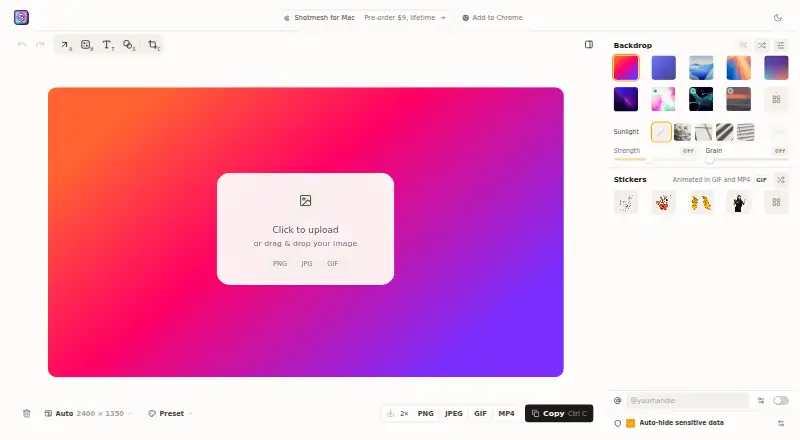
Shotmesh is a screenshot editor for makers preparing images and clips to share on X, LinkedIn, Product Hunt, and GitHub. In the browser, users can add backgrounds, frames, device mockups, and hand-drawn annotations, then export PNG, JPEG, GIF, or MP4 files. Its library offers 65 editable gradient presets as well as animated mesh, image, GIF, and video backgrounds. A local OCR scan can identify emails, API keys, card numbers, amounts, phone numbers, and @handles for redaction. Rendering, OCR, and video encoding run on the user's machine, and screenshots are not uploaded; saved designs remain in the browser. Editing and exporting in the browser do not require an account. A Chrome extension captures a selected tab area for editing, while the Mac app supports shortcut, window, or menu bar capture, offline use, a native Save dialog, and multiple windows. Browser editing and exports are free. A one-time 9.00 USD license covers up to 3 Macs and removes the mark on free Mac exports.
Who it suits
Shotmesh suits makers who need to prepare screenshots or clips for sharing, with local redaction and browser editing. Mac users who want offline capture can use the Mac app; its free exports carry a small mark until licensed.
What it does well
- Browser editing and exports are free, with no account required.
- Local OCR can flag sensitive details for redaction.
- Screenshots are not uploaded; processing runs locally.
- Exports include PNG, JPEG, GIF, and MP4.
- Mac app supports offline use and multiple windows.
What to know first
- Free Mac app exports carry a small mark.
- GIF export is automatically fitted under X's 15 MB upload limit.
- The 9.00 USD license covers up to 3 Macs.
Limits
Browser editing and exports are free. Mac app exports on the free use include a small “Made with Shotmesh” mark; the 9.00 USD one-time license removes it on up to three Macs.
Plans
| Plan | Billed and limits | Price |
|---|---|---|
| Browser editor | Editing and exports free · no signup · PNG, GIF and MP4 | Free |
| Shotmesh License | one-time · Up to 3 Macs · removes the export mark | $9, paid once |
As shotmesh.com lists them, read 5 Oct 2026. The maker's own page has the final word.
Getting started
- Open the Shotmesh browser editor on its website
- Edit without creating an account
- Capture a tab area with the Chrome extension, if desired
- Install the Mac app for shortcut, window, or menu-bar capture
- Export as PNG, JPEG, GIF, or MP4
- Add the one-time license to remove the Mac export mark
Verdict
Shotmesh combines screenshot styling, export, and local OCR redaction for makers. Browser editing is free, while removing the Mac export mark requires a 9.00 USD one-time license.
Questions
Does Shotmesh require an account?
No account is needed to edit or export in the browser editor.
Which export formats are available?
Shotmesh exports PNG, JPEG, GIF, and MP4 files.
Are screenshots uploaded?
Rendering, OCR, and video encoding run on your machine, and screenshots are not uploaded.
How much is the Mac license?
The Shotmesh License costs 9.00 USD once, covers up to three Macs, and removes the export mark.
What does the Chrome extension do?
It captures a selected area of a tab and sends it to the Shotmesh editor in the same browser.
Facts from Shotmesh's own pages
- Account requirement
- An account is not needed to edit or export in the browser editor. · shotmesh.com, 5 Oct 2026
- Backgrounds
- The library includes 65 editable gradient presets, plus animated mesh, image, GIF and video backgrounds. · shotmesh.com, 5 Oct 2026
- Browser extension
- Yes · shotmesh.com, 24 Sept 2026
- Chrome extension
- The extension captures a selected area of a tab and sends it to the Shotmesh editor in the same browser. · shotmesh.com, 5 Oct 2026
- Editing
- It provides backgrounds, frames, device mockups, hand-drawn annotations and PNG, GIF or MP4 export. · shotmesh.com, 5 Oct 2026
- Export formats
- PNG, JPEG, GIF, MP4 · shotmesh.com, 24 Sept 2026
- Free plan
- Yes · shotmesh.com, 24 Sept 2026
- GIF export limit
- GIF export automatically fits under X's 15 MB upload limit. · shotmesh.com, 5 Oct 2026
- Local processing
- Rendering, OCR and video encoding run on the user's machine, and screenshots are not uploaded. · shotmesh.com, 5 Oct 2026
- Mac app
- The Mac app supports a global shortcut, window or menu bar capture, offline use, a native Save dialog and multiple windows. · shotmesh.com, 5 Oct 2026
- Measurement tools
- No · shotmesh.com, 24 Sept 2026
- Notable limit
- The Mac app's free exports carry a small “Made with Shotmesh” mark until a license is added. · shotmesh.com, 5 Oct 2026
- Privacy scan
- A local OCR scan can find emails, API keys, card numbers, amounts, phone numbers and @handles for redaction. · shotmesh.com, 5 Oct 2026
- Redaction tools
- Yes · shotmesh.com, 24 Sept 2026
- Saved designs
- Designs that users choose to save remain in their browser. · shotmesh.com, 5 Oct 2026
- Support
- The maker invites feature requests on X and says they read them. · shotmesh.com, 5 Oct 2026
- Team collaboration
- No · shotmesh.com, 24 Sept 2026
- What it does
- Shotmesh is a screenshot beautifier for makers who share work on X, LinkedIn, Product Hunt and GitHub. · shotmesh.com, 5 Oct 2026
Where Shotmesh stands on Freedom251
- Screenshot Annotation Software#19 of 76