Freedom251 › Collage Maker Software
Shape Collage
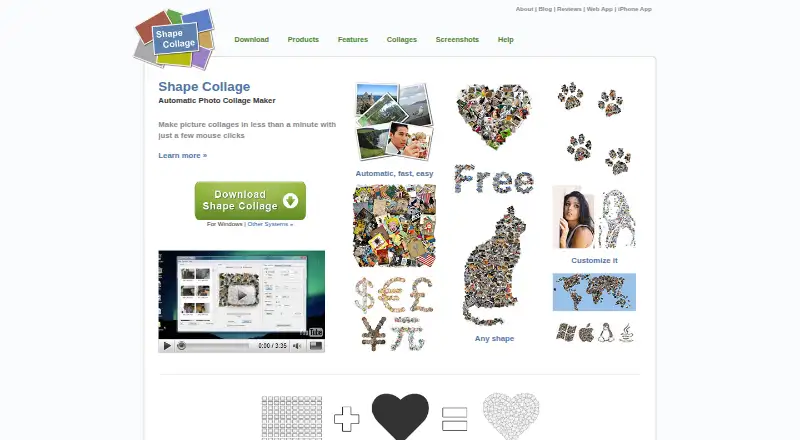
What Shape Collage is
Shape Collage automatically arranges photos into a collage in a shape selected by the user, such as a rectangle, heart, circle, letter, or a drawn outline. The maker says a collage can be created in less than a minute. Users can adjust collage and photo size, photo count, spacing, background, and border colour. Photos can come from a computer or listed web sources, including Facebook, Instagram, Flickr, Dropbox, and Google Drive. Finished work can be saved as JPEG, PNG, or Photoshop PSD files. The free version is for personal use; Pro removes watermarks and adds manual photo editing, PSD export, and project saving and loading. Shape Collage is listed for iOS, Linux, macOS, web, and Windows. The personal Pro license costs 40.00 USD once, covers one computer, and does not expire; commercial Pro costs 75.00 USD once for one computer. There is no built-in print function, so the output image must be printed through another program or service. Linux users need Java installed.
Who it suits
It suits people who want to assemble photos into shaped collages and adjust their layout before exporting an image. Commercial users need the Pro commercial license; Linux users need Java installed.
What it does well
- Creates collages in selected or user-drawn shapes
- Users can adjust photo count, spacing, and backgrounds
- Exports JPEG and PNG files
- Free version is available for personal use
- Personal Pro license does not expire
What to know first
- Free version is for personal use only
- No built-in print function
- Linux requires Java to run
- Each Pro license covers one computer
Limits
The free plan is for personal use and does not include watermark removal. Pro is required for commercial use, watermark removal, manual photo editing, PSD export, and saving and loading projects.
Plans
| Plan | Billed and limits | Price |
|---|---|---|
| Shape Collage Free | Free for personal use · Pro required for commercial use and watermark removal | Free |
| Shape Collage Pro (Personal) | Personal, non-business use · One computer per license · License does not expire | $40, paid once |
| Shape Collage Pro (Commercial) | Business, academic, or government use · One computer per license | $75, paid once |
As shapecollage.com lists them, read 2 Oct 2026. The maker's own page has the final word.
Getting started
- Visit https://www.shapecollage.com/.
- Choose the platform you want to use: iOS, Linux, macOS, web, or Windows.
- On Linux, install Java before running Shape Collage.
- Use the free plan for personal use or choose the Pro license that matches your use.
- Add photos from your computer or supported web services, then adjust the collage and save it as an image.
Shape Collage automatically arranges photos into a selected or drawn shape, making it a good fit for people who want a shaped composition without placing every image themselves. Its strongest case is flexible shape and layout control; the free edition has a watermark, and commercial work requires a separate license.
Overview
Choose a rectangle, heart, circle, letter, or a shape you draw, then adjust the collage and photo sizes, photo count, spacing, background, and border colour. The maker says its automatic method can create a collage in less than a minute. You can use photos from a computer or from web sources that include Facebook, Instagram, Flickr, Dropbox, Google Drive, Google+, Google Search, Twitter, and Tumblr.
JPEG and PNG exports suit common image workflows; Pro adds Photoshop PSD export. Shape Collage creates an image file rather than printing directly, so printing requires another program or service. See our Collage Maker Software list for more options.
Key features
- Automatic shaped layouts: The app places photos into the chosen silhouette, which is useful when the shape matters more than precise hand-positioning of every image.
- Composition controls: Set the collage dimensions, photo size and count, spacing, background, and border colour. These options allow meaningful tailoring while retaining automatic placement.
- Exports and project editing: JPEG and PNG are available, while Pro removes watermarks and adds manual photo editing, PSD export, and saving and loading projects. That makes Pro more appropriate for work that needs further refinement or a reusable project.
- Commercial and automated use: The commercial Pro license covers business, academic, or government use on one computer. A separate server license permits web-server use or command-line operation in automated or batch systems; details come from sales.
Pricing
The freemium structure makes it possible to create personal collages without paying, but the free edition retains watermarks and is not licensed for commercial use. There is no free trial.
- Shape Collage Free — free: For personal use. Choose it for no-cost personal collages if a watermark is acceptable; commercial use and watermark removal require Pro.
- Shape Collage Pro (Personal) — $40, paid once: For personal, non-business use on one computer. The license does not expire and adds manual editing, PSD export, project saving and loading, and watermark removal.
- Shape Collage Pro (Commercial) — $75, paid once: For business, academic, or government use, on one computer. This is the relevant license for those environments, rather than the cheaper personal license.
The one-computer limit matters if you need to use the software on multiple machines. Automated server or batch workflows use a separate server license, with custom pricing.
Platforms
Shape Collage is available for iOS, Linux, macOS, the web, and Windows. Linux users need Java installed to run the software. The maker directs users to its FAQ and accepts support requests through a contact form or [email protected].
Who it's for
Shape Collage suits people who want a photo composition formed around a specific silhouette and value control over its size, spacing, and background. The free version is suited to personal use where watermarks are acceptable; Pro is a better fit for watermark-free exports, project work, or commercial use under the appropriate license. It is less suitable for anyone who needs printing built into the app or a license that covers several computers.
Pros and cons
- Pro: Custom drawn shapes, letters, and familiar silhouettes make the layout more distinctive than a fixed grid.
- Pro: Adjustable sizing, photo count, spacing, background, and border colour offer control over the composition without requiring manual placement of each photo.
- Pro: A one-time personal Pro price and non-expiring license avoid a recurring subscription for eligible personal users.
- Con: Free exports carry watermarks, and the free edition cannot be used commercially.
- Con: Each Pro license covers one computer, limiting convenience across multiple machines.
- Con: There is no built-in print function; the saved image must be printed elsewhere.
Alternatives
Pick FotoJet if you want a freemium collage maker with a free trial and basic editing tools and templates; its Free plan costs nothing, while Plus is $6.99 a month.
CollageIt is another freemium option, with free Windows and Mac downloads and a Pro Personal License for Windows at $29.90, paid once.
PhotoGrid is available on Android, iOS, and the web, with a free plan that includes 100 MB of cloud storage; consider it if those platforms and cloud storage suit your workflow better.
PicCollage offers a free plan and trial on Android, iOS, and the web; consider it if you want a mobile- or web-based alternative.
SCRL is a freemium Android, iOS, and web option with basic creation tools, limited templates, and a free trial.
SnapLayout suits iOS and macOS users who want all layouts and formats, full creative control, and free exports capped at 1080px on the longest edge; its free plan allows up to 20 slides and includes a trial.
Collage Pro is a web-based freemium option with free core collage, long-image stitching, basic editing, and export, without a free trial.
Photovisi is a web-only option with free collage making, though free output may have limited quality or a watermark; Premium is $4.99 a month and removes the watermark while offering higher resolution.
Verdict
Choose Shape Collage if you want automatically arranged photos in a custom silhouette, with useful composition controls and the option to move to a non-expiring Pro license. Look elsewhere if built-in printing, commercial use without a separate license, or use across multiple computers is central to your workflow.
Verdict
Shape Collage offers automatic shaped layouts and several export formats, with additional editing and project features in Pro. Check the one-computer license limit and lack of built-in printing if either matters to your workflow.
Questions
Is Shape Collage free?
Yes. Shape Collage Free costs nothing and is for personal use.
How much does Pro cost?
Personal Pro costs 40.00 USD once for non-business use on one computer. Commercial Pro costs 75.00 USD once for business, academic, or government use on one computer.
Which platforms does Shape Collage support?
It is available for iOS, Linux, macOS, web, and Windows. Linux requires Java.
What does Pro add?
Pro removes watermarks and adds manual photo editing, PSD export, and saving and loading projects.
Can I print a collage directly from Shape Collage?
There is no built-in print function. Save the collage as an image and print it using another program or service.
Can a personal license be used for business?
No. The personal Pro license is for non-business use; the commercial license covers business, academic, or government use and one computer.
Facts from Shape Collage's own pages
- Automatic layout
- The maker says collages can be created in less than a minute and photos are automatically placed using a fast, patent-pending method. · shapecollage.com, 2 Oct 2026
- Commercial license
- The commercial Pro license permits use in business, academic, or government environments, and the maker says one license covers exactly one computer. · shapecollage.com, 2 Oct 2026
- Custom shapes
- Users can make collages in shapes such as rectangles, hearts, circles, letters, or their own drawn shape. · shapecollage.com, 2 Oct 2026
- Export formats
- The app can save collages as JPEG, PNG, or Photoshop PSD files. · shapecollage.com, 2 Oct 2026
- Founded
- 2007 · shapecollage.com, 28 Sept 2026
- Image sources
- The product can use photos on the computer or from the web; the download page lists Facebook, Instagram, Flickr, Dropbox, Google Drive, Google+, Google Search, Twitter, and Tumblr among sources. · shapecollage.com, 2 Oct 2026
- Layout controls
- Users can adjust collage size, photo size, number of photos, spacing, background, and border colour. · shapecollage.com, 2 Oct 2026
- Notable limit
- The FAQ says Shape Collage has no built-in print function; it creates an image file that users can print with another program or service. · shapecollage.com, 2 Oct 2026
- Platform detail
- The Linux download page says Java must be installed for Shape Collage to run. · shapecollage.com, 2 Oct 2026
- Pro features
- Pro removes watermarks and adds manual photo editing, PSD export, and saving and loading projects. · shapecollage.com, 2 Oct 2026
- Purpose
- Shape Collage automatically arranges photos into a collage in a chosen shape. · shapecollage.com, 2 Oct 2026
- Security claims
- The features page describes the personal-use version as having no ads or spyware. · shapecollage.com, 2 Oct 2026
- Server license
- A separate server license allows running the software on a web server or as a command-line program in automated or batch systems, with details available from sales. · shapecollage.com, 2 Oct 2026
- Support
- The maker directs users to its FAQ and accepts support requests through a contact form or [email protected]. · shapecollage.com, 2 Oct 2026
Where Shape Collage stands on Freedom251
- Collage Maker Software#14 of 34