Freedom251 › Collage Maker Software

LayPic
What LayPic is
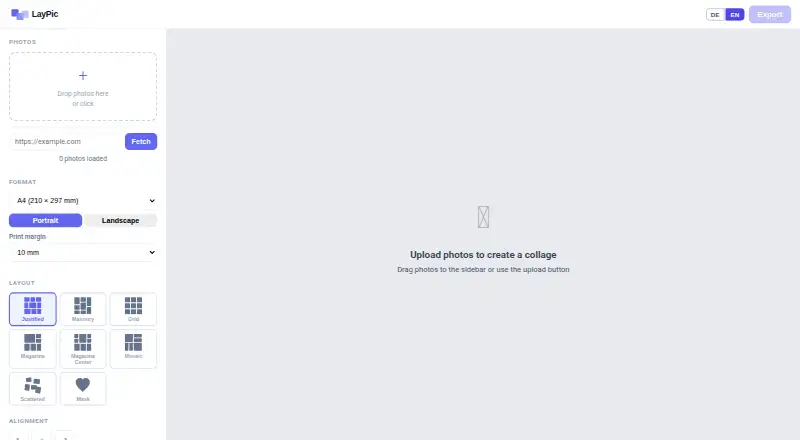
LayPic is a browser-based tool for creating photo collages, with layouts and masks for arranging images into a finished design. It offers eight layouts and more than 40 masks, including hearts, numbers, letters, and wedding designs. Users can add text in more than 20 fonts, upload a logo by file or URL, and adjust backgrounds, frames, rounded corners, spacing, and alignment. Backgrounds can use gradients or images. Collages export as PNG, JPG, or PDF at 96, 192, or 300 DPI. Supported dimensions run from DIN A5 to A0 and include Instagram and Pinterest formats, as well as custom sizes. LayPic says photos are processed locally in the browser and not sent to external servers. The FAQ allows unlimited photo uploads and notes that exports have no watermark apart from a subtle LayPic logo. Users can share collages on social media or download them for printing. The free plan costs nothing and includes all features, with no signup or hidden costs.
Who it suits
LayPic suits people making collages for social media, gifts, posters, or personal projects. Logo upload may also serve photographers and businesses that want to include branding.
What it does well
- Eight layouts and more than 40 masks
- Exports PNG, JPG, and PDF
- Print sizes include DIN A5 to A0
- Unlimited photo uploads on the free plan
- Photos are processed locally in the browser
What to know first
- No trial is available
- Exports include a subtle LayPic logo
Plans
| Plan | Billed and limits | Price |
|---|---|---|
| Free | All features · unlimited photo uploads · no signup · no hidden costs | Free |
As laypic.com lists them, read 10 Oct 2026. The maker's own page has the final word.
Getting started
- Open the LayPic website in a browser.
- Choose a layout or mask and upload photos.
- Add text or a logo and adjust the design controls.
- Set the output dimensions and export format and DPI.
- Share the collage on social media or download it for printing.
Verdict
LayPic combines collage layouts and design controls with several export formats and print sizes. Its free plan includes all features and unlimited uploads, while the FAQ notes the subtle logo mark.
Questions
How much does LayPic cost?
Its Free plan costs nothing and includes all features, unlimited photo uploads and no signup.
Is there a free trial?
No. LayPic lists no free trial; it offers a free plan.
What file formats can I export?
Collages can be exported as PNG, JPG or PDF at 96, 192 or 300 DPI.
Can I use a custom print size?
Yes. LayPic supports custom dimensions, as well as sizes from DIN A5 to A0 and Instagram and Pinterest formats.
Does LayPic send photos to external servers?
LayPic states that photos are processed locally in the browser and are not transferred to external servers.
Who makes LayPic?
LayPic is identified as a project by Thomas Harnisch. Its imprint lists him at an address in Hamburg, Germany.
Facts from LayPic's own pages
- Design controls
- Design options include gradient or image backgrounds, rounded corners, frames, spacing, and alignment. · laypic.com, 10 Oct 2026
- Export formats
- Collages can be exported as PNG, JPG, or PDF at 96, 192, or 300 DPI. · laypic.com, 10 Oct 2026
- Intended users
- The site presents LayPic for social media, gifts, posters, and personal projects, and says logo features may suit photographers and businesses. · laypic.com, 10 Oct 2026
- Layouts and masks
- It offers 8 layouts and over 40 masks, including hearts, numbers, letters, and wedding designs. · laypic.com, 10 Oct 2026
- Maker
- LayPic is identified as a project by Thomas Harnisch. · laypic.com, 10 Oct 2026
- Maker location
- The imprint lists Thomas Harnisch at an address in Hamburg, Germany. · laypic.com, 10 Oct 2026
- Photo limit
- The FAQ says users can upload as many photos as they like. · laypic.com, 10 Oct 2026
- Print sizes
- The tool supports sizes from DIN A5 to A0, Instagram and Pinterest formats, and custom dimensions. · laypic.com, 10 Oct 2026
- Privacy
- LayPic states that photos are processed locally in the browser and are not transferred to external servers. · laypic.com, 10 Oct 2026
- Product
- LayPic is an online tool for creating photo collages in a browser. · laypic.com, 10 Oct 2026
- Sharing and printing
- Users can share collages directly on social media or download them for printing at a photo service of their choice. · laypic.com, 10 Oct 2026
- Text and logos
- Users can add text with over 20 fonts and upload a logo by file or URL. · laypic.com, 10 Oct 2026
- Watermark
- The FAQ says there are no watermarks except the subtle LayPic logo. · laypic.com, 10 Oct 2026
Where LayPic stands on Freedom251
- Collage Maker Software#11 of 34