Freedom251 › Collage Maker Software

OptiPix Photo Collage Maker
What OptiPix Photo Collage Maker is
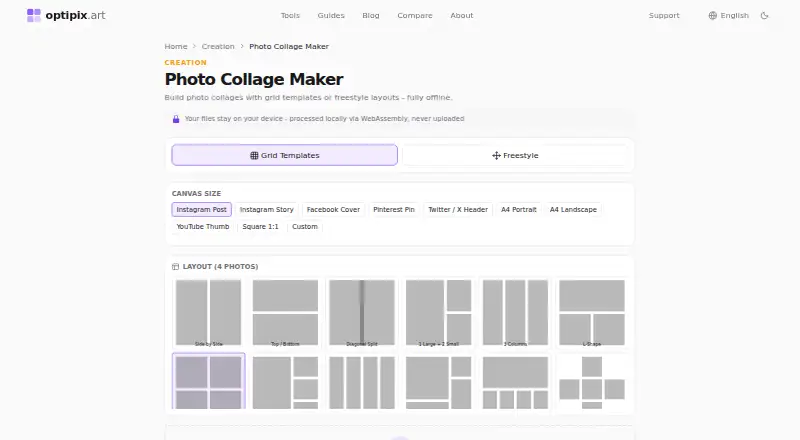
OptiPix Photo Collage Maker is a free browser tool for arranging photos in grid templates or a freestyle layout. It offers more than 30 grid templates, including options for up to 12 photos. Freestyle mode supports unlimited images that you can drag, resize, rotate, and layer. In grid cells, you can reposition or zoom photos, apply quick filters, and adjust spacing, borders, rounded corners, and shadows. The editor also supports text overlays, emoji stickers, decorative shapes, and custom or blurred backgrounds. It accepts JPEG, PNG, WebP, and HEIC images, and exports collages as JPEG, PNG, or WebP at standard or 2× retina resolution. Canvas presets include Instagram, Facebook, Pinterest, Twitter/X, YouTube, and A4, alongside a custom size option. Batch mode and ZIP export are available for multiple collages. OptiPix says collage processing happens locally in the browser and photos are never uploaded. The free plan is listed as having no ads, limits, or watermark. The maker also offers a free website embed that runs in visitors’ browsers without an API key or usage limits.
Who it suits
It suits people making collages in a browser who want grid or freestyle layouts, multiple export formats, and local photo processing. Website owners can also use the free embed.
What it does well
- Offers more than 30 grid templates.
- Freestyle mode supports unlimited images.
- Exports JPEG, PNG, and WebP.
- Accepts HEIC images.
- Photos are processed locally in the browser.
What to know first
- Video collages are not supported.
- The listed platform is web only.
Plans
| Plan | Billed and limits | Price |
|---|---|---|
| Free | 100% free · no ads · no limits · no watermark | Free |
As optipix.art lists them, read 7 Oct 2026. The maker's own page has the final word.
Getting started
- Open the OptiPix Photo Collage Maker website in a browser
- Choose a grid template or freestyle mode
- Add JPEG, PNG, WebP, or HEIC images
- Arrange and edit the collage, then export it as JPEG, PNG, or WebP
Verdict
OptiPix offers a wide range of collage layouts and editing controls at no charge, with batch export and a website embed as additional options. Its listed limitation is that it does not make video collages.
Questions
Is OptiPix Photo Collage Maker free?
Yes. The Free plan is listed as free, with no ads, limits, or watermark.
Which platforms can I use it on?
It is available on the web.
What image formats can I import and export?
It accepts JPEG, PNG, WebP, and HEIC images. Exports are available as JPEG, PNG, or WebP.
Can I make a collage with more than 12 photos?
Grid templates include layouts for up to 12 photos. Freestyle mode supports unlimited images.
Are photos uploaded during collage editing?
OptiPix says processing happens locally in the browser and photos are never uploaded.
Who operates OptiPix?
OptiPix is operated by Zeplik, Inc., which the maker describes as a Delaware C-Corporation founded in 2026.
Facts from OptiPix Photo Collage Maker's own pages
- Batch processing
- The page provides batch mode and ZIP export for multiple collages. · optipix.art, 7 Oct 2026
- Canvas sizes
- Presets include Instagram, Facebook, Pinterest, Twitter/X, YouTube, and A4 sizes, plus a custom size option. · optipix.art, 7 Oct 2026
- Company
- OptiPix is operated by Zeplik, Inc., which the maker describes as a Delaware C-Corporation founded in 2026. · optipix.art, 7 Oct 2026
- Editing
- Users can reposition or zoom images in their cells, apply quick filters, and adjust spacing, borders, rounded corners, and shadows. · optipix.art, 7 Oct 2026
- Embed
- The maker offers a free website embed that runs in visitors’ browsers without an API key or usage limits. · optipix.art, 7 Oct 2026
- Export
- Collages export as JPEG, PNG, or WebP at standard or 2× retina resolution. · optipix.art, 7 Oct 2026
- Formats
- The tool accepts JPEG, PNG, WebP, and HEIC images. · optipix.art, 7 Oct 2026
- Freestyle
- Freestyle mode lets users drag, resize, rotate, and layer images, and supports unlimited images. · optipix.art, 7 Oct 2026
- Headquarters
- Dover, Delaware, United States · optipix.art, 28 Sept 2026
- Privacy
- The maker says collage processing happens locally in the browser and photos are never uploaded. · optipix.art, 7 Oct 2026
- Purpose
- The tool creates photo collages using grid templates or freestyle layouts in the browser. · optipix.art, 7 Oct 2026
- Support
- OptiPix lists phone support at +1 (838) 221-7030 and an email contact on its About page. · optipix.art, 7 Oct 2026
- Templates
- It offers 30+ grid templates for collages with different photo counts, including layouts for up to 12 photos. · optipix.art, 7 Oct 2026
- Text and decoration
- The tool supports text overlays, emoji stickers, decorative shapes, and custom or blurred backgrounds. · optipix.art, 7 Oct 2026
Where OptiPix Photo Collage Maker stands on Freedom251
- Collage Maker Software#15 of 34