Freedom251 › Collage Maker Software

PhotoCollage
What PhotoCollage is
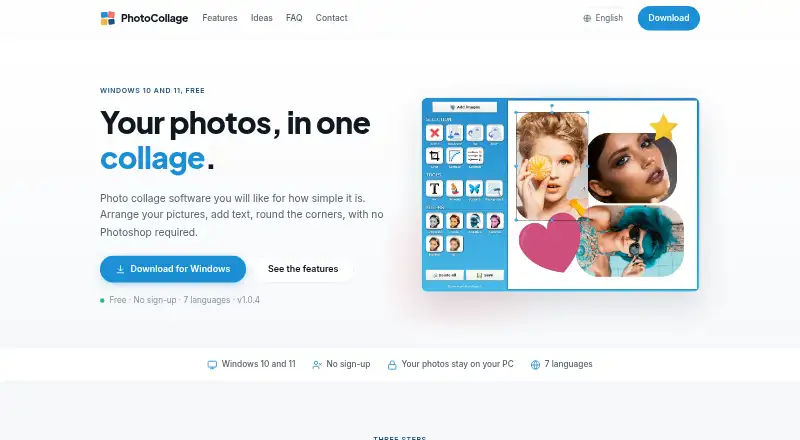
PhotoCollage is Windows software for building photo layouts with images, text, drawings and decorative shapes. You can crop pictures freely or to a fixed ratio, adjust brightness, contrast, saturation, hue and transparency, and add rounded corners, coloured borders or drop shadows. Six adjustable filters can be applied to individual pictures: black and white, sepia, negative, colourise, pixelate and blur. Choose a background colour or image, then export the collage as a PNG or JPEG at full resolution for printing or posting.
The free version costs nothing and adds a text watermark to exported collages. The Full version costs €29.99, paid once, removes that watermark, unlocks every feature and includes updates. There is no free trial. PhotoCollage is built for Windows 10 and Windows 11; the maker says there is no Mac or Linux version.
Images opened, edited and exported remain on the computer, and collage creation does not require an internet connection. At startup, the software checks for updates and sends product, operating system, interface language, installed version and IP address. Licensed users also send their licence email and serial number. The maker says this update check uses unencrypted HTTP because older versions cannot negotiate recent encryption protocols.
Who it suits
PhotoCollage suits Windows users who want to assemble pictures into custom layouts, add text or drawings, and make basic image adjustments without Photoshop. It may also suit people who want to keep image editing and export on their computer, though the startup update check transmits some product and device details.
What it does well
- Supports free and fixed-ratio cropping.
- Offers six adjustable filters for individual pictures.
- Exports full-resolution PNG and JPEG files.
- Image editing and export stay on the computer.
- Collage creation works without an internet connection.
What to know first
- The free version adds a text watermark to exports.
- No free trial is available.
- Built for Windows 10 and Windows 11 only.
- Startup update checks use unencrypted HTTP.
Limits
The free version adds a line of text watermark to exported collages. The Full version costs €29.99, paid once and removes the watermark permanently; no free trial is offered.
Plans
| Plan | Billed and limits | Price |
|---|---|---|
| Free version | Free to download and use · adds a line of text watermark to exported collages | Free |
| Full version | One-time payment · Removes watermark permanently · every feature unlocked · updates included | €29.99, paid once |
As photocollage.org lists them, read 9 Oct 2026. The maker's own page has the final word.
Getting started
- Visit https://www.photocollage.org/.
- Download the Windows version for Windows 10 or Windows 11.
- Install and open PhotoCollage.
- Arrange pictures, add text or shapes, and adjust images as needed.
- Export the collage as PNG or JPEG; choose the Full version to remove the watermark.
Verdict
Choose PhotoCollage if you need Windows collage layouts with text, drawing, filters and full-resolution exports. The free version includes a watermark, while removing it requires the 29.99 EUR one-time Full version; look elsewhere if you need a Mac or Linux version.
Questions
Is PhotoCollage free?
Yes. The Free version costs nothing, but exported collages include a text watermark.
How much does the Full version cost?
It costs €29.99, paid once. It removes the watermark permanently, unlocks every feature and includes updates.
Which platforms does PhotoCollage support?
It is built for Windows 10 and Windows 11. The maker says there is no Mac or Linux version.
What export formats are available?
Collages can be exported as PNG or JPEG at full resolution.
Does PhotoCollage send images to a server?
Images opened, edited and exported stay on the computer. At startup, the update check sends product, operating system, interface language, installed version and IP address; licensed users also send their licence email and serial number.
Facts from PhotoCollage's own pages
- Compatibility
- The software is built for Windows 10 and Windows 11; the FAQ says there is no Mac or Linux version. · photocollage.org, 9 Oct 2026
- Data collection
- At startup, the software checks for updates and sends product, operating system, interface language, installed version and IP address; licensed users also send their licence email and serial number. · photocollage.org, 9 Oct 2026
- Download
- The download page lists version 1.0.4 at 48.1 MB for Windows 10 and 11. · photocollage.org, 9 Oct 2026
- Export
- The maker says collages can be exported at full resolution, ready to print or post. · photocollage.org, 9 Oct 2026
- Filters
- It offers six adjustable picture-by-picture filters, including black and white, sepia, negative, colourise, pixelate and blur. · photocollage.org, 9 Oct 2026
- Licence
- The licence is tied to the purchaser’s email address, and the maker says it can be used to reinstall on another computer. · photocollage.org, 9 Oct 2026
- Network security
- The maker says the startup update check uses unencrypted HTTP because older software versions cannot negotiate recent encryption protocols. · photocollage.org, 9 Oct 2026
- Payment
- 2Checkout handles payment as reseller; the maker says card details are entered on 2Checkout systems and are not seen or stored by the maker. · photocollage.org, 9 Oct 2026
- Photo editing
- It supports free or fixed-ratio cropping, brightness, contrast, saturation, hue, transparency, rounded corners, coloured borders and drop shadows. · photocollage.org, 9 Oct 2026
- Privacy
- Images opened, edited and exported stay on the computer and are not sent to a server; the software needs no connection to build a collage. · photocollage.org, 9 Oct 2026
- Purpose
- PhotoCollage is photo collage software for arranging pictures and adding text without Photoshop. · photocollage.org, 9 Oct 2026
- Support
- The maker invites questions, licence problems and bug reports by email and says it answers every message. · photocollage.org, 9 Oct 2026
- Text and drawing
- Users can add text, draw freehand, add decorative shapes, and choose a background colour or image. · photocollage.org, 9 Oct 2026
Where PhotoCollage stands on Freedom251
- Collage Maker Software#17 of 34