Freedom251 › Collage Maker Software

CollageIt
What CollageIt is
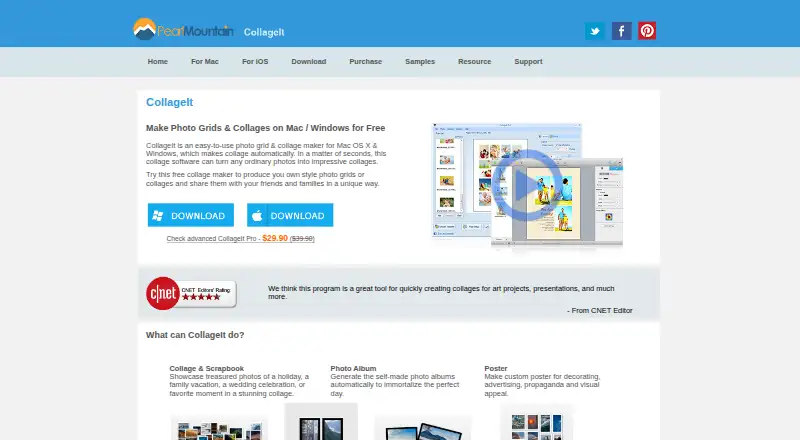
CollageIt creates photo grids and collages for albums, posters, scrapbook projects, art projects, and presentations. Its desktop version can accommodate up to 200 photos and offers controls for page size, background, spacing, margins, rotation, frames, shadows, cropping, and random layouts. The Mac version includes Mosaic, Grid, Center, Pile, and Free Mode, with more than 60 templates. Face recognition helps fit photos into generated layouts, and a real-time preview shows the arrangement. Collages can be saved as JPEG, PNG, PDF, PSD, TIFF, BMP, GIF, and other image formats. The iOS app supports up to 9 photos and collage dimensions up to 1800 by 1800 pixels. It can add photos from Facebook albums and share collages to Facebook, Twitter, Flickr, Tumblr, and Instagram. The free plan is available for Windows and Mac. Pro personal licenses are listed at $29.90, paid once for up to 2 PCs or Macs; commercial licenses are $49.90, paid once for up to 5 PCs or Macs.
Who it suits
CollageIt suits people making photo collages for personal or project use, including albums, posters, and presentations. The iOS version is for smaller collages of up to 9 photos.
What it does well
- Desktop version supports up to 200 photos.
- Mac version offers more than 60 templates.
- Includes controls for spacing, cropping, frames, and shadows.
- Exports include JPEG, PNG, PDF, and PSD.
- Free Windows and Mac plan is available.
What to know first
- iOS app is limited to 9 photos.
- iOS collage dimensions are limited to 1800 by 1800 pixels.
- Pro licenses cost $29.90, paid once or more.
Limits
The free desktop plan is listed for Windows and Mac downloads and supports up to 200 photos. The iOS app supports up to nine photos and collage sizes up to 1800 by 1800 pixels.
Plans
| Plan | Billed and limits | Price |
|---|---|---|
| CollageIt Free | Windows and Mac downloads; home page says it supports up to 200 photos | Free |
| CollageIt Pro Personal License for Windows | Up to 2 PCs | $29.90, paid once |
| CollageIt Pro Personal License for Mac | Up to 2 Macs | $29.90, paid once |
| CollageIt Pro Commercial License for Mac | Up to 5 Macs | $49.90, paid once |
| CollageIt Pro Commercial License for Windows | Up to 5 PCs | $49.90, paid once |
As collageitfree.com lists them, read 2 Oct 2026. The maker's own page has the final word.
Getting started
- Open the CollageIt website.
- Choose the free Windows or Mac download, or a paid desktop license.
- Install the version for Windows, Mac, or iOS.
- Add photos and choose a layout or template.
- Adjust the collage and save it in a supported image format.
CollageIt is a photo-collage maker for arranging images into grids and other layouts for sharing, printing, and projects. It is best suited to desktop users who want many photos and control over page layout; the iOS app is for smaller collages. The desktop versions offer more room to work, while the mobile app has firm photo and output-size limits.
Overview
CollageIt supports uses such as scrapbook pages, photo albums, posters, art projects, and presentations. The Mac edition offers Mosaic, Grid, Center, Pile, and Free Mode, with more than 60 templates. Desktop editions can accommodate up to 200 photos, giving users more scope for large collections than the iOS app, which supports up to 9 photos.
The desktop product combines automatic layout generation with extensive controls. That makes it a stronger fit for users shaping a collage for a particular page or print size than for anyone who only needs a quick, simple arrangement.
Key features
Layout and editing
The Mac version uses face recognition to fit photos into generated layouts and provides a real-time preview. Desktop users can adjust page size, background, spacing, margins, rotation, frames, shadows, and cropping, or create random layouts. Custom layouts and text overlays are supported. These controls make it possible to tailor a composition rather than settle for a template, though users who only want a basic grid may not need the extra options.
Exports and sharing
Collages can be saved in JPEG, PNG, PDF, PSD, TIFF, BMP, GIF, and other image formats. The iOS app can import photos from Facebook albums and share finished collages to Facebook, Twitter, Flickr, Tumblr, and Instagram. Its maximum collage size of 1800 by 1800 pixels limits its suitability for larger outputs; desktop is the better fit when print dimensions or a large image are priorities.
Pricing
CollageIt is freemium. CollageIt Free costs nothing and is a Windows and Mac download; the home page says it supports up to 200 photos. The paid desktop licenses add removal of limitations and the splash screen, photo cropping, large-size collage export, and lifetime support. A 30-day money-back satisfaction guarantee is also offered.
- CollageIt Pro Personal License for Windows: $29.90, paid once, for up to 2 PCs.
- CollageIt Pro Personal License for Mac: $29.90, paid once, for up to 2 Macs.
- CollageIt Pro Commercial License for Windows: $49.90, paid once, for up to 5 PCs.
- CollageIt Pro Commercial License for Mac: $49.90, paid once, for up to 5 Macs.
The free plan suits personal desktop use if its limitations are acceptable. The personal license fits an individual needing Pro benefits on as many as two computers of one platform; the commercial license raises that allowance to five for commercial use. These are one-time prices rather than recurring subscriptions. PearlMountain says payment providers handle sensitive payment information, including card numbers.
Platforms
CollageIt is available for Windows, macOS, and iOS. The download page lists Windows version 1.9.5, released January 5, 2015; Mac version 3.6.0, released September 7, 2016; and iOS version 2.0.0, released September 14, 2013. Those release dates are an important consideration for readers choosing software for current devices or workflows. Product questions are directed to PearlMountain technical support, with FAQs also provided.
Who it's for
Choose CollageIt if you want to assemble a large set of photos on a desktop and fine-tune the result with layout, crop, frame, and export controls. It is also a reasonable option for users who need a one-time license for a small number of personal or commercial computers. Look elsewhere if you need an iOS collage larger than 9 photos or 1800 by 1800 pixels, or if the dated version releases make it a poor fit for your setup.
Pros and cons
- Pros: Desktop capacity of up to 200 photos and more than 60 Mac templates provide room for larger projects.
- Pros: Desktop layout controls, custom layouts, text overlays, and multiple export formats support tailored results.
- Pros: One-time Pro licenses specify device limits, and include lifetime support and a 30-day money-back guarantee.
- Cons: The iOS app is limited to 9 photos and 1800 by 1800 pixels, making it unsuitable for larger collages.
- Cons: The listed releases date from 2013 to 2016, a concern for readers who prioritize recent software releases.
Alternatives
Collage Maker Software is a useful place to compare more options. Choose FotoJet instead if you want a web option alongside macOS, Windows, and Linux, or prefer a free plan with basic editing tools and templates; its Plus plan is $6.99 a month.
Shape Collage is another freemium choice across iOS, Linux, macOS, web, and Windows; its free plan is for personal use, while commercial use and watermark removal require Pro. PhotoGrid may suit users seeking an Android, iOS, or web option, with a free plan that includes 100 MB of cloud storage.
PicCollage offers Android, iOS, and web versions, with a free plan and a free trial. SCRL is another mobile and web alternative, with a free basic plan that has limited templates.
SnapLayout is worth considering for iOS or macOS users who want all layouts and formats on its free plan, with exports capped at 1080px on the longest edge. Collage Pro is a web-based option with free core collage, long-image stitching, basic editing, and export features; a single export costs $1.90, paid once. FreeCollageImage is a free web choice for up to 12 photos, with no account or watermark and PNG, JPG, and WebP export.
Verdict
CollageIt is best for desktop users who want to build and customize photo-heavy collages without a recurring subscription. Its photo capacity, Mac templates, and Pro layout controls are the main reasons to choose it. Look elsewhere if you need a larger mobile collage or prefer software with more recent listed releases.
Verdict
CollageIt offers desktop layout controls and templates, plus a more limited iOS app. Compare the platform-specific photo and size limits with the collage you need to make.
Questions
Is CollageIt free?
Yes. CollageIt has a free plan for Windows and Mac. Paid Pro personal licenses cost $29.90, paid once, and commercial licenses cost $49.90, paid once.
Which platforms does CollageIt support?
CollageIt is listed for iOS, macOS, and Windows.
How many photos can I use?
The desktop home page says it can accommodate up to 200 photos. The iOS app supports up to nine.
What formats can collages be exported in?
Listed formats include JPEG, PNG, PDF, PSD, TIFF, BMP, and GIF.
What are the Pro benefits?
The purchase page lists removal of limitations and the splash screen, photo cropping, large-size collage export, lifetime support, and a 30-day money-back satisfaction guarantee.
Who makes CollageIt?
CollageIt was founded in 2006. Product questions can be directed to PearlMountain technical support, and its support page provides FAQs.
Facts from CollageIt's own pages
- Automatic layout
- The Mac version uses face recognition to fit photos when generating layouts and provides real-time preview. · collageitfree.com, 2 Oct 2026
- Customization
- The desktop product supports page size, background, photo spacing, margins, rotation, frames, shadows, cropping, and random layouts. · collageitfree.com, 2 Oct 2026
- Download versions
- The download page lists Windows version 1.9.5 released January 5, 2015, Mac version 3.6.0 released September 7, 2016, and iOS version 2.0.0 released September 14, 2013. · collageitfree.com, 2 Oct 2026
- Exports
- The home page lists JPEG, PNG, PDF, PSD, and other image formats for saving collages. · collageitfree.com, 2 Oct 2026
- Founded
- 2006 · collageitfree.com, 28 Sept 2026
- Integrations and sharing
- The iOS page says users can add photos from Facebook albums and share collages to Facebook, Twitter, Flickr, Tumblr, and Instagram. · collageitfree.com, 2 Oct 2026
- Intended uses
- The home page describes collages for scrapbook projects, photo albums, posters, art projects, and presentations. · collageitfree.com, 2 Oct 2026
- iOS limit
- The iOS app supports up to 9 photos and collage sizes up to 1800 by 1800 pixels. · collageitfree.com, 2 Oct 2026
- Photo capacity
- The desktop home page says the software can accommodate up to 200 photos. · collageitfree.com, 2 Oct 2026
- Pro benefits
- The purchase page lists removal of limitations and splash screen, photo cropping, large-size collage export, lifetime support, and a 30-day money-back satisfaction guarantee. · collageitfree.com, 2 Oct 2026
- Security and privacy
- The privacy policy says PearlMountain does not know users’ credit card numbers or other sensitive payment information, which is handled by its payment providers. · collageitfree.com, 2 Oct 2026
- Support
- The support page directs product questions to PearlMountain technical support and provides FAQs. · collageitfree.com, 2 Oct 2026
- Templates and styles
- The Mac version supports Mosaic, Grid, Center, Pile, and Free Mode, with more than 60 templates. · collageitfree.com, 2 Oct 2026
- What it does
- CollageIt automatically creates photo grids and collages for sharing, printing, and other uses. · collageitfree.com, 2 Oct 2026
Where CollageIt stands on Freedom251
- Collage Maker Software#1 of 34