Freedom251 › Collage Maker Software
CollagePhotoApp
What CollagePhotoApp is
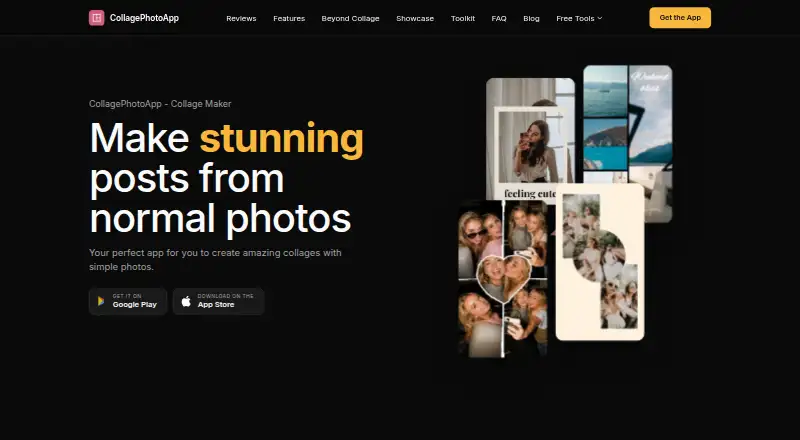
CollagePhotoApp combines photos into layouts for social media, stories and personal memories. It offers grids, frames and templates with themes such as selfies, weekends, birthdays and travel; the maker says new layouts are added regularly. Users can adjust brightness, contrast, exposure, temperature, vibrance and saturation, add text overlays or make custom layouts. The Humanout cutout tool removes a person’s background on-device and offers Erase and Custom Cut tools for refinement. Six aspect ratios are supported: 1:1, 9:16, 4:3, 3:4, 5:4 and 16:9. Exports include PNG, JPG and WebP, and HD PNG files can be saved at three times the canvas size without a watermark, logo or badge. The maker says photos and collages stay on the device rather than being uploaded to its or third-party servers. Its privacy policy says Google Firebase may collect technical device and app-usage information for crash analytics. The website also provides eight free browser tools with no install or sign-up. The app is available on Android, iOS and web, with a free plan and a 3-day trial.
Who it suits
It suits people making collages for social posts, stories or personal collections who want layout, editing and cutout tools. The browser tools may also suit users who prefer not to install or sign up.
What it does well
- Exports PNG, JPG and WebP.
- HD PNG exports are watermark-free.
- Background removal runs on-device.
- Eight browser tools need no install or sign-up.
- Available on Android, iOS and web.
What to know first
- Photostrips support up to 10 photos.
- Firebase may collect technical device and usage information.
Limits
Photostrip supports up to 10 photos per strip.
Plans
| Plan | Billed and limits | Price |
|---|---|---|
| Free | Free to download and use · Optional subscription unlocks premium extras; price not stated | Free |
As collagephotoapp.com lists them, read 8 Oct 2026. The maker's own page has the final word.
Getting started
- Open the website or get the app on Android or iOS.
- Use the free plan, or start the 3-day trial.
- Choose a grid, frame, template, or custom layout.
- Add photos and adjust them or add text as needed.
- Export as PNG, JPG, or WebP, or use a browser tool on the website.
CollagePhotoApp is a collage maker for social posts, stories and personal keepsakes, available on Android, iOS and the web. It best suits creators who want layouts, image correction and person cutouts in one place. Watermark-free, high-resolution exports are a notable strength, but the free plan does not spell out which premium extras require payment.
Overview
Grids, frames, templates, custom layouts and text overlays cover both quick arrangements and more deliberate designs. Selfie, weekend, birthday and travel themes provide ready-made starting points, while the maker says new layouts are added regularly. The app can combine as many photos as the user selects, although its Photostrip tool is capped at 10 photos.
Six aspect ratios—1:1, 9:16, 4:3, 3:4, 5:4 and 16:9—fit square posts, vertical stories and conventional landscape or portrait compositions. Instagram, TikTok, WhatsApp, Facebook and YouTube are listed as sharing destinations or supported formats. Eight browser tools are free, require no installation or sign-up, and do not upload photos, making them useful for occasional tasks without committing to the app.
Key features
Layouts and editing
The editor includes brightness, contrast, exposure, temperature, vibrance and saturation controls. These are practical corrections for balancing photos before placement, though the published feature set focuses on fundamental adjustments rather than advanced retouching. Custom layouts and text overlays help users move beyond fixed templates.
Cutouts and exports
Humanout removes a person’s background on-device. Erase and Custom Cut tools provide manual refinement when an automatic edge needs correction, a useful combination for portraits and social graphics. Exports include PNG, JPG and WebP; HD PNG files are rendered at three times the canvas size and carry no watermark, logo or badge. That makes the output suitable for sharing or further editing without branding, while the three-format choice covers common web and image workflows.
Privacy and browser use
The maker says photos and collages remain on the device rather than being uploaded to its servers or third-party servers. Google Firebase is used for crash analytics and may collect technical device and app-usage information, so local image handling does not mean zero telemetry. The browser tools separately promise not to upload photos.
Pricing
The Free plan costs nothing and is free to download and use. A 3-day trial gives prospective subscribers a short evaluation window; readers should check the store terms before it ends because purchases, refunds and cancellations are handled through the App Store or Google Play. The absence of a published subscription price makes long-term budgeting harder than the zero-cost entry suggests.
Platforms
CollagePhotoApp runs on Android, iOS and the web. App and support languages are English, Hindi and Marathi. Email support aims to reply within two business days.
Who it's for
Choose it for social creators, families and casual designers who need themed templates, common aspect ratios, basic corrections and cutouts together. It is also a sensible option for privacy-conscious users who want the maker’s stated on-device photo processing, provided Firebase analytics is acceptable. Businesses needing predictable subscription terms, or users making photostrips longer than 10 images, should compare alternatives first.
Pros and cons
Pros
- Watermark-free HD PNG export at 3× canvas size preserves clean, high-resolution output.
- PNG, JPG and WebP exports, six aspect ratios and social-platform destinations cover varied publishing needs.
- On-device person cutouts with Erase and Custom Cut support more controlled portrait compositions.
- Android, iOS, web access and eight no-install browser tools make it broadly reachable.
- The maker says photos are not uploaded to its or third-party servers.
Cons
- The subscription price and premium feature boundaries are unpublished, limiting cost comparison.
- Photostrip stops at 10 photos even though ordinary collages can use as many selected photos.
- Firebase crash analytics may collect technical device and usage data despite local image handling.
- The editor’s published controls are basic, with no stated advanced retouching features.
Alternatives
Collage Maker Software is the broader directory list to consult when you want to compare more products.
FotoJet is a better fit for desktop users needing Linux, macOS or Windows support, basic templates and resources, and a Plus plan priced at $6.99 a month.
Shape Collage suits users wanting desktop coverage and a free personal-use plan, but commercial use and watermark removal require Pro.
CollageIt is worth considering for Windows or Mac users who want a one-time Pro personal license and a stated capacity of up to 200 photos.
PhotoGrid is the alternative for users who value cloud projects, batch editing and 100 MB cloud storage in its free offering.
PicCollage is another Android, iOS and web freemium option with separate watermark removal and VIP plans.
April fits mobile-only users seeking a collage and editing app, with a Monthly April VIP plan at $1.99 a month.
Fotowall is a free desktop and browser application for users who do not need a subscription model.
Pi7 Photo Collage Maker is a free Android, iOS and web alternative from a small independent team.
Verdict
CollagePhotoApp is a strong choice for making social-ready collages when clean, watermark-free exports and on-device cutouts matter more than advanced editing or transparent subscription pricing. Its broad platform support, templates and format controls make the free starting point useful. Look elsewhere if you need a clearly priced premium tier, photostrips beyond 10 images, or assurances that extend beyond local photo storage and Firebase’s stated analytics.
Verdict
CollagePhotoApp brings layout, photo adjustment, cutouts and several export formats together. Its free plan and trial provide ways to start, while the privacy policy notes technical analytics collection.
Questions
Is CollagePhotoApp free?
It has a free plan listed as free. An optional subscription unlocks premium extras, and a 3-day trial is offered.
Which platforms does it support?
It is available on Android, iOS, and the web.
What export formats are available?
Exports include PNG, JPG, and WebP. HD PNG exports are at three times the canvas size without a watermark, logo, or badge.
Does it upload photos?
The maker says photos and collages stay on the device and are not uploaded to its or third-party servers. The privacy policy says Firebase may collect technical information for crash analytics.
Can I share collages to social platforms?
The maker lists Instagram, TikTok, WhatsApp, Facebook, and YouTube as supported sharing destinations or formats.
Facts from CollagePhotoApp's own pages
- Analytics
- The privacy policy says Google Firebase is used for crash analytics and may collect technical information about the device and app usage. · collagephotoapp.com, 8 Oct 2026
- Browser tools
- The website offers eight free browser tools that require no install or sign-up and do not upload photos. · collagephotoapp.com, 8 Oct 2026
- Cutouts
- Humanout removes a person’s background on-device, with Erase and Custom Cut tools for refinements. · collagephotoapp.com, 8 Oct 2026
- Export
- The app exports HD PNG files at 3× the canvas size without a watermark, logo or badge. · collagephotoapp.com, 8 Oct 2026
- Free trial
- The App Store listing states an optional subscription includes a 3-day free trial; it also says the weekly plan has no free trial. · apps.apple.com, 8 Oct 2026
- Integrations
- The maker lists Instagram, TikTok, WhatsApp, Facebook and YouTube as supported sharing destinations or formats. · collagephotoapp.com, 8 Oct 2026
- Languages
- The app and support are available in English, Hindi and Marathi. · collagephotoapp.com, 8 Oct 2026
- Limits
- Photostrip supports up to 10 photos per strip; the maker says a collage can include as many photos as the user selects. · collagephotoapp.com, 8 Oct 2026
- Photo editing
- The built-in editor offers adjustments including brightness, contrast, exposure, temperature, vibrance and saturation. · collagephotoapp.com, 8 Oct 2026
- Privacy
- The maker says photos and collages stay on the device and are not uploaded to its or third-party servers. · collagephotoapp.com, 8 Oct 2026
- Purpose
- The app combines photos into collage layouts using grids, frames and templates for social media, stories or personal memories. · collagephotoapp.com, 8 Oct 2026
- Social formats
- The app supports six aspect ratios: 1:1, 9:16, 4:3, 3:4, 5:4 and 16:9. · collagephotoapp.com, 8 Oct 2026
- Support
- The maker says it aims to reply to email within two business days; purchases, refunds and cancellations are handled through the App Store or Google Play. · collagephotoapp.com, 8 Oct 2026
- Templates
- Templates include selfie, weekend, birthday and travel themes, and the maker says new layouts are added regularly. · collagephotoapp.com, 8 Oct 2026
Where CollagePhotoApp stands on Freedom251
- Collage Maker Software#2 of 34