Freedom251 › Payment Reconciliation Software
SettlePair
What SettlePair is
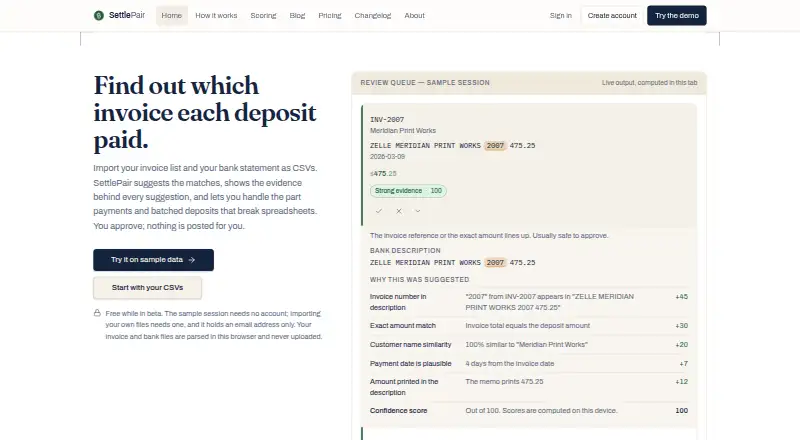
SettlePair is a browser-based tool for matching bank deposits to invoices from CSV exports. Its deterministic, rule-based matching displays evidence behind each score and leaves match decisions to the user; it does not use AI. Users can allocate partial payments, split one deposit across invoices, or apply several deposits to one invoice. After reviewing the results, they can export a reconciliation as `settlepair-reconciliation.csv`. Invoice and bank files are parsed in the browser and are never uploaded. An account for working with personal files stores an email address only; payer rules and opted-in saved sessions stay on the user’s device, and saved sessions expire after 30 days. SettlePair does not connect directly to banks or accounting systems, so users import CSV exports and record reviewed results themselves. The FAQ lists current desktop Chrome, Edge, Firefox, and Safari, as well as the same engines on mobile. Very large files may be limited by the device’s available memory. The product is intended for small businesses, bookkeepers, and accounts-receivable teams. Its free beta has no subscription tiers or payment collected.
Who it suits
It is intended for small businesses, bookkeepers, and accounts-receivable teams that reconcile invoices using CSV exports. It may suit users who want to review suggested matches before recording the results themselves.
What it does well
- Shows evidence behind each match score
- Handles partial and split payments
- Exports reviewed reconciliations to CSV
- Invoice and bank files are not uploaded
- Free beta has no usage limits
What to know first
- Does not connect to banks or accounting systems
- Large files depend on device memory
- Saved sessions expire after 30 days
- Support has no guaranteed response time
Limits
The free beta plan has no usage limits, but very large files can be constrained by the memory available on the device. The plan requires a free beta account for own files.
Plans
| Plan | Billed and limits | Price |
|---|---|---|
| Free reconciliation | during beta · Browser-only CSV parsing and scoring · Deterministic matching · Review queue · Partial, grouped and one-to-many allocations · CSV export · No usage limits | Free |
As settlepair.com lists them, read 15 Oct 2026. The maker's own page has the final word.
Getting started
- Open the SettlePair website in a supported browser.
- Create the free beta account if you need to work with your own files.
- Import bank and invoice CSV exports.
- Review the match evidence and decide which matches to accept.
- Export the reviewed reconciliation as settlepair-reconciliation.csv.
- Record the reviewed results in your bank or accounting system.
Overview
SettlePair is a web tool for matching bank deposits with invoices from CSV files. It suits small businesses, bookkeepers, and accounts-receivable teams that want to inspect and decide matches themselves. Its strongest appeal is a free, browser-based workflow with visible matching evidence; it is not a fit for teams seeking connected, end-to-end reconciliation.
Key features
SettlePair uses deterministic, rule-based matching and shows the evidence behind each score. That makes proposed matches easier to review than decisions made by an opaque automated process, while leaving the final call with the user. It does not use AI, and it is designed for oversight rather than unattended processing.
Payment allocation handles cases that do not fit a simple one-deposit-to-one-invoice pattern: users can record partial payments, split one deposit across invoices, or apply several deposits to one invoice. This flexibility helps with irregular payment patterns, but users still have to make and record those allocation decisions.
After review, SettlePair exports the result as settlepair-reconciliation.csv. It does not connect to banks or accounting systems, so users import their own CSV exports and enter the reviewed results into their other systems. Treat it as a reconciliation aid within a manual workflow, not a replacement for integrated accounting software.
Invoice and bank files are parsed in the browser and are never uploaded. Payer rules and opted-in saved sessions remain on the user's device, and saved sessions expire after 30 days. An account for handling your own files stores only an email address. These choices limit what is retained centrally, though very large files remain constrained by the memory available on the device.
Pricing
The Free reconciliation plan costs free, with no subscription tiers or payment collected during beta. It has no usage limits and includes browser-only CSV parsing and scoring. A free beta account is required for own files; there is no free trial because the plan itself is free. The absence of usage caps makes it accessible for ongoing use, but the plan does not add bank or accounting-system connections.
Platforms
SettlePair runs on the web. Its FAQ lists current desktop versions of Chrome, Edge, Firefox, and Safari, along with the same browser engines on mobile. Device memory can limit very large files, so local processing is not an assurance that every file size will be practical.
Who it's for
SettlePair is best for small businesses and finance teams that reconcile from CSV exports, want to see why a match was proposed, and are prepared to check and record the outcome themselves. Email support is best-effort, without a guaranteed response time or service-level commitment, which may matter to teams with time-critical reconciliation needs. The product is independently built and maintained by James F. Kollie, Jr.
Pros and cons
- Pros: Rule-based scores include visible evidence, helping users review rather than blindly accept matches.
- Pros: Partial payments and one-to-many or many-to-one allocations cover common exceptions to straightforward invoice matching.
- Pros: The free plan has no usage limits, and files are parsed in the browser rather than uploaded.
- Cons: Users must import CSV exports and record results themselves because there are no bank or accounting-system connections.
- Cons: Very large files depend on local device memory, and support has no guaranteed response time.
Alternatives
For other options, see Payment Reconciliation Software.
- UnPay Loan Management System is an alternative for readers who want a freemium product with Android, iOS, web, and API platforms, including a free Build plan with sandbox products, API endpoints, and community support.
- Fihary may suit readers seeking a freemium option across Android, web, and Windows, with a free plan capped at one Mobile Money operator, one user, and 10 transactions per day.
- BankStatementMatcher is worth considering for a freemium web or API tool whose free plan includes daily statement, upload-row, receipt-match, and insights caps, plus CSV export without signup.
- ReconcileIQ offers a freemium web and API option; its free plan provides one-off credits and one cash-accounting organisation in IQ Books, without overage.
- SettleFlow is a paid web option with a free diagnostic covering one source and 90 days of data, with a leakage report, order-level detail, and claim deadlines.
- Invoiced is a paid web and API alternative with custom pricing based on requirements and intended use.
- Loopfour Payment Reconciliation is another paid option available on web and API.
- Serrala Alevate AR Cash Application is a paid web alternative with pricing provided by quote.
Verdict
Choose SettlePair if you want a no-cost way to review CSV-based invoice reconciliation with visible matching evidence and flexible payment allocation. Its main advantage is user control without usage limits; look elsewhere if you need bank or accounting integrations, automated follow-through, or a support commitment.
Verdict
SettlePair offers CSV-based reconciliation with visible matching evidence and several ways to handle payment exceptions. Users should expect to import files and record results themselves, rather than rely on bank or accounting-system connections.
Questions
How much does SettlePair cost?
The Free reconciliation plan costs nothing. No subscription tiers or payment are collected during beta.
Does SettlePair have a free trial?
No. The facts list no free trial; the beta reconciliation plan is free.
Which platforms and browsers does it support?
It is a web product. It supports current desktop versions of Chrome, Edge, Firefox, and Safari, plus the same engines on mobile.
Does it connect to my bank or accounting software?
No. Users import CSV exports and record reviewed results themselves.
Are my invoice and bank files uploaded?
No. The files are parsed in the browser and are never uploaded. An account for own files stores an email address only.
Who makes SettlePair?
It is an independent product built and maintained by James F. Kollie, Jr.
Facts from SettlePair's own pages
- API and SDKs
- The published product pages describe no public API, SDK or developer integration surface. · settlepair.com, 15 Oct 2026
- Audience
- The pricing page describes the product as intended for small businesses, bookkeepers, and accounts-receivable teams. · settlepair.com, 9 Oct 2026
- Beta status
- SettlePair is described as an independent product in beta built and maintained by James F. Kollie, Jr. · settlepair.com, 15 Oct 2026
- Browser processing
- Parsing, scoring, allocations and export run in the browser tab using JavaScript. · settlepair.com, 15 Oct 2026
- Browser requirements
- Current desktop Chrome, Edge, Firefox and Safari versions are supported, with JavaScript enabled; mobile browsers using the same engines are also listed. · settlepair.com, 15 Oct 2026
- Browser support
- The FAQ lists current desktop versions of Chrome, Edge, Firefox, and Safari, plus the same engines on mobile. · settlepair.com, 9 Oct 2026
- Bulk approval
- Visible suggestions scoring at least 80 can be approved in one confirmed action. · settlepair.com, 15 Oct 2026
- Changelog: August 11 2026
- The August 11, 2026 release added payer-rule memory and opt-in session resume with 30-day expiry. · settlepair.com, 15 Oct 2026
- Changelog: August 18 2026
- The August 18, 2026 release added clearer confidence labels, evidence highlighting, keyboard review controls and the published scoring model. · settlepair.com, 15 Oct 2026
- Column mapping
- Column names are automatically mapped and can be corrected before reconciliation. · settlepair.com, 15 Oct 2026
- Confidence bands
- Scores of 80 or more are labelled Strong evidence, 60–79 Likely, 45–59 Worth a look, and below 45 Not suggested. · settlepair.com, 15 Oct 2026
- CSV inputs
- The invoice file uses invoice number, customer, amount and issue date fields, with due date optional; the bank file uses date, description or reference and amount. · settlepair.com, 15 Oct 2026
- Customer similarity
- Customer-name overlap and edit distance contribute between 10 and 20 points when similarity exceeds the stated floor. · settlepair.com, 15 Oct 2026
- Data handling
- Invoice and bank files are parsed in the browser and are never uploaded; an account for own files stores an email address only. · settlepair.com, 9 Oct 2026
- Date signal
- A plausible payment date contributes between 1 and 10 points, while dates more than 60 days away contribute nothing. · settlepair.com, 15 Oct 2026
- Deterministic matching
- The same two files produce the same scores because matching uses fixed rules rather than statistical or AI models. · settlepair.com, 15 Oct 2026
- Documentation
- Documentation consists of the FAQ, workflow guide, scoring-model page, security page, terms, acceptable-use policy and changelog. · settlepair.com, 15 Oct 2026
- Exact amount signal
- A deposit matching the invoice total to the cent contributes 30 points. · settlepair.com, 15 Oct 2026
- Export
- The reviewed output is exported as settlepair-reconciliation.csv with allocation, decision, confidence and evidence fields. · settlepair.com, 15 Oct 2026
- File limits
- Very large files are limited by the available memory on the user's device. · settlepair.com, 9 Oct 2026
- File separators
- Comma-, semicolon- and tab-separated files are supported. · settlepair.com, 15 Oct 2026
- Grouped allocations
- Users can split one deposit across several invoices, apply several deposits to one invoice, or leave money unapplied. · settlepair.com, 15 Oct 2026
- Integer-cent arithmetic
- Amounts and allocations are stored in integer cents to prevent rounding drift. · settlepair.com, 15 Oct 2026
- Integrations
- SettlePair has no bank or accounting-system connection and does not post entries to Xero, QuickBooks or other ledgers. · settlepair.com, 15 Oct 2026
Where SettlePair stands on Freedom251
- Payment Reconciliation Software#5 of 29