Freedom251 › Screen Time Management Apps

ScreenZen
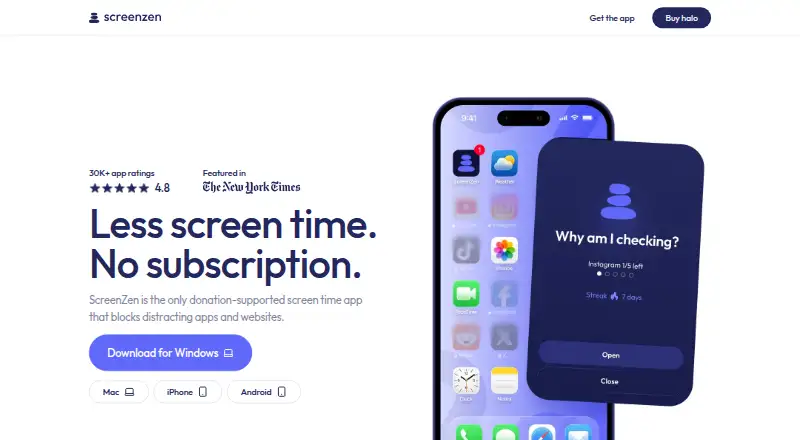
What ScreenZen is
ScreenZen blocks selected apps and websites to help people reduce screen time. Users can set daily limits, create scheduled focus blocks, use apps mindfully, and track progress. Its lock mode helps protect against common ways around blocking and can prevent uninstalling. The core app is free on Android, iOS, macOS, and Windows, and does not require an account. The maker says core settings and blocking data stay on the device and that the core app collects no personally identifiable information. Optional social accountability and Halo features may store account details and selected usage or Halo data in Google Firebase and cloud storage. Halo uses Bluetooth to block selected apps and sites when a device enters a chosen physical boundary. It supports unlimited phones and tablets running iOS 16.4+ or Android 12.0+, an adjustable radius up to 50 ft, and custom schedules. Halo costs $49, paid once; an account is needed to manage the device and add users. The terms require users to be at least 13 and state that ScreenZen is not medical or mental-health advice.
Who it suits
ScreenZen suits people seeking app and website limits, scheduled focus time, or progress tracking across mobile and desktop platforms. Halo may suit users who want blocking tied to a physical boundary.
What it does well
- Core app is free on four platforms.
- No account is needed for the core app.
- Supports daily limits and scheduled blocking.
- Lock mode can prevent uninstalling.
- Halo works with unlimited compatible phones and tablets.
What to know first
- Halo costs $49, paid once.
- Halo requires an account to manage devices and users.
- Halo requires iOS 16.4+ or Android 12.0+.
- Terms require users to be at least 13.
Limits
The core app is free. Halo costs $49, paid once and ships only within the US; its adjustable radius goes up to 50 ft, and compatible devices must run iOS 16.4+ or Android 12.0+.
Plans
| Plan | Billed and limits | Price |
|---|---|---|
| ScreenZen app | Core app is free; optional donations support the project | Free |
| halo | Pay once, use it forever · US shipping only · 1 halo · Free shipping · 30-day money-back guarantee | $49, paid once |
As screenzen.co lists them, read 3 Oct 2026. The maker's own page has the final word.
Getting started
- Visit https://screenzen.co/.
- Choose the core app for Android, iOS, macOS, or Windows.
- Select apps or websites to block and set daily limits or schedules.
- Use the free core app without creating an account.
- For Halo, purchase it for $49, paid once; US shipping only.
- Create an account to manage Halo and add users.
ScreenZen is a distraction-blocking app for people who want limits on selected apps and websites across mobile and desktop. It is a strong fit for anyone who wants scheduled rules without an account for the core app; Halo is a separate choice for people who want blocking tied to a physical boundary.
Overview
ScreenZen combines daily limits, scheduled focus blocks, mindful-use controls and progress tracking. That range makes it suitable for building repeatable habits, not just switching access off entirely. Lock mode can protect against common workarounds and prevent uninstalling, a meaningful safeguard for users who find it easy to abandon their own rules. It is less compelling if the goal is simply to observe usage rather than actively restrict it.
The core app does not require an account. Its maker says core settings and blocking data stay on the device, and that the app collects no personally identifiable information. Optional social-accountability and Halo features may store account details and selected usage or Halo data in Google Firebase and cloud storage. ScreenZen says it may use self-hosted OpenPanel analytics and does not collect per-app activity from apps users have not selected to block.
Key features
Rules for apps and websites
Users choose what to block and apply daily limits or recurring schedules. This is a practical fit for people whose distractions follow predictable routines, while mindful-use features and progress tracking offer a way to make restrictions less all-or-nothing. The controls cover websites as well as apps, and lock mode helps keep a chosen session in force.
Halo boundary blocking
Halo uses Bluetooth to block selected apps and websites when a device enters a chosen physical boundary. Its radius is adjustable up to 50 ft, it supports custom schedules, and it works with unlimited iOS 16.4+ or Android 12.0+ phones and tablets. That makes it useful for household or place-based boundaries; the trade-off is that it is a separate hardware purchase and requires an account to manage the device and add users.
Pricing
The ScreenZen app costs nothing, with optional donations supporting the project. There is no free trial because the core app is free. It is the natural starting point for anyone who wants the app’s blocking controls without an upfront cost.
Halo costs $49, paid once: pay once, use it forever. The purchase is for 1 halo, includes free shipping, is limited to US shipping, and comes with a 30-day money-back guarantee. Choose it only if physical-boundary blocking justifies buying the device; otherwise the free app covers the core app-and-website blocking use case.
Platforms
ScreenZen is available on Android, iOS, macOS and Windows. Halo compatibility is narrower: iOS 16.4+ and Android 12.0+ phones and tablets.
Who it's for
ScreenZen suits people who want to curb chosen distractions with scheduled blocks, daily caps and a safeguard against easy rule-breaking. Its account-free core and on-device storage are also a good match for people who prefer not to create an account for basic use. Halo is aimed at users who want those restrictions to activate around a physical boundary. ScreenZen is not medical or mental-health advice, and its terms require users to be at least 13.
Pros and cons
- Pro: The core app is free and account-free, so users can set up blocking without a subscription or sign-in.
- Pro: Daily limits, recurring schedules, mindful-use controls and lock mode support several ways to make restrictions stick.
- Pro: The app spans Android, iOS, macOS and Windows, while Halo can work with unlimited compatible phones and tablets.
- Con: Halo is a separate $49 as a one-time purchase, and shipping is US only.
- Con: Halo and optional social-accountability features can involve account details and cloud storage, unlike the account-free core app.
Alternatives
Freedom is worth considering if you want multi-device sync and custom blocklists, or need Linux and web support; its free plan is limited and a free trial is available.
StayFree is a free option to consider if cross-device screen-time tracking and usage control matter more than ScreenZen’s scheduled blocking emphasis.
Opal may suit someone who wants blocking with basic timers and soundscapes on iOS, Android or Mac; its free plan is limited to one rule, with a free trial also available.
YourHour is another Android and iOS option, with a free download that contains ads and in-app purchases.
AppBlock is an alternative for users comparing freemium app-blocking options on Android, iOS or through an extension.
Apple Screen Time is a free built-in choice for Apple devices, particularly for managing a child’s controls across a family group with Family Sharing and individual Apple Accounts.
Focusly is a free, offline, no-account option for macOS, Windows and extension users who want all features under an MIT license.
Jomo is an iOS and macOS alternative with a free plan capped at one session, one action or limit, and one screen-time budget.
For more options, browse Screen Time Management Apps or Distraction Blocking Software.
Verdict
ScreenZen is a sound pick for people who want free, account-free blocking across mobile and desktop, with schedules, daily limits and lock mode to reinforce their intentions. Halo is a distinctive add-on for physical-boundary routines, but its price, US-only shipping and account requirement make it less suitable for anyone who only needs software-based limits.
Verdict
ScreenZen provides free app and website blocking with scheduling and limits. Halo adds Bluetooth-based boundary blocking at a one-time listed price.
Questions
Is ScreenZen free?
The core ScreenZen app is free. Optional donations support the project.
What does Halo cost?
Halo costs $49, paid once. The plan includes one Halo, free shipping, and a 30-day money-back guarantee; shipping is US only.
Which platforms does ScreenZen support?
The core app supports Android, iOS, macOS, and Windows. Halo works with phones and tablets running iOS 16.4+ or Android 12.0+.
Do I need an account?
The core app does not require an account. Halo requires one to manage the device and add users.
What does Halo do?
It uses Bluetooth to block selected apps and websites when a device enters a chosen physical boundary. It supports custom schedules and an adjustable radius up to 50 ft.
What does ScreenZen say about privacy?
The maker says the core app keeps settings and blocking data on the device and collects no personally identifiable information. Optional social accountability and Halo features may store account details and selected usage or Halo data in Google Firebase and cloud storage.
Facts from ScreenZen's own pages
- Account requirement
- The core ScreenZen app does not require an account, while Halo requires an account to manage the device and add users. · screenzen.co, 3 Oct 2026
- Analytics
- ScreenZen says it may use self-hosted OpenPanel analytics and does not collect per-app usage or activity from apps users have not chosen to block. · screenzen.co, 3 Oct 2026
- App features
- Users can choose apps, set daily limits, schedule focus blocks, use apps mindfully, and track their progress. · screenzen.co, 3 Oct 2026
- Blocking controls
- Users choose which apps and websites to block and can use schedules or daily limits. · screenzen.co, 3 Oct 2026
- Halo
- Halo uses Bluetooth to block selected apps and websites when a device enters a chosen physical boundary. · screenzen.co, 3 Oct 2026
- Halo compatibility
- Halo works with unlimited phones and tablets running iOS 16.4+ or Android 12.0+. · screenzen.co, 3 Oct 2026
- Halo limits
- Halo has an adjustable radius up to 50 ft and supports custom schedules. · screenzen.co, 3 Oct 2026
- Headquarters
- Sonoma, California, United States · screenzen.co, 23 Sept 2026
- Lock mode
- Lock mode helps protect against common loopholes and can prevent uninstalling. · screenzen.co, 3 Oct 2026
- Optional data
- Optional social accountability and Halo features can store account details and selected usage or Halo data in Google Firebase and cloud storage. · screenzen.co, 3 Oct 2026
- Privacy
- The maker says core app settings and blocking data are stored only on the device and that the core app collects no personally identifiable information. · screenzen.co, 3 Oct 2026
- Purpose
- ScreenZen blocks distracting apps and websites to help people reduce screen time. · screenzen.co, 3 Oct 2026
- Security reporting
- Potential Halo security issues can be reported in the app or by email; the stated acknowledgement target is within five business days. · screenzen.co, 3 Oct 2026
- Support
- The site lists [email protected] and invites users to join its Discord community. · screenzen.co, 3 Oct 2026
- Terms and audience
- The terms describe ScreenZen as a digital-wellbeing tool, require users to be at least 13, and state that it is not medical or mental-health advice. · screenzen.co, 3 Oct 2026
Where ScreenZen stands on Freedom251
- Screen Time Management Apps#14 of 36
- Distraction Blocking Software#19 of 29