Freedom251 › Screen Time Management Apps

StayFree
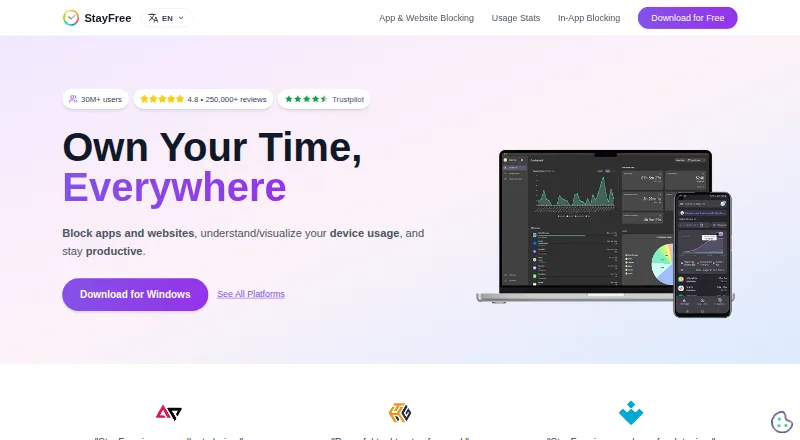
What StayFree is
StayFree tracks device use and helps people manage distractions across apps and websites. It offers instant and scheduled blocks, daily limits, and session limits, while Focus Mode can make selected websites inaccessible on a schedule or when activated manually. For social media, it can hide distracting parts of a site without blocking the whole site. Website limits can block further use, send a notification, or show a dismissible popup when time is up. Cross-device statistics and graphs show usage across connected devices; mobile, PC, and smartwatch data can be linked with a six-digit pairing code. The browser extension includes options to import or export usage data and settings, delete history, and reset settings. PIN Protection limits access to significant extension settings. StayFree is free and listed for Android, iOS, Windows, macOS, Linux, browsers, and Wear OS. The maker describes it for both work and personal use, with support by email and through a Discord community.
Who it suits
StayFree suits people who want to track and limit device use for work or personal purposes. Its cross-device statistics and range of blocking controls may be useful for people managing distractions across devices and browsers.
What it does well
- Free plan is available.
- Offers daily, session, instant, and scheduled blocks.
- Usage statistics and graphs cover linked devices.
- Can hide distracting social media elements.
- Supports Android, iOS, desktop, browsers, and Wear OS.
What to know first
- Device linking requires a six-digit pairing code.
- PIN Protection applies to extension settings.
Limits
The listed StayFree plan is free. Linking mobile, PC, and smartwatch usage data requires a six-digit device pairing code.
Plans
| Plan | Billed and limits | Price |
|---|---|---|
| StayFree | Download for free · cross-device screen time tracking and usage control | Free |
As stayfreeapps.com lists them, read 29 Sept 2026. The maker's own page has the final word.
Getting started
- Open the StayFree website or download the app or extension for a supported platform.
- Connect device usage by entering the six-digit pairing code on the devices you want linked.
- Choose instant blocks, scheduled blocks, daily limits, or session limits.
- Set Focus Mode for selected websites if needed.
- Use Backup & Restore or PIN Protection in the extension settings if needed.
Overview
StayFree is a screen-time manager for people who want to see where their device time goes and put practical limits on apps and websites. It suits users who need more than a usage report, particularly those coordinating boundaries across several kinds of devices. Its mix of cross-device tracking, flexible blocking and a free plan makes it a strong starting point; users seeking a more narrowly focused tool may prefer an alternative.
Key features
Usage tracking across devices
StayFree presents usage statistics and graphs for connected devices. A six-digit pairing code links mobile, PC and smartwatch usage data, which can give people who move between devices a more unified view of their screen time. That broad view is useful for spotting patterns, though it depends on connecting the devices whose usage you want to include.
Controls that fit different boundaries
Blocking can be immediate or scheduled, and users can set daily or session limits. Focus Mode makes selected websites inaccessible on a schedule or whenever it is manually activated. These options suit people who want a firm boundary during work or other planned periods, while the range of controls may be more than needed if all they want is a basic usage report.
For social media, StayFree can hide distracting parts of a site without blocking the whole site. Website limits can block further use, send a notification or display a dismissible popup when the limit is reached. The softer options let users choose a reminder rather than a hard stop, but a dismissible popup is not a strict barrier.
Extension safeguards and data controls
The extension’s Backup & Restore settings allow users to export or import usage data and settings, delete history, or reset settings. PIN Protection requires a PIN to access and change significant extension settings. These controls are useful for people who want a way to preserve or clear their setup and prevent casual changes, though the PIN protection described applies to extension settings.
Pricing
StayFree costs nothing. The free plan includes cross-device screen-time tracking and usage control, making it a straightforward fit for individuals who want its core tracking and restriction tools without a subscription. No other StayFree plan is presented, so there is no paid tier to weigh against the free option.
The maker describes StayFree for work and personal use. It does not provide a seat-based plan in the stated offer, so this is best judged as an individual tool rather than a team purchase.
Platforms
StayFree supports Windows, macOS, Linux, Android, iOS, Chrome, Firefox, Safari and Wear OS. This unusually wide spread is a practical advantage for people who want to link usage across desktop, mobile and smartwatch devices. Its device-pairing feature connects mobile, PC and smartwatch data using a six-digit code.
Who it's for
StayFree is best for people who want both a cross-device picture of their screen time and several ways to act on it, from scheduled website restrictions to daily or session limits. It is also a good fit for users who prefer targeted social-media interventions over blocking an entire site. It is less compelling for someone who only needs a single-platform tracker or wants a non-dismissable response to every website limit.
Pros and cons
- Pros: Cross-device usage statistics and graphs, paired with support for desktop, mobile and Wear OS, suit people whose device time is spread across platforms.
- Pros: Instant blocks, schedules, daily and session limits, plus multiple website-limit responses, give users meaningful choice over how restrictive their controls are.
- Pros: Hiding distracting social-media sections can preserve access to the rest of a site.
- Cons: Website-limit popups can be dismissed, so they are not a firm stop for users who need strict enforcement.
- Cons: The PIN safeguard described is for significant extension settings, not a general claim of protection across every platform.
Alternatives
Screen Time Management Apps is the broader category to browse if you want to compare other approaches.
- Freedom is worth considering if you want a free plan with apps, websites or internet blocking, multi-device sync, custom blocklists and website exceptions.
- Opal may suit someone who wants a free option limited to iOS, Android and Mac, with one rule, basic timers and soundscapes, app blocking and a same-day Opal Score.
- ScreenZen is a free alternative for users on Android, iOS, macOS or Windows who want its core app without a trial-based offer.
- YourHour is an Android and iOS alternative with a free download that contains ads and in-app purchases; its Pro Monthly plan costs $1.99 a month.
- AppBlock is another freemium option for Android, iOS and browser-extension users.
- Focusly is a free choice for extension, macOS and Windows users who want offline use, no account and MIT licensing.
- Google Digital Wellbeing is a free Android-only alternative.
- Hikage is a macOS alternative with a free plan for local usage records, daily and per-app statistics, data export and iCloud Backup.
Verdict
Choose StayFree if you want a free screen-time manager that combines broad platform support with cross-device reports and several ways to limit distracting apps and websites. Its flexibility, especially targeted social-media hiding and configurable website-limit responses, is the main reason to choose it. Look elsewhere if a dismissible prompt is too easy to ignore or if you want a tool focused on a different platform range or control style.
Verdict
StayFree combines usage tracking with several ways to limit access to distracting apps and websites. Its free plan and broad platform support make it an option for people seeking controls across multiple devices.
Questions
How much does StayFree cost?
StayFree is free. Its plan is listed as free.
Which platforms does StayFree support?
It is listed for Windows, macOS, Linux, Android, iOS, web, browser extensions, and Wear OS. Chrome, Firefox, and Safari are named among its supported browsers.
Can StayFree limit websites on a schedule?
Yes. Focus Mode can make selected websites inaccessible on a schedule or when activated manually.
Can I link usage across devices?
Yes. Enter a six-digit pairing code to connect mobile, PC, and smartwatch usage data.
Can StayFree hide only parts of a social media site?
Yes. It can hide distracting parts of social media without blocking the entire site.
Who makes StayFree?
The site identifies ST Pulse as a Sensor Tower company. Support is listed through [email protected] and a Discord community.
Facts from StayFree's own pages
- Blocking controls
- Its blocking options include instant blocks, scheduled blocks, daily limits, and session limits. · stayfreeapps.com, 29 Sept 2026
- Data portability
- The extension’s Backup & Restore settings let users export or import usage data and settings, delete history, or reset settings. · userguide.stayfreeapps.com, 29 Sept 2026
- Device linking
- Users can connect mobile, PC, and smartwatch usage data by entering a six-digit device pairing code. · userguide.stayfreeapps.com, 29 Sept 2026
- Focus schedules
- Focus Mode can make selected websites inaccessible on a schedule or when manually activated. · userguide.stayfreeapps.com, 29 Sept 2026
- Headquarters
- San Francisco, California, United States · stayfreeapps.com, 28 Sept 2026
- In-app blocking
- StayFree can hide distracting parts of social media without blocking the entire site. · stayfreeapps.com, 29 Sept 2026
- Ownership
- The site identifies ST Pulse as a Sensor Tower company. · stayfreeapps.com, 29 Sept 2026
- Purpose
- StayFree tracks device usage, blocks apps and websites, and helps users stay productive. · stayfreeapps.com, 29 Sept 2026
- Security control
- PIN Protection requires a PIN to access and modify significant extension settings. · userguide.stayfreeapps.com, 29 Sept 2026
- Support
- The maker lists [email protected] and a Discord community for support. · stayfreeapps.com, 29 Sept 2026
- Usage stats
- StayFree provides cross-device usage statistics and graphs. · stayfreeapps.com, 29 Sept 2026
- Website limits
- Website limits can block further use, send a notification, or show a dismissible popup when a time limit is reached. · userguide.stayfreeapps.com, 29 Sept 2026
- Who it serves
- The maker describes the product for work and personal usage. · stayfreeapps.com, 29 Sept 2026
Where StayFree stands on Freedom251
- Screen Time Management Apps#18 of 36