Freedom251 › Screen Time Management Apps
Focusly
What Focusly is
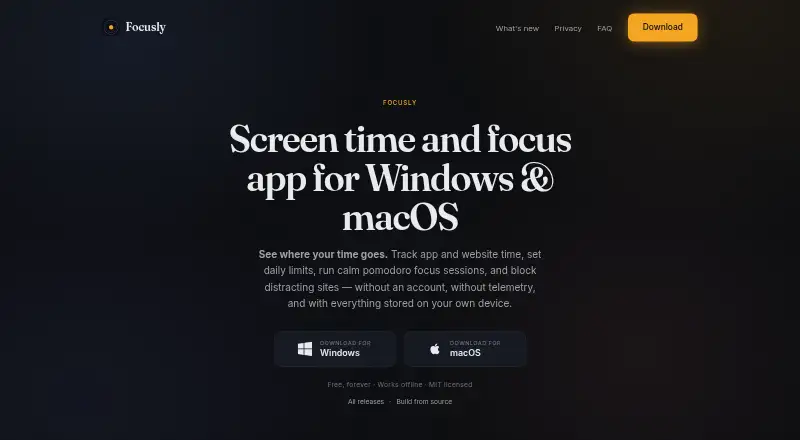
Focusly is a free desktop focus tool for tracking application and website time, setting daily limits, running focus sessions, and blocking distractions. Its 25-minute Pomodoro sessions include focus-day and streak tracking. Users can schedule blocking for work hours or wind-down periods, preview blocked items, and choose soft warnings or optional hard termination with one-click overrides. The app reads the foreground application and supported browser address-bar URL, but not keystrokes, clipboard contents, screenshots, or file contents. Usage history, schedules, and focus sessions are kept in a SQLite file on the user's device. Focusly has no account, login, cloud sync, analytics, or telemetry, and its desktop app works offline. It supports Windows 10 and 11, and macOS 11 Big Sur or later on Intel and Apple Silicon. The optional Chrome extension redirects blocked sites to a local block page and requires the desktop app to be running; network access is needed for that extension. On Windows, website blocking uses the system hosts file, with temporary or permanent unblocking available. The full source is available under the MIT license.
Who it suits
Focusly suits people who want local application and website tracking, limits, and scheduled blocking on Windows or macOS. It may also fit users who prefer offline desktop use without an account or cloud sync.
What it does well
- Tracks application and supported website time.
- Includes 25-minute sessions and streak tracking.
- Stores history and sessions in a local SQLite file.
- Desktop app works offline.
- Full source is available under the MIT license.
What to know first
- Chrome extension requires the desktop app to run.
- Extension needs network access.
- Website blocking on Windows uses the system hosts file.
Limits
The Free plan costs nothing, billed free forever, and includes all features. The Chrome extension requires the desktop app to be running and needs network access; the main desktop app works offline.
Plans
| Plan | Billed and limits | Price |
|---|---|---|
| Free | Free, forever · all features · works offline · no account · no feature paywall | Free |
As focusly.so lists them, read 15 Oct 2026. The maker's own page has the final word.
Getting started
- Visit https://focusly.so/.
- Install the desktop app for Windows 10 or 11, or macOS 11 Big Sur or later.
- Set application and website limits or schedule blocking.
- Start a 25-minute focus session, if desired.
- Install the optional Chrome extension for site blocking; keep the desktop app running.
Verdict
Focusly combines time tracking, focus sessions, and blocking with local storage and offline desktop use. The Chrome extension has a desktop-app dependency, and Windows website blocking changes the system hosts file.
Questions
How much does Focusly cost?
Its Free plan costs nothing and is billed free forever.
Is there a free trial?
No. Focusly has a free plan instead.
Which platforms does it support?
Focusly supports Windows 10 and 11, macOS 11 Big Sur or later on Intel and Apple Silicon, and a Chrome extension.
Does Focusly work offline?
The main desktop app works fully offline. The optional Chromium extension needs network access and the desktop app running.
Is Focusly open source?
Yes. Its full source is available on GitHub under the MIT license.
What does Focusly read?
It reads the foreground application and supported browser address-bar URL. It does not read keystrokes, clipboard contents, screenshots, or file contents.
Facts from Focusly's own pages
- Accounts
- Focusly has no account system, login, cloud sync, analytics, or telemetry. · focusly.so, 30 Sept 2026
- API and SDKs
- The homepage does not describe a public API, SDK, webhook interface or developer integration surface. · focusly.so, 15 Oct 2026
- Blocking
- Focusly provides soft warnings and optional hard termination, with one-click overrides available. · focusly.so, 30 Sept 2026
- Browser extension
- The Focusly Blocker Chrome extension redirects blocked sites to a local block page and requires the desktop app to be running. · focusly.so, 30 Sept 2026
- Chrome extension behavior
- The extension redirects blocked sites to a local block page in the same Chrome tab without opening a new window. · chromewebstore.google.com, 15 Oct 2026
- Chrome extension dependency
- The Focusly Blocker extension requires the Focusly desktop application to be running. · chromewebstore.google.com, 15 Oct 2026
- Chrome extension privacy disclosure
- The Chrome Web Store developer declaration says the extension does not collect, sell or transfer user data for unrelated purposes. · chromewebstore.google.com, 15 Oct 2026
- Chrome extension size
- The Chrome Web Store lists the extension size as 31.9 KiB. · chromewebstore.google.com, 15 Oct 2026
- Chrome extension update
- The Chrome Web Store listing says it was updated on August 28, 2026. · chromewebstore.google.com, 15 Oct 2026
- Chrome extension version
- The listed Focusly Blocker version is 1.1.1. · chromewebstore.google.com, 15 Oct 2026
- Extension data handling
- The extension is described as reading only URLs and not page contents, cookies, passwords, screenshots, keystrokes or browsing history. · focusly.so, 15 Oct 2026
- Focus sessions
- Focus sessions use a 25-minute Pomodoro timer with pausing, ending and focus-day streak tracking. · focusly.so, 15 Oct 2026
- Integrations
- No third-party integrations are listed on the product homepage. · focusly.so, 15 Oct 2026
- Licence
- The source is published under the MIT licence. · focusly.so, 15 Oct 2026
- Licensing
- Focusly's full source is available on GitHub under the MIT license. · focusly.so, 30 Sept 2026
- Limit: desktop-only coverage
- The maker lists Windows and macOS desktop support, with no phone application listed. · focusly.so, 15 Oct 2026
- Limit: documentation
- The homepage links to GitHub source, architecture and roadmap materials, but the linked repository pages returned 404 or unavailable responses when opened. · github.com, 15 Oct 2026
- Limit: extension availability
- Browser blocking is optional and depends on the separate Chromium extension plus the running desktop app. · focusly.so, 15 Oct 2026
- Local storage
- Usage history, schedules and sessions are stored in a local SQLite database that users can back up, move or delete. · focusly.so, 15 Oct 2026
- macOS support
- The macOS build supports macOS 11 Big Sur and later on Intel and Apple Silicon. · focusly.so, 15 Oct 2026
- Maker identity
- The site footer identifies the project as built by Focusly contributors. · focusly.so, 15 Oct 2026
- Offline operation
- The desktop application is designed to work fully offline; only the optional browser extension needs network access. · focusly.so, 15 Oct 2026
- Offline use
- The main desktop app works fully offline; network access is only needed for the optional Chromium extension. · focusly.so, 30 Sept 2026
- Overrides
- Users can override a block for five minutes, 15 minutes, one hour or permanently. · focusly.so, 15 Oct 2026
Where Focusly stands on Freedom251
- Screen Time Management Apps#1 of 36