Freedom251 › Screen Time Management Apps
Focusd
What Focusd is
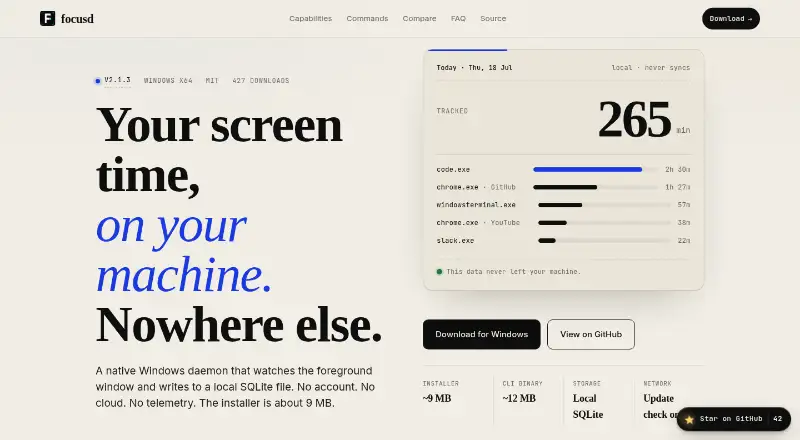
Focusd is a free screen-time tracker for Windows that records use of applications and browser tabs. It saves activity to a local SQLite database, without cloud syncing, and the site says there is no account or telemetry. Its background process checks the active window at a configurable interval, set to five seconds by default. Browser titles are sorted into 74 built-in categories, and users can add custom browsers.
You can set a daily time ceiling for each executable; Windows toast notifications appear when a ceiling is crossed. A configurable Pomodoro timer starts at 25 minutes and includes break reminders. Usage reports can be exported as CSV or JSON from the TUI Settings tab. Usage history is retained for 30 days. Focusd is MIT licensed, with source code available on GitHub. The download supports Windows 10 or 11 on x64. The installer is about 9 MB and the CLI binary about 12 MB. The maker presents Focusd as an option for people who want to keep usage data out of a SaaS service.
Who it suits
Focusd suits Windows users who want to track application and browser-tab use while keeping records on their own device. Its limits, timer, and exports may also suit people who want lightweight time tracking and focus sessions without an account.
What it does well
- Stores usage data locally without cloud syncing.
- Groups browser titles into 74 built-in categories.
- Sets daily limits per executable with Windows notifications.
- Includes a configurable Pomodoro timer and break reminders.
- Exports reports as CSV or JSON.
- MIT licensed, with source code on GitHub.
What to know first
- Available for Windows 10 or 11 on x64 only.
- Usage history retention is 30 days.
- No free trial is offered.
Limits
The free plan supports Windows x64, and usage history retention is 30 days. The download supports Windows 10 or 11; macOS and Linux are not supported yet.
Plans
| Plan | Billed and limits | Price |
|---|---|---|
| Free | Free alternative; Windows x64 | Free |
As focusd.0xarchit.is-a.dev lists them, read 7 Oct 2026. The maker's own page has the final word.
Getting started
- Open the Focusd website.
- Download the Windows 10 or 11 x64 build.
- Install Focusd on Windows.
- Configure the tracking interval, app limits, or Pomodoro timer as needed.
- Export reports as CSV or JSON from the TUI Settings tab.
Verdict
Choose Focusd if you use Windows and want local screen-time tracking with app limits, a Pomodoro timer, and report exports. It is not suited to macOS or Linux users, and its usage history is retained for 30 days.
Questions
How much does Focusd cost?
Focusd is free; its listed plan is free.
Is there a free trial?
No, Focusd lists no free trial.
Which platforms does it support?
It supports Windows 10 or 11 on x64. macOS and Linux are not supported yet.
Is Focusd open source?
Focusd is MIT licensed, and its source code is available on GitHub.
Where is activity data stored?
Usage data is stored in a local SQLite database and is not synced to the cloud. The site says Focusd has no account or telemetry; its only network request is an optional update check.
Does Focusd integrate with other services?
No external integrations are listed. It groups browser tab titles and supports custom browser executables.
Facts from Focusd's own pages
- App limits
- Users can set daily time ceilings per executable, with Windows toast notifications when a limit is crossed. · focusd.0xarchit.is-a.dev, 7 Oct 2026
- Browser grouping
- Browser titles are grouped into 74 built-in categories, and users can register custom browsers. · focusd.0xarchit.is-a.dev, 7 Oct 2026
- Distribution size
- The installer is about 9 MB and the CLI binary is about 12 MB. · focusd.0xarchit.is-a.dev, 7 Oct 2026
- Export
- Tracking data can be exported as CSV or JSON from the TUI Settings tab. · focusd.0xarchit.is-a.dev, 7 Oct 2026
- Focus timer
- Focusd includes a configurable Pomodoro timer with a 25-minute default and break reminders. · focusd.0xarchit.is-a.dev, 7 Oct 2026
- Integrations
- Focusd lists no external integrations; it groups browser tab titles and supports custom browser executables. · focusd.0xarchit.is-a.dev, 7 Oct 2026
- Intended users
- The maker describes Focusd as a free alternative to RescueTime, StayFree, and Toggl Track for people who prefer not to send their usage data to a SaaS service. · focusd.0xarchit.is-a.dev, 7 Oct 2026
- License
- Focusd is MIT licensed, and its source code is available on GitHub. · focusd.0xarchit.is-a.dev, 7 Oct 2026
- Local storage
- Usage data is stored in a local SQLite database and is not synced to the cloud. · focusd.0xarchit.is-a.dev, 7 Oct 2026
- Privacy
- The site states that Focusd has no account, cloud sync, or telemetry, and that its only network request is an optional update check. · focusd.0xarchit.is-a.dev, 7 Oct 2026
- Purpose
- Focusd is a native Windows screen-time tracker that records app and browser-tab usage. · focusd.0xarchit.is-a.dev, 7 Oct 2026
- Supported system
- The download is for Windows 10 or 11, x64; the site says macOS and Linux are not supported yet. · focusd.0xarchit.is-a.dev, 7 Oct 2026
- Tracking
- The daemon polls the foreground window at a configurable interval that defaults to five seconds. · focusd.0xarchit.is-a.dev, 7 Oct 2026
Where Focusd stands on Freedom251
- Screen Time Management Apps#12 of 36