ScanFlow
What ScanFlow is
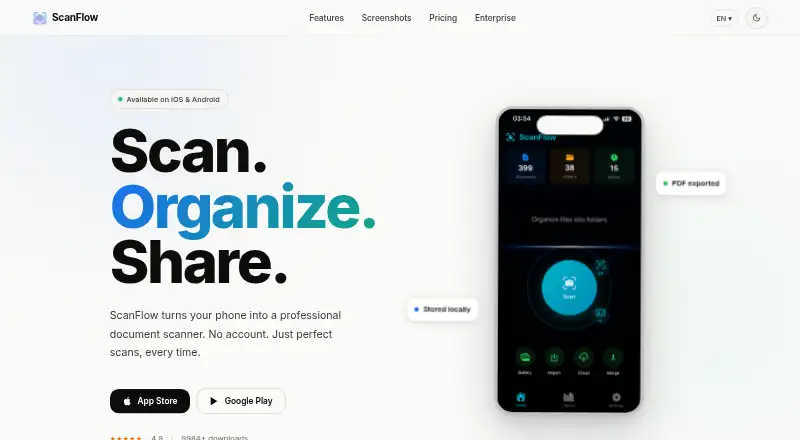
ScanFlow is a mobile document scanning and PDF management app for iPhone, iPad, and Android. It detects document edges automatically and can combine multi-page scans into PDFs. You can organize documents with folders, tags, notes, automatic classification, and Smart Folders for types such as receipts and contracts. OCR extracts searchable text from scans. The app also supports PDF signing and annotation, merging documents, and exporting PDFs, JPGs, or extracted OCR text. Optional direct cloud backup is listed for iCloud Drive, Google Drive, Dropbox, and OneDrive. Scanning, organizing, signing, OCR, and core features work offline; cloud backup and purchase restoration need an internet connection. The privacy policy says documents are stored locally and the app has no user accounts, personal data collection, analytics, advertising SDKs, or third-party trackers. It also lists app sandboxing, PDF password protection, encrypted HTTPS/TLS cloud transfers, and on-device OCR and image processing. ScanFlow has a free plan with unlimited scans and a Pro plan listed at $29.99 per year, with a 7-day trial. A Lifetime plan is listed at $69.99 per month and described as a one-time payment.
Who it suits
ScanFlow suits people who want to scan and organize documents on an iPhone, iPad, or Android device, including offline. Its folders, Smart Folders, OCR, PDF signing, and export tools also suit people managing searchable document collections.
What it does well
- Automatic edge detection and multi-page PDF scanning.
- Folders, tags, notes, and Smart Folders organize documents.
- OCR extracts searchable text from scans.
- Core scanning and document tools work offline.
- Optional backup supports four listed cloud services.
What to know first
- Cloud backup and purchase restoration need internet access.
- The free plan excludes OCR, signing, merging, and cloud backup.
- The Lifetime plan is listed at $69.99 per month.
Limits
The Free plan includes scanning, folders and tags, and basic organization, but excludes OCR recognition, signing, merging, cloud backup, and sharing and export. Pro Yearly is listed at $29.99 per year with a 7-day free trial. The Lifetime plan is listed at $69.99 per month and described as a one-time payment.
Plans
| Plan | Billed and limits | Price |
|---|---|---|
| Pro Yearly | 7-day free trial · No watermark · Share and export · Cloud backup · OCR recognition · Document signing · Merge documents | $29.99 a year |
| Free | Document scanning · Folders & tags · Basic organization · Unlimited scans · Local storage | Free |
| Pro | $29.99/year · Everything in Free · No watermark · Share & export · Cloud backup · OCR recognition · Document signing · Merge documents · Password protection · ID extraction | $29.99 a year |
| Lifetime | $69.99 once · Everything in Pro · One-time payment · No subscription · Free updates forever | $69.99, paid once |
As scanflow.me lists them, read 23 Sept 2026. The maker's own page has the final word.
Getting started
- Visit https://scanflow.me/.
- Choose the iOS or Android app for your device.
- Start with the Free plan or choose a paid plan.
- Use the listed 7-day trial with Pro Yearly if you choose that plan.
Verdict
Choose ScanFlow if you want mobile scanning, document organization, and offline access, with paid options for OCR, signing, and cloud backup. The free plan covers unlimited scans, while sharing and export, OCR, and other listed Pro features require a paid plan. The Lifetime plan is described as a one-time payment but listed at $69.99 per month.
Questions
Is ScanFlow free?
Yes. Its Free plan costs nothing and includes document scanning, folders and tags, basic organization, and unlimited scans.
How much do paid plans cost?
Pro is listed at $29.99 per year. Pro Yearly is also listed at $29.99 per year with a billed 7-day free trial. Lifetime is listed at $69.99 per month and described as a one-time payment.
Which devices does it support?
ScanFlow is available for iPhone, iPad, and Android. The site lists iOS 17.4+.
Does ScanFlow work offline?
Scanning, organizing, signing, OCR, and core features work offline. Cloud backup and purchase restoration need internet access.
Which cloud services are listed?
Optional direct cloud backup is listed for iCloud Drive, Google Drive, Dropbox, and OneDrive.
What does the privacy policy say?
It says documents are stored locally and that ScanFlow has no user accounts and does not collect personal data or include analytics, advertising SDKs, or third-party trackers.
Facts from ScanFlow's own pages
- Android app
- Yes · scanflow.me, 23 Sept 2026
- Auto capture
- Yes · scanflow.me, 23 Sept 2026
- Availability
- The site says ScanFlow is available for iPhone, iPad, and Android, and lists iOS 17.4+. · scanflow.me, 8 Oct 2026
- Cloud integrations
- Optional direct cloud backup is listed for iCloud Drive, Google Drive, Dropbox, and OneDrive. · scanflow.me, 8 Oct 2026
- Export
- Users can merge PDFs and export PDF, JPG, or extracted OCR text. · scanflow.me, 8 Oct 2026
- Free plan
- Yes · scanflow.me, 23 Sept 2026
- iOS app
- Yes · scanflow.me, 23 Sept 2026
- Multipage PDF
- Yes · scanflow.me, 23 Sept 2026
- OCR included
- Yes · scanflow.me, 23 Sept 2026
- OCR and signing
- The app can extract searchable text from scans and lets users sign and annotate PDFs. · scanflow.me, 8 Oct 2026
- Offline use
- Scanning, organizing, signing, OCR, and core features work offline; cloud backup and purchase restoration require internet access. · scanflow.me, 8 Oct 2026
- Organization
- It offers folders, tags, notes, auto-classification, and Smart Folders for document types such as receipts and contracts. · scanflow.me, 8 Oct 2026
- Privacy
- The privacy policy says documents are stored locally, the app has no user accounts, and it does not collect personal data or include analytics, advertising SDKs, or third-party trackers. · scanflow.me, 8 Oct 2026
- Product
- ScanFlow is a mobile document scanning and PDF management app. · scanflow.me, 8 Oct 2026
- Scanning
- It uses automatic edge detection and supports multi-page scans that can be combined into a PDF. · scanflow.me, 8 Oct 2026
- Searchable PDF
- Yes · scanflow.me, 23 Sept 2026
- Security
- The privacy policy lists app sandboxing, PDF password protection, encrypted HTTPS/TLS cloud transfers, and on-device OCR and image processing. · scanflow.me, 8 Oct 2026
- Support
- ScanFlow lists support by email and says it typically responds within 24 hours. · scanflow.me, 8 Oct 2026
Where ScanFlow stands on Freedom251
- Scanner apps#23 of 76
- Mobile Scanning Apps#24 of 76