Freedom251 › Mobile Scanning Apps
QuickScan
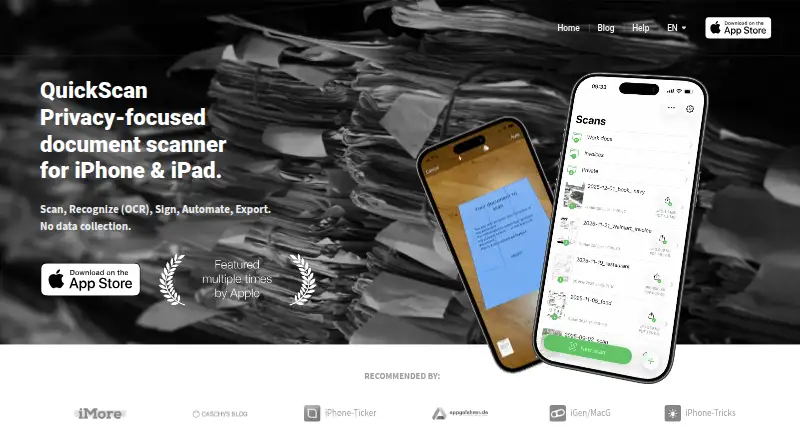
What QuickScan is
QuickScan is a document-scanning app for iPhone and iPad that can capture pages, recognize text, add signatures and export files. It detects document edges automatically and can name and file scans. Its OCR can embed recognized text in PDFs, making that text searchable and selectable; the app also supports multipage PDFs. You can sign with a finger or Apple Pencil and protect signatures using Face ID or Touch ID. Export formats include PDF, JPG, Excel, CSV and plain text, with destinations including iCloud Drive, Dropbox, OneDrive, SharePoint, Google Drive, WebDAV, paperless-ngx, SMB, email, pCloud, NextCloud, NAS and DEVONthink. Widgets and Siri Shortcuts can start scans using preconfigured Export Favorites. The maker says scanning and OCR happen on-device, the app collects no personal data and it is GDPR compliant. Personal use is free, and optional donations do not limit functionality. Professional use requires a VIP donation in QuickScan or a QuickScan Enterprise license. The app is native to iOS and is not available on Android.
Who it suits
QuickScan suits iPhone and iPad users who need searchable scans, signatures or automated exports. Professional users need either a VIP donation or an Enterprise license.
What it does well
- On-device scanning and OCR, according to the maker.
- Searchable PDFs support selectable recognized text.
- Exports include PDF, JPG, Excel, CSV and plain text.
- Widgets and Siri Shortcuts can trigger scans.
What to know first
- Unavailable on Android.
- Professional use requires a VIP donation or Enterprise license.
Limits
The free plan provides all app functionality for personal use. Professional use requires either a VIP donation in QuickScan or a QuickScan Enterprise license; optional donations do not restrict functionality.
Plans
| Plan | Billed and limits | Price |
|---|---|---|
| QuickScan | All app functionality available free for personal use · donations optional · professional use requires a VIP donation or QuickScan Enterprise license | Free |
| Donation: 1 book for my kids | Optional donation; does not restrict app functionality | $24.99, paid once |
| Donation: One good coffee | Optional donation; does not restrict app functionality | $4.99, paid once |
As quickscanapp.com lists them, read 11 Oct 2026. The maker's own page has the final word.
Getting started
- Open the QuickScan website or find the app for iOS.
- Install QuickScan on an iPhone or iPad.
- Scan a document; edge detection can run automatically.
- Choose an export format and destination, or configure an Export Favorite.
- Use a widget or Siri Shortcut to trigger a saved scan workflow.
Verdict
QuickScan combines scanning, OCR, signing and a broad set of export destinations in a free personal-use app. Its iOS-only availability and separate professional-use requirement are important to check first.
Questions
Is QuickScan free?
The QuickScan plan is free for personal use. Optional one-time donations are listed at 4.99 USD and 24.99 USD, and do not restrict app functionality.
Is there a free trial?
No. QuickScan lists no free trial.
Which platforms does QuickScan support?
QuickScan is a native iOS app for iPhone and iPad. The maker says it is unavailable on Android.
Can it create searchable PDFs?
Yes. OCR can embed recognized text in PDFs so it is searchable and selectable.
Can it export scans to cloud storage?
Yes. Destinations include iCloud Drive, Dropbox, OneDrive, SharePoint, Google Drive, WebDAV, pCloud, and NextCloud, among others.
What does professional use require?
Professional use requires a VIP donation in QuickScan or a QuickScan Enterprise license. Enterprise is available through Apple Business/School Manager and is eligible for VPP.
Facts from QuickScan's own pages
- Android app
- No · quickscanapp.com, 22 Sept 2026
- Auto capture
- Yes · quickscanapp.com, 22 Sept 2026
- Automation
- Widgets and Siri Shortcuts can trigger scans associated with preconfigured Export Favorites and their destinations and settings. · quickscanapp.com, 11 Oct 2026
- Enterprise limits
- QuickScan Enterprise is functionally the same as QuickScan but does not include donations. · quickscanapp.com, 11 Oct 2026
- Export formats
- The app can export scans as PDF, JPG, Excel, CSV, or plain text. · quickscanapp.com, 11 Oct 2026
- Free plan
- Yes · quickscanapp.com, 22 Sept 2026
- Google Drive handling
- For Google Drive Export Favorites, the maker says it stores the selected folder path on-device and encrypts that path on the device. · quickscanapp.com, 11 Oct 2026
- Integrations
- Export destinations include iCloud Drive, Dropbox, OneDrive, SharePoint, Google Drive, WebDAV, paperless-ngx, SMB, Email, pCloud, NextCloud, NAS, and DEVONthink. · quickscanapp.com, 11 Oct 2026
- iOS app
- Yes · quickscanapp.com, 22 Sept 2026
- Multipage PDF
- Yes · quickscanapp.com, 22 Sept 2026
- OCR
- QuickScan recognizes text on images and can embed recognized text into PDFs so the text is searchable and selectable. · quickscanapp.com, 11 Oct 2026
- Platform availability
- The maker says QuickScan is engineered as a native iOS app and is currently unavailable on Android. · quickscanapp.com, 11 Oct 2026
- Privacy
- The maker says scanning and OCR happen on-device, no personal data is collected in the app, and QuickScan is GDPR compliant. · quickscanapp.com, 11 Oct 2026
- Professional licensing
- Professional use requires either a VIP donation in QuickScan or QuickScan Enterprise; Enterprise is available through Apple Business/School Manager and eligible for VPP. · quickscanapp.com, 11 Oct 2026
- Purpose
- QuickScan is a privacy-focused document scanner for iPhone and iPad with scanning, OCR, signing, automation, and export features. · quickscanapp.com, 11 Oct 2026
- Scanning
- The app automatically detects document edges and can automatically name and file scanned documents. · quickscanapp.com, 11 Oct 2026
- Searchable PDF
- Yes · quickscanapp.com, 22 Sept 2026
- Signatures
- Users can sign documents with a finger or Apple Pencil and protect signatures with Face ID or Touch ID authentication. · quickscanapp.com, 11 Oct 2026
- Support
- The maker provides a Help and FAQ page with instructions for automatic export, Export Favorites, widgets, and signatures. · quickscanapp.com, 11 Oct 2026
Where QuickScan stands on Freedom251
- Mobile Scanning Apps#20 of 76
- Scanner apps#20 of 76