Freedom251 › Metaverse Workplace Software

Samudaia
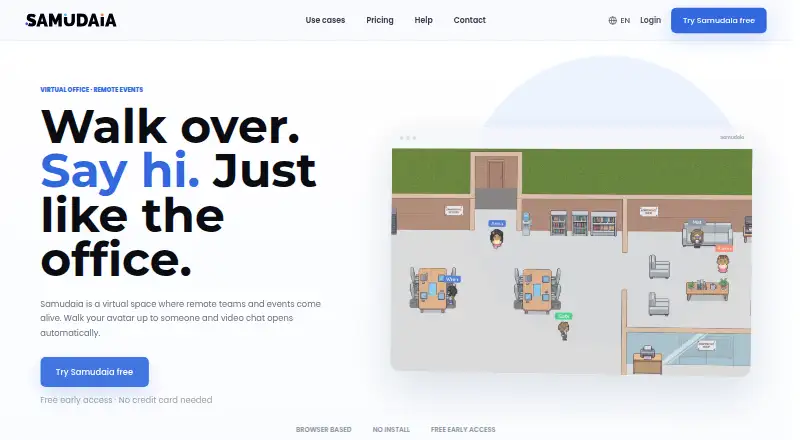
What Samudaia is
Samudaia is a virtual office for remote and hybrid teams, built around a shared 2D map that shows members’ live presence. To talk, a member walks an avatar into a video room, connecting their camera and microphone to the people already there without a meeting link. Workspaces include map themes, avatars, status, multiple workspaces, roles and permissions, screen sharing, background blur, a shared whiteboard and per-room chat. Members can join by email invitation or a shared join link. Video and audio use WebRTC through LiveKit, and the whiteboard is an Excalidraw canvas. Samudaia runs on Linux, macOS, Windows and the web; no mobile apps are listed. Its Free plan is available during early access with no credit card required and a team-sized workspace. The privacy policy describes access controls, encryption in transit where applicable and least-necessary access, and says personal data is not sold. Support is available through a help center, documentation and contact form.
Who it suits
Samudaia is aimed at fully remote and hybrid teams, small companies, startups, agencies and studios. It also targets virtual events and meetups, though it is not sized for 200-person all-hands events.
What it does well
- Free early-access plan requires no credit card.
- Walking into a room connects camera and microphone.
- Includes roles, permissions and multiple workspaces.
- Screen sharing, whiteboard and room chat are included.
- Available on Linux, macOS, Windows and web.
What to know first
- No mobile apps are listed.
- Outside-workspace guests are not supported.
- No spatial audio or open-floor conversations.
- Not sized for 200-person all-hands events.
Limits
The Free plan provides a team-sized workspace. Large-organisation paid plans are in development; the product also does not support outside guests, spatial audio or 200-person all-hands events.
Plans
| Plan | Billed and limits | Price |
|---|---|---|
| Free | Free during early access · No credit card · team-sized workspace · large-organisation paid plans in development | On request |
As samudaia.com lists them, read 1 Oct 2026. The maker's own page has the final word.
Getting started
- Open samudaia.com.
- Use Samudaia on Linux, macOS, Windows or the web.
- Start with the Free plan during early access; no credit card is required.
- Create a workspace and invite members by email or share a single join link.
Samudaia is a map-based virtual office for teams that prefer casual drop-ins to scheduled video calls. It is best suited to small remote and hybrid groups working inside a shared workspace; teams that need outside guests or large all-hands meetings should look elsewhere.
Overview
Samudaia makes a shared 2D map the starting point for team contact. Walk an avatar into a room and your camera and microphone connect to the people already there, with no meeting link to send. That favors spontaneous conversations and a persistent sense of who is around, but the whole team needs workspace access: guests from outside it cannot join.
Key features
Map themes and avatars let teams shape the office, while live presence and status help colleagues see who is available. Multiple workspaces, roles and permissions give administrators a way to separate groups and manage access. These are useful foundations for a continuing virtual office, though the format is not a substitute for every kind of meeting: Samudaia has no spatial audio or open-floor conversations and is not sized for 200-person all-hands events.
Screen sharing, background blur, a shared whiteboard and per-room chat add practical collaboration tools to the rooms. Members can be invited by email or by a single join link, but that link does not extend access to people outside the workspace. Audio and video use WebRTC through LiveKit; the whiteboard is an Excalidraw canvas.
Pricing
Samudaia offers a Free plan during early access, with no credit card required and a team-sized workspace. That makes it a low-friction option for a small team to try as its everyday virtual office, but it is not a defined free tier for an organization of any size: paid plans for large organizations are in development. There is no free trial because the product is offered as free access, and no renewal term or numerical seat cap is given.
The Free plan includes the core workspace experience, including persistent rooms and screen sharing. Teams considering it should weigh its member-only access and event-size ceiling against their needs; it cannot bring in external guests or host a 200-person all-hands. No other plan is currently described.
Platforms
Samudaia runs on Linux, macOS, Windows and the web. It has no mobile apps, so teams expecting dedicated iOS or Android apps should choose a different fit.
Who it's for
Small companies, startups, agencies and studios may find the room-based setup useful when colleagues want to drop in throughout the day. It is also positioned for remote and hybrid teams, virtual events and meetups, but the lack of guest access and capacity for very large all-hands makes it a better match for internal, smaller gatherings than broad events.
Pros and cons
- Pro: Walking into a room starts a conversation without a meeting link, which suits informal team contact.
- Pro: Persistent rooms, presence, chat, screen sharing and a shared whiteboard support an ongoing workspace rather than one-off calls alone.
- Pro: Multiple workspaces and role-based permissions help teams organize access.
- Con: External guests cannot join, limiting client calls and open events.
- Con: No spatial audio or open-floor conversations means it cannot recreate those styles of ambient office interaction.
- Con: It is not built for 200-person all-hands, and there are no mobile apps.
Alternatives
For more choices in this category, browse Virtual Meeting Room Software.
- Hubs is the better fit for teams seeking an open-source, customizable virtual space that can be self-hosted through its Community Edition.
- WorkAdventure offers a free plan for up to 10 users and supports self-hosting and mobile platforms, making it worth considering when those are priorities.
- Glue may suit teams that want a free plan with 10 members, 10 Team Spaces and 30-minute sessions.
- Topia is an option for smaller hosted gatherings: its DEMO plan has a 50-person capacity, with broadcasting and screensharing each limited to one.
- Watch2Gether is for people choosing a shared viewing service; its free Starter plan limits Watch Together to two people and includes ads.
- Overte is open-source virtual-world and social VR software, with Linux and Windows support and self-hosting.
- Tangle offers a free plan for up to 50 members per server and 25 per room, with unlimited rooms and screensharing.
- flat.social is a web-based alternative whose free plan allows up to five people at once and includes spatial audio and video rooms.
Verdict
Choose Samudaia if your team wants an always-available, map-based office for quick internal conversations, with shared work tools close at hand. Its strongest case is the frictionless walk-in room; look elsewhere if you need guest access, large all-hands, spatial audio or mobile apps.
Verdict
Samudaia combines a shared team map with drop-in video rooms and common workspace tools. It may suit teams that want informal room-based conversations, but its guest and event-size limits matter for wider meetings.
Questions
Is Samudaia free?
Yes. The Free plan is available during early access and requires no credit card.
Which platforms does Samudaia support?
It is available on Linux, macOS, Windows and the web. It has no mobile apps.
Can people join a room without a meeting link?
Yes. Walking an avatar into a room connects the member’s camera and microphone to everyone already inside.
Can I invite people from outside my workspace?
No. Samudaia does not support guests from outside the workspace.
What tools are included in the office?
It includes screen sharing, background blur, a shared whiteboard, per-room chat, map themes, avatars, presence and status, multiple workspaces, and roles and permissions.
How can I get help?
Samudaia offers a help center, documentation and a contact form for product questions, technical problems and feedback.
Facts from Samudaia's own pages
- Automatic conversations
- Walking an avatar into a room connects the user’s camera and microphone to everyone already inside, without a meeting link. · samudaia.com, 1 Oct 2026
- Core features
- The office includes map themes, avatars, presence and status, multiple workspaces, roles and permissions, screen sharing, background blur, a shared whiteboard and per-room chat. · samudaia.com, 1 Oct 2026
- Data practices
- Samudaia says it does not sell personal data and uses written Article 28 GDPR contracts with selected processors. · samudaia.com, 1 Oct 2026
- Integrations
- The privacy policy identifies Clerk as an authentication processor and lists hosting, communications, storage, analytics and support processors generally. · samudaia.com, 1 Oct 2026
- Invitations
- Workspace members can be invited by email or a single join link. · samudaia.com, 1 Oct 2026
- Limitations
- Samudaia has no spatial audio, no open-floor conversations, is not sized for 200-person all-hands events and does not support guests from outside the workspace. · samudaia.com, 1 Oct 2026
- Platforms
- Samudaia runs in browsers on Windows, macOS, Linux and ChromeOS with nothing to install. · samudaia.com, 1 Oct 2026
- Product
- Samudaia is a virtual office where teams share a 2D map, see live presence and enter video rooms by walking into them. · samudaia.com, 1 Oct 2026
- Security and privacy
- Samudaia’s privacy policy is written for GDPR compliance and says it applies access controls, encryption in transit where applicable and least-necessary access. · samudaia.com, 1 Oct 2026
- Support
- Support is provided through a help center, documentation and a contact form for product questions, technical problems and feedback. · samudaia.com, 1 Oct 2026
- Target users
- The product is positioned for fully remote and hybrid teams, small companies and startups, agencies and studios, plus virtual events and meetups. · samudaia.com, 1 Oct 2026
- Technology
- Video and audio use WebRTC through LiveKit, and the shared whiteboard is an Excalidraw canvas. · samudaia.com, 1 Oct 2026
Where Samudaia stands on Freedom251
- Metaverse Workplace Software#4 of 15
- Virtual Meeting Room Software#7 of 22