Freedom251 › Virtual Meeting Room Software
Watch2Gether
What Watch2Gether is
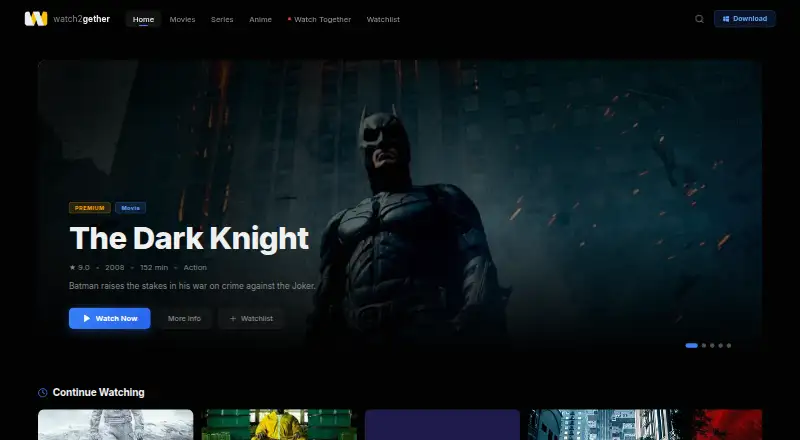
Watch2Gether is a service for watching movies and series with friends in real time. Watch Together rooms synchronize playback so participants can play, pause, and resume while following the same scene. Rooms also include live chat for messages and reactions, and private rooms let users invite friends with a short code. The site says streaming adjusts to the connection, and viewers can continue across phones, tablets, laptops, and Smart TVs. The free Starter plan has a limited content library, 720p streaming, ads, and room capacity for two people. Premium costs $9.99/mo and includes the full content library, 1080p Full HD, ad-free viewing, and rooms for up to 10 people. Ultra costs $19.99/mo and adds 4K Ultra HD + HDR, unlimited rooms, downloads, and priority support. Watch2Gether is listed for Android, iOS, web, and Windows. Its advertised Windows app requires Windows 10/11; the home page also lists Samsung, LG, and Sony Smart TVs.
Who it suits
Watch2Gether suits friends who want synchronized movie or series viewing with room chat. Starter is described for casual use and small rooms, while Premium and Ultra are aimed at larger or more frequent watch groups.
What it does well
- Synchronizes play, pause, and resume
- Rooms include live chat
- Private rooms use invite codes
- Adaptive streaming adjusts to the connection
- Supports continuing across multiple device types
What to know first
- Starter room is limited to two people
- Starter has a limited content library
- Starter includes ads and 720p streaming
- Windows app requires Windows 10/11
Limits
Starter has a limited content library, 720p streaming, ads, and a two-person room limit, with no offline downloads or priority support. Premium supports up to 10 people at 1080p and does not include 4K Ultra HD + HDR.
Plans
| Plan | Billed and limits | Price |
|---|---|---|
| Starter | Limited content library · 720p streaming · Watch Together for 2 people · Ads · No offline downloads · No priority support | Free |
| Ultra | /mo · Full content library · 4K Ultra HD + HDR · Unlimited Watch Together rooms · Ad-free · Downloads · Priority support | $19.99 a month |
| Premium | /mo · Full content library · 1080p Full HD · Watch Together for 10 people · Ad-free · Continue watching across devices · No 4K Ultra HD + HDR | $9.99 a month |
As watch2gether.tv lists them, read 8 Oct 2026. The maker's own page has the final word.
Getting started
- Open https://www.watch2gether.tv/.
- Choose the free Starter plan or a paid plan.
- Use the web version or a listed iOS, Android, or Windows app.
- For the advertised Windows app, use Windows 10/11.
- Create a private room and share its short room code with invited friends.
Watch2Gether is a synchronized streaming service for friends who want to watch movies and series together online. It suits small groups that value shared controls and private invitations, while larger parties and viewers who want better picture quality need a paid tier.
The free tier is a reasonable way to watch with one other person, but its 720p ceiling, advertising, and limited library make Premium the more practical choice for regular group viewing.
Overview
Watch Together rooms keep playback aligned: participants can play, pause, and resume while remaining on the same scene. A live room chat places messages and reactions beside the video, so conversation does not require a separate app. Private rooms use invite-only access and a short room code, a useful setup for friends or family rather than open public events.
Adaptive-bitrate streaming adjusts to each connection, which can help maintain playback when network conditions change. The service also supports continuing across phone, tablet, laptop, and Smart TV, making it better suited to households that switch screens than services tied to one device.
Key features
- Synchronized playback: Shared controls keep a group watching the same moment instead of manually coordinating pauses.
- Room chat: Live messages and reactions sit alongside the movie, preserving social interaction in the room.
- Private invitations: Invite-only rooms and short codes limit participation to people you invite.
- Adaptive quality: Bitrate changes automatically with the connection, prioritizing continuity over a fixed picture setting.
- Premium upgrades: Paid plans remove ads and increase room size and picture quality; Ultra adds downloads and priority support.
Pricing
Watch2Gether uses a freemium model. Starter costs nothing and is aimed at casual browsing and small rooms. It includes a limited content library, 720p streaming, Watch Together for two people, and advertising. There are no offline downloads or priority support. That combination works for occasional two-person sessions, but the two-person cap and restricted catalog quickly limit groups or frequent viewers.
Premium costs $9.99 a month, billed /mo. It adds the full content library, 1080p Full HD, Watch Together for 10 people, ad-free viewing, and continuation across devices. It does not include 4K Ultra HD + HDR. For daily watching and friend groups, this is the balanced tier: larger rooms and a cleaner viewing experience without Ultra's higher monthly price.
Ultra costs $19.99 a month, billed /mo. It keeps the full library and ad-free service, adds 4K Ultra HD + HDR, unlimited Watch Together rooms, downloads, and priority support. Families and watch parties that need the highest quality or repeated room creation have the clearest reason to choose it; smaller groups may not benefit enough to justify the extra $10 per month.
Platforms
Watch2Gether is available on Android, iOS, web, and Windows. The advertised Windows app is version 2.4.0 and requires Windows 10 or 11. The service also lists Samsung, LG, and Sony Smart TVs, extending viewing beyond computers and phones.
Who it's for
Starter fits a pair of people who watch occasionally and can accept 720p, ads, and a limited library. Premium is the natural fit for daily viewing with a friend group of up to 10, especially when ad-free 1080p and device switching matter. Ultra is designed for families and watch parties that want unlimited rooms, 4K HDR, downloads, and priority support.
Watch2Gether is less suitable when you need a free room larger than two people, unrestricted content on the free tier, or 4K without paying for Ultra.
Pros and cons
Pros
- Playback stays coordinated: Shared play, pause, and resume controls remove the usual manual countdowns.
- Private by default: Invite-only rooms and short codes are well suited to closed friend and family sessions.
- Flexible screen choice: Cross-device continuation and Smart TV listings support moving between mobile, desktop, and television.
- Clear paid progression: Premium increases capacity to 10 and 1080p, while Ultra targets 4K, downloads, and support.
Cons
- Starter is tightly capped: Two participants, 720p, ads, and a limited library make the free plan unsuitable for larger or frequent groups.
- 4K is reserved for Ultra: Premium stops at 1080p, so higher-resolution viewing requires the $19.99 monthly tier.
- Offline viewing is paid-only: Downloads are exclusive to Ultra, leaving Starter and Premium dependent on streaming.
Alternatives
Hubs is the better choice for teams wanting open-source, customizable spaces with self-hosted Community Edition access across web, desktop, and mobile platforms.
WorkAdventure suits groups seeking a freemium virtual workspace with a free plan for up to 10 users and unlimited duration.
Glue is preferable for collaborative teams needing defined team-member, space, session-length, and file-storage allowances.
Samudaia offers a free early-access workspace with self-hosting options and no credit-card requirement.
Topia fits event organizers who need browser-based spaces with a 50-person demo capacity.
Overte is an option for users seeking fully open-source virtual-world and social-VR software.
Tangle suits small teams wanting desktop rooms with screensharing, avatars, and on-camera video.
flat.social is worth considering for web-only sessions of up to five people with spatial audio and video rooms.
For a broader directory of room-based tools, see Virtual Meeting Room Software.
Verdict
Choose Watch2Gether if synchronized playback, private invitations, and integrated chat are the priority for a pair or a modest friend group. Premium is the strongest fit for regular groups because it combines 10-person rooms, 1080p, ad-free viewing, and cross-device continuation at $9.99 a month. Look elsewhere if you need a generous free group allowance, open-source control, or 4K without stepping up to Ultra.
Verdict
Watch2Gether centers on shared playback, chat, and private rooms. Starter has clear limits on room size, content, and quality; paid plans add larger rooms and higher picture quality.
Questions
Is there a free plan?
Yes. Starter costs nothing and includes a limited content library, 720p streaming, ads, and Watch Together for two people.
How much do the paid plans cost?
Premium is $9.99 a month. Ultra is $19.99 a month.
Which platforms are listed?
The service lists web, iOS, Android, and Windows. Its home page also lists Samsung, LG, and Sony Smart TVs.
How many people can watch together?
Starter supports two people, Premium supports 10, and Ultra offers unlimited Watch Together rooms.
What does Ultra add?
Ultra includes 4K Ultra HD + HDR, unlimited Watch Together rooms, ad-free viewing, downloads, and priority support.
Facts from Watch2Gether's own pages
- Audience
- The Starter plan is described for casual browsing and small watch rooms, Premium for daily watching and friend groups, and Ultra for families and watch parties. · watch2gether.tv, 8 Oct 2026
- Cross-device use
- The site says users can continue watching across phone, tablet, laptop, and Smart TV. · watch2gether.tv, 8 Oct 2026
- Platform availability
- The home page advertises a Windows app requiring Windows 10/11 and lists iOS, Android, and Samsung, LG, and Sony Smart TVs. · watch2gether.tv, 8 Oct 2026
- Premium capabilities
- Premium plans offer higher picture quality, larger watch rooms, and an ad-free experience; Ultra adds downloads and priority support. · watch2gether.tv, 8 Oct 2026
- Private rooms
- Users can create a private room and invite friends by sharing a short room code. · watch2gether.tv, 8 Oct 2026
- Product
- Watch2Gether describes itself as a service for streaming movies and series together with friends in real time. · watch2gether.tv, 8 Oct 2026
- Room chat
- Rooms include live chat for messages and reactions beside the movie. · watch2gether.tv, 8 Oct 2026
- Streaming quality
- The site says streaming uses adaptive bitrate that adjusts automatically to the connection. · watch2gether.tv, 8 Oct 2026
- Synchronized playback
- Watch Together rooms let participants play, pause, and resume together while staying on the same scene. · watch2gether.tv, 8 Oct 2026
- Windows app
- The advertised Windows app is version 2.4.0 and requires Windows 10/11. · watch2gether.tv, 8 Oct 2026
Where Watch2Gether stands on Freedom251
- Virtual Meeting Room Software#11 of 22