Freedom251 › Virtual Meeting Room Software

CloudRooms
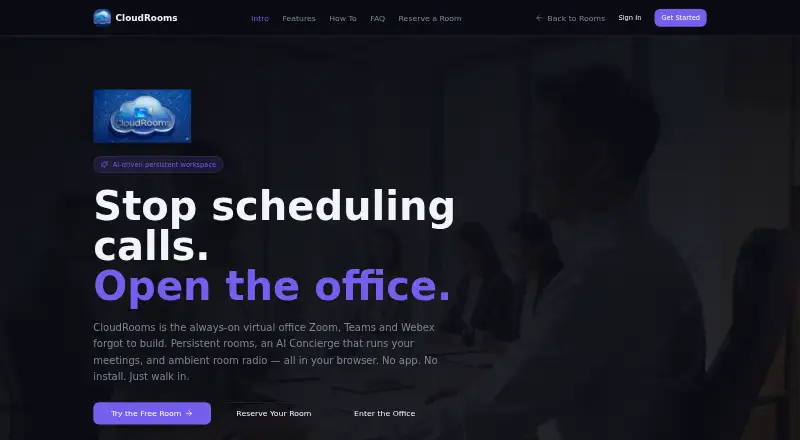
What CloudRooms is
CloudRooms is a browser-based virtual office organized around persistent rooms for teams and client-facing work. A room combines screen sharing, media uploads, live presence, guest links that work without an account, and recording with backup; recordings can be downloaded or deleted. Its AI Concierge can draft timed agendas, provide live captions and notes, identify action items, and send meeting recaps with next steps. Rooms also have a broadcast channel for shared music, radio, white noise, and live DJ events.
The service runs in a browser on a PC, phone, or tablet, with no app or installation required. CloudRooms lists a room capacity of 10 participants and offers plans sized for 10, 20, 50, or 100 people. Visitors can explore a free room without a credit card. Paid plans are Focus Desk at $19 a month, Team Room at $49 a month, Conference at $99 a month, and Event at $199 a month. CloudRooms says it does not use third-party ad tracking or behavioral profiling, and does not train AI on meeting content. Its intended users include consultants, agencies, therapists, coaches, and finance teams.
Who it suits
CloudRooms suits consultants, agencies, therapists, coaches, and finance teams that want persistent online rooms and tools for meetings or client sessions. It also fits groups that want browser access and guest links without requiring visitors to create accounts.
What it does well
- Persistent rooms include screen sharing and media uploads.
- Guest links let visitors join without an account.
- AI Concierge creates agendas, captions, notes, action items, and recaps.
- Recordings include backup and can be downloaded or deleted.
- Runs in a browser without an app or installation.
What to know first
- Room capacity is 10 participants.
- There are no mobile apps; access is through the browser.
- Paid plans range from 19.00 USD to $199 a month.
Limits
Each room has a listed capacity of 10 participants. Paid plans are listed from $19 a month for Focus Desk to $199 a month for Event, with plan sizes of 10, 20, 50, and 100 people.
Plans
| Plan | Billed and limits | Price |
|---|---|---|
| Focus Desk | $19/mo · 10 people | $19 a month |
| Event | $199/mo · 100 people | $199 a month |
| Team Room | $49/mo · 20 people | $49 a month |
| Conference | $99/mo · 50 people | $99 a month |
As cloudrooms.net lists them, read 8 Oct 2026. The maker's own page has the final word.
Getting started
- Open https://cloudrooms.net/ in a browser on a PC, phone, or tablet.
- Explore a free room without providing a credit card.
- Choose a paid plan: Focus Desk, Team Room, Conference, or Event.
- Invite guests with links that do not require an account.
Verdict
Choose CloudRooms if your work benefits from persistent browser-based rooms, guest access, meeting assistance, and room broadcasts. Look elsewhere if you need mobile apps or rooms with capacity above 10 participants.
Questions
Is there a free way to try CloudRooms?
Yes. Visitors can explore a free room without a credit card.
What does CloudRooms cost?
Paid plans are Focus Desk at $19 a month, Team Room at $49 a month, Conference at $99 a month, and Event at $199 a month.
What platforms does CloudRooms support?
It runs in a browser on PC, phone, or tablet and does not require an app or installation.
How many people can join a room?
The listed room capacity is 10 participants.
What does the AI Concierge do?
It drafts timed agendas, provides live captions and notes, extracts action items, and sends meeting recaps and next steps.
What are CloudRooms’ stated privacy practices?
CloudRooms says it has no third-party ad tracking, does not train AI on meeting content, and does not use behavioral profiling.
Facts from CloudRooms's own pages
- Access
- CloudRooms says it runs in a browser on PC, phone, or tablet and requires no app or installation. · cloudrooms.net, 8 Oct 2026
- AI Concierge
- The AI Concierge drafts timed agendas, provides live captions and notes, extracts action items, and sends meeting recaps and next steps. · cloudrooms.net, 8 Oct 2026
- Ambient broadcast
- Rooms include a broadcast channel for shared music, radio, white noise, and live DJ events. · cloudrooms.net, 8 Oct 2026
- Compliance
- The site says SSO/SAML, SOC 2, and HIPAA documentation are on its enterprise roadmap. · cloudrooms.net, 8 Oct 2026
- Free access
- The site invites visitors to try a free room and says no credit card is needed to explore. · cloudrooms.net, 8 Oct 2026
- Intended users
- The site names consultants, agencies, therapists, coaches, and finance teams as users it is built for. · cloudrooms.net, 8 Oct 2026
- Privacy
- CloudRooms says it has no third-party ad tracking, does not train AI on meeting content, and does not use behavioral profiling. · cloudrooms.net, 8 Oct 2026
- Product
- CloudRooms describes itself as an always-on virtual office with persistent rooms, an AI Concierge, and ambient room radio. · cloudrooms.net, 8 Oct 2026
- Recording
- The site lists recording with backup among the features included in every room and says recordings can be downloaded and deleted. · cloudrooms.net, 8 Oct 2026
- Room features
- The site says every room includes screen sharing, media uploads, live presence, and guest links that do not require an account. · cloudrooms.net, 8 Oct 2026
- Support
- The site lists [email protected] as its support contact. · cloudrooms.net, 8 Oct 2026
Where CloudRooms stands on Freedom251
- Virtual Meeting Room Software#5 of 22