Freedom251 › Motion Capture Software

Rokoko Create
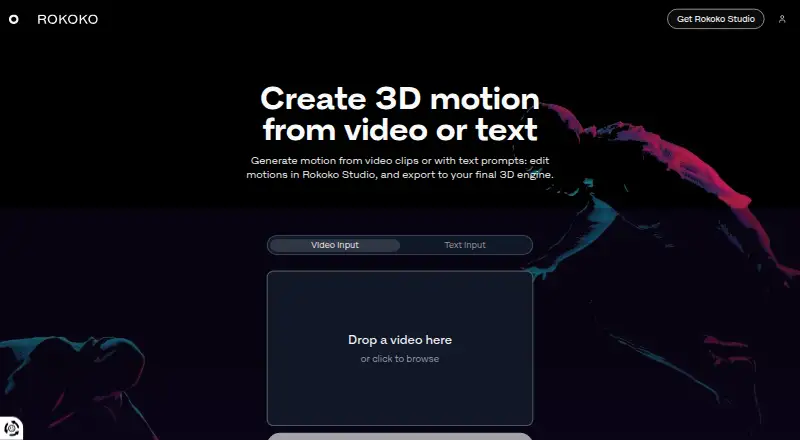
What Rokoko Create is
Rokoko Create generates 3D motion from video clips or text prompts, then lets users edit it in Rokoko Studio and export it for a 3D engine. Video motion capture uses Vision AI, with monthly processing allowances that vary by plan. Starter and paid plans include unlimited text-to-motion clips, but Studio imports are capped by plan except on Pro. Motion can be exported as FBX, BVH, or CSV. Rokoko says generated video-to-motion and text-to-motion data can be used commercially. It describes FBX and BVH files as compatible with skeletons including UE5 Manny, HIK, and Mixamo, and with several listed 3D tools. The free Starter plan includes 30 seconds of Vision AI processing and five Studio imports each month, plus one month of cloud storage. Basic costs $12 a month; Plus costs $28 a month; Pro costs $70 a month. New accounts can try Plus or Pro free for seven days. Rokoko says it was founded in 2014 and is headquartered in Copenhagen, Denmark.
Who it suits
Rokoko Create suits people generating 3D motion from video or text and editing it in Rokoko Studio before export. It may also suit teams needing commercial use of generated motion data or team features included with Plus.
What it does well
- Generates motion from video clips or text prompts.
- Exports motion as FBX, BVH, or CSV.
- Generated motion data can be used commercially.
- New accounts can try Plus or Pro for seven days.
What to know first
- Starter includes only 30 seconds of video processing monthly.
- Starter includes five Studio imports per month.
- Studio is offered for Windows and macOS.
Limits
Starter includes 30 seconds of Vision AI video processing and five Studio imports per month, plus one month of cloud storage. Basic allows 600 seconds of Vision AI processing and 100 Studio imports monthly; Studio imports are unlimited on Pro.
Plans
| Plan | Billed and limits | Price |
|---|---|---|
| Starter | free forever · Vision AI 30s/month · unlimited text-to-motion · 5 Studio imports/month · 1-month cloud storage | Free |
| Basic | billed monthly · Vision AI 600s/month · unlimited text-to-motion · 100 Studio imports/month · unlimited cloud | $12 a month |
| Enterprise | starting from; billed monthly · local storage · extra offline days · custom support hours · onboarding · SLA | $150 a month |
| Plus | billed monthly · Vision AI 3000s/month · unlimited text-to-motion · 1000 Studio imports/month · livestreaming · team management | $28 a month |
| Pro | billed monthly · Vision AI 15000s/month · unlimited text-to-motion and imports · Face Capture · advanced Command API · CSV export | $70 a month |
As create.rokoko.com lists them, read 15 Oct 2026. The maker's own page has the final word.
Getting started
- Visit the Rokoko Create website and create an account.
- Choose Starter or review the paid plans.
- Use the free 7-day trial of Plus or Pro if eligible as a new account.
- Create motion from a video clip or text prompt.
- Edit the motion in Rokoko Studio, then export as FBX, BVH or CSV.
Rokoko Create suits animators and game creators who want to generate motion and carry it into a 3D production workflow. Its clearest advantage is unlimited text-to-motion on every tier; video processing and Studio imports, however, are tightly tied to the plan.
Overview
Create turns video clips or text prompts into 3D motion, which can then be edited in Rokoko Studio and exported as FBX, BVH, or CSV. Rokoko permits commercial use of motion generated by either method. This is a practical route from generated movement to production tools, provided the monthly allowances fit the volume of work.
Key features
Motion generation and Studio imports
Vision AI video processing ranges from 30 seconds a month on Starter to 15,000 seconds on Pro. Text-to-motion clips are unlimited on every plan, but Studio imports are capped at five per month on Starter, 100 on Basic, and 1,000 on Plus; Pro removes that cap. The distinction matters: generating many prompts does not help if the chosen tier cannot move enough results into Studio for editing.
Editing, export, and integrations
Rokoko Studio supports real-time plugins for Blender, Houdini, Unity, Unreal, Maya, Cinema 4D, Reallusion, and MotionBuilder. FBX and BVH exports are compatible with skeletons including UE5 Manny, HIK, and Mixamo, and work in tools such as Blender, Unreal Engine, Unity, Cinema 4D, Maya, Houdini, MotionBuilder, and iClone. That breadth makes the output useful across several established pipelines; CSV is also an export option, though the stated skeleton compatibility applies to FBX and BVH.
Studio is offered as a download for Windows and macOS. Rokoko Create is also listed for web use. Support hours are weekdays, 09:00–17:00 GMT+2, based in Greece, with Greek public holidays observed.
Pricing
Starter is free forever and includes 30 seconds of Vision AI video processing per month, unlimited text-to-motion clips, five Studio imports per month, and one month of cloud storage. It is a useful way to try the workflow, but the short video allowance and small import quota make it a poor fit for sustained production.
Basic costs $12 a month, billed monthly. It raises video processing to 600 seconds per month, imports to 100, and includes unlimited cloud storage, while retaining unlimited text-to-motion. This suits individual users with moderate video and editing needs, though it does not include the team features provided by Plus.
Plus costs $28 a month, billed monthly. It provides 3,000 seconds of video processing, 1,000 Studio imports, unlimited cloud storage, and unlimited text-to-motion. It also includes unlimited team members and user management, making it the stronger choice for a team or a higher-volume workflow.
Pro costs $70 a month, billed monthly, and includes 15,000 seconds of video processing, unlimited text-to-motion and Studio imports, and unlimited cloud storage. It is the clearest fit for frequent production where import limits would otherwise interrupt work.
Enterprise starts at $100 a month. It includes local storage without cloud sync, extra offline days, custom support hours, custom onboarding, and a custom SLA. Choose it for those storage and service requirements rather than simply for higher quotas. New accounts can try Plus or Pro free for seven days.
Platforms
Create is available on the web, while Rokoko Studio downloads are offered for Windows and macOS. The combination gives users a browser-based generation option and desktop Studio editing on those operating systems.
Who it's for
Create is best for animators, game creators, and teams that want generated motion in software they already use. The free tier suits occasional exploration; Basic or Plus makes more sense when regular Studio imports matter, and Pro is for workflows that need unrestricted imports. Look elsewhere if the monthly video-processing allowance does not match your workload or if you need a platform beyond web, Windows, and macOS for this workflow.
Pros and cons
- Pros: Unlimited text-to-motion clips on every plan, including free Starter, give prompt-led exploration room to continue.
- Pros: FBX, BVH, and CSV export, plus broad Studio plugin support, connect generated motion to established 3D tools.
- Pros: Rokoko allows commercial use of motion generated from text or video.
- Cons: Video processing is capped monthly on every tier, from 30 seconds on Starter to 15,000 seconds on Pro.
- Cons: Studio imports are limited on all but Pro, so unlimited text-to-motion does not mean unlimited editable output.
- Cons: Starter includes only one month of cloud storage, and Basic does not include the team features listed for Plus.
Alternatives
For a broader set of motion-capture choices, compare motion capture software, game motion capture software, and AI motion capture software. Readers focused on generated animation can also browse AI animation makers or motion tracking software.
Move AI is worth comparing if its free tier of 30 credits, with videos up to 30 seconds, better suits a small initial project. Krikey AI offers a free plan with 20 one-time credits and a Pro plan with 165 monthly credits for $15 a month. Motion Transfer AI may suit a small trial workflow: its free plan provides 18 signup credits and watermarked previews and downloads. Melted Crayons TV is an alternative with a free, image-only plan that includes 30 monthly credits and watermarked comic-video export. Storybook Adventures is an iOS and macOS alternative with a free app download and token-based animation. AnimateDiff is a free alternative released for academic use. Artiroom and Charios are additional alternatives to compare.
Verdict
Choose Rokoko Create if you want text- or video-generated motion that can move into Rokoko Studio and familiar 3D tools, especially when commercial use and unlimited text-to-motion matter. Its main drawback is the tiered video and import capacity: creators who regularly process longer clips or need many Studio imports should budget for a higher plan or compare alternatives.
Verdict
Rokoko Create links motion generation with Studio editing and export, while monthly video-processing and import allowances depend on plan. Review the listed tier limits and the export formats against your workflow.
Questions
Is Rokoko Create free?
Yes. Starter is free forever and includes 30 seconds of monthly Vision AI processing, unlimited text-to-motion clips, five Studio imports per month and one month of cloud storage.
How much do the paid plans cost?
The pricing note says paid plans start at $10/mo billed annually. Basic is listed at $12 a month, Plus at $28 a month and Pro at $70 a month.
Is there a free trial?
Yes. New accounts can get a free 7-day trial of Plus or Pro.
Which platforms are supported?
The listed platforms are macOS, web and Windows. Rokoko Studio downloads are offered for Windows and macOS.
Can generated motion be used commercially?
Rokoko says motion data generated through text-to-motion and video-to-motion can be used commercially.
Who makes Rokoko Create?
Rokoko says it was founded in 2014 and is headquartered in Copenhagen, Denmark.
Facts from Rokoko Create's own pages
- AI model
- The Create model is proprietary and trained on millions of Rokoko motion assets and text pairs. · rokoko.com, 15 Oct 2026
- API
- Studio's HTTP Command API can start or stop recording, calibrate, reset actors, return scene information and attach trackers; its default port is 14053. · support.rokoko.com, 15 Oct 2026
- Commercial rights
- Rokoko says motion generated by text-to-motion and video-to-motion may be used commercially. · create.rokoko.com, 15 Oct 2026
- Commercial use
- Rokoko says all motion data generated with text-to-motion and video-to-motion can be used commercially. · create.rokoko.com, 7 Oct 2026
- Company
- Rokoko says it is headquartered in Copenhagen, Denmark, and was founded in 2014. · rokoko.com, 7 Oct 2026
- Company activities
- LinkedIn says Rokoko builds motion-capture hardware and software for 3D, robotics, teleoperation, research and real-time motion data. · uk.linkedin.com, 15 Oct 2026
- Company profile
- LinkedIn describes Rokoko as a privately held Copenhagen computer-hardware company founded in 2014 with 51–200 employees. · uk.linkedin.com, 15 Oct 2026
- Documentation depth
- SDK documentation includes quick start, networking and calibration guides, runnable examples, and RCSP/RGMP protocol references. · support.rokoko.com, 15 Oct 2026
- Enterprise storage
- Enterprise includes local storage with no cloud sync, extra offline days, custom support hours, custom onboarding, and a custom SLA. · rokoko.com, 7 Oct 2026
- Export compatibility
- The product page says exported FBX or BVH files are compatible with major skeletons including UE5 Manny, HIK, and Mixamo, and work in Blender, Unreal Engine, Unity, Cinema 4D, Maya, Houdini, MotionBuilder, and iClone. · create.rokoko.com, 7 Oct 2026
- Exports
- Studio exports FBX on all plans, BVH on paid plans and CSV on Pro and Enterprise, with HumanIK, Mixamo and Unreal skeleton presets. · rokoko.com, 15 Oct 2026
- Founded
- 2014 · create.rokoko.com, 28 Sept 2026
- Funding news
- TechCrunch reported on August 17, 2022 that Naver Z made a strategic investment valuing Rokoko above $80 million. · techcrunch.com, 15 Oct 2026
- G2 review availability
- G2 says there are not enough Rokoko reviews to provide buying insight. · g2.com, 15 Oct 2026
- Google Play listing
- Rokoko Face Capture shows 5K+ downloads but no displayed star rating or review count; the listing says a Rokoko Headcam is required. · play.google.com, 15 Oct 2026
- Headquarters
- Copenhagen, Denmark · create.rokoko.com, 28 Sept 2026
- Integrations
- Studio provides native real-time integrations for Blender, Unreal Engine, Unity, Maya, Cinema 4D, MotionBuilder, Houdini, iClone and Cartoon Animator 4. · rokoko.com, 15 Oct 2026
- Licence
- The Studio EULA grants a non-exclusive licence and prohibits reproduction, distribution, sublicensing, renting or lending, indicating proprietary software. · cdn.rokoko.com, 15 Oct 2026
- Limit: desktop dependency
- CG Channel reported that users need Rokoko Studio desktop software to clean issues such as foot slippage and export Create animations. · cgchannel.com, 15 Oct 2026
- Limit: facial calibration
- An Apple reviewer criticized the absence of a neutral-face calibration control, saying facial performances could look poor. · apps.apple.com, 15 Oct 2026
- Limit: mobile compatibility
- Apple reviewers reported that Rokoko Remote required legacy Studio, failed to connect on some phones and had iPhone 13 compatibility problems. · apps.apple.com, 15 Oct 2026
- Limit: review evidence
- SoftwareWorld reports no approved Rokoko Studio reviews and lists the product as proprietary, cloud hosted and web based. · softwareworld.co, 15 Oct 2026
- Limit: shipping and sales
- The sole Trustpilot reviewer alleged undisclosed US import duties, roughly $4,000 shipping on a roughly $5,000 order, and refund difficulties. · trustpilot.com, 15 Oct 2026
- Motion scope
- Rokoko positions Create primarily for idles, walks, gestures and other short basic sequences; complex dynamic motion may require retries or cleanup. · rokoko.com, 15 Oct 2026
Where Rokoko Create stands on Freedom251
- Motion Capture Software#12 of 63
- Game Motion Capture Software#7 of 23
- Motion Tracking Software#15 of 40
- AI Motion Capture Software#12 of 27
- AI Animation Makers#11 of 23