Freedom251 › AI Animation Makers
Storybook Adventures
What Storybook Adventures is
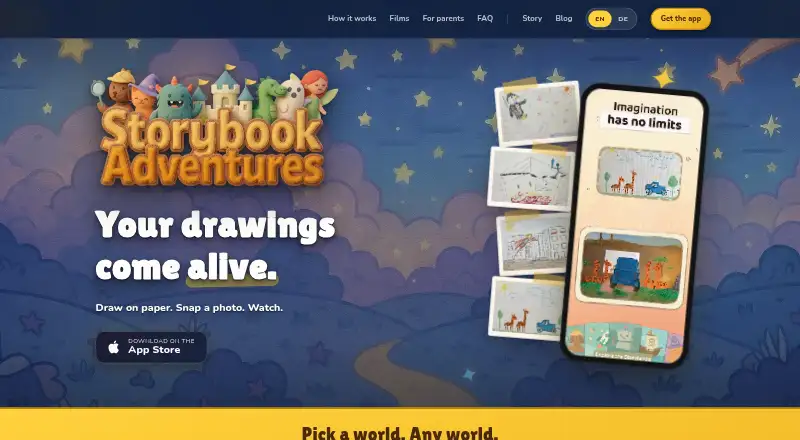
Storybook Adventures turns children’s paper drawings into animated short films with sound. A child chooses a story world, draws on paper, photographs the drawing in the app, and watches it animate. Each film has three scenes, and there are 24 adventures, including Pirate Treasure, Space Journey, and Fairy Forest. The App Store listing describes the app as designed for children ages 6–12; it is available on iOS and macOS. The download is free, and each animation uses one token. Token packs are purchased through Apple In-App Purchase: Starter Pack costs 4.99 USD once, Explorer Pack 9.99 USD once, Creator Pack 19.99 USD once, and Family Pack 29.99 USD once. The maker says every photo receives an AI safety review before animation and inappropriate submissions are rejected. It also says the app has no account, ads, trackers, social features, or chat, and complies with GDPR and COPPA by design. Creating animations requires internet because processing happens on the maker’s servers; finished films can be watched offline in the app.
Who it suits
Storybook Adventures suits children ages 6–12 who want to turn paper drawings into short animated films, with parents managing purchases through the app’s parental controls.
What it does well
- Offers 24 story adventures.
- Each film has three animated scenes with sound.
- Finished animations can be watched offline.
- Parents can lock the shop.
What to know first
- Creating animations requires internet access.
- Each animation uses one token.
- Tokens for delivered animations cannot be returned.
- Available platforms are iOS and macOS.
Limits
The app download is free, and each animation uses one token. Tokens used for delivered animations cannot be returned; moderation rejections and technical failures automatically refund the token.
Plans
| Plan | Billed and limits | Price |
|---|---|---|
| Free download | App download is free · animations use one token each; token packs sold through Apple In-App Purchase | Free |
| Creator Pack | Token pack · token count not stated on the opened page | $19.99, paid once |
| Family Pack | Token pack · token count not stated on the opened page | $29.99, paid once |
| Starter Pack | Token pack · token count not stated on the opened page | $4.99, paid once |
| Explorer Pack | Token pack · token count not stated on the opened page | $9.99, paid once |
As storybookadventures.io lists them, read 8 Oct 2026. The maker's own page has the final word.
Getting started
- Download the app for iOS or macOS.
- Have the child choose a story world.
- Draw a picture on paper and photograph it in the app.
- Use a token to create the animation; creating it requires internet.
- Use Apple In-App Purchase for token packs if needed.
Storybook Adventures turns children’s paper drawings into short animated films with sound, using a choice of themed story worlds. It is best suited to children aged 6–12 and parents who want a contained, account-free creative activity on Apple devices. Its strongest appeal is the drawing-to-film workflow and child-focused safeguards; the trade-offs are server-dependent creation and a token charge for every delivered animation.
Overview
Children select one of 24 adventures, draw on paper, photograph the result in the app, and watch it become an animated film. Themes include Pirate Treasure, Space Journey and Fairy Forest, giving younger users a clear prompt without requiring them to invent a complete story from scratch. Each film consists of three scenes, so the format is substantial enough to feel like a finished story while remaining bounded for a short activity.
The app converts images into animation with sound rather than offering a general-purpose animation studio. That makes it a focused choice for family creativity and a less suitable option for users seeking detailed character control, long-form production or AI-generated characters; character creation is not provided.
Key features
Drawing to animation
The image-to-animation workflow keeps the child’s own artwork central: draw traditionally, capture it with the camera, and receive an animated result. Animation processing takes place on the maker’s servers, so an internet connection is required when creating a film. Completed animations can be watched offline in the app, which is useful for travel or viewing away from a connection.
Safety and privacy
An AI safety review checks every submitted photo before animation, rejecting inappropriate submissions. The maker says the app operates without accounts, email collection, names, location data, advertising, trackers, social features or chat, and is designed to comply with GDPR and COPPA. Purchases are behind an in-app parental gate and Apple authentication, and parents can lock the shop. These controls make it easier to keep the experience limited to private family use.
Token mechanics
Each animation uses one token. Tokens are bought through Apple In-App Purchase, and Apple handles refund requests for delivered token purchases. A token cannot be returned after a successful delivery; moderation rejections and technical failures automatically restore the token. Families should therefore treat each submission as a paid attempt, even though failed or rejected processing is protected by an automatic refund.
Pricing
| Plan | Price | What it means |
|---|---|---|
| Free download | free | Free app download; animations consume one token each, with token packs sold through Apple In-App Purchase. |
| Starter Pack | $4.99, paid once | One-time token pack for occasional animation sessions. |
| Explorer Pack | $9.99, paid once | One-time token pack for families expecting more than a single short session. |
| Creator Pack | $19.99, paid once | One-time token pack for regular use across multiple story projects. |
| Family Pack | $29.99, paid once | Largest one-time pack, aimed at households likely to create films repeatedly. |
The app itself has no subscription charge in these plans, but animation volume depends on how quickly purchased tokens are consumed. The pack names signal different usage levels, while the one-token-per-film rule gives parents a straightforward way to estimate consumption before buying.
Platforms
Storybook Adventures runs on iOS and macOS. Creation needs internet access because processing is remote; offline use is limited to watching finished films. Support is available by email in English or German at [email protected].
Who it's for
This is a strong fit for children aged 6–12 who enjoy drawing and want an immediate animated payoff, and for parents prioritising no-account privacy, purchase gates and a private viewing experience. It also suits families that value themed prompts and offline playback after creation.
It is a weaker fit for Android households, creators needing desktop-platform breadth, or anyone wanting character-generation tools, extensive scene editing or animation without an internet connection. The token model also makes frequent experimentation less predictable than an unlimited-creation plan.
Pros and cons
Pros
- Child-led workflow: Paper drawings become three-scene films with sound, turning a familiar activity into a shareable result.
- Broad prompt selection: 24 story worlds provide variety without requiring children to design a premise from zero.
- Strong privacy posture: No account, ads, trackers, social tools or chat reduces exposure of children’s data.
- Practical safeguards: Photo moderation, parental purchase authentication and a shop lock address common family concerns.
- Offline viewing: Finished films remain watchable without internet after server processing is complete.
Cons
- Creation requires connectivity: Server processing prevents making new films during an outage or offline trip.
- Per-film token cost: Every delivered animation consumes one token, so repeated attempts can add expense.
- Apple-only platform coverage: Android and other operating systems are not supported.
- Limited production control: There is no AI character creation and the fixed three-scene format may constrain older or more advanced creators.
Alternatives
Melted Crayons TV is the better pick for broader platform coverage, including Android, web and Windows, and its free Sketch plan provides 30 monthly credits, though outputs are image-only, watermarked and lack panel animation.
Choose Move AI instead when you need video-focused creation across web, Windows, macOS, iOS, API or self-hosted setups; its free tier supplies 30 non-expiring credits for videos up to 30 seconds.
Krikey AI suits users seeking a web, Android or iOS alternative with a free tier and a larger paid monthly credit allowance.
Rokoko Create is preferable for motion-oriented work on macOS, Windows or the web, with a free tier, text-to-motion clips and limited monthly video processing.
Motion Transfer AI is an option for iOS or web users who want to transfer motion from images or video, starting with one-time signup credits but watermarked free outputs.
AnimateDiff is a free, Linux-, web- and self-hosted alternative released for academic use.
Artiroom fits web users who want one-time or subscription credit plans and watermark-free scene downloads.
Charios is aimed at web-based project and mocap work, with a free plan offering three active projects and monthly credits.
For a wider comparison of animation software, see AI Animation Makers.
Verdict
Storybook Adventures is a focused choice for families with children aged 6–12 who want to turn real drawings into short, sound-enabled stories inside a private, parent-controlled app. Choose it for the guided worlds, safety design and offline playback of finished films. Look elsewhere if you need Android support, offline creation, advanced animation controls or a pricing model that does not charge one token for every delivered film.
Verdict
Storybook Adventures offers a drawing-to-animation activity with multiple story worlds and offline viewing of finished films. Note the internet requirement for creation and the token cost for each animation.
Questions
Is Storybook Adventures free?
The app download is free. Each animation uses one token, and token packs are sold through Apple In-App Purchase.
How much do token packs cost?
Starter Pack costs 4.99 USD once, Explorer Pack 9.99 USD once, Creator Pack 19.99 USD once, and Family Pack 29.99 USD once.
Which devices can run the app?
Storybook Adventures is available on iOS and macOS.
Does making an animation require internet?
Yes. Animation is processed on the maker’s servers; finished animations can be watched offline in the app.
How does the app handle children’s photos and purchases?
The maker says an AI safety review checks photos before animation and rejects inappropriate submissions. Purchases require an in-app parental gate and Apple authentication, and parents can lock the shop.
Can a token be refunded?
Tokens used for delivered animations cannot be returned. Moderation rejections and technical failures automatically refund the token; Apple handles refund requests for delivered token purchases.
Facts from Storybook Adventures's own pages
- AI safety review
- The maker says an AI safety review checks every photo before it is animated and inappropriate submissions are rejected. · storybookadventures.io, 8 Oct 2026
- Film format
- Three scenes make one animated film. · storybookadventures.io, 8 Oct 2026
- Headquarters
- Berlin, Germany · storybookadventures.io, 28 Sept 2026
- How to use it
- Children choose a story world, draw on paper, photograph the drawing in the app, and watch it animate. · storybookadventures.io, 8 Oct 2026
- Integrations and payments
- Token packs are purchased through Apple In-App Purchase, and Apple handles refund requests for delivered token purchases. · storybookadventures.io, 8 Oct 2026
- Intended users
- The App Store listing describes the app as designed for children ages 6–12. · apps.apple.com, 8 Oct 2026
- Internet requirement
- Animation is processed on the maker’s servers and requires internet, while finished animations can be watched offline in the app. · storybookadventures.io, 8 Oct 2026
- Notable limit
- Tokens used for delivered animations cannot be returned, while moderation rejections and technical failures automatically refund the token. · storybookadventures.io, 8 Oct 2026
- Parental controls
- Purchases require an in-app parental gate and Apple authentication, and parents can lock the shop. · storybookadventures.io, 8 Oct 2026
- Platforms
- The maker says the app runs on iPhone and iPad; its FAQ says an Android version is in active development. · storybookadventures.io, 8 Oct 2026
- Privacy and safety
- The maker says the app has no account, email, name, location, ads, trackers, social features, or chat, and states that it complies with GDPR and COPPA by design. · storybookadventures.io, 8 Oct 2026
- Story worlds
- The app offers 24 adventures, including Pirate Treasure, Space Journey, and Fairy Forest. · storybookadventures.io, 8 Oct 2026
- Support
- Support is available by email in English or German at [email protected]. · storybookadventures.io, 8 Oct 2026
- What it does
- The app turns photos of children’s paper drawings into animated short films with sound. · storybookadventures.io, 8 Oct 2026
Where Storybook Adventures stands on Freedom251
- AI Animation Makers#19 of 23