
RetroBat
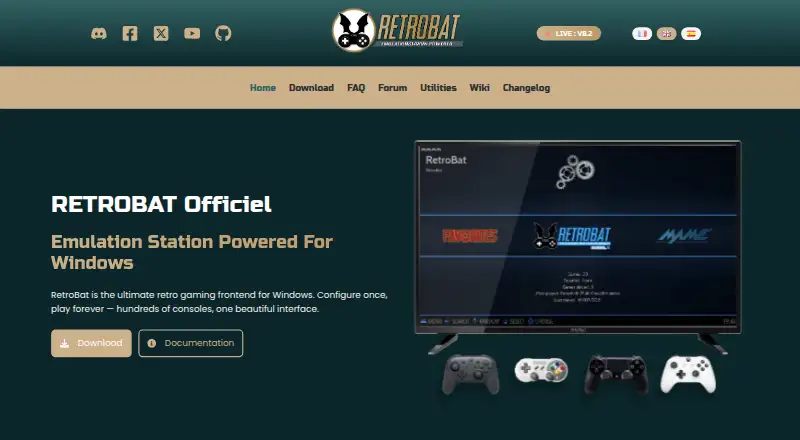
What RetroBat is
RetroBat is a free, open-source Windows frontend for organizing and playing a retro ROM collection. It brings games from more than 230 consoles and computers into one library, with emulator support; compatible emulator programs are not included in the setup and must be downloaded separately, which requires an internet connection. RetroBat can be installed on a PC, hard drive, or USB key, and supports Windows 11, Windows 10, and Windows 8.1.
The library can be enriched using ScreenScraper, TheGamesDB, HFSDB, ArcadeDB, or IGDB. ScreenScraper is the default and requires credentials. Scraped material can include game details, ratings, images, videos, maps, manuals, and pad-to-key settings. Players can add downloadable themes, shaders, and bezels, and use netplay, cheats, save states, and rewind. Major Windows-compatible controllers should work; X-Input is recommended for best compatibility. RetroBat’s free plan costs nothing, and the project says it will always be free. Help is available through its official Discord, forum, and FAQ.
Who it suits
RetroBat suits Windows users who want one frontend for organizing and playing a retro ROM collection across many consoles and computers. It is also a fit for people who want library scraping, controller support, and options such as save states or rewind.
What it does well
- Covers more than 230 consoles and computers.
- Can be installed on a PC, hard drive, or USB key.
- Offers five listed metadata scraping services.
- Includes themes, shaders, bezels, netplay, cheats, and rewind.
- Free and open source, with a free plan.
What to know first
- Windows only, with Windows 11, 10, and 8.1 supported.
- Emulator programs are not included in the setup.
- ScreenScraper requires credentials when used as the default scraper.
Limits
The free plan is limited to Windows, and a ROM collection plus compatible emulators are required. Emulator programs are not included in the setup and require an internet connection to download.
Plans
| Plan | Billed and limits | Price |
|---|---|---|
| RetroBat | Windows only · ROM collection and compatible emulators required | Free |
As retrobat.org lists them, read 8 Oct 2026. The maker's own page has the final word.
Getting started
- Visit the RetroBat website.
- Download and install it on a PC, hard drive, or USB key.
- Use a Windows 11, Windows 10, or Windows 8.1 system.
- Connect an internet connection to download additional emulator programs.
- Add a ROM collection and compatible emulators.
- Optionally configure a scraping service and compatible controller.
Verdict
Choose RetroBat if you want a free Windows frontend for a broad retro ROM library, with scraping and play options in one place. Look elsewhere if you need a platform other than Windows or expect emulator programs to be part of the initial setup.
Questions
How much does RetroBat cost?
Its plan is listed as free. The project says RetroBat is free and open source and will always be free.
Is there a free trial?
No. The listed free trial status is no; the product has a free plan.
Which platforms does RetroBat support?
RetroBat supports Windows 11, Windows 10, and Windows 8.1.
Does RetroBat include emulators?
It supports emulators, but emulator programs are not included in the setup. An internet connection is required to download additional emulator programs.
Which metadata services can it use?
The listed scraping services are ScreenScraper, TheGamesDB, HFSDB, ArcadeDB, and IGDB. ScreenScraper is the default and requires credentials.
Is RetroBat open source?
Yes. The project describes RetroBat as free and open source.
Facts from RetroBat's own pages
- Controller support
- The documentation says major Windows-compatible controllers should work and recommends X-Input for best compatibility. · wiki.retrobat.org, 8 Oct 2026
- Customization
- The site lists downloadable themes, shaders, bezels, netplay, cheats, save states, and rewind. · retrobat.org, 8 Oct 2026
- Download limitation
- An internet connection is required to download additional emulator programs, which are not included in the setup. · retrobat.org, 8 Oct 2026
- Game library
- The site describes support for more than 230 consoles and computers. · retrobat.org, 8 Oct 2026
- Intended users
- The site presents RetroBat as a way to organize and play a retro game ROM collection through one frontend. · retrobat.org, 8 Oct 2026
- Metadata integrations
- The documentation lists ScreenScraper, TheGamesDB, HFSDB, ArcadeDB, and IGDB as scraping services; ScreenScraper is the default and requires credentials. · wiki.retrobat.org, 8 Oct 2026
- Portable
- The site says RetroBat can be installed on a PC, hard drive, or USB key. · retrobat.org, 8 Oct 2026
- Price
- The site says RetroBat is free and open source and will always be free. · retrobat.org, 8 Oct 2026
- Purpose
- RetroBat is a retro gaming frontend for playing ROM collections on Windows. · retrobat.org, 8 Oct 2026
- Requirements
- The listed supported operating systems are Windows 11, Windows 10, and Windows 8.1. · wiki.retrobat.org, 8 Oct 2026
- Scraped content
- Scraping can retrieve game information, ratings, images, videos, maps, manuals, and pad-to-key settings. · wiki.retrobat.org, 8 Oct 2026
- Support
- The documentation directs users to the official Discord, forum, and FAQ for help. · wiki.retrobat.org, 8 Oct 2026
Where RetroBat stands on Freedom251
- Game launchers#47 of 68
- Game Library Managers#32 of 40
- Emulation Frontends#20 of 25